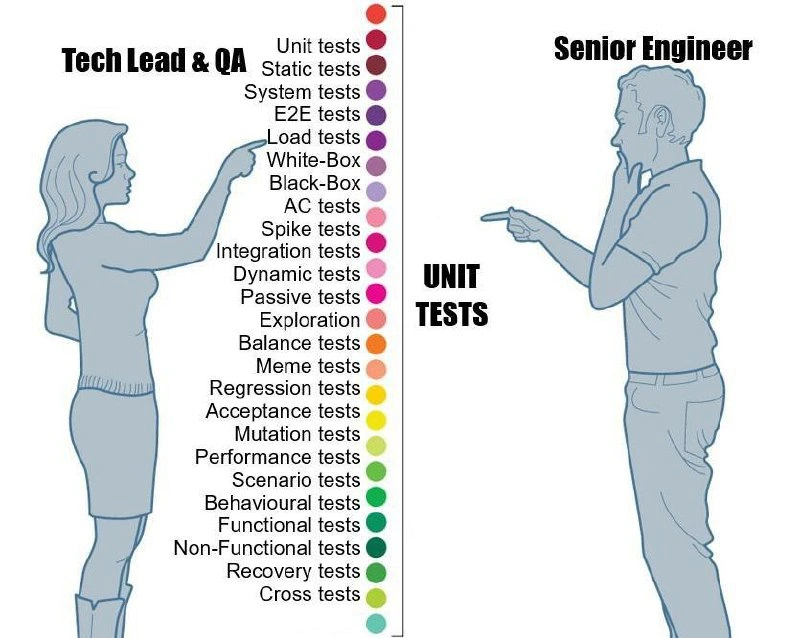
When QA’s rainbow test matrix meets the senior dev’s one-color worldview
Why is this Testing meme funny?
Level 1: All Colors vs One
Imagine two kids drawing a picture. One kid has a big box of crayons with every color you can think of. She carefully picks different crayons — blue for sky, green for grass, yellow for the sun, even a special sparkle crayon for the stars. She has a name for each color and a specific use for it. Now the other kid has just one blue crayon. He decides that one crayon is enough for the whole drawing. He draws the sky, the grass, the sun, and the stars all in blue. 🌈🖍️
This is exactly what’s happening in the meme, but with software tests instead of crayons. The person on the left (the QA) thinks you need a rainbow of different tests to make sure the software is really good — each kind of test is like a different color crayon for a specific job. The person on the right (the developer) acts like using just one kind of test (one blue crayon) will do the job for everything.
It’s funny and a bit silly, right? The picture looks strange if you color everything with one crayon. In the same way, it’s silly in real life if someone tries to check a complicated piece of software with only one kind of test. The meme makes us laugh because the developer is being overly simplistic (and stubborn) like a kid who says “Blue is my favorite, I’ll just use blue for everything!” while the QA is like the kid saying “But look at all these beautiful colors we have, each one is important!” The humor comes from seeing how differently they think: one sees all the details and options (all the colors), and the other sees just one big thing (only blue).
Level 2: The Testing Spectrum
This meme highlights the broad spectrum of tests that Quality Assurance folks think about, versus the single-minded focus some developers have on UnitTesting. Let’s break down the terms and ideas for a junior developer or someone new to the testing world:
On the QA side (the left side of the image), there’s a rainbow-colored list of test types, each with a specific name:
- Unit tests – these are the smallest, atomic tests. They check individual “units” of code (like a single function or class) in isolation. For example, a unit test might call a function
add(2, 3)and assert that the result is5. Unit tests are fast and narrow in scope. Developers often write these as they code, especially if they practice Test Driven Development (TDD) where you write the test first. - Static tests – this usually refers to static analysis or checks that don’t actually run the program but analyze the code. For instance, a linter or a type checker is a static test: it can find syntax errors, type errors, or style issues without executing the code. It’s called “static” because it inspects the static (non-running) code.
- Integration tests – these tests check that different modules or services integrate correctly. Instead of isolating a single function, an integration test might call a component of your application that in turn calls another component. For example, testing a database repository class by actually hitting a test database is an integration test (combining your code with the database system). Integration tests are a bit larger in scope and often slower than unit tests because they might involve external systems (databases, network calls, etc.).
- System tests – a step up in scope, a system test (or sometimes called end-to-end tests (E2E)) exercises the entire application as a whole, as a user would. For example, launching the application or website and going through a login flow from the UI down to the database and back, to ensure every layer (frontend, backend, database) works together. These are usually automated through scripts or tools (like Selenium for web UI tests) or done manually by QA. They tend to be slower and more brittle, but they catch issues that only appear when the whole system is running.
- Load tests and Performance tests – these are types of non-functional tests focusing on how the system behaves under heavy use or how fast it responds. A load test might simulate hundreds or thousands of users using your application at once to see if it can handle the traffic (throughput, memory usage, etc.). Performance testing might measure how long certain actions take (e.g., how quickly does a page load or a report generate). These tests help ensure your software won’t crash or grind to a halt when lots of people actually use it.
- White-Box tests vs Black-Box tests – these terms describe the approach rather than specific test subjects. White-box testing means the tester has knowledge of the internal code and structure, and tests are designed with that knowledge (like writing tests for each branch in the code). Black-box testing means the tester treats the software as a black box – they don’t care how it’s implemented, they just test the inputs and outputs against requirements. For instance, a QA doing black-box testing on a login feature doesn’t need to know how the code works, they just know that if they input the correct username/password, they should get logged in (and if not, it’s a failure). Developers writing unit tests are doing white-box testing (they know the code internals), whereas a user acceptance tester clicking through the UI is doing black-box testing.
- AC tests (Acceptance Criteria tests) and Acceptance tests – these refer to testing against the acceptance criteria of a feature. In agile teams, each user story has acceptance criteria (“Given X, when Y, then Z should happen”). QA will write tests or check that each criteria is met. These tests ensure the feature does what the users or business stakeholders expect. Often, these can overlap with integration or system tests, but the key is they’re tied to requirements.
- Spike tests – this isn’t a very common term; it might be referencing “spike testing” as in pushing something to its limits quickly (similar to stress testing where you abruptly increase load) or could be a playful inclusion. It could also refer to exploratory “spikes” where a dev or tester quickly evaluates something. Not a standard category, so it might be included to pad out the list.
- Dynamic tests vs Passive tests – “dynamic testing” usually means running the code (opposite of static testing). Almost all the tests that execute the software (unit, integration, etc.) are dynamic tests. “Passive tests” isn’t standard terminology; it could imply monitoring something without active input, or tests that observe system behavior passively (maybe logging and analyzing results after the fact). This might also be a tongue-in-cheek addition to contrast with “dynamic.”
- Exploration – likely referring to exploratory testing, where QA actively explores the application without a fixed script, trying out different things like a curious user to see if they can find unexpected behaviors or bugs. It’s an unscripted, creative form of testing.
- Balance tests – possibly meant in a game development context (checking if things are balanced, or maybe load balancing in systems). Not a typical enterprise software term; might be included humorously or for completeness.
- Meme tests – definitely a joke in this context. There’s no formal “meme test” in software (unless you count testing the latest memes on your team chat app!). It’s included to be funny, suggesting the QA list covers even absurd things. It accentuates how the QA person has every possible test you could imagine on their list, down to a silly one.
- Regression tests – these tests are designed to catch regressions, meaning bugs that slip back in when something changes. Whenever you fix a bug or add a new feature, there’s a risk of breaking something that used to work. A regression test suite reruns important scenarios from previous releases to ensure nothing that was fixed or working has broken again. Often, automated test suites (unit, integration, etc.) double as regression tests because you run them after every change. QA also maintains regression checklists for manual testing of critical flows.
- Mutation tests – this is a more advanced concept in test engineering. Mutation testing involves deliberately introducing small changes (mutations) into the code (like flipping a boolean, changing an operator) and then running the tests to see if the tests catch the mistake. The idea is to measure test suite thoroughness: good tests should fail if the code is wrong. If a mutant (modified code) isn’t caught by any test, that indicates a gap in the tests. So mutation testing is basically testing your tests. It’s quite sophisticated and not as commonly practiced, which makes its appearance in the QA’s list comedic – implying this QA lead even worries about test quality to that extreme.
- Scenario tests – similar to system or end-to-end tests, scenario tests validate specific user scenarios or workflows. For example, “a user signs up, then updates their profile, then logs out” – a multi-step scenario. These tests ensure a sequence of actions works properly in order.
- Behavioural tests – possibly referring to Behavior-Driven Development (BDD) style tests or generally tests of behavior expected by the user. BDD tests are often written in natural language (using frameworks like Cucumber) and focus on the behavior of the system from an outside perspective (they might overlap with acceptance tests).
- Functional tests vs Non-Functional tests – Functional tests check features against functional requirements (what the software should do: calculations correct, buttons work, etc.). Non-functional tests check qualities of the system (how it does things: performance, security, usability, reliability). The list explicitly mentions both, which shows the QA is ensuring both the features work (Functional) and that things like performance and robustness are good (Non-Functional, e.g., Performance tests, Recovery tests fall here).
- Recovery tests – these tests verify that the system can recover from problems. For example, if one server goes down, does the system fail over to a backup? If the database connection is lost temporarily, does the application reconnect properly? Recovery testing often involves simulating failures or crashes to see if the system can bounce back gracefully (related to resiliency or disaster recovery plans).
- Cross tests – possibly short for cross-browser tests or cross-platform tests. For instance, if it’s a web app, QA needs to test on Chrome, Firefox, Safari, etc. If it’s mobile, test on iOS vs Android. “Cross tests” could be shorthand for ensuring the software works across different environments and configurations.
Phew, that’s a lot of tests! 📝 As you can see, each term in QA’s rainbow list corresponds to a specific focus area or methodology in testing. QA engineers often categorize tests like this to be thorough and to make sure test coverage isn’t just about lines of code but about different aspects of quality. It’s not enough just to test that each function returns expected values (unit tests); you also want to test how the whole system works, how it performs under load, how it behaves when things go wrong, and whether it meets the user’s needs.
Now, contrast that with the Senior Engineer’s perspective on the right side of the meme. He’s pointing at “UNIT TESTS” in big bold letters, effectively saying “this is the test category that matters (or that I acknowledge).” This is funny because it’s an extreme simplification. It’s like he’s ignoring that whole rainbow and seeing the world in one color. In reality, no one will outright say only unit tests matter – but many developers act in ways that prioritize unit tests and overlook the rest:
- Developers love unit tests because they directly tie to the code they write. Unit tests are under the dev’s control, can be run quickly on a local machine or in a build, and give immediate feedback. When you write code and a unit test fails, you know exactly which function broke. They’re a core part of many dev workflows and CI pipelines.
- Other tests often require more setup or involve other systems. For example, to run integration tests, you might need a test database or a staging environment. End-to-end tests might need a deployed server and test accounts, etc. These can be slow, flaky (“flaky” means sometimes the test fails for unrelated reasons, like a network glitch), and harder to debug. So developers might shy away from running them frequently. They often say, "QA can run those" or "we'll do those in a nightly build."
- There’s also sometimes a knowledge gap or terminology confusion. A developer might honestly not know or care about the fine distinctions between, say, a “system test” and a “scenario test” – to them, it’s just testing the app. They might call anything that isn’t a unit test an integration test by default, or just call them all “tests”. This meme captures that kind of oversimplification in a humorous way.
For a junior developer, the key lesson here is: testing is multi-faceted. While a lot of programming courses or tutorials focus on writing unit tests (because it’s a fundamental skill and easy to do in code), in real-world projects you’ll encounter many kinds of tests. Each type catches different categories of issues:
- A bug in a single function (like an off-by-one error in an algorithm) will be caught by a unit test.
- A bug in how two modules interact (say, the data format mismatches between service A and service B) might only be caught by an integration test.
- A bug in the whole workflow (like a missing step in a user transaction) might only surface in an end-to-end scenario test or acceptance test.
- A performance bottleneck (your page takes 10 seconds to load under load) will only be noticed in performance or load testing.
- A missing feature or wrong behavior relative to customer expectations might be discovered in exploratory testing or acceptance testing.
The QA lead in this meme wants to ensure quality from every angle by naming and addressing all these test categories. The senior dev’s stance, intentionally or not, downplays that complexity – which can be risky, but the meme is using it for comedy. It’s highlighting a common friction: QA engineers often complain that developers only care about unit tests and think “if the unit tests pass, we’re good to deploy,” whereas QA (and often project managers) insist on running the full test suite (all the colors of the rainbow) before deeming a release ready.
Finally, notice the labels: “Tech Lead & QA” versus “Senior Engineer.” This suggests the woman on the left embodies both a leadership role and QA perspective (maybe she’s a QA Lead or a tech lead who heavily values testing), and the man on the right is an experienced developer. This reflects reality: usually, QA engineers or test leads categorize tests in detail, while many senior developers (especially those without a QA background) focus on just writing a lot of unit tests. The meme is poking fun at that disconnect with a bit of role stereotype: QA sees all the differences, dev sees one thing.
In summary, for a junior audience: the meme is funny because the two characters have very different views on testing:
- The QA person has a complex, multicolored view: each color represents a different kind of test needed to thoroughly check the software.
- The developer has a simple, one-colored view: he basically says “we have tests: the unit tests,” treating all testing as the same bucket.
It’s a reminder that in real software teams, you’ll encounter both viewpoints. Good testing practice is somewhere in between: you usually need a mix of many types of tests (not necessarily 24, but a healthy variety), and you shouldn’t ignore the higher-level tests just because your unit tests pass. The meme just amplifies this disparity to make you laugh and think, “yeah, I should probably pay more attention to those integration and system tests, not just my beloved unit tests.” It’s a piece of TestingHumor that also educates about the breadth of QAProcess and test coverage beyond code.
Level 3: One Test to Rule Them All
At the highest technical level, this meme exposes a classic QA vs Dev mindset clash in the realm of software testing. The Tech Lead & QA on the left brandishes a rainbow of test types – a meticulously categorized test matrix spanning everything from Unit tests to Recovery tests – while the Senior Engineer on the right confidently points at a single label: “UNIT TESTS.” This humorous exaggeration riffs on real-world tensions around test taxonomy and priorities. Experienced engineers recognize the pattern: a testing specialist or QA lead creates a detailed test plan covering every imaginable angle, yet a senior developer (perhaps jaded or laser-focused on code) simplifies the world to the one test type they truly value or understand. It’s a satirical take on how broad QA coverage ambitions often meet the narrowing lens of “just code and unit tests” in practice.
Why is this funny to seasoned developers? It’s because we’ve all seen the “all_tests_are_unit_tests” attitude before. This is an inside joke in TestingHumor: some developers label nearly any automated test as a “unit test” to keep things simple (or to pad their TestCoverage stats), much to the eye-rolling of QA. The meme’s text lists 24 colored dots, each a different kind of test. It’s a test taxonomy overload – a tongue-in-cheek reference to how QA folks have nuanced names for every testing approach. In contrast, the developer’s one-color worldview lumps everything together. This reflects a common industry anti-pattern: reducing a rich testing strategy down to the single category that developers are most comfortable with.
Real-world enterprise projects often have a testing pyramid or matrix encompassing: Unit tests (small, fast, isolated), Integration tests (combining modules), System tests (the whole application), E2E tests (end-to-end user scenarios), Performance tests (load and stress), Regression tests (ensuring old bugs stay fixed), and more. Each has a purpose:
- Unit tests catch bugs in individual functions or classes early.
- Integration and system tests catch issues in how components work together.
- Acceptance tests verify the software meets business requirements (often defined in QA’s QAProcess or acceptance criteria).
- Non-functional tests (performance, security, recovery, etc.) ensure the system behaves under real-world conditions beyond just features.
Yet, despite this well-known spectrum, many developers act as if “Unit tests are all we need.” The meme exaggerates this by having the dev literally ignore the rainbow spectrum and point only at UNIT TESTS. Seasoned devs chuckle because it’s a familiar scenario: for example, a QA engineer might ask, “Did you run the integration tests on the new payment module?” and a developer responds, “All tests passed!” – but they only ran the unit tests in their IDE. It’s a nod to the test coverage inflation games people play: calling everything a unit test so the coverage report in CI shows impressive numbers, or running only the fastest tests in the pipeline to get green builds.
This dynamic is often seen in large projects or monorepos with complex CI pipelines. In a huge codebase (monorepo), an exhaustive rainbow test matrix might be very slow to run on each commit. The Senior Engineer mindset might be: “We’ll do the quick unit tests on each push, and maybe run the other tests nightly or when we remember.” This is practical, but it can devolve into ignoring those other tests entirely. Over time, everything funnels into “unit tests” in name, even if they’re not true unit tests, simply because that’s the only suite consistently run. The meme’s humor captures the absurdity of collapsing a rich QA process into a single bucket.
There’s also a hint of TechHumor in how the list includes a few odd entries like “Meme tests.” Seasoned readers know there’s no serious “meme test” (it’s a playful addition), but it symbolizes how exhaustive (even excessive) the QA list can get – covering things you wouldn’t even think to test. It pokes fun at test matrices that include everything under the sun. Meanwhile, the senior dev’s perspective is almost cynically minimalist. The comedic truth is that both extremes are flawed:
- A QA insisting on 24 distinct test types can seem bureaucratic or over-the-top to a dev trying to ship code.
- A dev insisting “if it compiles and unit tests pass, it’s fine” can lead to nasty surprises in production because other aspects (performance, integration, etc.) were neglected.
This contrast resonates with experienced engineers who have sat in meetings where QA leads present multi-colored charts of test coverage across categories, only for a lead developer to reply, “Cool, but when are we at 90% unit test coverage?” The one-color worldview is essentially an overly narrow focus on a single metric or test stage (often unit tests, since those are directly in developers’ control as they code). The meme underscores an organizational dysfunction: QA and dev speaking past each other. The QA is advocating for a comprehensive QAProcess – verifying everything from function correctness to user experience under load – whereas the dev is defaulting to the familiar territory of code-level tests.
Historically, this stems from how testing was siloed. In the past, developers wrote code and maybe a few unit tests, while separate QA teams did system and acceptance testing. In modern agile teams practicing Test Driven Development (TDD) and continuous delivery, developers are supposed to take on more testing responsibilities across that spectrum. But old habits die hard. Many senior devs never deeply engaged with testing beyond unit tests, so they tend to conflate “test” with “unit test.” It’s a running joke that when some devs say “we have tests,” they really mean unit tests – no integration environment, no dedicated load testing, etc. This is why the meme labels the dev as “Senior Engineer”: it’s poking at the irony that even senior folks can be a bit myopic about testing.
In essence, the humor lands because it’s true: the test taxonomy overload from QA often collides with the one-track mind of certain devs who think in terms of code and nothing else. It’s a lighthearted take on the perennial negotiation in software teams over what counts as a “complete” test suite. Those deeply experienced in testing strategy will nod and perhaps sigh, remembering the meetings where they tried to explain the difference between, say, Black-box testing (testing without internal knowledge) and White-box testing (using knowledge of the code) only for someone to shrug and say “a test is a test, let’s just write something that asserts output.” The meme captures that exasperating yet comical disconnect.
Description
Two blue silhouette cartoon figures face each other. On the left, a woman labelled “Tech Lead & QA” points to a long vertical legend of 24 colored dots, each with small black text: “Unit tests, Static tests, System tests, E2E tests, Load tests, White-Box, Black-Box, AC tests, Spike tests, Integration tests, Dynamic tests, Passive tests, Exploration, Balance tests, Meme tests, Regression tests, Acceptance tests, Mutation tests, Performance tests, Scenario tests, Behavioural tests, Functional tests, Non-Functional tests, Recovery tests, Cross tests.” Every entry has its own hue. On the right, a man labelled “Senior Engineer” ignores the spectrum and points confidently at giant bold words “UNIT TESTS.” The meme humorously contrasts QA’s nuanced taxonomy against a senior engineer’s tendency to bucket everything into the same target, riffing on real-world battles over test nomenclature, coverage metrics, and what actually runs in the CI pipeline

Comments
21Comment deleted
If it fits inside the same Docker container, the senior says it’s a unit test - bonus points if the linter passes and the CFO thinks it increased velocity
After 20 years in the industry, you realize the real test pyramid isn't about coverage percentages - it's about how many testing frameworks your team will adopt before someone finally admits that 80% of production bugs could have been caught by the humble unit test that runs in 3 milliseconds instead of the 45-minute E2E suite that breaks whenever Mercury is in retrograde
When your Tech Lead presents a 25-item testing taxonomy that would make IEEE proud, but you've been in production long enough to know that 80% of bugs are caught by unit tests, 15% by integration tests, and the remaining 5% by angry customers at 3 AM. The real test suite is: 'Does it compile?', 'Does it pass CI?', and 'Will it wake me up on-call?' Everything else is just documentation for the audit
Our 'comprehensive test plan' is 5k unit tests and a very nervous SRE - aka the Ice Cream Cone anti-pattern
If your 'unit test' needs Docker Compose, a database seed, Kafka and an IAM role, you didn’t shift testing left - you rebuilt a flaky E2E test with better branding
Tech leads blueprint the testing cathedral; senior engineers deliver the unit test cornerstone - solid, shippable, scalable
I don't even know most of these words Comment deleted
Lol right Comment deleted
meme tests lol Comment deleted
No smoke tests? Comment deleted
Also forgot scream tests Comment deleted
🫡 Comment deleted
Poor data centers can't work when stressed Comment deleted
😞 Comment deleted
Gigachad engineer: test on prod Comment deleted
Scream test = as long as nobody screams at you, everything's fine. Comment deleted
We also utilize what we have dubbed the ellipsis test. One of our largest customers always ends his emails with three periods. If he drops them and uses just one full stop, you know he's serious. Comment deleted
Sounds like me during prompting 🌚 And they then say LLMs ain’t sentient lol Comment deleted
Disaster recovery tests? Upgrade path tests? Migration tests? Comment deleted
Migrane Comment deleted
Saw a woman fall on a bikr today. Didnt see the moment. Make of that what you want. Comment deleted