The Six Stages of Developer Grief, aka Debugging
Why is this Debugging Troubleshooting meme funny?
Level 1: Broken Toy Mystery
Imagine you have a battery-powered toy that always worked fine. One day, your friend tries to play with it and it just won’t turn on for them. You immediately protest, “That can’t be! It was working fine for me this morning.” Confident that nothing’s wrong, you take the toy back to show them. Sure enough, it lights up when you press the switch. So you hand it over and say, “See? It works when I use it!” But then, right in front of both of you, the toy suddenly flickers and turns itself off. Now you’re really puzzled and mutter, “Hmm, that shouldn’t happen… the batteries are new.” Determined to figure it out, you grab a little screwdriver and open up the toy, asking yourself, “Why is this happening?” After checking inside, you finally spot the issue – a loose wire is barely connected. “Oh, I see the problem!” you exclaim as you twist the wire back into place. Once you do, the toy runs perfectly again. Now you both are asking, “How was it even working at all before if that wire was so loose?” You’ve just gone through a whole journey from thinking nothing was wrong to discovering the hidden problem and being surprised it ever worked. That’s exactly what programmers feel when they debug a tricky bug: at first they’re sure everything is fine, then they find a tiny hidden issue and even they are amazed the program ran before at all, just like you were with the toy.
Level 2: Works on My Machine
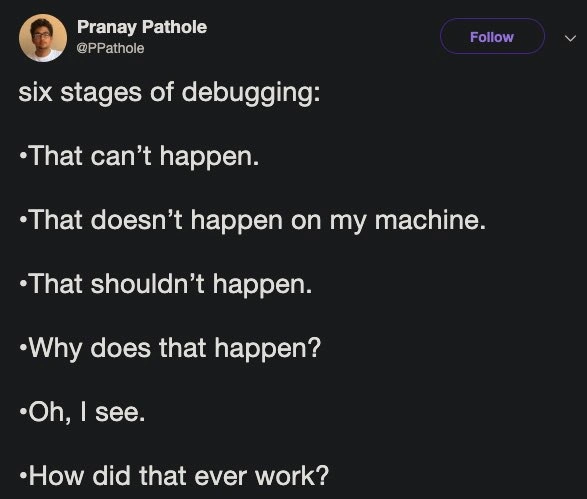
Let’s break down the joke in simpler terms. Debugging is the process of finding and fixing errors (called bugs) in your code. A “production bug” means something is going wrong in the live application – the version of the software that real users or customers are using. Fixing a bug in production is high-stakes because it’s affecting actual people and data right now. This meme lists six reactions a developer might have while troubleshooting a production bug, almost like emotional stages:
- "That can't happen." – First, total disbelief. The developer is sure the problem reported isn’t possible. In their mind, the code should not allow that behavior, so they think the bug report must be wrong or something strange is going on. (It’s like saying, “No way, that’s impossible!”)
- "That doesn’t happen on my machine." – Next, blame the environment. Here the developer says, “It works fine on my computer, so something else must be causing this.” This often means they suspect the issue is with the setup on the server or the user’s computer, not with the code itself. It’s a famous excuse among programmers: “Works on my machine!”
- "That shouldn’t happen." – Now the developer acknowledges something is definitely wrong, but they’re really confused by it. They’re basically saying, “Okay, it’s happening, but it really doesn’t make sense because the system is not supposed to do that.” This is a hesitant admission that their understanding of how the software should work might be incomplete.
- "Why does that happen?" – At this stage, the developer switches into detective mode. They’ve accepted the bug is real and start investigating actively. This means checking the code, looking at log files (where the program writes down error messages or status info), and trying to reproduce the issue to see step-by-step what leads to the problem. They’re literally asking, “What’s the reason this is happening?” and searching for clues.
- "Oh, I see." – This is the lightbulb moment. The developer has discovered the root cause of the bug. Suddenly they understand exactly what went wrong – maybe a variable wasn’t initialized, or a wrong value from a configuration file was being used. “Oh, I see,” basically means “Aha! I found the bug and now everything makes sense.”
- "How did that ever work?" – Finally, amazement (and a bit of shock). Now that the developer knows the cause, they realize the bug was so fundamental that it’s surprising the program ever worked at all before. They’re asking, “Wow, given this mistake, how was the app even running without issues until now?” It’s a way of saying the code was working by luck or under conditions that happened to hide the bug until this moment.
Each of these lines corresponds to a common feeling or remark in the life of a programmer. The famous line “Works on my machine” is something developers jokingly say when a user finds a bug that the developer didn’t see on their own computer. It highlights how the environment (the system and settings where you run the software) can be different between your laptop and the production servers. For example, you might have a library or tool installed on your PC that the server doesn’t. Or your machine might be running a different version of something (like Python 3.8 vs Python 3.9) which could avoid a bug that shows up in the other version. Even differences like the operating system (Windows vs Linux) or hardware can cause a program to behave differently. A common newbie experience is, "But it worked on my computer!" – and it’s genuinely puzzling until you learn how environment differences can create bugs.
To make “my machine vs production” more concrete: imagine you wrote a program that sorts a list of names. On your machine, you tested it with 5 or 10 names and it worked perfectly. But in production, it had to sort 5 million names, and suddenly it runs out of memory or crashes. It worked on your machine because your test was too small, but it fails in production because the real data was much larger. Another example: your code might handle dates and times. It works fine in your time zone, but when the server (in a different time zone) runs it during a daylight savings switch, it encounters a time that doesn’t exist and breaks. Those are the kind of tricky differences that lead to “it doesn’t happen on my box!” scenarios. This is why teams try to make the testing environment as close to production as possible. Tools like containers (e.g. Docker) were invented to package applications so they run the same everywhere, which helps reduce the “works on my machine” problem – but even then, data and usage patterns can still expose new bugs in production.
The key takeaway for a junior developer is that these emotional stages are very common. Writing software isn’t just writing code – it’s also debugging it when it behaves in unexpected ways. And that process can be frustrating! You might really feel upset or confused at first (“No, that can’t be happening!”), but then you learn more about the problem and eventually figure it out. The meme is funny to developers because it exaggerates a real experience we all share (RelatableHumor): at first, you’re sure nothing’s wrong with your code, and by the end you’re amazed your code ever worked at all. It’s both humbling and comforting to know that even experienced engineers go through this dramatic DebuggingAndTroubleshooting cycle. In fact, when you catch yourself saying any of these lines, you can smile and think, “Okay, I’m in the middle of the six stages of debugging — time to buckle up and keep investigating.” Each bug you solve will make you a better programmer, so ride out that rollercoaster of emotions and don’t give up!
Level 3: When the Impossible Happens
The six stages of debugging listed in this meme painfully capture a journey every seasoned engineer knows by heart. It's a rollercoaster from disbelief to enlightenment that plays out during any serious debugging session of a nasty production bug. In a sense, it's the five stages of grief re-imagined for software incidents – with a bonus stage of existential dread at the end. Here’s how each stage breaks down from a jaded developer’s perspective:
Stage 1: "That can't happen." This is pure denial. You've run all the unit tests, double-checked the logic, and by all known laws of computing, the scenario described by this bug should be impossible. Yet here we are: production logs are blinking red with an error that defies your mental model. It's that familiar gut punch when an alert triggers for something you knew could never occur. Seasoned devs have learned that "impossible" in software really means I haven't figured out how it's possible yet. Murphy’s Law applies to code too – anything that can go wrong will eventually go wrong, especially in production at 3 AM.
Stage 2: "That doesn’t happen on my machine." Now comes the reflexive deflection. The code ran perfectly on your laptop; you demoed this feature twice without a hitch. So your first instinct is to blame the environment or the user. This is the classic on_my_machine_excuse every programmer has muttered. It’s practically a trope in DeveloperHumor circles: “Works on my machine, so why not ship my machine?” The humor masks a real issue: differences between your dev box and the production environment. Perhaps your local environment has a different library version, or some configuration that production doesn’t. Maybe you seeded your database with ideal test data, whereas production’s data is a wild zoo of weird cases. Of course it worked on your machine – your machine is a cozy sandbox, while production is the wild west with tumbleweeds of unpredictable user input and server quirks.
Stage 3: "That shouldn’t happen." By this stage, raw denial gives way to baffled acceptance. You concede the bug is real, but it still feels like it violates the laws of logic. This just shouldn’t be possible. You find yourself staring at the code and documentation, muttering in confusion. "It shouldn't happen… unless everything I know about this code is wrong." Often, this is where you uncover a false assumption. Maybe you assumed an API would always return valid data, but in production it returned
nulland your code didn’t check for that. Or you discover a race condition – perhaps two threads ran in an unexpected order, breaking an invariant that "should" always hold. In other words, reality is punching holes in your theoretical model of the software. It’s a humbling moment: the system is politely (or not so politely) showing you that your understanding was incomplete.Stage 4: "Why does that happen?" Now curiosity and determination kick in. You’ve moved past “no way” and into full troubleshooting mode, donning the detective hat. This is where the real debugging work happens: you gather clues from log files, error messages, and maybe stack traces. You add
printfstatements or breakpoints in the code, hoping to catch the system in the act of misbehaving. Perhaps you try to reproduce the issue on a staging server or your own machine with production data. The earlier frustration turns into focus: you’re running experiments, changing one thing at a time, asking “Could it be this?” and systematically ruling out hypotheses. Sometimes the bug even vanishes when observed – a classic Heisenbug that disappears when you enable debug logging or run it in a debugger (talk about infuriating!). Still, if you persist, patterns emerge. Little by little, the once-impossible problem starts to make sense, and you zero in on the culprit.Stage 5: "Oh, I see." Eureka! This is the moment of clarity when the cause of the bug finally reveals itself. The code’s strange behavior now has an explanation, even if it’s an embarrassing one. Maybe you find a simple off-by-one error – say, using
<=instead of<in a loop, causing one extra iteration and an out-of-bounds error. Or you realize the configuration file in production had a typo in a key name, so your code was reading a default value the whole time. Often the root cause ends up being a tiny oversight that was easy to miss. You might facepalm hard at this point. There’s a mix of relief (at least you can fix it now) and chagrin (it was so obvious in hindsight). Still, that "Oh, I see" is incredibly satisfying because it means the puzzle is solved. You’ve turned on the light in a very dark room.Stage 6: "How did that ever work?" This final stage is the punchline of the whole ordeal – the incredulous realization. Now that you know the bug’s cause, you’re left wondering how the software operated at all up until now. The fix might be so fundamental that it’s scary to think the system was running without it. You might literally say, "How on earth was this working yesterday?!" Often, the answer is sheer luck or a fragile chain of conditions that happened to hold true… until they didn’t. Perhaps that code with the off-by-one error usually processed 100 items (and the bug just hadn’t tripped), but today there were 101 items and everything fell apart. Or that misconfigured setting had a fallback that mostly masked the issue, making things appear fine until a new user with an odd name came along and broke it. Seasoned developers joke that many legacy systems are held together with duct tape and prayers – in this moment, you feel it in your bones. It’s both funny and terrifying to realize the only thing preventing catastrophe was some random factor or outdated workaround. You laugh, you shake your head, and maybe you vow to add more unit tests next time.
By the end of this journey, you’ve gone from absolute denial to questioning reality. The reason this list resonates so much is that it spotlights a shared pain in software development: debugging isn’t just a technical task, it’s an emotional rollercoaster. This meme pokes fun at our DebuggingFrustration, but it also reassures us — hey, everyone goes through this. No matter how many years you’ve coded, confronting a bizarre bug in production can reduce you to a frazzled, baffled bundle of feelings, just like the six stages describe. The humor lands so well because it’s rooted in truth. Every developer reading those bullet points can remember a specific nightmare bug that led them through those exact stages step by step. In the end, we laugh at the list because we’ve all been there, and sometimes laughing is the only sane response when you finally survive a brutal debugging session.
Description
A screenshot of a tweet from user Pranay Pathole (@PPathole) on a dark background. The tweet is titled 'six stages of debugging:' and lists the following six points as a bulleted list: 'That can't happen.', 'That doesn't happen on my machine.', 'That shouldn't happen.', 'Why does that happen?', 'Oh, I see.', and 'How did that ever work?'. This meme perfectly encapsulates the emotional and intellectual rollercoaster that developers experience when troubleshooting a bug. It mirrors the five stages of grief, starting with denial ('That can't happen'), moving to bargaining ('That doesn't happen on my machine'), and eventually reaching a state of shocked acceptance. For senior engineers, this is a deeply relatable cycle, especially the final stage, 'How did that ever work?', which often occurs when discovering a critical flaw in a system that has somehow been functioning for an extended period

Comments
8Comment deleted
A junior stops at 'Oh, I see.' and fixes the bug. A senior gets to 'How did that ever work?' and immediately checks git blame to confirm it wasn't them
Seasoned engineers know the secret Stage 7: label the glitch an “emergent property of distributed consensus,” slip in a one-line fix, and watch 500 pods redeploy while everyone debates the CAP theorem instead of your missing null check
The seventh stage is discovering it was a race condition that only manifests in production under specific load patterns, and your entire distributed tracing setup was lying to you because someone disabled sampling on that one critical service three quarters ago
Stage seven, never spoken aloud: quietly closing the ticket because fixing 'How did that ever work?' means admitting the load-bearing bug has paying customers
The six stages perfectly mirror the Kübler-Ross grief model, except instead of acceptance, we arrive at 'How did this ever pass code review?' The 'works on my machine' stage is particularly insidious - it's where Docker containers were born from pure desperation, and where senior engineers have learned that 'my machine' is never a valid production environment, no matter how many times we've seen it ship to prod anyway
Senior edition: Stage 7 - it only worked on my machine because my laptop’s scheduler made the race condition deterministic
Senior take: the sixth stage is realizing it only “worked” thanks to a stale cache, a missing migration, and a feature flag colluding into accidental eventual consistency
Stage 7: 'The fix passes all tests... until it hits prod and implicates a microservice three teams away.'