Home Network Expectations vs. Reality
Why is this Networking meme funny?
Level 1: One Wire to the World
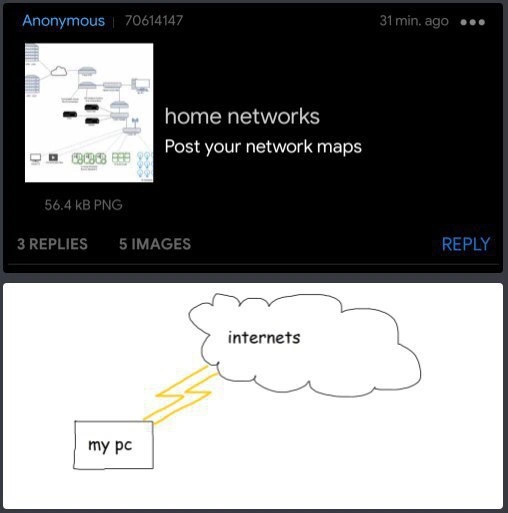
Imagine you ask your friend to draw how their computer connects to the world. They draw a picture of their computer on one side and a big cloud labeled "Internet" on the other side. Then they draw one bright line (like a lightning bolt) directly from the computer to that cloud. That’s it! It’s like asking for directions from your house to a faraway city and your friend just draws your house, the city, and a single arrow between them, with no roads, cars, or bridges shown. 😂 It looks super simple because they left out all the middle parts. In real life, of course, your computer needs some help from other devices (like a router box and your Internet provider’s network) to reach the big Internet cloud. The reason this drawing is funny is because it’s so simple that it’s wrong – but in a silly way. It’s as if the person believes their PC is connected to the entire world by one magic wire. Everyone expected a complicated map with many boxes and lines, but they got a childishly simple sketch. The humor comes from that surprise: knowing there’s a lot more hidden in between, but seeing it boiled down to just “my PC -> Internet.” It’s a bit like a kid’s view of a very complex thing, drawn in the simplest way possible, which makes us smile.
Level 2: The Missing Router
Let’s break down what’s actually missing in that simplistic diagram, and why network folks find it funny. In a typical home setup, your PC doesn’t magically beam straight to the Internet – there are usually one or more devices in between. The crucial device is the router. A router is like the traffic director of your home network: it sits between your local devices and the big bad Internet. When you connect your computer to Wi-Fi or plug it into a port in the wall, you’re really connecting to this router. The router then connects onward to your Internet Service Provider (ISP) via a modem. The modem is the box that takes the signals from your ISP (through the cable, fiber, or phone line coming into your house) and converts them into data your router can understand. Often the router and modem are combined into one unit from the ISP – that one box with blinking lights that you might just call “the Wi-Fi box.”
So if we were to draw a more realistic home network map, it would look more like: PC → Router/Modem → Internet. If you have multiple devices (phones, tablets, smart TVs), they’d all connect to the router too, maybe shown as PC, Laptop, Phone → Router → Internet Cloud. In the meme’s diagram, those middle pieces are completely missing. It’s as if someone drew a power strip connected directly to a power plant, ignoring the wiring in between. The cloud labeled “internets” stands for the entire Internet – basically every website and server out there. Usually on diagrams, we use a cloud icon to simplify that part because drawing the whole Internet is impossible (it’s millions of networks). But we do usually show the immediate devices like the router or firewall that link a home to that cloud. By skipping the router, the meme’s author either assumes everyone knows it’s there or (more likely) is joking that their network is so simple it’s literally just one cord to the outside world.
Let’s clarify some terms that this meme touches on:
- Networking: In general, networking is connecting computers and devices so they can talk to each other. A network map is just a diagram showing how those connections are laid out.
- Home network: Your personal LAN (Local Area Network) at home – typically includes your PC, maybe a laptop, smartphone, smart appliances, all connected via a router.
- Router: The device that routes traffic between your home network and the Internet. It usually also has a built-in firewall (to block unwanted traffic) and does NAT, which stands for Network Address Translation. NAT is basically how your one ISP-assigned address on the Internet can represent many devices in your home. Think of NAT like a receptionist at a company: all mail comes to one street address but the receptionist knows which person (device) to deliver each letter to.
- Switch: (Often part of the router) A switch allows multiple wired devices to connect; it’s like an Ethernet splitter that intelligently directs network traffic between devices on the same network.
- Wi-Fi Access Point: (Also often part of the router) The radio antenna that communicates with your wireless devices. If you’re on Wi-Fi, your data actually goes through this access point to the router, then out to the Internet.
- ISP (Internet Service Provider): The company that gives you Internet access (like Comcast, AT&T, etc.). They connect your home to the rest of the Internet. The modem talks to the ISP’s network.
- Internet (the cloud): The global network of networks. In diagrams, a cloud icon is used because the details inside it are hazy and not drawn out – it’s everything outside your local network.
In the top panel of the meme, we see a forum post titled “home networks – Post your network maps,” implying folks are sharing diagrams of their setups. Usually, those images have lots of icons: maybe a cable modem icon, a router, a few switches, lines representing Ethernet cables or Wi-Fi links, maybe labels like “192.168.1.0/24” for subnets, and symbols for each device (desktop, laptop, server, NAS storage, etc.). The OP (original poster) in the meme, however, replied with the bottom image that literally has one box “my pc” and a cloud “internets”. The yellow zig-zag lines likely represent either an Ethernet cable (often drawn as a straight line with little lightning symbols) or just a cheeky way to show a connection (it kind of looks like cartoon lightning, suggesting a magical or super-fast link). The joke here is how over-simplified this map is. It’s as if the person either has no idea about the network hardware (like they forgot they have a router), or they’re making a sarcastic statement: “Here’s my complicated network, just a PC and the Internet, nothing else.”
For someone new to networking, this meme actually hints at a learning moment. You might wonder, “Wait, isn’t that how it works? My computer does go to the Internet, right?” Yes, your computer reaches the Internet, but not directly—there’s a chain of devices and services making it happen. This drawing leaves out those intermediate steps, which is exactly why those in networking find it funny. It’s a bit like showing a car connected to a destination city with no roads or bridges in between. It technically shows the start and end, but ignores the journey. In networking terms, the router/modem, ISP, and all the networking protocols are that journey. So the meme humorously underscores the difference between a beginner’s mental model (“Computer talks to Internet cloud”) and the actual infrastructure involved in networking. Even as a junior developer or IT student, you quickly learn that there’s more than just a cloud: understanding what a router is and why we need it is one of the first steps into networking. This meme playfully visualizes what happens if we skip that step!
Level 3: Look Ma, No Router!
The meme hilariously boils down a home network to its most absurdly simple form: just one computer (my pc) connected directly to the Internet (drawn as a fluffy “internets” cloud) via a couple of lightning bolt lines. On a technical forum where people typically show off elaborate network topologies, this is basically a mic-drop of minimalism. It satirizes the newbie perspective that “my PC goes straight to the internet” without acknowledging any of the intermediate networking gear or complexity. Experienced network engineers see this and immediately chuckle because it ignores all the invisible infrastructure that actually makes that connection possible.
In reality, a diagram of even the simplest home network is never literally PC → Cloud. There’s always some hidden boxes in that path. Typically, your computer connects to a router (often a Wi-Fi router provided by your ISP or a separate home router). That router might be combined with a modem (the device that interfaces with your ISP’s cable/DSL/fiber line). The router assigns your PC a private IP (like 192.168.0.42) and uses Network Address Translation (NAT) to masquerade all your home traffic behind one public IP address on the WAN (Wide Area Network). And of course, there might be a switch (to connect multiple wired devices) or a separate Wi-Fi access point for wireless gadgets. All of these devices are completely missing from the meme’s “network map.” The cloud labeled "internets" is a classic diagram icon representing the vast, nebulous Internet – usually we draw a cloud to avoid detailing the entire world’s network beyond your router. Here, the joke is that the cloud is the only other thing in the picture, as if the PC has a direct line to the whole Internet with nothing in between.
This resonates with system admins and network engineers because it’s a playful reminder of how much complexity we take for granted. It’s like seeing someone draw a map of a complex metro system as a single straight line. Seniors in networking know that even a “simple” home network involves layers of technology: DHCP assigning IP addresses, NAT handling traffic to the internets, firewall rules in the router protecting the PC, and physical cables or Wi-Fi signals connecting everything. The meme’s crude diagram (likely drawn in MS Paint or on a napkin) contrasts with the expectation of a polished Visio diagram full of Cisco icons for servers, switches, and firewalls. It pokes fun at those ultra-detailed home lab schematics by going to the opposite extreme. On forums, you’ll often see users bragging with insanely complex home setups (multiple VLANs, a dedicated pfSense firewall box, maybe a rack of gear). Then someone comes along with this tongue-in-cheek submission: just a lone PC and the Internet cloud, as if saying “Yep, this is my network. Deal with it.”
Importantly, the meme also highlights a beginner’s innocence (or trolling humor). We all started somewhere – remember the first time you got internet at home and probably didn’t realize what that “wifi box” or cable modem really did? From a seasoned perspective, the drawing screams, “You’ve left out everything!” If you truly tried to plug a PC directly into the Internet cloud with no router or modem, nothing would happen – it’s akin to plugging a computer into thin air. But from a high-level view, one could say their PC connects to the Internet and not be technically wrong, just vastly oversimplified. This absurd simplification is exactly why it’s funny. It’s a gentle roast of naive network diagrams and a nod to the unseen complexity that makes modern home networking “just work.”
Description
A two-panel meme contrasting complex and simple home network setups. The top panel shows a screenshot of an anonymous forum post titled 'home networks' which prompts users to 'Post your network maps'. The post includes a thumbnail of an intricate, detailed network diagram featuring multiple servers, switches, and connections. The bottom panel displays a humorous, minimalist reply: a simple, hand-drawn diagram showing a box labeled 'my pc' connected by a single yellow lightning bolt to a cloud labeled 'internets'. The meme humorously highlights the gap between elaborate 'homelab' enthusiasts, who build enterprise-grade infrastructure for personal use, and the vast majority of tech professionals for whom a home network is simply a utility to connect to the internet. The misspelling 'internets' adds to the comedic, deliberately unsophisticated tone of the response

Comments
8Comment deleted
The first diagram is a weekend project for a network engineer. The second diagram is the production environment for 99% of developers
Home lab diagram done: [my pc] → ☁️. Marketing calls it “Zero-Trust Serverless Mesh,” Ops calls it “single-point-of-failure-as-a-service.”
This is exactly how the CEO describes our infrastructure when explaining why we need "just one more microservice" to fix everything
Honestly the second diagram is the more accurate architecture doc - it's the only one that still matches production
When the product owner asks for the network architecture diagram but you're running everything on a single Raspberry Pi behind your ISP's router with UPnP enabled and praying the NAT holds
Peak home networking: collapsing the entire OSI stack into one lightning bolt from 'internets' to 'my pc' - still more honest than most high-level architecture slides
“my pc → internets” is the most accurate home network diagram I’ve seen - the bolts are UDP, the cloud is CGNAT, and the missing boxes are double NAT, PPPoE on VLAN 35, and a Pi-hole that breaks the TV
The perfect CAP theorem implementation: always partition-tolerant because there's no network to partition