The five stages of dealing with Regex
Why is this Debugging Troubleshooting meme funny?
Level 1: Big Boys Do Cry
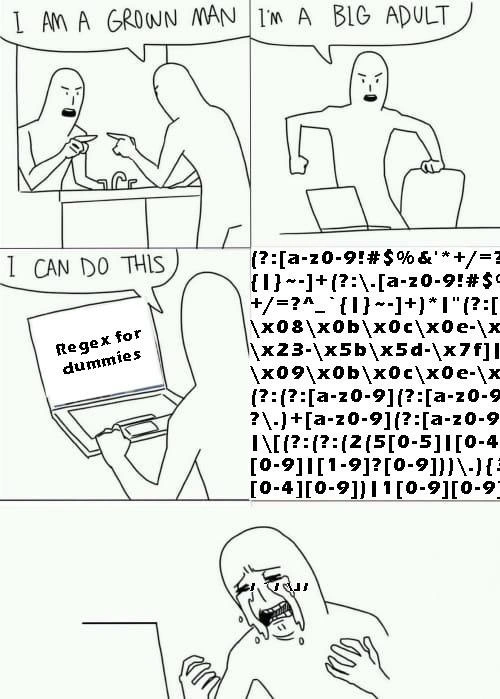
Imagine a strong grown-up who prides themselves on being able to handle anything, from lifting heavy boxes to fixing things around the house. One day, they pick up a kid’s puzzle that says “Easy – for ages 5 and up.” Our confident adult laughs, “Ha, I’m way older than 5, I got this!” But when they open the box, out tumbles a thousand tiny puzzle pieces with a super confusing picture. They try for a while, rotating pieces, checking the picture on the box, but nothing makes sense. Frustration builds up until this big adult is sitting on the floor in tears, feeling totally defeated by a “kid’s” puzzle. 😭 In the meme, the developer is that overconfident adult, and the “Regex for dummies” tutorial is the puzzle that was supposed to be easy. Turns out it’s much harder than it looked, and even a grown-up coder ends up feeling like a helpless kid. The joke is that no matter how old or experienced you are, some challenges (like that ridiculously complicated regex) can make you meltdown and cry. It’s a funny reminder that everyone has limits, and sometimes something labeled “for beginners” can still leave even experts sobbing for help.
Level 2: Regex for Rookies
Let’s break down what’s happening in simpler terms. Regular expressions are like little blueprints for matching text patterns. Think of them as supercharged wildcards. For example, if you want to find either “cat” or “car” in text, you might write a regex like c(at|ar) – this pattern means “a ‘c’ followed by either ‘at’ or ‘ar’.” Pretty cool, right? But regex can scale up to very complex patterns when you need to precisely define something. Each special character in a regex has a job: . means “any character,” \d might mean “any digit,” ^ means “start of the line,” $ means “end of the line,” and so on. You can imagine that to describe something with lots of specific rules (say, a valid email address), you end up chaining a ton of these symbols and rules together. That’s exactly what we see hapless our dev attempting: the laptop in the meme shows “Regex for dummies”, which presumably is going to teach how to write a regex for a tricky use-case. The next moment, the poor dev is staring at an insane jumble of characters: something like (?:[a-z0-9!#%&'*+/=?^_{|}~-]+(?:.[a-z0-9!#%&'*+/=?^_{|}~-]+)*@…). It looks like cartoon cursing, but it’s actually a very detailed pattern probably intended to match an email address (yes, those are some of the valid characters in the username part of an email!). In plain English, that part [...] is listing allowed characters (letters a–z, numbers 0–9, and those punctuation symbols). The + after the bracket means “one or more of these.” Then (?: ... ) is a grouping that, in this case, doesn’t create a backreference (you can think of it as just clustering things without remembering them – a bit advanced, but it helps make the pattern more efficient). The pattern shown likely continues to define an @ symbol, then allowed domain name characters, possibly dots in the domain, etc. In short, the screen has a huge regex pattern that tries to capture every little rule of what a “proper” email looks like.
Now, why is the dev crying about it? Because reading or writing something like that is hard. Imagine a normal piece of code – you can add spaces, line breaks, and comments to explain things. Regex on the other hand often ends up as a single line of dense text (unless you use verbose mode with comments, which beginners usually don’t). Our confident developer went in thinking, “I program complex things all the time, surely I can handle a simple pattern matching task using a tutorial.” This is the “I CAN DO THIS” moment in panel 3. But regex has a way of making even experienced folks feel lost because it’s like learning a mini-language of its own. All those sigils (*?+[]() etc.) have to be just right. A newbie might start with something simpler (like “find all words starting with A”), but here the dev likely jumped to a really convoluted example (maybe copying a proven fully-featured email regex). The DeveloperFrustration kicks in when our hero realizes they can’t even read what they just pasted or wrote. It’s a relatable moment for any new programmer or a programmer new to regex: you feel on top of the world with general coding, then one small subtopic (like regex, pointers, or recursion) knocks you down a peg. The tag complex_regex_patterns is apt: this is about being overwhelmed by the complexity of a pattern you thought you could handle. Essentially, regex are powerful tools, but they come with a steep learning curve. The comic exaggerates it humorously – showing the dev literally bawling – to drive home how DeveloperExperience_DX can sometimes be downright awful when a tool or language is too esoteric. But don’t worry: feeling confused by regex at first (or even after years) is completely normal. Every developer has been there, consoling themselves that it’s okay not to speak “regex” fluently.
Level 3: Regex Reality Check
The humor here hits home for any seasoned programmer: nothing shatters the ego quite like a gnarly regex. The meme’s protagonist starts off with big bravado – “I’m a grown man… I’m a big adult… I can do this” – which is exactly that overconfident pep talk we give ourselves before tackling an infamous tech pain point. RegularExpressions have a reputation in the DeveloperHumor world: they’re incredibly powerful for pattern matching, yet almost every dev has felt utterly defeated trying to write or read one of non-trivial size. Why is this so relatable? Because we’ve all been that person hyping ourselves up to solve a problem with a single clever regex, only to faceplant when confronted by the reality of its cryptic syntax. It’s a classic regex_overwhelm scenario – the tutorial was titled “for dummies,” but even experts feel like dummies looking at that wall of slashes, brackets, and punctuation.
What makes regex so meltdown-inducing is the CodeComplexity packed into such a small space. A regular program can be broken into variables, functions, and readable logic. A regex, by contrast, is a terse one-liner (or many-line monstrosity using x flag for readability) where every character is loaded with meaning. Reading a dense regex feels like deciphering an alien language – did that question mark mean “optional” here, or was it part of a lookahead, or escaped literally? 😅 Even senior developers who architect scalable systems might freeze when asked to quickly debug someone’s 200-character regex. It’s not that they’re not smart enough; it’s that the pattern’s logic is all implicit in symbol placement. One missed caret ^ or an extra backslash and the whole thing fails or, worse, quietly gives wrong results. That creates a constant background fear. DeveloperFrustration sets in when you realize even a “simple” task like validating input can turn into this arcane exercise. We know how to parse strings with code, but we wish a single regex could do it neatly – and technically it can – but the price is a near-impenetrable string of symbols that no one wants to maintain.
There’s a famous saying in programming: “Some people, when confronted with a problem, think: ‘I know, I’ll use regular expressions.’ Now they have two problems.” 😈 This meme perfectly illustrates that joke. The dev’s original problem might have been, say, “validate email input” or “find all dates in text.” In theory, one complex regex could solve it. But by diving into it (with a “Regex for Dummies” guide, no less), our confident engineer ends up with a second problem: understanding the monster regex itself. The relatablehumor factor is huge – even the best of us have sat there, head in hands, after copy-pasting a supposedly authoritative regex, as we realize we have no idea how it works or how to fix it if it’s slightly wrong. In workplaces, big regexes in code become almost taboo to touch. A senior dev reviewing that code might joke, “LGTM” (Looks Good To Me) without really deciphering it, because fully parsing it mentally is just pain. It’s like unspoken developer lore: regex is powerful, but comes at the cost of human sanity.
From an organizational perspective, this is a DeveloperExperience_DX cautionary tale. Sure, having a single regex do complex validation is nifty – one line of code! – but onboarding another dev to that code is going to involve tissues for the tears. Teams often discover that maintaining a fifty-line plain Java/Python validation logic is actually easier in the long run than maintaining one line of pure regex black magic that does the same. The meme’s last panel – the figure openly sobbing – might be cartoonish, but it’s a dramatization of very real frustration and humility. Every senior engineer has at least once felt like “I have no idea what I’m doing” when encountering a wild regex written by someone else (or by themselves six months ago!). This comic flips the usual tech bravado on its head: the “big adult” turns into a crying kid in front of a laptop. It’s poking fun at the fact that in software development, pride goes out the window when you’re staring at something you don’t understand. And regex, with its terse symbolic language and endless edge cases, is a prime culprit for making even grown pros feel like confused novices. We laugh at this meme because it’s true – that I CAN DO THIS moment followed swiftly by sob… is basically the universal regex learning curve. It’s equal parts comforting and brutal: comforting to know you’re not alone, and brutal to realize regex spares no one.
Level 4: Finite State, Infinite Frustration
Regular expressions (regex) trace back to the formal theory of regular languages and finite automata. In theory, a complex regex like the one on that laptop screen defines a precise set of strings using a kind of algebra over characters. Each [] denotes a character class, each * or + is a Kleene star-style quantifier (named after mathematician Stephen Kleene), and sequences like (?: … ) are non-capturing groups that cluster parts of the pattern without saving them for later. All this syntax corresponds to states and transitions in an abstract state machine. Beautiful, right? Well, theoretically, yes – the CS_Fundamentals behind regex are elegant: any pattern you can describe with these tokens can be recognized by some finite-state automaton. But when you smash real-world complexity (like email validation rules) into a single pattern, the result is a dense, nearly unreadable symbol soup. That enormous blob on the screen likely attempts to implement an entire email address grammar inside one regex. Under the hood it’s constructing something akin to a little compiler or parser: dozens of states to handle every allowed character or sequence – from an email’s local part user.name+tag to its domain sub.domain.co.uk. Each ?, ^, or | in that monster is a tiny piece of logic (optional here, start there, choice between patterns), collectively forming a labyrinthine pattern-matching machine. The paradox is that what’s fundamentally a “regular” language (the simplest in the Chomsky hierarchy) becomes head-spinningly irregular for humans to decipher when written out explicitly. Modern regex engines have also extended beyond pure finite-state simplicity by adding backreferences, lookahead assertions, and other context-sensitive features. These add expressive power but can turn regex matching into an NP-complete backtracking problem in the worst cases – a far cry from the linear-time matching promised by automata theory. In simpler terms, the theoretical underpinnings guarantee that any proper regex can be computed by a neat little automaton, but the moment you try to wrangle chaotic real-world text with one, you end up with an ungodly pattern that even the automaton would raise an eyebrow at (if it had eyebrows). The meme’s enormous [a-z0-9!#%&'*+/=?^_{|}~-]+(?:.[a-z0-9!#...]+)*@...` gibberish is actually a fully specified machine in disguise – it’s the machine code of text matching. And just like reading raw machine code, reading this regex feels impossibly hard. The ironic kicker: a veteran developer who can design complex systems might still crumble when facing the algorithmic complexity and sheer visual chaos of a single over-ambitious regex. It’s a reminder that there’s a thin line between code complexity and outright indecipherability. Even though a regex engine will faithfully execute that pattern, the DeveloperExperience_DX of debugging or understanding it approaches zero. In the end, the formal power of regex becomes the informal kryptonite of even confident devs – a theoretical triumph but a human readability nightmare that leads to very real developer frustration.
Description
A four-panel comic strip meme illustrating the struggle of working with regular expressions. In the first panel, a stick-figure character looks in a mirror, confidently stating, 'I AM A GROWN MAN'. The second panel shows him at a desk, saying, 'I'M A BIG ADULT'. In the third panel, he sits at a laptop with the screen showing 'regex for dummies' and says, 'I CAN DO THIS', while a massive, cryptic regex pattern looms beside him. The final panel depicts the character crying uncontrollably in front of the laptop. This meme captures the universal developer journey with regex: starting with confidence, underestimating the complexity, and ultimately breaking down in frustration. It hilariously portrays how regex, with its dense and arcane syntax, can humble even experienced programmers
Comments
25Comment deleted
Some say that if you have a problem and you think regex is the solution, now you have two problems. They're wrong. You have a problem, a regex, and a future maintenance ticket that no one will ever want to touch
“I can nail this email regex,” said every senior dev right before deploying a 40-KB pattern, paging Ops, and quietly drafting an RFC for the new “just-click-the-confirmation-link” microservice
After 20 years in the industry, I've learned there are two types of developers: those who pretend to understand regex, and those who've given up pretending and just use an online regex builder while praying the Stack Overflow answer from 2012 still works
The classic regex journey: 'I have a problem. I know, I'll use regular expressions!' Now you have two problems - and one of them is explaining to your therapist why you're having nightmares about nested lookaheads and catastrophic backtracking
15+ YoE and regex still forces a regex101 tab orgy just to validate an email
Regex is the only quick fix where a stray .* turns your 99.9% SLO into a backtracking incident and a 3 a.m. postmortem
"Quick regex" is how you accidentally ship a write-only DSL: PCRE nods, RE2 refuses, and the CEO's email is suddenly "invalid"
me when regex Comment deleted
btw that regex in that screenshot wouldn't parse Comment deleted
btw it's full version doesn't cover 100% of cases it was created for anyway Comment deleted
pain Comment deleted
Between choosing their current state or addition of Turing completeness I'm for the former all the way. Comment deleted
Jeez I have Vietnam flashbacks of sendmail.cf rn Comment deleted
pretty sure Comment deleted
Шло третье тысячелетие... Comment deleted
http://neilk.net/blog/2000/06/01/abigails-regex-to-test-for-prime-numbers/ Comment deleted
It's a Perl script, not a regexp. There are no while or write functions = no Turing completeness. Comment deleted
By the way, printf is Turing-complete Comment deleted
relying heavily on inner function calls, but yeah it is Basically it can call a nice portion of C standard lib Comment deleted
Turing completeness, my ass Comment deleted
and deterministic termination, yes Comment deleted
Idk, its not that hard Comment deleted
why did I spend 15 minutes trying to figure out what this regex was supposed to do Comment deleted
Its cropped Comment deleted
I realized that 15 minutes late Comment deleted