Skip to content
DevMeme
3453 of 7435
Choosing a name that meets modern password complexity requirements
Security Post #3787, on Oct 8, 2021 in TG

Choosing a name that meets modern password complexity requirements

Why is this Security meme funny?

Level 1: Secret Code Name

Imagine your friend got a new puppy and decided to name it "X9$@!" — just a bunch of random letters and symbols. When he takes the puppy to the vet, the vet would be super confused trying to read that name out loud! The puppy itself wouldn’t recognize its own name because it’s not a real word or something you’d normally call out at the dog park. Sounds silly, right? That’s exactly what’s happening in this cartoon, but with a baby.

Usually, a name is something simple, like Sam or Emily, that you can easily say and remember. But in the joke, the baby’s uncle chose a name that looks like a secret code or a crazy password you might use on a computer. The doctor reading the name is going “y-J-percent-X-6-P-L-at-sign-apostrophe-z...” as if he’s trying to decipher some encrypted message. The uncle is happy and confirms, “Perfect!” — he wanted it to be just that way. The doctor then asks, basically, “Are you sure the little guy will be able to remember this name?” That’s what we’re all thinking! The uncle proudly says, “He’ll thank me when he’s older.” He believes that giving the kid such a unique, complex name is doing him a favor, maybe to keep him safe or special.

The humor here is that the uncle is acting like the baby’s name needs to be as secret and strong as a computer password. It’s as if he’s worried someone might hack his nephew if the name isn’t complicated enough, which is a pretty goofy idea. We know that in real life, a name that hard would just make things difficult for the kid. He might not even learn to spell it without a cheat sheet, and every time he tells someone his name, he’d have to spend five minutes explaining it. It’s like locking your diary with such a tough code that even you can’t open it easily — sure, no one else can guess it, but you’ve also made your own life harder.

So the big joke is: the uncle is treating a simple thing (naming a baby) like a super serious computer security task. In real life, you don’t need to do that! A name is supposed to help people identify you, not protect you like a password. By showing an over-the-top example – a baby name that looks like yJ%X6PL@'z – the comic makes us laugh at how out-of-place that is. Even if you’re not a tech expert, you can see the silliness: it’s funny because everyone knows a kid would probably prefer a name they can say and spell, rather than something that belongs in a hacker movie. In the end, the uncle saying “He’ll thank me when he’s older” is ironic – we all suspect that actually, when the kid grows up, he’ll think this was a pretty ridiculous idea! He might even wish his name was just Bob or Charlie instead of a line of gobbledygook. It’s a lighthearted reminder not to mix up everyday life with the extreme rules we use for computers, and that sometimes grown-ups with tech jobs can over-complicate things in a funny way.

Level 2: Name or Password?

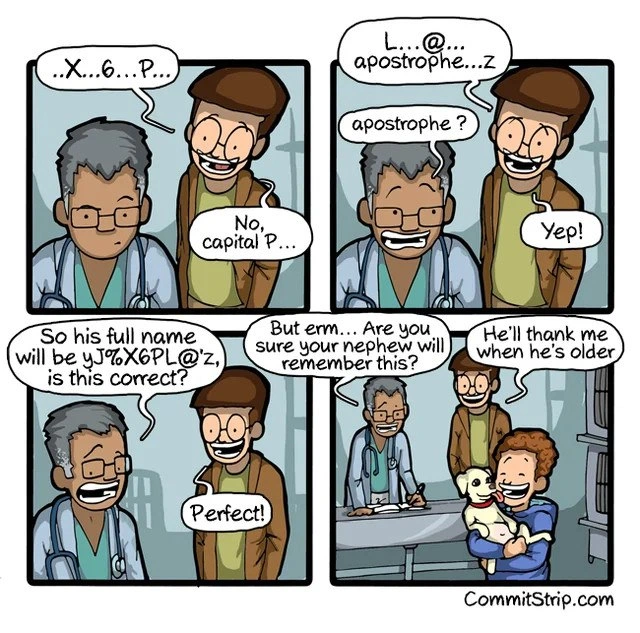
Let’s break down the joke in simpler terms. In the comic, a doctor is looking at a screen and reading out what is supposed to be a baby’s name, but it sounds nothing like a normal name – it’s more like he’s reading a computer password. He says things like “X...6...P...” and “L...@... apostrophe...z”, spelling it out character by character. This is exactly how you might read a password or a Wi-Fi code aloud to someone, carefully noting capitals and symbols ("No, capital P..."). The man standing next to him (the proud uncle, it seems) is happily confirming each part, as if this jumble of letters and symbols is indeed the intended name. By the third panel, the doctor asks, a bit incredulously, “So his full name will be yJ%X6PL@’z, is this correct?” and the uncle proudly says “Perfect!” The punchline comes when the concerned doctor gently asks, essentially, “Are you sure your nephew will remember this?,” and the uncle confidently replies, “He’ll thank me when he’s older.”

Why is this funny? It’s mixing up two very different ideas: how we name people, and how we create strong passwords for computers. People’s names are usually chosen to be meaningful or at least easy enough to say and remember. Think of common names like Alice, Mohammed, or Li – typically just letters, maybe a hyphen or an accent mark at most. Passwords, on the other hand, we’re told should be complex, containing a mix of uppercase letters (A-Z), lowercase letters (a-z), numbers (0-9), and symbols (like @, %, &, etc.) to make them hard to guess. A randomly-generated password is one created by a computer program or algorithm to be basically nonsense that nobody could predict – for example, something like Tr&9k#Pz!Q. These are great for security because hackers can’t easily guess them by brute force or by using common words. But they’re also very hard for humans to remember or even communicate. If you’ve ever had to reset a password and got something like X7$p$q*9 as a temporary password, you know it’s awkward – you have to copy it exactly, and telling someone else over the phone is a pain (“capital X, then the number 7, then a dollar sign...”).

Now, in the comic, the uncle is treating the baby’s name as if it needs to meet password security rules. This is immediately silly – a name isn’t a secret or a key to protect something; it’s an identity that you share openly. The doctor’s confusion with the apostrophe and verifying the capital letter shows just how out-of-place these things are in a name. (A quick side note: apostrophes do appear in some real names – like O’Connor – but an @ symbol or a % sign definitely doesn’t!) We also see the tag NamingConventions, which refers to the usual rules or patterns for naming things. In programming, we talk about naming conventions for variables or files (like whether to_use_underscores or useCamelCase), but for people, conventions are more like “start with a capital letter, maybe use letters from your language’s alphabet, no crazy punctuation.” This uncle is blatantly breaking those human naming conventions and instead following a security policy convention.

For a junior developer or someone new to tech, the comic is a playful jab at how seriously we take things like security best practices. We’re always talking about avoiding weak passwords (like “123456” or “password” which are incredibly easy to guess) and encouraging strong passwords that look more like random gibberish. Here, the uncle has clearly heard that lesson – maybe a little too well – and decided that even his family member’s name should be as strong and unique as a password. He probably thinks he's being clever and forward-thinking. When he says, "He'll thank me when he's older," the joke is that the uncle truly believes this complicated name will somehow benefit the kid in the future (maybe he thinks his identity will be super secure or that the kid will appreciate the uniqueness). It echoes how IT pros sometimes insist “you’ll appreciate these strict rules later when they save you from a security breach,” but in reality the kid might just be inconvenienced daily.

The comic also subtly references how developers struggle with naming things. There's a well-known lighthearted saying that "the hardest problem in programming is naming." In real life, parents can also find it hard to pick a baby name. Here the uncle essentially gave up on coming up with a nice name and let a computer-style process do it. It’s like he treated the baby as a new variable in his program of life, and hit the "generate secure name" button! A junior dev might not have experienced it yet, but down the road in coding you might find yourself agonizing over what to name a function or a new product so it makes sense – this comic takes that to an extreme (and absurd) solution.

Lastly, think about the doctor’s perspective as akin to a regular user or someone not steeped in tech rules. The doctor is basically saying, "This name is crazy, are you sure he'll even know it's his name?" That’s a very valid question! It highlights the usability issue: a name this complex is not convenient for the user (the nephew who has to go by it). Yet the uncle, like a stubborn sysadmin enforcing a 16-character password with symbols, insists it’s for the best. Tech humor often comes from these kinds of misunderstandings or over-the-top applications of computer logic in normal life. It’s funny to us because it shines a light on how absurd some tech practices would be if we tried them in everyday situations. Just imagine if you had to change your name every 90 days or remember a name like yJ%X6PL@'z to introduce yourself – it’s clearly ridiculous, and that’s why we get a good laugh. The comic is basically a caution and a chuckle in one: yes, strong passwords are important... but maybe don’t name your nephew like one!

Level 3: Naming Things: Password Edition

For experienced developers, this scenario hits on a couple of very familiar inside jokes. First, it lampoons the perennial truth that "naming things is hard." In software development, choosing good names for variables, functions, or databases is notoriously tricky – we even joke that the two hardest problems in computer science are cache invalidation, naming things, and off-by-one errors (yes, there are supposed to be only two!). Here, instead of carefully picking a meaningful name for his nephew, the tech-savvy uncle basically throws up his hands and lets a random string generator do the job. It’s an absurd literal take on solving the naming problem: if coming up with a good name is difficult, why not just generate one that’s guaranteed unique and meets all the criteria... of a secure password? The result is a baby name that reads like a Wi-Fi password — complete with a capital letter in the middle, numbers, a special symbol like @, and even an apostrophe for extra chaos. Seasoned devs can’t help but snicker because it’s taking a common developer pain point (hard-to-name things) and solving it with an even worse solution (random gibberish), much like how some coders name variables foo or xyz when they give up on clarity. Except, in real life you can’t get away with naming a person foo%bar7 – or can you?

The second layer of humor is all about security culture and over-engineering. In corporate IT and dev teams, we’ve all encountered those stringent security best practices that require passwords like Xk%9Ps!4Q – hard for attackers to guess, and equally hard for users to remember. This comic cranks that up to eleven by applying it to a newborn’s identity. The uncle’s insistence on including a capital “P” and even clarifying “apostrophe” shows he’s treating the baby name like entering a case-sensitive password or software license key. It’s the exact interaction you’d have reading out a license activation code or a 2FA recovery key over the phone: “Capital P, then L, then at-symbol, apostrophe, z…”. Developers and IT folks recognize the situation immediately – how many times have we painstakingly dictated a 30-character API token or Wi-Fi key to a colleague, emphasizing each symbol? The doctor’s baffled expression and need to confirm each character comically mirrors those frustrating exchanges. We’re essentially watching a hospital naming registry turn into a Terminal window prompt 😄.

From a seasoned dev perspective, there’s also an element of “We’ve seen this movie before.” Remember the famous xkcd comic about "Little Bobby Tables"? In that joke, a mom literally names her son Robert'); DROP TABLE Students;-- causing havoc in the school’s database because it's interpreted as an SQL injection. This CommitStrip gag is like a cousin to that scenario: a dev taking a normal real-world task (naming a child) and injecting programming absurdity into it. Instead of an SQL injection exploit, here we have a name that looks like it was selected to satisfy a password policy. Both scenarios poke fun at how poorly real-world systems might handle such input. In fact, imagine the edge cases this kid’s name will trigger as he grows up:

  • Many online forms won’t accept special characters like % or @ in a name field. The poor parents (or uncle, in this case) might see a lot of error pop-ups: "Name contains invalid characters." He’s essentially given the baby a name that breaks form validation rules!
  • The apostrophe might wreak havoc in databases if not handled correctly. Seasoned devs know the pain: think of every O'Connor or D'Arcy that caused an SQL query to fail because someone forgot to escape the '. Now this kid has ...'z in his name – DBAs and developers maintaining future systems better prepare for some funky bug reports.
  • Pronunciation and communication will be a nightmare. Every first day of school or doctor’s visit, someone will be reading out “yJ... percent... X6... P... L ... at sign ... apostrophe ... z??” The scenario we see in the comic (the doctor struggling to read it, the uncle correcting the case) will replay over and over IRL. In developer terms, the user experience of this "interface" (the name) is terrible! It’s as if the uncle designed a UI that only a computer could love and expect humans to use it flawlessly.
  • On the bright side, uniqueness is guaranteed. This child will never have the issue of another kid in class having the same name. In a way, the uncle future-proofed the name in terms of uniqueness – no collisions in the "human name" database for sure! It's the ultimate globally unique identifier (GUID) for a person. He might even claim, "hey, at least I ensured his username on every platform will be available – who else is named yJ%X6PL@'z?"

It also subtly mocks the "users will thank us later" mentality that sometimes creeps in with security policies or over-engineered solutions. The uncle confidently says, "He’ll thank me when he’s older," echoing every IT admin who’s enforced a painful password rotation policy thinking users will ultimately appreciate the increased security. In reality, as any experienced dev knows, overly complex rules often backfire. Users (or in this case, the kid) end up frustrated, writing the password (name) down on paper or simplifying it in practice. We can easily imagine the nephew, as soon as he's old enough, choosing a nickname or going by a simpler middle name – essentially the human equivalent of storing passwords in a manager because you can't remember them. It’s comedic irony: the very person this security measure is meant to help is the one most burdened by it.

And let's not overlook how real-world absurd this situation is. We actually have precedents of tech-minded folks choosing unconventional names: Elon Musk famously named his child X Æ A-12, blending algebraic-looking symbols and numbers, which had to be adjusted because it didn’t comply with California naming laws. That case wasn’t about passwords, but it shows this comic isn’t entirely fantasy – tech culture does inspire some wild naming ideas. The comic exaggerates it further by hitting all the typical password requirements in the name. In fact, let’s do a quick tongue-in-cheek compliance check on yJ%X6PL@'z against a standard corporate password policy:

  • Uppercase letter (Yes – there's a capital P)
  • Lowercase letters (Yes – plenty of those)
  • Digit (Yes – 6 is in there)
  • Special character (Absolutely – %, @, and ' are present)
  • Not a common word (It’s pure gibberish, so check)
  • Minimum length 12 (Oops, only 10 characters – this might actually fail the strictest policies!)

The fact that we can even humorously run through this checklist for a person’s name shows just how deep the developer mindset has seeped into everyday life in this joke. As senior devs, we chuckle because we’ve perhaps been on both sides of this: the enforcers of strict rules and the exasperated users of someone else’s “you’ll thank me later” scheme. It’s a cheeky reminder that while security and naming conventions are crucial in tech, context matters. You can follow all the best practices to the letter, but if you apply them in the wrong situation – like a baby name – you just create a new problem. This meme cleverly invites those of us in tech to laugh at our tendency to over-apply our rules and logic. After all, a name is not a password – and if you treat it like one, don’t be surprised when the first thing the kid does after learning to write is figure out how to simplify “yJ%X6PL@’z” into a nickname he can spell before recess.

Level 4: Entropy vs Memorability

At the deepest technical level, this comic highlights a classic security trade-off between entropy (randomness/unpredictability) and memorability (human ease of recall). The nephew’s proposed name yJ%X6PL@'z has all the hallmarks of a cryptographically strong token: it's 10 characters long, mixing lowercase (y, j, z), uppercase (X, P, L), digits (6), and special symbols (% , @ , '). In terms of information theory, each additional character type and increased length adds to the search space of possible combinations. For example, if we assume ~94 possible characters (all letters, numbers, and common symbols), a 10-character string has (94^{10}) possible combinations – that's on the order of (5 \times 10^{19}) possibilities! In simpler terms, the name has dozens of bits of entropy, making it astronomically difficult to brute-force guess if it were a password.

This high entropy is exactly what you'd want from a randomly-generated password or cryptographic key. Password-cracking algorithms (like brute force or dictionary attacks) thrive on predictability and limited choices. By including uncommon symbols and varied case, the name avoids obvious dictionary words and dramatically reduces the chance of any single guess being correct by pure luck. In a security context, this is gold: it's like using a 128-bit random AES key versus a simple word – one is effectively unguessable by any adversary within the age of the universe. The decision to include an apostrophe (') is particularly amusing because it's not even a character typical password generators consider, but as developers know, that character often has special meaning in code (like ending a string or causing SQL injection issues). From a strict entropy perspective, though, ' is just another valid symbol adding complexity.

However, the flip side of high entropy is low memorability. There’s a reason modern password guidelines (even NIST’s recommendations) have shifted towards longer passphrases over bizarre character mixes. A passphrase like "battery-horse-staple" (famous from an XKCD comic on passwords) might have comparable or greater total entropy due to length, while still being memorable. By contrast, a string like yJ%X6PL@'z is essentially maximum entropy, minimum meaning – it's not built for a human brain to easily remember or pronounce. Humans are pattern-finders: we remember familiar words, phrases, or at least something we can say out loud. This name defies all those patterns; it's as if someone took the output of a CSPRNG (cryptographically secure pseudo-random number generator) and decided to use it in a birth certificate. The comic exaggerates this to make us laugh: the developer uncle has prioritized security best practices so much that he's treating an identity label (which should be human-friendly) like a secret key that must resist hacking. It's a tongue-in-cheek example of over-engineering: applying rigorous computer security logic (maximize entropy to thwart attackers) in a context where it’s fundamentally overkill and counterproductive.

Deep down, there's also a subtle nod to the inherent tension in security design: security vs. usability. In InfoSec theory, a super secure system that no one can use (or remember how to use) isn't actually practical. Here the “system” is the poor kid’s name — extremely secure by randomness standards, but with such poor usability that even the doctor processing the birth registration is struggling to parse it character by character. The question “Are you sure your nephew will remember this?” is almost philosophical: what good is a high-entropy identifier if the authorized user (in this case, the child himself) can’t recall or reproduce it? It humorously echoes security research findings: forcing overly complex passwords often leads to unintended consequences (like people writing them down on sticky notes, reusing them, or in this case maybe the kid carrying a flashcard of his name!). In summary, at this most technical level, the meme is a playful illustration of how a concept like strong password entropy collides with human factors – it's basically Shannon’s information theory meeting the nursery room, with absurd and comical results.

Description

A four-panel comic strip from 'CommitStrip' depicting a conversation between a doctor and a man. In the first two panels, the man, with a wild expression, dictates a nonsensical string of characters, including mixed cases, numbers, and symbols, to the skeptical doctor. In the third panel, the doctor confirms the full name, 'yJ%X6PL@'z,' and the man agrees enthusiastically. The final panel reveals the man is naming his young nephew (who is happily holding a puppy), and when the doctor questions if the child will remember it, the man confidently replies, 'He'll thank me when he's older.' This comic satirizes the increasingly absurd complexity requirements for modern passwords, analogizing them to naming a child. The joke resonates with senior developers who have experienced the friction between stringent security policies and user experience, where 'secure' often becomes synonymous with 'unusable' and 'unmemorable'
Comments

20
Anonymous ★ Top Pick I tried to name my son using our corporate password policy. He's now 'Hunter2!', but every three months I have to call him 'Hunter2@' and he's not allowed to be named any of his previous 12 names
  1. Anonymous ★ Top Pick

    I tried to name my son using our corporate password policy. He's now 'Hunter2!', but every three months I have to call him 'Hunter2@' and he's not allowed to be named any of his previous 12 names

  2. Anonymous

    Bold move naming the kid “yJ%X6PL@’z”; he’ll ace every entropy meter - right up until the hospital’s legacy EMR truncates at 8 bytes and collides him with “hunter2”

  3. Anonymous

    After 20 years of sanitizing user inputs and escaping special characters, you realize the real vulnerability was letting developers name their children - somewhere a DBA is crying over a WHERE clause that needs to handle little Bobby'); DROP TABLE students;--

  4. Anonymous

    This is what happens when you let a developer who's spent too many years fighting with regex validators, SQL injection prevention, and Unicode normalization name a human being. The kid's going to need a prepared statement just to introduce himself at school, and good luck getting that past any government database that still thinks VARCHAR(50) without special characters is perfectly adequate for the 21st century

  5. Anonymous

    Naming the kid yJ%X6PL@'z is a full-stack integration test: IAM rejects the %, the legacy DB escapes the ', SSO parses the @ as an email, and the ETL quietly nulls the record

  6. Anonymous

    Threat modeling level: name the dog yJ%X6PL@'z so every ‘first pet’s name’ KBA is OSINT-proof - assuming the vet’s regex lets the apostrophe through

  7. Anonymous

    This identifier's so cryptic, even the family monorepo needs a dedicated grep alias to reference it

  8. ẞonny 4y

    Me rn

  9. @VolodymyrMeInyk 4y

    X Æ A-12

  10. Deleted Account 4y

    Explain

    1. @Artkash 4y

      A few years later, when puppy leaves this world, it would be easier to forget ...just as your regular password

      1. Deleted Account 4y

        Then the dad failed, cause some websites don't allow using apostrophe

        1. @Artkash 4y

          Not in "secret question" section ¯\_(ツ)_/¯

      2. @QutePoet 4y

        😲

  11. @flex_ape 4y

    Lol, when he grows up, that password will be too weak

  12. @JoseAngelSanchez 4y

    "What was your first pet name?"

    1. @affirvega 4y

      Ohhhhhhhhhhhh, that makes sense!

    2. @okutasan 4y

      Genius

  13. @RiedleroD 4y

    ol' Pl@zie

  14. @Magilarp 4y

    /wajihzesplaz/

Use J and K for navigation