Skip to content
DevMeme
2946 of 7435
The Unwavering Importance of !important in CSS
Frontend Post #3255, on Jun 15, 2021 in TG

The Unwavering Importance of !important in CSS

Why is this Frontend meme funny?

Level 1: Because I Said So

Imagine you're playing with friends and everyone is arguing about which game to play. Usually you might vote or take turns, but then one friend—maybe the older kid—steps in and says, "We're doing it my way because it's important." Suddenly, that's it. No one argues anymore because that friend pulled out the ultimate card: "because I said so." This meme is funny for the same reason: it shows a moment where one special rule beats all the others. Using !important in a website's code is like using a magic word that makes the browser listen to you no matter what. The pirate character confidently saying "Well yes, but actually yes" is a goofy way to celebrate that idea. It’s the feeling of finally getting your way by using the one trick that everyone has to respect. People laugh at this because they've felt that relief — finding a simple answer that makes a tricky problem instantly go away.

Level 2: Bending the Rules

CSS (Cascading Style Sheets) is the language that makes websites look good by controlling colors, layouts, fonts, and all those visual details. The word "cascading" in CSS refers to how the browser decides which style rule to apply when there are multiple possibilities – essentially a hierarchy or priority system. This is known as the CSS cascade. Think of it like layers of instructions: if two rules say different things about an element's style, the browser has to figure out which rule should win. That decision depends on CSS specificity (how specific or targeted a rule is) and the order in which the rules appear.

For example, a style rule targeting a unique element ID (like #main-title) is considered more specific and will usually beat a rule that targets a tag or class (like h1 or .title). Also, if two rules have the same specificity, the one that comes last in the CSS (or in the last loaded stylesheet) will generally win because it overrides earlier instructions. These are the normal rules of resolving CSS properties when there's a conflict.

Now enter !important. In CSS, adding !important to a style declaration is like saying "No really, this one takes priority." It's a special flag you attach to a CSS property value. Here's how things change with !important:

  • Normally: The browser might say, "I see two rules for the same thing; I'll apply the one that seems more specific or came later." For instance, if you have p { color: green; } and later p.special { color: blue; }, a <p class="special"> would normally be blue because the second rule is more specific to that element.
  • With !important: A rule that has !important wins even if it wasn't the most specific or was written earlier. If we change the first rule to p { color: green !important; }, then every <p> will insist on green text, even the ones with class "special" that a later rule tried to turn blue. The !important tag basically shouts at the browser: "Ignore the usual order; this style is critical!"

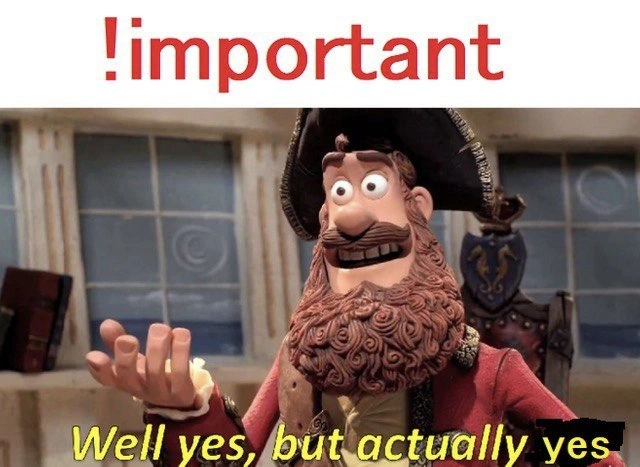
The meme illustrates this with the text !important at the top and a familiar pirate character at the bottom. The pirate image is from a popular meme format where he normally says "Well yes, but actually no." In our CSS scenario, before using !important, you might feel like "I applied a style... is it going to show up?" and the browser's cascade might reply, "Well yes, you wrote a rule, but actually no – I'm using a different rule that outweighs yours." It's a common frustration for newcomers to web development: you expect your style to work, but another rule (perhaps from a framework or an earlier stylesheet) wins out.

By changing the caption to "Well yes, but actually yes," the meme jokes that once you add !important, the browser will unequivocally apply your style. No more second-guessing or "actually no" from the cascade. Front-end developers find this funny because they know !important is a blunt tool. It's often used when you're in a hurry or can't easily fix the specificity issue the proper way. Essentially, !important is a CSS priority hack – it forces the browser's hand. The cascade’s normal polite rules get bent: even if ten other rules said otherwise, your !important declaration boldly declares, "I outrank you all."

However, even as a junior developer, you'll hear warnings: use !important sparingly! It can make your CSS harder to maintain because it overrides the natural cascading order that usually makes styles predictable. If one style is marked important, the only way to override it is to write another rule that is also !important (and usually more specific). This can lead to a spiral where everything gets labeled important just to compete – not a fun situation in a growing codebase. But in the context of the joke, the focus is on that victorious feeling when you finally see your changes take effect after adding the magical !important. The pirate saying "actually yes" reflects the relief and triumph of that moment: the CSS cascade was defeated by the almighty !important flag, and your style won.

Level 3: The Nuclear Option

In the world of CSS, !important is the big red button you push when all else fails. This meme humorously portrays that moment when a developer, frustrated by the normal CSS cascade, decides to drop the !important flag to force a style to apply. The top half shows !important in bold red (like a high-priority warning or an emergency override button), and the bottom uses the famous claymation pirate from the "Well yes, but actually no" meme template. But here the caption is changed to "Well yes, but actually yes" – because once you add !important, the browser has no choice but to say "Aye, Captain!" and apply your style.

Experienced developers see the humor in this immediately. It's a nod to all those CSS specificity wars we've fought in large web applications (the kind of front-end humor you earn after wrestling with thousands of lines of styles). Normally, CSS has a hierarchy of rules:

  • More specific selectors (like an id selector or inline style) trump more general ones.
  • Later rules override earlier ones if they have equal specificity.
  • Styles from libraries or frameworks can be hard to override without writing equally specific rules or loading your overrides later.

However, !important is like the nuclear option in these style conflict resolution battles. It overrides the cascade entirely: no matter how specific another rule is, a rule marked !important will take precedence (unless the other rule is also !important and manages to be even more specific). In other words, !important essentially says, "I don't care what any other stylesheet or rule said — this CSS property wins." The meme's punchline "well yes, actually yes" captures that perfectly: the cascade's typical "well yes, but actually no" response to a low-priority style is turned into an unconditional surrender.

To illustrate, consider two CSS rules for a page banner:

/* Without !important: */
.banner { background-color: blue; }
header .banner { background-color: red; }
/* → A .banner inside a <header> will be red (header .banner wins) */

/* With !important: */
.banner { background-color: blue !important; }
/* → Now .banner is blue everywhere (this !important rule wins) */

In the first case, a banner inside the header would be red because header .banner is more specific than just .banner. But in the second case, we added !important to the blue rule. Now every .banner will insist on blue no matter where it is, unless another rule also uses !important with even greater specificity. The cascade basically throws up its hands and says, "Alright, blue it is."

Seasoned devs chuckle at this because they know the double-edged sword they're wielding. Using !important can fix a quick CSS bug or override a deeply nested library style, but it can also lead to a cascade of new problems. Once you start adding !important, others might retaliate by adding more !important (cue the "specificity arms race"). If everything becomes !important, then ironically you’re back to relying on specificity and source order among those important rules – a case of "if everything is important, nothing really is." This meme hits home because it playfully acknowledges that sometimes, out of desperation, we accept the brute-force solution. And in that moment, the CSS engine’s response is exactly as the pirate says: "Well yes, but actually yes."

For veteran front-end developers, it's a laugh-and-groan situation. We laugh because we've been there – perhaps late at night deploying a hotfix – and the absurdly simple fix was just to yell at the stylesheet with !important. We groan because we also remember that using !important is like paying off debt with a credit card: it solves the immediate problem but can make things messier in the long run. The meme uses the pirate's emphatic double-yes to celebrate that guilty victory when the browser finally yields. It's a perfect encapsulation of web development irony: sometimes the clean, proper solution fails, and the CSS priority hack wins the day. (Yarr!)

Description

A clever tech meme that combines a CSS rule with a popular reaction meme format. At the top, against a white background, is the text '!important' in bold red font. Below is an image of the Pirate Captain from the Aardman Animations movie 'The Pirates! In an Adventure with Scientists!'. He is gesturing with an open palm and has a slightly confused but agreeable expression. The caption at the bottom reads, 'Well yes, but actually yes'. The humor lies in the double meaning. In CSS, the `!important` rule is an override that gives a specific style property the highest precedence, making it 'important' above all other rules. The meme format 'Well yes, but actually no' is twisted to 'Well yes, but actually yes', perfectly capturing the absolute, non-negotiable authority of the `!important` directive. It's a niche joke that resonates with web developers who have both used `!important` as a last resort and suffered from debugging CSS cascades where it was overused

Comments

19
Anonymous ★ Top Pick Using `!important` is like being the architect who, instead of fixing the foundation, just declares that one specific brick is now holding up the entire building by sheer force of will
  1. Anonymous ★ Top Pick

    Using `!important` is like being the architect who, instead of fixing the foundation, just declares that one specific brick is now holding up the entire building by sheer force of will

  2. Anonymous

    “!important” is the CSS equivalent of chmod 777 - instant gratification now, archaeological dig for whoever debugs the cascade next quarter

  3. Anonymous

    When the junior dev discovers !important and suddenly every CSS rule becomes a nuclear option in the specificity arms race, turning a simple stylesheet into a cascade of mutually assured destruction where the only winner is the browser's last-parsed declaration

  4. Anonymous

    The !important declaration: because sometimes you need to tell the browser 'I don't care about your cascade, your specificity calculations, or your well-architected component hierarchy - this button WILL be Comic Sans.' It's the nuclear option of CSS, turning every styling decision into an arms race where future-you will curse past-you for creating a specificity war that makes geopolitical conflicts look straightforward. Senior engineers know that reaching for !important is like admitting defeat to the cascade, but also that sometimes shipping beats purity, and you can always refactor it later (narrator: they never refactored it later)

  5. Anonymous

    CSS is a democracy; !important is the Friday 5:55pm coup that becomes constitutional law in your design system

  6. Anonymous

    CSS specificity is a coordination bug masquerading as a parser feature; '!important' is our Paxos - fast to converge, impossible to roll back

  7. Anonymous

    !important: CSS's GOTO - brutally effective, eternally shunned by architecture purists

  8. @Artemus_2 5y

    Lmaoo.

    1. @pavloalpha 5y

      Hmmmmmm

    2. @pavloalpha 5y

      Some familiar nickname

  9. @Artemus_2 5y

    You didn't see me.

    1. @pavloalpha 5y

      Ok😐

    2. @pavloalpha 5y

      I have left prog chat already, don't worry

      1. @Artemus_2 5y

        Ok.

        1. @pavloalpha 5y

          Impressed why I'm not blocked

          1. @Artemus_2 5y

            Only faggots got block by me.

            1. @pavloalpha 5y

              So I'm faggot, understand

  10. @Artemus_2 5y

    There are only 3 faggots.

  11. @azizhakberdiev 5y

    "Fuck others' opinion about that" CSS

Use J and K for navigation