Skip to content
DevMeme
5112 of 7435
The Developer's Journey: A Graph of Code Complexity vs. Experience
CodeQuality Post #5596, on Oct 20, 2023 in TG

The Developer's Journey: A Graph of Code Complexity vs. Experience

Why is this CodeQuality meme funny?

Level 1: Back to Basics

Imagine learning a new skill like cooking. When you’re just starting out, maybe you can only make a basic dish – say a simple bowl of pasta with tomato sauce. It’s not fancy, but it’s straightforward and it works because you don’t know many cooking techniques yet. Then you go to culinary school or watch a bunch of cooking shows and learn all sorts of new tricks. Suddenly, when you try to make dinner, you use every spice in the rack, complex plating, and elaborate techniques, turning that simple pasta into a 5-layer lasagna with three sauces and a soufflé on the side. It’s way more complicated than it needs to be for a regular meal! You did it because you wanted to use all the cool things you learned. The result might be okay, but it took a ton of effort and dirty dishes, and maybe it doesn’t taste any better – it might even taste worse because the flavors got too mixed up. Now picture a seasoned chef with 20 years of experience. They’ve gone through all the training and experimentation. In the end, when this chef makes pasta, they keep it simple – perhaps just fresh tomatoes, a bit of garlic, a few high-quality ingredients, cooked perfectly. It seems simple, but it’s delicious and just right. They know exactly which fancy techniques to use and which to leave out. In the end, the simple dish actually turns out the best. This meme is saying programming is like that. When you start coding, you do something simple because that’s all you know. Then you learn a lot of new coding tricks and you try to use them all at once – your code becomes overly complicated like that overdone lasagna. Finally, once you’ve been coding for many years, you understand which tricks are really important. You go back to making the code simple – just like the experienced chef making a perfect, simple pasta – and it ends up being the best solution. The funny part is realizing that the true expert’s code looks kind of plain and straightforward, a lot like the beginner’s, and that’s absolutely okay. The journey taught them that sometimes less is more.

Level 2: OOP and Patterns Phase

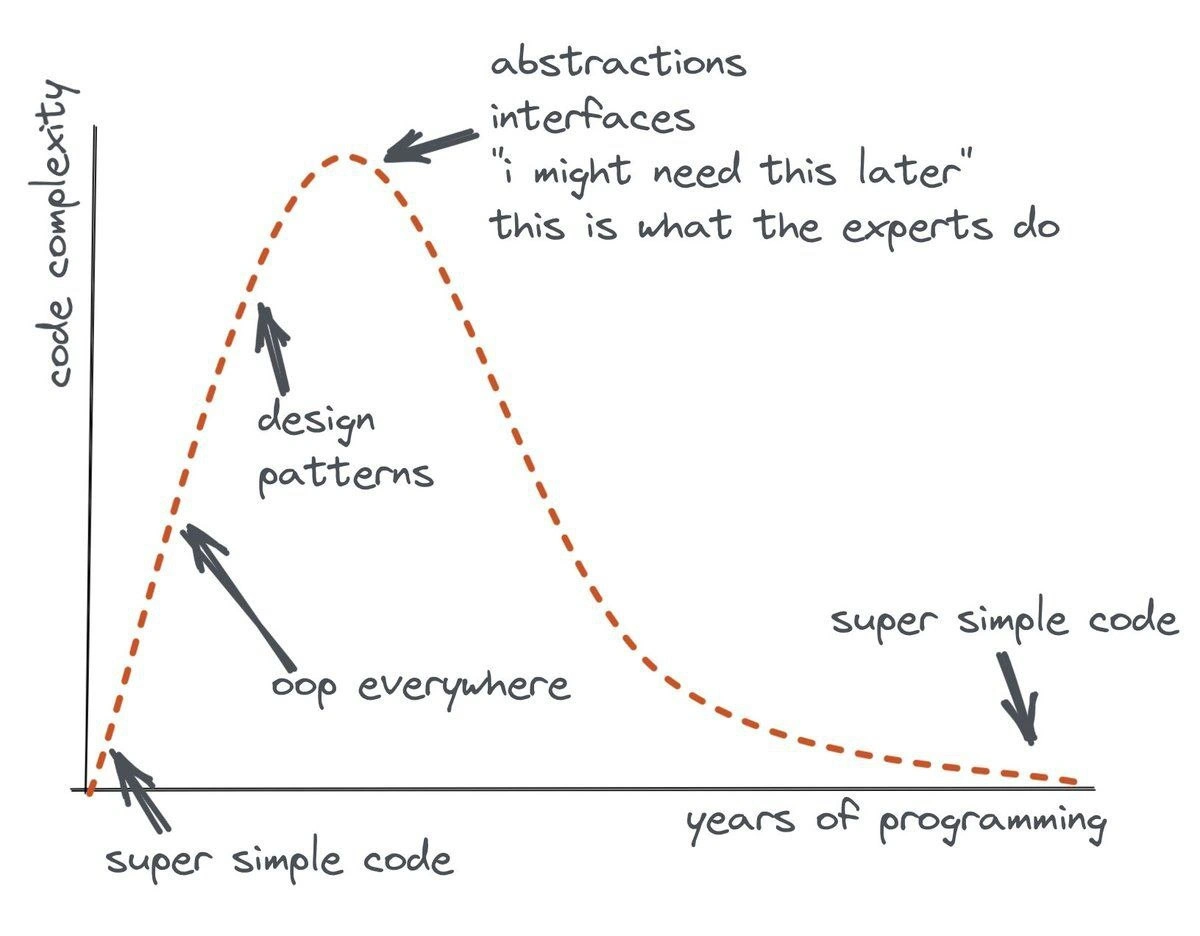
Let’s break down what’s happening in this funny chart in more approachable terms. The horizontal axis is years of programming experience – as you spend more time coding, you progress from beginner to intermediate to advanced. The vertical axis is code complexity, which means how complicated your code structure is. At the very start (lower left), you see “super simple code.” Imagine a newbie programmer who only knows the basics. Their code might not follow all the best practices, but it’s pretty straightforward. For example, if they need to add two numbers, they’ll just write a couple of lines to do it directly. There aren’t many layers or fancy structures because the beginner only knows the simplest tools.

Now, as that programmer gains a bit more knowledge, they enter what we might call the “OOP everywhere” stage (OOP stands for Object-Oriented Programming). OOP is a style of coding where you organize code into objects (which bundle data and functions together) and use concepts like classes, inheritance, and interfaces. When developers first learn OOP, it often blows their mind – “I can make a Car class with a drive() method, cool!” Suddenly everything in their program becomes an object or a class because that seems like the “right” way to code. Even tasks that could be done with a simple function might get their own class file. For instance, a beginner might write a simple function send_email(), but an excited new OOP convert might create an EmailSender class with methods and perhaps even a subclass for each email provider. The code complexity starts rising here because the program now has more moving parts (multiple classes interacting) instead of just straightforward sequences of commands.

Next up the curve is the “design patterns” phase. Design patterns are formal, named solutions to common software design problems – like reusable templates for how to structure your code. Some famous ones are the Singleton (ensuring only one instance of a class), the Factory (an object whose job is to create other objects), the Observer (objects subscribing to events from another object), and many more. There’s even a classic book called “Design Patterns: Elements of Reusable Object-Oriented Software” that every eager programmer tends to read. When you first learn about these patterns, it’s exciting – you start seeing opportunities to use them everywhere. It feels like leveling up as a developer. So the intermediate programmer begins applying patterns even when they aren’t necessary. Need to parse a file? Why not use a Strategy pattern with interchangeable parsing algorithms! Working on a game character class? Let’s throw in the Builder pattern to construct it in steps! Each of these patterns is not bad on its own – in fact, they exist because they solve real problems. The issue is when someone uses a pattern in the wrong context or “just in case” for later. This adds a lot of extra code (“boilerplate” code) and layers that don’t actually solve a problem we have today. It’s often premature optimization or over-planning – implementing hooks and extensions for hypothetical future requirements that might never materialize. The meme notes this with the text “I might need this later”. That mentality is common when we’re trying to write code that’s super flexible for the future, but it can lead to over-engineering: making the system more complex than it needs to be right now.

At the very top of the curve, the code has become pretty complicated. We have multiple abstraction layers (for example, classes that don’t do much except call other classes), lots of interfaces (which are like agreements of what methods a class will have, used here even when there’s only one class implementing them), and maybe an entire architecture that’s very elaborate. The graph humorously scribbles “this is what the experts do” at that peak. That’s reflecting the intermediate developer’s belief that real experts must be structuring their code in these sophisticated ways. It’s like when you learn a new word and use it all the time because you think it makes you sound smart. Here the developer is using every pattern and abstraction because they think that’s professional CodeQuality. The irony, and why developers find this meme funny, is that actual experts – the seasoned programmers – often avoid gratuitous complexity. The right side of the graph shows the curve coming down: as the years of programming increase further, the code complexity drops back toward “super simple code” again. This suggests that after going through that everything-and-the-kitchen-sink phase, experienced developers start simplifying their designs. They realize that writing clean, straightforward code usually leads to better outcomes than an over-engineered solution. This is where principles like YAGNI (“You Aren’t Gonna Need It”) and KISS (“Keep It Simple, Stupid”) come into play. YAGNI means don’t add functionality just because you think you might need it in the future – add things when you actually need them. KISS is a reminder to prefer simple designs over complex ones. A senior developer has likely been bitten by complex code before – maybe they wrote it themselves a few years ago! They’ve learned that while using patterns and abstractions is sometimes very useful, it’s also possible to misuse them and make code harder to work with. So in the end, the veteran programmer writes code that might look minimalistic or obvious, but it’s backed by a lot of wisdom about what not to do. The whole curve is basically the learning curve of a programmer’s career in terms of design approach. Early on, you’re simple because you don’t know enough to be fancy. In the middle, you’re overly fancy because you do know a lot and want to apply it. Later, you’re simple again because now you’ve learned which fancy things are actually useful and which aren’t. It’s a full circle from simple to simple – but the second “simple” is a consciously chosen simplicity.

Level 3: Over-Engineering Peak

For those of us with a few years in the industry, this chart hits home as a shared journey. It’s poking fun at that over-engineering peak many developers go through. Early in your career, you start out writing straightforward code – maybe it’s not optimal, but it’s super simple and gets the job done. Then you discover OOP everywhere: you learn about classes, inheritance, and interfaces and suddenly every piece of code becomes an object. Perhaps you’ve seen code where something trivial like printing a message is turned into a full OOP production:

interface MessageService {
    void send(String msg);
}
class ConsoleService implements MessageService {
    public void send(String msg) {
        System.out.println(msg);
    }
}
class NotificationManager {
    private MessageService service;
    NotificationManager(MessageService svc) { this.service = svc; }
    void notify(String message) {
        service.send(message);
    }
}

// Using the over-engineered setup:
MessageService service = new ConsoleService();
NotificationManager notifier = new NotificationManager(service);
notifier.notify("Hello World!");

// Meanwhile, a simpler approach could be just:
System.out.println("Hello World!"); // (no classes needed!)

In that “OOP everywhere” stage, a developer is proud to apply their new knowledge, wrapping every operation in a class or interface. Soon after, you dive into the world of design patterns – Singleton, Factory, Observer, you name it. This is the design patterns phase labeled on the chart. Suddenly every problem in your code seems to call for a pattern from the famous “Gang of Four” book. Did a simple data structure need to save to a file? Let’s add a Factory and a Strategy so we can swap algorithms at runtime! Working on a UI component? Better throw in the Observer pattern because you might reuse it someday. We’ve all either written or reviewed code where a simple task ballooned into an architecture astronaut’s dream, complete with layers of factories, managers, and abstractions that nobody asked for. It’s the stage where a developer’s answer to “Why is this so complicated?” is, “Because this is what the experts do.”

"I might need this later"
"This is what the experts do."

These quotes scribbled at the peak of the graph perfectly capture the mindset. It’s a mix of premature optimization mindset (“I’ll build it this way now so I don’t have to change it later”) and a bit of imposter syndrome (“Real experts use fancy patterns, so I should too”). The humor is that many of us followed this pattern: we over-engineered projects thinking it would make our code future-proof and professional. Instead, we often created rigid, hard-to-read systems – a pile of unnecessary abstractions that actually made the code worse in terms of CodeQuality. For example, implementing half a dozen classes and interfaces for a feature that could be done with one clear function is a classic over-engineering outcome. The longer you stay in the field, the more you encounter the downsides: debugging a labyrinth of abstract factories at 2 AM, struggling to explain the code to new team members, or the classic “why do we even have this layer?” in a code review. Over time, these painful experiences teach you that clarity trumps cleverness. Seasoned devs start recognizing the value of simplicity and directness – you learn to apply design patterns sparingly, only when they truly fit a recurring problem you’re facing. Also, with experience, you’ve seen the cost of maintaining complex designs. This is where the curve trends downward: the senior developer embraces simplicity after experience. They might chuckle at their own past code full of generic factories and abstract base classes that never got used more than once (violating the YAGNI principle). In real-world scenarios, teams often end up refactoring “clever” code to make it simpler, more readable, and thus more maintainable. In meetings, a senior engineer might now be the one saying, “Do we really need all these layers, or can we keep it simple?” The meme is funny to developers because it’s relatable humor: it satirizes a rite of passage in our careers. It’s basically a rite where Senior vs Junior Developers have opposite coding styles – the junior writes maybe messy but straightforward code, the mid-level dev writes an impressive-looking but over-complicated contraption, and the senior comes in with a solution so elegant and simple that it looks almost obvious. The dashed graph’s shape and labels exaggerate this for comedic effect, but there’s truth in it. We laugh (perhaps a bit self-consciously) because we see our past selves in that peak, and we see how far we’ve come in understanding Code Complexity and the art of simple design.

Level 4: The Complexity Paradox

At an advanced level, this meme illustrates a paradox of software design: adding more structure and abstraction is supposed to manage complexity, yet overusing these tools actually creates more complexity. The dashed curve is essentially a complexity bell curve plotted against a developer’s experience. In theoretical terms, it highlights the tension between essential complexity and accidental complexity. Essential complexity is the irreducible complexity of the problem itself – the minimal complexity your code must have to solve the problem. Accidental complexity is the extra mess we add on top through our design choices and tools. Early on, a programmer’s solution might only address essential needs (hence “super simple code” at the start of the graph). As they learn sophisticated techniques – think deep Object-Oriented Programming hierarchies, excessive design patterns, and generalizations for future use – the accidental complexity skyrockets. Academically, this mirrors Frederick Brooks’ observation in No Silver Bullet: there is no magic tool or methodology that can eliminate complexity; in fact, misapplied “good practices” can bloat a system with unnecessary abstractions that have nothing to do with the actual problem domain. The peak of the curve (“abstractions, interfaces, ‘I might need this later’, this is what the experts do”) reflects a kind of second-system effect on a personal scale: like an over-ambitious second version of a program, the mid-career developer, armed with new knowledge, stuffs every conceivable feature and pattern into the codebase. The result is over-engineering – a system so generalized and future-proofed that it’s ironically fragile and hard to understand. Seasoned engineers eventually internalize principles like KISS (Keep It Simple, Stupid) and YAGNI (“You Aren’t Gonna Need It”). These principles are essentially strategies to combat accidental complexity: don’t add things you don’t need, prefer clarity over cleverness. With time, masters of the craft develop a kind of simplicity on the other side of complexity – they can discern when an elegant design pattern truly adds value versus when it’s overkill. The right side of the graph shows code complexity falling back toward the baseline as years of programming increase. This isn’t because the problems got easier; it’s because the veteran developer now chooses the simplest architecture that solves the problem, filtering out all the premature abstractions. In essence, the meme encodes a deep truth in software engineering: true expertise often involves taming complexity by judiciously removing or avoiding overly complex constructs. As the saying goes (attributed to Tim Peters in The Zen of Python), “Simple is better than complex.” The humor here is that the “expert” solution ends up looking embarrassingly close to the newbie solution – except with the wisdom to know why it’s the right approach.

Description

A hand-drawn graph plots 'code complexity' on the y-axis against 'years of programming' on the x-axis, illustrating the evolution of a developer's coding style. The graph starts at 'super simple code,' then ascends steeply through phases labeled 'oop everywhere' and 'design patterns.' It peaks at maximum complexity with annotations like 'abstractions,' 'interfaces,' '"i might need this later,"' and 'this is what the experts do.' Finally, the curve descends back to the baseline, ending at 'super simple code' again. This chart is a classic representation of the developer's journey. It humorously depicts the common trajectory of moving from naive simplicity to a period of over-engineering - where developers, armed with new knowledge, create unnecessarily complex systems. The final return to simplicity signifies true mastery: the ability to solve complex problems with elegant, maintainable, and straightforward solutions, having learned the high cost of complexity through experience

Comments

42
Anonymous ★ Top Pick You know you're on the right side of that curve when you replace a 12-class strategy pattern with a single 'if' statement and call it a win
  1. Anonymous ★ Top Pick

    You know you're on the right side of that curve when you replace a 12-class strategy pattern with a single 'if' statement and call it a win

  2. Anonymous

    My proudest senior moment: a PR diff of - 3,421 / +1 replacing AbstractVisitorFactoryServiceInterface with `return data;` - merged in twelve seconds and a collective sigh of “finally.”

  3. Anonymous

    After 20 years, you realize the AbstractFactoryFactoryBuilder pattern you architected for that config file parser could have just been a JSON.parse() call with a try-catch

  4. Anonymous

    This graph perfectly captures the arc of every architect's career: you start writing procedural spaghetti, discover the Gang of Four and suddenly everything needs seventeen layers of abstraction and a factory factory, then after debugging your tenth AbstractSingletonProxyFactoryBean at 3 AM, you realize the junior who just wrote a 50-line function that actually works might be onto something. The real senior move is knowing when NOT to use that design pattern you spent three years mastering

  5. Anonymous

    Real seniority is deleting the AbstractFactoryFactoryManager and replacing it with two small functions and a map, because YAGNI pages less than inheritance

  6. Anonymous

    The expert's secret: every abstraction layer you add today is just future tech debt you'll pay off tomorrow - with interest

  7. Anonymous

    Peak architecture is the day you justify an IStrategyFactoryProvider; true seniority is deleting it and shipping a 30‑line function with tests

  8. @ideugen 2y

    База

    1. @ZgGPuo8dZef58K6hxxGVj3Z2 2y

      English only

      1. @Iplay2hours 2y

        Baza

        1. @ZgGPuo8dZef58K6hxxGVj3Z2 2y

          Whatever that is

          1. @Iplay2hours 2y

            that means something "super obvious thing", like smoke after eat

          2. @xamnol 2y

            baza = based

            1. @ZgGPuo8dZef58K6hxxGVj3Z2 2y

              Ah makes sense

            2. @AlexKart20129 2y

              base, not based

              1. @xamnol 2y

                Lol, “Based” is a well-known meme and nobody uses “base” in this context

                1. @AlexKart20129 2y

                  yes, but russian meme "это база!" (eng. "it's a base!") has a different meaning and typically used in different context

                  1. @endisn16h 2y

                    all your base are belong to us

                    1. @CcxCZ 2y

                      you have no chance to survive make your time

  9. @s2504s 2y

    True story

  10. @bezuhten 2y

    is this meme correct? any super experienced programmers here?

    1. @RiedleroD 2y

      I'm not that experienced, but I know I'm past the maximum. I sometimes used really complex patterns in the past, but nowadays I just do what works.

      1. @RiedleroD 2y

        non-professional self-taught dev of 7 years btw

        1. @RiedleroD 2y

          well, semi-professional. I had an internship this summer, and the company seemed to be happy with my work, so.

        2. @Fatimel 2y

          lol what were you doing all that time))))

          1. @RiedleroD 2y

            school

    2. @Fatimel 2y

      yes. at least couple of super experienced devs that I watch say that. didn’t get their position for some years, now understanding the meme myself fck oop, btw… ruined my early dev life

  11. @hotsadboi 2y

    non-professional dev of 2 years, going through my functional programming arc atm. which part of the slope is that?

    1. @RiedleroD 2y

      the slope is quite simplified, but I'd guess just a bit before the peak. Depends on how you use it ig

  12. @dsmagikswsa 2y

    I am in Oop everywhere now Anyone else?

  13. @CcxCZ 2y

    Part of the reason IMO is that OOP (FSVO OOP, Alan Kay would beg to differ) and design patterns are taught as to how, but not why and when.

  14. @ArtemVoikov 2y

    Have you noticed how OOP has died? Yes, it happened a long time ago, and no one noticed.

    1. @CcxCZ 2y

      It died like four times by now. 🤷‍♀ There wasn't agreement on what it meant in the first place.

      1. @ArtemVoikov 2y

        Since C++ it was about inheritance, polymorphism and encapsulation. After IoC we have: 1) inheritance has been substituted by injection, 2) single implementation of an interface - yes, no one wants to write unit tests = no polymorphism 3) DTO/POCO everywhere. Encapsulation is the last man standing, but it will surrender any time soon to reflection and code generators.

        1. @Araalith 2y

          Inheritance has been replaced by composition. Because no one wants to guess what will happen with the base class after an update.

          1. @CcxCZ 2y

            CLU got it right and Simula wrong :]

          2. @ArtemVoikov 2y

            yes, this is more accurate definition.

            1. @CcxCZ 2y

              Without inheritance most functional languages with typed interfaces (Standard ML, Haskell) or in general structurally typed procedural languages (Modula2/3, Algol68, probably Go) would now count as OO languages. A way to implement virtual methods was the addition to Caml to make it OCaml.

        2. @CcxCZ 2y

          We've talked through this extensively here https://loup-vaillant.fr/articles/deaths-of-oop https://t.me/devs_chat/52446 https://t.me/devs_chat/52487

          1. @ArtemVoikov 2y

            Good article. I would be glad to see an example of a code, that would substitute a C++ method Render(listOfObjects) that wouldn't use polymorphism with the same or faster performance and that would've increase of developers KPI.

            1. @CcxCZ 2y

              Well, listOfObjects kind of implies that the list contains references to things with different behaviors. The traditional functional approach here would be closures. Both methods and closures are something that you can call/evaluate to access some local state. There are no clear wins in performance here. The main performance advantage we see with ECS is move from what http://canonical.org/~kragen/memory-models/ calls LISP memory model (which the regular OOP-y use of C++ has) to Fortran memory model by using memory pools and thus having huge locality improvements. And that's quite general concept. However I think this article might be closer to what you intended to ask: https://blog.janestreet.com/why-gadts-matter-for-performance/

  15. @ZgGPuo8dZef58K6hxxGVj3Z2 2y

    Yeah ignore catch just have them there to not take the whole docker container down

Use J and K for navigation