Skip to content
DevMeme
2242 of 7435
The Only 'How to Start Hacking' Tutorial You Need
Security Post #2497, on Dec 22, 2020 in TG

The Only 'How to Start Hacking' Tutorial You Need

Why is this Security meme funny?

Level 1: Thrown in the Deep End

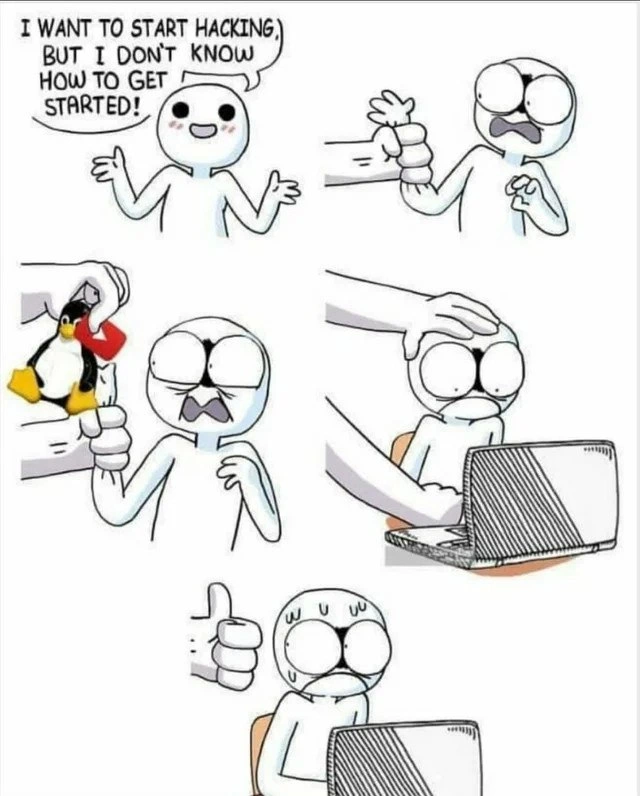
Imagine you want to learn how to swim, and you tell this to a swim coach. Instead of starting you with gentle step-by-step instructions, the coach puts a life vest on you, carries you over to the pool’s deep end, and plops you right into the water with a big thumbs-up 👍. You’d be surprised and maybe a little scared, splashing around at first. But guess what – you’ll start paddling and kicking to stay afloat, and before long you’re actually swimming (or at least learning how). It’s a bit of a shock, but you learn quickly when you’re in the water. This comic is showing that same idea, but with computers. The eager person wants to learn “hacking” (using computers in clever ways), so their friend basically says, “Okay, time to jump in!” and sits them down in front of a computer running Linux (a different kind of software for the computer) and says “go for it.” The friend gives a thumbs-up like “You can do it!” while the new learner is sweating and nervous, staring at the screen not sure where to start. It’s funny because it’s such an extreme way to teach – just throw them into the deep end and see if they swim. But just like with swimming, the idea is that by being thrown in, the beginner will start figuring things out through experience, even if it’s a bit scary at first.

Level 2: Penguin Bootcamp

So what’s going on in this cartoon? It’s showing a beginner hacker’s crash-course introduction to the world of computers, specifically through Linux. Linux is an operating system (like Windows or macOS) that is super popular among programmers and security experts. Why? Because it’s open-source (meaning you can see and change the code that runs it), and it gives you tons of control through something called the Command Line Interface (CLI), also known as the terminal or shell. In Linux, instead of clicking buttons, you often type text commands to do things. That can feel intimidating for newcomers, but it’s incredibly powerful – kind of like speaking the computer’s native language.

In the comic’s first panel, the small stick-figure character is excited but lost: “I want to start hacking, but I don’t know how to get started!” They’re basically asking, “How do I begin learning cybersecurity or coding tricks?” This is a very common question. The next panels show the “answer” in a comedic way. A bigger hand (belonging to an unseen mentor or friend) literally grabs the newbie and hands them two things: a tiny plush Tux the penguin (Tux is the official Linux mascot) and a USB flash drive. That USB drive is likely a bootable USB, meaning it’s been loaded with a Linux installer or a live Linux system. In real life, if you want to install Linux, you often download a Linux ISO (an image of the OS) and put it on a USB stick so you can boot a computer from it and install the new system. The mentor in the comic is basically saying, “Here, this USB has Linux on it – let’s set your computer up with it.” It’s the first step in the “universal hacker onboarding” process: get on Linux.

Why Linux? Because the hacking and security world runs on it. Many popular hacking tools (for example, nmap for network scanning, Metasploit for exploits, or Wireshark for packet sniffing) are built to run on Linux. Even many servers and infrastructure you’re trying to secure or penetrate run Linux. So if you use Linux, you’re in the same environment where the action happens. Plus, Linux lets you really dig into how computers work – you can open the hood, mess with configurations, run scripts in the terminal, and basically learn by doing. It’s a bit challenging (hence the newbie’s panicked look), but it teaches you a ton. Think of it as a bootcamp (hence our subtitle “Penguin Bootcamp” 😊): it’s intensive and sometimes overwhelming, but very effective. The mentor physically pushing the newbie’s head toward the laptop in Panel 4 is an exaggerated way to say, “Don’t overthink it, just jump on the keyboard and start exploring.” The thumbs-up from the mentor in the last panel means they’re encouraging the newcomer: “Yep, just like that, you’re on the right track!” Meanwhile, the poor newbie is sweating bullets looking at the screen – a mix of learning excitement and fear of the unknown.

This resonates with how many of us started out. The first time you open a terminal (that black window with white text) can be scary – it just sits there, waiting for you to type a command, and you might be afraid of breaking something. But using the CLI is fundamental in the Security field. For example, instead of clicking a scanner app, a hacker might type nmap 192.168.0.0/24 to scan a range of IP addresses for vulnerabilities. To do that, you need to be comfortable setting up Linux and typing commands. The comic simplifies that whole journey into a funny little sequence: the newbie wants in on the hacker world, so the community’s response is “Install Linux and start typing.” No lengthy lecture, just immediate immersion. It’s a bit of a running joke that the first step is always “Try Linux,” because it’s both true and kind of a learning curve hazing ritual. After all, Linux has a reputation for being less user-friendly at first, but once you get it, you gain a superpower: control over your environment. By being “forced” to use the terminal, the newbie will inevitably learn how files are organized, how to run programs via commands, how to edit config files with a text editor like vim or nano, and maybe even a bit of scripting. It’s learning by immersion – the tech equivalent of throwing someone into a new language environment so they pick it up faster.

In summary, this meme is showing a newbie hacker getting an abrupt, hands-on start. The tags like terminal_life and forced_learning sum it up perfectly: life in the terminal is basically compulsory for hacking, and sometimes the best (or only) way to learn it is to just dive in headfirst. The humor comes from how blunt and over-simplified this initiation is: there’s no magic trick or secret book of knowledge handed to the beginner – just a Linux install and a “good luck!” Yet, if you ask many experienced hackers how they started, a lot will chuckle and admit: yep, pretty much like that.

Level 3: Baptism by Terminal

The humor here is a hacker culture rite-of-passage captured in one comic. An enthusiastic newbie shouts “I want to start hacking, but I don’t know how!” – a cry every seasoned security guru has heard on forums and chat groups. The punchline: the universal hacker onboarding is literally just shoving the newcomer into the world of Linux and the command line. In the comic, the larger figure (representing a grizzled mentor or the infamously brusque online community) doesn’t bother with PowerPoints or hand-holding. Instead, they grab the newbie’s arm and essentially say, “Oh, you want to hack? Here you go!” by thrusting a Tux penguin plushie and a bootable USB into their hands. The Tux mascot and USB drive are symbolic: it’s time to install Linux and live in the terminal. This is hacker initiation 101 – a baptism by terminal fire.

Why is this funny to experienced devs? Because it’s so true. There’s a long-standing inside joke that if you ask “How do I learn to hack?” the snarky but earnest answer is “Install Linux, open a terminal, and start typing.” The meme exaggerates it with physical manhandling, but honestly, it’s not far from reality. Seasoned hackers know that the path to Security wizardry isn’t through fancy GUIs or Hollywood-style 3D hacking interfaces – it’s through a plain shell prompt, likely on a Unix-like system, with you sweating over cryptic commands. The big hand forcing the newbie’s head to the laptop is a perfect visual metaphor for the tough love approach in many tech circles. Instead of step-by-step tutoring, the community often believes in forced learning: throw the newbie into the deep end of a CLI (Command Line Interface) and let them struggle productively. It’s a trial by fire (or trial by penguin 🐧) that all veteran hackers recognize. The learning curve for using Linux and terminal tools is steep – and that overwhelmed, wide-eyed look on the newbie’s face in Panel 5? Every developer remembers having that exact expression the first time they stared at a blinking $ prompt not knowing what to do next.

This comic also reflects a bit of gatekeeping humor ingrained in hacker culture. To “truly” join the club, you must ditch the comfort of familiar operating systems (sorry Windows, you can keep your pretty buttons) and embrace the raw power (and occasional pain) of the terminal. It’s funny because it’s a shared experience: the rite of root. The mentor’s thumbs-up in the final panel nails it – it says “Good luck, you’ll thank me later,” while the newbie is already shell-shocked (literally and figuratively). For seasoned folks, it’s a knowing smile: been there, done that. We laugh because we survived that initial chaos of installing Ubuntu or Kali Linux from a USB, probably breaking things, googling frantically, and gradually feeling the pieces click. The meme captures the absurd simplicity of the advice (“just use Linux, kid”) contrasted with the very real complexity the newbie is about to face. It’s an exaggeration of how learning in tech often works: you’re eager to be a l33t hacker, and your mentor basically holds your hand hands you a USB and pushes you headfirst into a terminal. Surprise! Your hacker journey starts now, no GUI, no training wheels – just you, a blinking cursor, and a whole lot of determination.

Description

A five-panel comic strip illustrating a humorous take on how beginners are introduced to hacking. In the first panel, a cheerful character asks, 'I WANT TO START HACKING, BUT I DON'T KNOW HOW TO GET STARTED!'. In the second panel, a large hand forcefully grabs the character's arm, causing a look of panic. The third panel shows the hand pushing a Tux, the Linux mascot, into the character's hand. In the fourth panel, the hand gently guides the now-distressed character to a laptop. The final panel shows the character sweating and overwhelmed in front of the laptop, while the hand gives an encouraging thumbs-up. The meme satirizes the common, and often daunting, advice given to aspiring hackers: to learn Linux. It captures the steep learning curve and the 'sink or swim' mentality sometimes present in the security and developer communities

Comments

9
Anonymous ★ Top Pick The universal 'getting started with hacking' guide: Step 1: Install Linux. Step 2: Forget everything you know about intuitive user interfaces. Step 3: Your real first hack is figuring out how to exit Vim
  1. Anonymous ★ Top Pick

    The universal 'getting started with hacking' guide: Step 1: Install Linux. Step 2: Forget everything you know about intuitive user interfaces. Step 3: Your real first hack is figuring out how to exit Vim

  2. Anonymous

    Our red-team onboarding test is just a live-USB distro; if the newbie can get the Wi-Fi and trackpad working, they’ve already proven more privilege-escalation skill than half our bug-bounty reports

  3. Anonymous

    Ah yes, the classic pipeline: 'I want to be a hacker' → discovers Linux → spends next 6 months configuring i3wm and arguing about systemd instead of learning actual security fundamentals. We've all mentored that junior who installed Kali as their daily driver before understanding what sudo does

  4. Anonymous

    The classic security career path: Step 1 - Get excited about hacking. Step 2 - Install Linux. Step 3 - Spend the next six months just trying to get your WiFi drivers working. By the time you've mastered systemd, SELinux policies, and why your audio suddenly stopped working after an update, you've accidentally become a sysadmin instead of a pentester. The real hack was the kernel panics we encountered along the way

  5. Anonymous

    Every “teach me hacking” onboarding is just handing over Linux - five minutes in you’re root, ten minutes in you’re arguing with systemd and nftables, and by lunch you’ve learned the only zero‑day was your sudoers file

  6. Anonymous

    Classic onboarding: hand 'em Tux, watch 'em GRUB-hunt their way to strace enlightenment - or EFI hell

  7. Anonymous

    Everyone wants 0-days; the real rite of passage is privilege escalating your WiFi drivers with sudo apt --fix-broken install

  8. @dfgprg 5y

    LiveOverflow, John Hammond, Hak5

    1. @there_is_no1 5y

      +

Use J and K for navigation