Skip to content
DevMeme
1262 of 7435
HTML Best Practices: An Idealist vs. a Pragmatist
Frontend Post #1406, on Apr 27, 2020 in TG

HTML Best Practices: An Idealist vs. a Pragmatist

Why is this Frontend meme funny?

Level 1: Just Press Enter

Imagine you’re writing a school essay on the computer, and you want a little extra blank space between one paragraph and the next. There are two ways you could do this. The proper way is to go into the settings and add space after the paragraph (like setting a format or using a tool designed for it). The easy way, however, is just to hit the “Enter” key a few times to create some empty lines. In this scenario, picture one kid who is very rule-following and says, “Hey, you’re not supposed to just hit Enter a bunch of times! That’s the wrong way to format it!” That’s like the left side of the meme, the upset person yelling “you can’t do that, it’s bad practice!” Now picture another kid who just shrugs with a smile and goes, “Haha, I pressed Enter three times and it looks fine, see?” That’s the right side of the meme.

The meme is funny because it shows one person super angry and fussy about doing things the “right” way, and another person being super chill and doing it the quick way. It’s like if a teacher’s pet is freaking out that someone isn’t following the exact guidelines, while the other kid is like “whatever, it still works!” The angry character is basically saying “You’re not allowed to do it that lazy way!” and the calm character is proudly doing the lazy way and laughing. We find it humorous because of the exaggeration: in real life, adding extra blank lines (or in coding, using little shortcuts) isn’t the end of the world, but some people react like it is. It’s a goofy take on how different people have different attitudes: one is very strict about rules, and the other just cares about getting it done. So, the meme uses a simple analogy – adding blank lines in code versus using the proper spacing method – and turns it into a little cartoon argument. Even if you don’t code, you can relate to the idea of someone saying “you’re doing it wrong!” while someone else goes “haha, I don’t care, it works!” That contrast is the heart of the joke.

Level 2: Spacing Showdown – HTML vs CSS

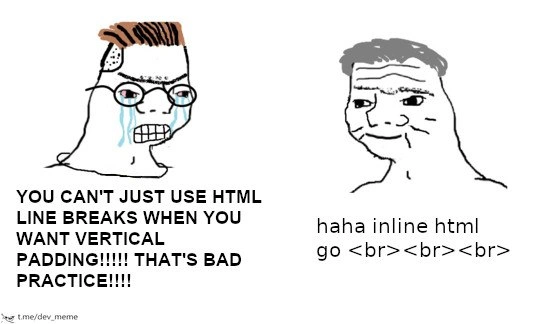
Let’s break down the joke in simpler terms. We have two cartoon characters in a two-panel meme (a popular format in programming humor): on the left, a very upset, crying figure (often called a “soyjak”, basically a nerdy Wojak) yelling about doing things the wrong way; on the right, a relaxed “Chad” character who is just doing it anyway and smiling. They’re arguing about how to add empty space on a webpage. One is a frontend purist (a developer who insists on best practices and clean code), and the other is a pragmatist (a developer who cares more about quick results and “if it works, it works”). The text on the left says: “YOU CAN’T JUST USE HTML LINE BREAKS WHEN YOU WANT VERTICAL PADDING!!!!! THAT’S BAD PRACTICE!!!!” – basically shouting “Don’t use <br> tags to make space, that’s wrong!” The right side text says: “haha inline html go <br><br><br> – which in a relaxed, joking way means “hehe, I’m just going to insert <br> tags in the HTML to get my spacing, and I don’t care what you say.” The right side is literally showing the <br> code repeated three times, because that’s the “inline HTML” trick he’s using.

Now, what are they talking about? In building web pages, you often want to add some vertical space between elements – say, a gap between a heading and a paragraph. There are two main ways to do this:

  • Proper way (CSS): Use CSS (Cascading Style Sheets) to add margin or padding. CSS is the language that controls how HTML elements look (colors, spacing, fonts, layout, etc.). For example, you can add margin-top: 20px; to a paragraph in CSS to give it 20 pixels of blank space above. This is considered the correct and clean approach because it separates content (HTML) from presentation (CSS). In other words, the HTML remains semantic (only containing text and structure), and all style decisions (like spacing) are in the CSS file. This approach is easier to maintain: if you later want to change that 20px to 10px for all paragraphs, you edit the CSS in one spot.

  • Quick hack way (HTML <br> tags): Just put actual line break tags in your HTML where you want space. The <br> tag in HTML stands for “line break” – it’s like hitting the “Enter” key in a text document, creating a new blank line. If you put <br><br><br> in your HTML code, you’ll get three blank lines of vertical space in the page. This is what the smiling Chad character is doing: he’s literally adding multiple <br> tags to push content down. This method does create space visually, but it’s seen as a bad practice or anti-pattern. Why? Because you are using HTML (which should only define structure/content) to do the job of CSS (which is meant for styling/layout). It makes the HTML code messy – imagine opening an HTML file and seeing lots of <br> scattered all over; it’s hard to tell if those are intentional or just accidental extra lines. It can also become a headache if you later want to adjust the spacing everywhere – you’d have to remove or add <br> tags in many places. It’s not DRY (Don’t Repeat Yourself) – you’re repeating the spacing in many places instead of controlling it from one stylesheet.

The FrontendHumor here comes from this relatable situation: one developer (often a more experienced one or someone who’s learned the “right way”) getting mad at another developer for doing something hacky or shortcut-ish. The phrase “that’s bad practice!” is something you might hear in a code review or on StackOverflow when someone suggests a quick fix that isn’t the “proper” solution. In web development, using a bunch of <br> tags for spacing is like a newbie move – it might work on your screen, but it’s not scalable or clean. The crying soyjak is basically that strict senior developer or a standards enthusiast yelling at the idea of this shortcut. On the flip side, the Chad pragmatist represents the attitude of “Lighten up, it works, who cares?” – maybe a junior developer who hasn’t yet learned why it’s problematic, or even a seasoned dev who just wants to ship the feature and move on. The contrast is comical: one person is super agitated, and the other is totally unfazed and even making a meme-y joke out of it.

Let’s clarify some terms and why this matters:

  • HTML <br> tag: In HTML (HyperText Markup Language, the code for structuring web pages), <br> is an element that produces a line break. It’s an empty tag (no closing tag needed) that just says “break the line here.” It’s meant to be used within text where a line break is part of the content (like in an address: “123 Main Street
    City, State”). Using it repeatedly to create large gaps is not its intended use. Think of <br> as hitting “enter” once. Using three <br> in a row is like hitting “enter” three times to create two blank lines in between text.

  • CSS and proper spacing: CSS (Cascading Style Sheets) is the separate language where we write rules to style HTML elements. For spacing, CSS provides properties like margin (space outside an element’s border) and padding (space inside an element’s border, like indents). If you want space between two paragraphs, you would typically use a top margin on the second paragraph or a bottom margin on the first. For example, you might have:

    <p class="intro">Welcome to my site.</p>
    <p class="body">Here is some introductory text.</p>
    
    .body {
      margin-top: 20px; /* add 20px of blank space above the second paragraph */
    }
    

    This way, your HTML stays clean (no extra dummy tags, just meaningful paragraphs), and all the styling is handled in CSS. A class like "body" or "intro" is used to target the element in CSS. This is considered clean, maintainable, and professional.

  • “Bad practice”: This is a general term in programming for something that works but is not recommended because it can lead to problems later. It’s the opposite of a “best practice.” In this context, using <br> for layout is a bad practice. It might solve the immediate problem (you see space on the page), but it creates technical debt (future headache). For example, if every time you need space you add <br> tags, later someone has to go clean all that up to make the site responsive or to re-style it. It’s also not semantically correct HTML – meaning you’re not using HTML tags for their true meaning/purpose.

Now, why is this meme funny to those of us in WebDevelopment? Because it exaggerates a common small drama. If you’ve ever been in a team setting or an online community for coding, there’s often debate over things like code style and practices. A newbie might say, “Hey, I just put a bunch of <br>s and it looked right,” and a veteran developer might respond, “No! Don’t do that, that’s horrible!” – possibly with the same energy as the soyjak yelling. The crying_soyjak vs chad format is perfect here: the left side is basically a caricature of that overzealous code quality cop who’s losing it over a minor injustice, and the right side is the carefree coder just doing something “wrong” but chuckling about it. The text “haha inline html go <br><br><br> is written in a meme-speak way to further poke fun. It reads kind of like “haha, I do it anyway, look: <br><br><br>”. It’s mimicking the “haha X go brrr” meme phrase, which is just a slang way of saying “I use X quickly or excessively and it works, lol.”

For a junior developer or someone just learning, it’s also a little lesson: While you can use <br> to force spacing, it’s generally not the path you’d take in professional projects. It’s okay if you did it in a quick HTML homework or a small personal page – many of us have at first – but as you grow, you learn to separate style into CSS files. The meme just dramatizes that lesson by turning it into a comedic argument between two stereotypes. And because it’s done with familiar meme characters (Wojak/Chad), it delivers the point in a very visual, humorous way. You don’t have to know all the background to laugh at the ridiculousness: one guy is crying and screaming over something, the other literally says “haha” and does the forbidden thing with a smile. Even without coding knowledge, you sense the dynamic. But if you do know a bit about HTML/CSS, it clicks even more – you likely recall a time you or a friend used <br> hacks and someone yelled “That’s bad practice!”

To illustrate, here’s the difference in code style they’re arguing about:

<!-- ❌ Using <br> tags for spacing (Pragmatist's quick hack) -->
<h1>Hello</h1>
<br><br>   <!-- two line breaks to create a blank gap -->
<p>Nice to meet you!</p>
<!-- ✅ Using CSS for spacing (Purist's best practice) -->
<h1 class="greeting">Hello</h1>
<p class="intro">Nice to meet you!</p>
/* CSS: add space before the paragraph via margin (in an external .css file ideally) */
.intro {
  margin-top: 1em;  /* roughly one blank line of space */
}

In the first snippet, the HTML has <br><br> directly in it, which the purist would call messy and not scalable. In the second snippet, the HTML is clean, and the spacing is handled by CSS (the .intro class adds a top margin). The purist developer would be happy with the second approach.

The meme’s labels “frontend purist vs pragmatist” perfectly describe the two viewpoints:

  • The purist cares about doing it the “proper way” (using CSS for layout, keeping HTML semantic). They’re often concerned with long-term maintainability and code elegance. They see multiple <br> tags and think, “Yuck, that’s like using a hammer for a screw – it’s the wrong tool!”
  • The pragmatist cares about getting the immediate result with minimal effort. They see the <br> solution and think, “It works and it was fast. Why make it more complicated?” They might be less concerned about future issues or maybe assume it’s just a one-time thing that won’t hurt.

The comedy comes from the extreme depiction: the purist is way too upset (blue tears flying, huge bold text with many exclamation marks) for such a small issue, and the pragmatist is almost comically laid-back, just going “haha” and typing code that the purist hates. It’s an overdramatization of a minor developer disagreement, which is what makes it silly and fun. If you’ve ever been in a situation where a senior dev gave you a hard time for a small shortcut, you’ll relate and probably smirk. Or if you were the one correcting someone about a bad practice, you might cringe seeing yourself in that overly upset soyjak.

In short, this meme uses a simple coding controversy (using <br> vs using CSS for spacing) to jokingly portray the clash between coding ideals and real-world shortcuts. It’s a nod to FrontendPainPoints like dealing with colleagues who either nitpick every little thing or those who cut corners. And at the end of the day, it’s light-hearted – nobody’s recommending to actually fill your site with <br>s, but it’s okay to laugh at how absurd both sides can be: the one who acts like a few <br>s will end the world, and the one who pretends not to care at all about code quality. After all, as the pragmatist might say, “it works on my machine!” and as the purist would retort, “but we have to maintain this!” – a classic developer back-and-forth, captured in one image.

Level 3: BReaking Good Practice

In this meme, a classic Wojak comic format pits a frustrated frontend purist against a chill pragmatist to highlight a WebDev holy war: using HTML <br> tags for spacing versus using proper CSS. The left panel’s crying soyjak (glasses, tears, and rage) screams in all-caps about bad practice: “YOU CAN’T JUST USE HTML LINE BREAKS WHEN YOU WANT VERTICAL PADDING!!!!!” This character represents the developer obsessed with CodeQuality and best practices. To them, stacking <br> elements (a prime example of br_tag_abuse) for layout is heresy against clean code architecture. The soyjak’s emotional explosion parodies those intense code reviewers or forum commenters who react strongly to BadPractices in markup. Why such fury? Because in modern WebDevelopment, HTML should define content and structure, while CSS handles presentation and spacing. Using a <br> for layout is like hard-coding design into your content – a cardinal sin to a standards evangelist who’s probably haunted by nightmares of 1990s tag soup and inline styling.

Meanwhile, the right panel’s confident Chad character hardly bats an eye. His line, “haha inline html go <br><br><br>, is written in a calm, lowercase font – the embodiment of the pragmatic developer who just wants to get things done. This phrase riffs on the meme-y slang “X go brrr,” which implies using a brute-force solution without concern for elegance (here X = “inline html”). By literally writing out <br><br><br>, the Chad is embracing the quick-and-dirty fix: dropping three line-break tags right in the HTML to create vertical space. He’s basically saying “look, it works – why fuss?”. The humor is amplified by this deadpan response juxtaposed with the purist’s meltdown. It’s a classic FrontendHumor scenario: the purist cites the rules with vein-popping intensity, while the pragmatist casually breaks them with a grin. For seasoned developers, this contrasts two archetypes we’ve all met in code reviews or team discussions. We chuckle because we’ve been either or both at times – perhaps yelling about a colleague’s messy hack, or slyly slipping in a quick fix to meet a deadline. 🕙💻

On a technical level, the purist’s concern is valid. The <br> tag in HTML inserts a line break – essentially an inline HTML spacing hack if misused for layout. It was never meant for adding large gaps between sections of a page; that’s what CSS margin or padding is for. When the soyjak yells “THAT’S BAD PRACTICE!!!!”, he’s referring to how mixing content with styling breaks the principle of separation of concerns. In proper web design, you keep the HTML semantic and lean (only structure/content) and use CSS for all visual spacing and styling. Stacking <br>s to push content down is considered poor maintainability. For instance, if you later want to change the spacing between all headings and paragraphs, editing one CSS rule is trivial – but hunting down dozens of stray <br><br> in HTML files is a maintenance nightmare. It’s also a readability issue: future developers might scratch their heads at random <br> tags littered around, wondering if they’re needed or just forgotten placeholders. The meme nails this FrontendPainPoint: the conflict between doing things “the right way” versus doing things that “just work” under pressure.

This joke also carries a whiff of tech history. Back in the early days of web design (think late 90s and early 2000s), developers often relied on crude techniques for layout – massive <table> grids for page structure, 1px transparent GIFs to force spacing, and yes, heaps of <br> tags to create blank lines. CSS support was limited or poorly understood, so these hacks were common. Today, however, web standards and CSS are powerful, and such old-school tricks are strongly discouraged. The crying soyjak essentially channels a modern developer who’s internalized all the web standards guides: they’ve read the MDN docs, follow strict CodeQuality linters, and maybe have PTSD from cleaning up legacy pages filled with &nbsp; and <br> chaos. The Chad, by contrast, might be an unbothered old-timer who built sites in the GeoCities era or a jaded engineer who just wants the UI to look right before the meeting. He’s thinking: “Why write a new CSS rule for a one-off fix when I can slap three <br>s here and call it a day?” – a very pragmatist mindset. It’s the eternal tussle between code purity vs. pragmatism.

The meme is funny to developers because it exaggerates a real dynamic. The purist’s rage (“YOU CAN’T JUST… THAT’S BAD PRACTICE!”) is an over-the-top version of code review comments we’ve all seen, where someone insists on doing it the “correct” way for the sake of long-term sanity. The pragmatist’s flippant “haha… go <br><br><br>” encapsulates the cheeky attitude of “it might be ugly, but it works, and I’m fine with that”. In practice, neither extreme is ideal: too strict and you waste time bikeshedding minor issues; too lax and you accrue technical debt. But in this comic, the black-and-white contrast is what makes it comedic. It’s poking fun at how bent out of shape we get over something as trivial as an extra blank line – and simultaneously how absurd it is to abuse HTML tags like a quick fix band-aid. Frontend developers share a collective groan and laugh because we’ve all encountered that one file full of <br>s (and maybe muttered “who wrote this?!”) or that one colleague who will not shut up about semantic purity. The meme distills that shared experience into a simple, ridiculous visual: one guy essentially having a meltdown about <br> usage, and the other memeing his way through it. It’s a lighthearted take on the css_vs_html_spacing debate we deal with in real life.

Under the hood, there’s a real lesson: using <br> for vertical spacing is sloppy engineering except perhaps in throwaway prototypes. It violates HTML semantics — those <br> tags don’t convey any meaning except “new line”; they’re not indicating a new section or any content structure, just visual gap. From an accessibility standpoint, excessive <br>s could confuse screen readers or create awkward pauses for users using assistive tech. From a responsive design view, hard-coded breaks won’t adjust if the layout changes (imagine switching to mobile view; those breaks might create too much empty space on a tiny screen). CSS, on the other hand, can be made responsive with media queries or relative units. The frontend purist knows all this, hence the exasperation. They’re essentially shouting, “Stop the madness! Use CSS properly for WebDevelopment sanity!” But the humor is that the pragmatist just doesn’t care – maybe they think the project is too small to matter, or the deadline’s too tight, or they just enjoy the simplicity of HTML-only fixes. His smug “inline html go brr” attitude is a nod to how sometimes engineers knowingly commit a hack with a grin, aware it’s not ideal but valuing immediate results. It’s a tongue-in-cheek celebration of those little rebellious moments in coding. And let’s be honest, after hours of wrestling with a tricky CSS cascade or fighting specificity wars, who hasn’t felt the temptation to throw up their hands and just drop a <br> or &nbsp; to make it work? The Chad in the meme gives voice to that cheeky inner laziness, while the Soyjak voices our inner coding conscience losing its mind.

In summary, this meme resonates on multiple levels. It satirizes the Frontend culture of obsessing over CodeQuality (and the sometimes elitist tone that comes with it) while also poking fun at the scrappy shortcuts we take. It’s specifically lampooning inline_html_spacing – using markup for something that CSS should handle – which is widely known as br_tag_abuse among developers. The exaggerated crying_soyjak vs chad personas make the lesson entertaining: we laugh at the absurd anger, we smirk at the brazen laziness, and maybe we reflect a bit on our own practices. It’s a small coding joke, but it captures a real truth: in software, there’s often a gap between idealism and pragmatism, and sometimes that gap is only as wide as a few <br> tags.

<!-- Example of the "bad practice" the purist is upset about: -->
<h2>Welcome to My Site</h2>
<br><br>  <!-- using two line breaks to push content down (quick hack) -->
<p>Here is the introduction text with some padding above it.</p>
/* Example of the "best practice" approach the purist advocates: */
p {
  margin-top: 2em;  /* add vertical space before the paragraph via CSS */
}

(Above: Instead of inserting <br> tags, a CSS margin is used to create spacing. This keeps HTML clean and styling in one place.)

Description

A two-panel Wojak comic meme contrasting a junior and senior developer's approach to frontend code. On the left, an angry, crying Wojak character with glasses (often called a 'zoomer' or 'soyjack') yells, 'YOU CAN'T JUST USE HTML LINE BREAKS WHEN YOU WANT VERTICAL PADDING!!!!! THAT'S BAD PRACTICE!!!!!'. On the right, a calm, grey-haired, more experienced-looking Wojak character (a 'boomer' or 'chad') replies with a slight smirk, 'haha inline html go <br><br><br>'. This meme humorously pits web development purism against pragmatism. It satirizes the rigid, by-the-book mentality often seen in less experienced developers who insist on using modern CSS properties like 'padding' or 'margin' for spacing. In contrast, the senior developer, having seen it all, knows when to apply a quick, 'dirty' fix like using multiple line-break tags, prioritizing speed and simplicity over dogmatic adherence to best practices, especially for trivial tasks. The joke resonates with experienced engineers who have transitioned from idealism to a more practical, results-oriented mindset

Comments

7
Anonymous ★ Top Pick The junior dev spends an hour writing a perfectly scoped, BEM-compliant CSS utility class for spacing. The senior dev ships the feature in 5 minutes with three <br> tags and spends the other 55 minutes explaining technical debt to the product manager
  1. Anonymous ★ Top Pick

    The junior dev spends an hour writing a perfectly scoped, BEM-compliant CSS utility class for spacing. The senior dev ships the feature in 5 minutes with three <br> tags and spends the other 55 minutes explaining technical debt to the product manager

  2. Anonymous

    Our “enterprise design system” boasts atomic CSS, a Figma library, and 200-page style guidelines - yet the hero section’s vertical rhythm still comes from 42 consecutive <br> tags checked in three product owners ago

  3. Anonymous

    The same developer who insists on semantic HTML will ship a React app with 47 divs nested inside each other, but at least they all have proper CSS margins

  4. Anonymous

    The real senior move is using `<br><br><br>` in production, then spending three sprints migrating to a design system with proper spacing tokens, only to discover the designer specified '48px' which doesn't map to any of your carefully crafted t-shirt sizes. Meanwhile, those three `<br>` tags? Still rendering perfectly in IE6

  5. Anonymous

    Using <br> for spacing turns layout into hidden state; the next on-call learns why deleting a sentence collapses the hero and tanks CLS

  6. Anonymous

    We built a design system; then the CMS stripped styles and Outlook’s Word engine showed up, so vertical padding became three <br> in a trench coat - our most reliable layout microservice

  7. Anonymous

    BR tags for padding: the hack that 'works' until mobile QA drops the responsive bomb on your parade

Use J and K for navigation