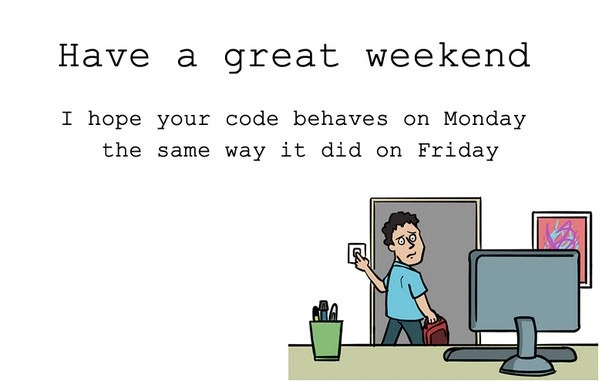
The Weekend Uncertainty Principle for Code
Why is this Bugs meme funny?
Level 1: The Monday Surprise
Imagine you spent all of Friday building a big, awesome LEGO tower in your room. It’s tall, it’s perfect, and it didn’t topple over – hooray! You leave it standing on your table when you go away for the weekend. Now, when you come back on Monday, what do you hope to see? You’d want that LEGO tower exactly as you left it on Friday, still standing strong, right? You really hope that over the weekend no one knocked it down, and nothing mysteriously fell apart while you weren’t watching.
This meme is basically saying that for a software developer, their code is like that LEGO tower. On Friday, the code was working perfectly (the tower was standing). The developer goes home for the weekend feeling good. The little joke/wish “I hope your code behaves on Monday the same way it did on Friday” means “I hope when you come back, your program is still working just as well, and nothing unexpected broke while you were away.” It’s a funny, friendly way for programmers to wish each other a good weekend without any Monday surprises. Nobody wants to open their laptop on Monday morning and find a mess (like seeing the LEGO tower in pieces). So the meme is basically like telling a friend: “Have a great weekend – and I’m crossing my fingers that on Monday everything is still okay with what you built.” It’s both hopeful and a bit humorous, because sometimes, just like a cat might sneak in and knock over your blocks, computers can have little “gremlins” or hiccups that show up out of nowhere. The wish is that nothing sneaky happened, so Monday will be as happy as Friday was.
Level 2: Works on Friday, Broken on Monday
So why would code that was working on Friday suddenly not work on Monday? As a newer developer, it’s easy to think “if no one touched the code, nothing should change.” In theory that’s true – code doesn’t physically change itself. But in practice, software sits in a living world of changing conditions. When we say “I hope your code behaves on Monday the same way it did on Friday,” it’s a humorous way to wish that none of those outside changes or hidden issues bite you after a nice weekend.
Let’s break down a few key terms and scenarios here:
Bug: A bug is a mistake or problem in the code that makes it act in unexpected or wrong ways. On Friday, you might not have seen any bugs – everything seemed fine. But sometimes bugs are sneaky. They might only show up when something specific happens (like a certain date, or a certain amount of data, or an outside service changes). If one of those specific triggers happened over the weekend, boom – you’ve got a bug on Monday that wasn’t visible before. This situation leads to DebuggingFrustration, the not-so-fun process of trying to find out why something broke.
Regression: This is a special kind of bug where something that used to work stops working in a later version or later time. If your code was giving correct results on Friday but by Monday it’s misbehaving, developers call that a regression. It basically means something regressed (went backwards) in reliability. Regressions can happen because of new code changes or because of environmental changes. The meme is poking fun at the constant fear of regressions – every dev hopes nothing regresses while they’re away. Regression_fear is real: nobody wants to start their week finding out a previously solved issue has returned.
Deployment (especially Friday deployments): Deployment means putting new code or changes into the environment where users or systems run it (like releasing a new version of a website or app). There’s a bit of folklore among developers about FridayDeployments. Deploying on a Friday, especially late in the day, is considered risky because if something goes wrong, you might not notice until many users are affected (over the weekend or on Monday), and you might ruin your weekend (or someone’s on-call weekend) fixing it. Many teams actually avoid end-of-week deployments unless absolutely necessary. The meme’s message “may your code behave on Monday as it did on Friday” is partly saying “if you did deploy or change something on Friday, I hope it doesn’t blow up later!” It’s basically a nice way of saying “Good luck, hope you didn’t introduce a bug that will surprise you later.” This is a DeveloperPainPoint: discovering a bug from a Friday change when you come back to work is a rough start to the week.
Environment and External Services: Code doesn’t run in isolation – it runs on computers/servers and often talks to other services (databases, APIs, etc.). Those can change even if your code didn’t. For example, maybe your app uses a database that got upgraded on Saturday by the IT team. Or an external API (like a third-party service) your code calls changed its response format on Sunday. Another scenario: perhaps your server’s security certificate expired on Sunday night, so on Monday your app can’t connect securely anymore. These changes will make the code “behave” differently (usually failing or erroring out) even though your actual code files are the same. This is sometimes called environment drift – the idea that the environment (all the software and settings around your code) can shift or drift over time. A lot of Monday morning debugging involves checking if “something in the environment changed” while we were away.
Scheduled Tasks and Time Triggers: Many systems have scheduled jobs (like cron jobs or automated tasks) that run at specific times – some run nightly, some run on weekends. If one of these tasks did something unexpected over the weekend (say, archived some data or reset a configuration), your code on Monday might be dealing with a scenario it never encountered on Friday. Also, time itself can be a factor: imagine code that deals with dates (like generating a weekly report). If that code was only ever run and tested on weekdays, maybe no one noticed a bug that happens on a Monday or the first day of a new week. It sounds silly, but even the day of week or date can expose a bug (for instance, a validation that fails because the date is the 1st of the month, etc.). A real-world example: if you have a free trial that lasts 3 days, and you started it on Friday, guess what – it ends by Monday. On Friday, everything was fine (trial active), but on Monday the trial expired and now the code might be blocking you out! That’s not the developer’s intention, just a scenario that wasn’t obvious at first.
All these technical details boil down to this: software bugs can be triggered by changes in code or changes in context. The meme captures the collective experience of developers realizing that a peaceful weekend can be followed by an “interesting” Monday. DeveloperRelatability comes from the fact that pretty much everyone in this field has had to troubleshoot a “worked before, now it doesn’t” issue. It’s like the code decided to take the weekend off from behaving correctly.
So when someone says “I hope your code behaves on Monday the same way it did on Friday,” they’re basically saying, “I hope you don’t come back to any nasty surprises or bugs after your weekend.” It’s a kind, humorous wish among programmers. We can all appreciate it because we know Mondays are tough enough without discovering a new bug first thing. This meme is a light-hearted way to acknowledge that anxiety. After all, few things are more frustrating than starting your week by debugging something that was supposedly done – that’s a prime source of DebuggingFrustration. And few things are more universal among developers than the shared sigh of relief when everything does run fine on Monday! It means you can actually get on with new work instead of firefighting old problems. In short, it’s a fun way to say “Happy Friday, don’t worry, and fingers crossed for Monday!” to fellow coders.
Level 3: Monday Morning Gremlins
For seasoned engineers, this friendly weekend wish is equal parts genuine hope and dark humor. By Friday evening, you've run all the tests, deployed the code, and everything looks stable. You shut down your workstation with a sigh of relief, wishing your teammates “Have a great weekend.” But deep down, every battle-hardened dev knows there's a chance come Monday morning some sneaky bug will have crept in. It’s the unspoken anxiety behind every works on Friday, fails on Monday story – a perfect summary of BugsInSoftware that surface at the worst times.
Why is this meme so relatable in tech circles? Because we’ve all been there: arriving fresh on Monday only to find out the code has decided to go on strike. The humor comes from the painfully common scenario where code that behaved perfectly before the weekend suddenly misbehaves after a two-day break. It’s referencing those mysterious regressions and Monday morning gremlins that haunt DeveloperPainPoints. We laugh (a bit nervously) because almost every developer has faced this debugging nightmare at least once.
Let’s unpack what might really be happening when code “changes” its behavior over the weekend:
Environment Drift & Updates: The world around your code isn’t static. Perhaps the server applied an OS patch Sunday at 2 AM, or a third-party API you depend on rolled out a new version. Suddenly, the environment on Monday isn’t identical to Friday. A library got updated or a configuration changed without you realizing – and now your once-stable code is hitting an unexpected condition. In production, environment drift can introduce new bugs even if your application code didn’t change a line.
Time-Sensitive Bugs: Some issues only reveal themselves with the passing of time. Think about date and time logic. Maybe your code had an off-by-one error that only pops up on the first day of a new week or month. Or a cron job (a scheduled task) ran over the weekend and cleaned up data that your app expected to be there on Monday. A classic example is an expired certificate or token: on Friday it was valid, but by Monday it lapsed, and now nothing can connect. The code itself is the same – but the Monday date or the new week triggered a path that wasn’t tested. Hello, regression!
Resource Exhaustion (AKA Software “Entropy”): Ever hear of a service that runs fine for days and then crashes? Maybe your application has a memory leak – on Friday it was fine, but after running all weekend, it gobbled up memory and finally hit its limit. Or the log file grew so large that it filled the disk. By Monday, the app is out of space or memory and starts behaving erratically. The code didn't change itself, but its long-running state deteriorated. It’s like a slow-burning fuse that finally blew while you were enjoying your Sunday. This is why seasoned devs schedule restarts or keep an eye on metrics – they’ve been burned by “everything was fine… until it wasn’t.”
Last-Minute Friday Deploys: Ah, the infamous FridayDeployments. Pushing new code on a Friday afternoon is almost a rite of passage in software – and not a pleasant one. Sure, it feels great to ship that feature before the weekend, but if something goes wrong, guess who might get a panicked phone call on Saturday? Many teams half-jokingly, half-seriously say “Don’t deploy on Friday” because if a nasty bug slipped through, you won’t discover it until users log back in on Monday (or worse, until you get paged at 3 AM Saturday). This meme’s hopeful wish – “may your code behave on Monday like it did on Friday” – is basically telling you, “I hope that Friday push didn’t introduce a production bug that blows up later.” It’s developer dark humor at its finest: we smile, but we’ve lived the horror of Monday fallout from a hasty Friday fix.
Heisenbugs & Unobserved Failures: There’s even a nickname for bugs that seem to appear or vanish depending on whether you’re looking: Heisenbug (named after the Heisenberg uncertainty principle). You might have run all your tests on Friday, even did a quick check on production – everything passed. Then over the weekend, when no one is watching, an issue surfaces. Sometimes, the very act of testing or using the system on Friday prevented the bug (for example, caches were warm, or a service hadn’t timed out). By Monday, when the system had idle time, some quirky sequence occurred that never happened during testing. It feels like the software waited for you to leave to reveal its true colors. Cue the DebuggingFrustration: you’re now staring at logs on Monday thinking, “What changed? I swear it was fine before…”
In essence, this meme combines DeveloperHumor with a hearty dose of reality. It satirizes that uneasy feeling every dev has when powering down for the weekend: the code is like a toddler you’re leaving alone for a moment – you hope it won’t get into trouble, but you can’t be absolutely sure. The image of the developer literally turning off the office lights drives it home: we walk away from our desks hoping there are no monday_morning_gremlins waiting to wreak havoc by the time we return. It’s funny because it’s true; as much as we trust our work, experience has taught us to be just a little paranoid. BugsInSoftware have a knack for showing up when you least expect them, and nothing murders your DeveloperProductivity on a Monday like discovering that Friday’s “done and dusted” task has caught fire. So when a colleague wishes, “May your code behave on Monday the same way it did on Friday,” it’s both a genuine goodwill wish and an inside joke – a recognition that, in the crazy world of software development, even a 48-hour lull can invite chaos if you’re unlucky. You smile, nod, and maybe double-check that you didn’t leave any feature flags or debug code turned on.
In the end, this meme resonates because it’s a DeveloperRelatability moment: code is supposed to be deterministic, not a fickle beast that changes its mood over the weekend… supposed to be. And yet, every engineer with a few years under their belt has war stories of the code that went feral after a quiet weekend. It’s equal parts comforting and troubling to know you’re not alone – we’ve all flipped that light switch off on Friday with fingers crossed. As the saying goes in ops teams: “Nothing changed, except maybe everything.” So here’s hoping your Monday is bug-free and your code stays tame – because there’s nothing like walking in on a post_weekend_debugging circus to make you need that extra-strong coffee. Cheers, and good luck – we all know you can sometimes use it.
# Pseudo-code for the weekend code behavior (just kidding... or am I?)
today = "Friday"
tests_passed = True
if today == "Friday" and tests_passed:
print("All clear! Enjoy the weekend 🍻")
# Developer heads home, confident... perhaps too confident.
# ...time passes, weekend happens...
today = "Monday"
if today == "Monday":
raise BugException("WTH, it was fine on Friday!")
# Monday morning surprise: something's off, time to debug!
Description
A cartoon depicts a male developer with a worried expression looking back over his shoulder as he leaves the office for the weekend. He is switching off the light, holding a bag, and glancing anxiously at his computer monitor. Above the drawing, the text reads: "Have a great weekend. I hope your code behaves on Monday the same way it did on Friday." This meme perfectly captures the common anxiety developers feel when leaving code unattended. It humorously points to the phenomenon where a perfectly functional application on a Friday can mysteriously break by Monday morning due to external factors like dependency updates, infrastructure changes, race conditions, or other non-deterministic issues, leading to a stressful start to the week
Comments
7Comment deleted
The only thing more terrifying than a Friday deployment is discovering on Monday that the CI/CD pipeline decided to update a minor version of a dependency over the weekend
May your Monday diff be empty - because if the weekend gremlins silently pulled “:latest” into prod, even CI’s green badge won’t save your stand-up
After 20 years in this industry, I've learned that code has a half-life inversely proportional to the proximity of your vacation. The real mystery isn't why it breaks on Monday - it's why we still deploy on Fridays knowing full well our logging infrastructure won't survive the weekend either
The classic Friday 5 PM deployment paradox: your code passes all tests, monitoring shows green across the board, and you've got that dangerous confidence that comes from a successful staging run. But deep down, every senior engineer knows that production has a special way of finding edge cases that only manifest when you're two drinks into Saturday brunch. It's not paranoia if the logs consistently prove you right every Monday morning - it's pattern recognition earned through battle scars and pager alerts at 2 AM on Sunday
Here’s to a Monday that’s idempotent - same commit SHA and image digest, no cron job or semver caret deciding weekends are a source of nondeterminism
CAP theorem extension: Weekends guarantee Code's Availability Friday, but Consistency partitions by Monday
Enjoy the weekend; Monday will reveal whether Friday’s green build was deterministic - or just outrunning the wall clock, Sunday cert rotation, and a cron named cleanup.sh