Dark Lord Receives Report: User Was Not in the Sudoers File
Why is this Security meme funny?
Level 1: No Permission Slip
Imagine you’re at school, and there’s going to be a special field trip that only some students are allowed to join. The teacher has a list of names of students who brought in their signed permission slips from their parents. Now, think of a kid who didn’t bring a permission slip but still tries to get on the bus for the trip. The teacher stops them and says, “Sorry, you’re not on the list, you can’t go.” If the kid has tried this more than once, the teacher might even sigh and say, “We’ve been over this – you’re not allowed because I never got your permission slip.” The teacher might then tell the principal or the kid’s parents that this student tried to sneak in again.
In this little story, the teacher is like the computer or the person in charge of the system, and the student is like a regular user. The permission slip is like having your name on the special admin list that says you’re allowed to do big important things. If you don’t have that permission, the computer says “No, you can’t do that” just like the teacher did. The meme takes this idea and makes it look like a scene with a big scary boss (the one in charge) and a little minion (the one delivering the news). It’s a funny way of showing the idea that “if you’re not on the approved list, you’re not getting in – and the boss will hear about it!”
Level 2: Permission Denied
If you’re newer to Linux or the command line, let’s break down what’s going on. This meme revolves around a common situation when using a Unix/Linux CommandLineInterface (CLI) like the terminal. In such systems, there are basically two types of users: normal users (with limited permissions) and the superuser (with all permissions). The superuser account in Unix is usually called root. When you run your system normally, you’re not root (for safety). But sometimes you need to do administrative tasks – for example, installing software, changing system settings, or starting/stopping system services. That’s where the sudo command comes in. sudo stands for “superuser do” – it means “do this command as the superuser (administrator).” It’s the approved way to temporarily act as an admin without fully switching to the root account. Think of it like asking for a temporary hall pass to do something important.
Now, not everyone is allowed to use sudo. The system has to know who can be trusted with this power (you wouldn’t hand the keys to the kingdom to just anyone, right?). The list of who can use sudo and what they’re allowed to do is kept in a special file named /etc/sudoers (often just called “the sudoers file”). Only users listed in that file (or belonging to a group listed in that file, like the “sudo” or “wheel” group on many systems) are allowed to run sudo commands. If you’re not on the list and you try to use sudo, the system will refuse and throw back an error message. The famous one goes something like:
$ sudo apt update
[sudo] password for alice:
alice is not in the sudoers file. This incident will be reported.
Let’s decode that: Alice (our example user) tried to run apt update with elevated privileges using sudo. The system first asks for her password (to confirm it’s really Alice typing, not some script). Then it checks “Is Alice in the sudoers file? Is she allowed to do this?” If the answer is no, it prints “alice is not in the sudoers file.” That’s a technical way of saying “Alice is not authorized as an admin on this system.” The next line, “This incident will be reported,” sounds ominous but usually just means the attempt got logged for the real administrator to see later. (Don’t worry, it’s not sending an alert to the FBI or anything – it’s mostly to inform system admins or security logs).
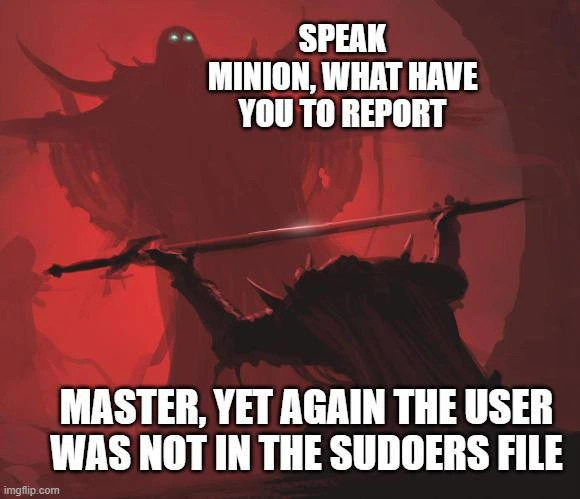
In the meme, instead of just showing that text, they personified it. The overlord (master) in the picture represents the system or the system administrator – the one who has the power. The minion with the spear represents either a junior IT person or just the system’s messenger/logs delivering the news. When the minion says, “Master, yet again the user was not in the sudoers file,” it’s basically the same as the terminal saying “User not in sudoers… (again).” The “Speak, minion, what have you to report?” from the overlord is like the system administrator demanding, “Alright, what’s the problem this time?” And the reply is the problem we’ve been talking about: a user tried to use sudo but wasn’t allowed. The word “yet again” implies this keeps happening repeatedly – a running gag where someone hasn’t learned their lesson or the admin keeps forgetting to add the user. This repetition is a big part of the humor; anyone who’s managed users on a system knows that permission issues can crop up over and over until things are set up correctly.
Some key concepts in simpler terms:
- Privileges: These are like permissions or rights. A user with higher privileges (like root) can do more things on the system (install programs, change configurations, etc.). A regular user has limited privileges for safety (so they can’t accidentally wreck the whole system).
sudo: A command that lets a permitted user temporarily act with high privileges (acting as an admin) for a specific task. You usually have to enter your password when usingsudoto prove you are who you say you are.- sudoers file (
/etc/sudoers): A configuration file that lists who can usesudoand any specific rules for it. For example, it might say “Alice can use sudo to do anything” or maybe “Bob can use sudo but only to restart the web server.” Typically, operating systems will have user groups (like a group namedsudooradmin) and any user in that group is automatically allowed to usesudofor most tasks. If your username or group isn’t referenced in that file, you’re out of luck. - “Not in the sudoers file” error: This is the system’s way of saying “You are not on the approved list of admins.” It’s a common shell permission error encountered on Linux. If you see this, it means you need to either log in as a different user that has admin rights, or get someone with admin rights to add you to the sudoers list (usually by adding you to the right user group, or editing the sudoers file with proper procedure).
When you’re new, encountering this error can be both confusing and frustrating. It’s like trying a secret knock on a door and getting a response, “You’re not on the guest list.” The meme plays this out in a humorous way by exaggerating the situation. Instead of a simple “guest list” scenario, it’s an evil overlord scenario – much more dramatic! That’s part of the TerminalHumor here: taking a mundane text error from the terminal and blowing it up into a fantasy storyline. The result is funny because the “problem” being reported is very techy and dry, but it’s delivered as if it’s the downfall of a kingdom.
For some additional context, in many Linux distributions (like Ubuntu), the first user you create during install is automatically added to the sudoers (often via a group). So they can use sudo out of the box. But if you create a new user account later, that user might not have sudo rights unless you specifically give it to them. It’s a safety feature. Many of us have seen a new colleague create a login on a server and then immediately get stymied by “not in sudoers” when they try to do something. The fix is usually straightforward: an existing admin edits the sudoers file (often using a safe command visudo) or adds the user to the admin group. But until that happens, that user is essentially kneeling before the overlord saying “I can’t do the thing!” In the meme, the overlord’s reaction would presumably be some mix of annoyance and dark chuckling: “Foolish mortal, of course you can’t – you’re not authorized.”
Basically, the meme is showing a very nerdy joke: it’s portraying a technical error message (“user not in sudoers”) as if it were a scene from an epic fantasy movie. For someone who doesn’t know the tech context, the line might sound bizarre. But for those of us who have seen that error on our screen, it immediately clicks. We recall the frustration of being denied, and we also recall how overly serious the phrasing “This incident will be reported” felt the first time. That error message almost reads like a stern butler tattling: “You’re not allowed here, and I’m telling on you!” The meme just makes that explicit with the minion telling the master. It’s a fun way to laugh at the situation. The takeaway: in the world of Linux, you need the right permissions to do admin things. If you don’t have them, you’ll be stopped in your tracks... and maybe the system (or your IT department) will “report” your attempt. Cue evil laughter (or in our case, a good chuckle at the meme).
Level 3: This Incident Will Be Reported
For seasoned developers and sysadmin humor connoisseurs, this meme hits that sweet spot where everyday tech frustration meets melodrama. The scene shows a titanic dark lord demanding a status update, and a kneeling minion delivering bad news with Shakespearean gravity: “Master, yet again the user was not in the sudoers file.” If you’ve ever managed Linux servers or assisted coworkers with command-line foibles, you can practically hear the heavy sigh behind those words. The humor here springs from shared trauma: the infamous "user is not in the sudoers file" error message is a rite of passage (or a scarlet letter) for anyone dabbling in Linux CommandLineInterface for the first time. It usually pops up when someone tries to run a command with sudo (to do something requiring admin rights) but their account isn’t authorized. Cue the record scratch and the operation stops dead with a terse “nope.”
Why is this funny to us in the industry? Because we’ve all been both the foolish user and the exasperated overlord at some point. On one side, you have the user (often a developer or newbie sysadmin) who just wants to get something done – install a package, restart a service, you name it – only to be smacked with a permission_denied_error. It’s usually followed by confusion: “Huh, why can’t I do this? I’m logged in, aren’t I?” Then maybe a facepalm when they realize they never got added to the sudoers list or forgot to switch to an account that has privileges. On the other side, you have the senior sysadmin (or the stubborn Linux box itself) effectively saying, “Once again, your attempt to wield powers beyond your station has failed.” In the meme, the sysadmin’s role is played by this glowing-eyed demon lord – and honestly, that’s exactly how a lot of newbies perceive the gatekeepers of production servers! Privilege management can feel arcane and tyrannical when you’re the one locked out. The overlord (or the operating system acting on his strict rules) doesn’t care if it’s the first or fiftieth time – no entry means no entry.
The line “This incident will be reported” (while not shown verbatim in the image, it’s part of the full error message) gets a brilliant double nod. In reality, when that message appears, it adds a log entry that an unauthorized sudo attempt was made. But logs are silent and boring – maybe an email to root or just a line in /var/log/auth.log that no one reads until a security audit. The meme imagines a literal scenario of that line: the minion physically reporting the incident to his master. “Speak, minion, what have you to report?” bellows the overlord, and the poor underling has to confess the mundane truth: some peon user tried to run a forbidden command and the system shut them down again. The word “again” is key – it tells us this isn’t the first time this has happened. Every sysadmin can relate: there’s always that one user (or many) who repeatedly forgets they don’t have admin rights. Maybe it’s a new hire who wasn’t added to the sudoers file yet, or a developer who normally has rights on their machine but not on a production server. They try, they fail, they file a help ticket or ping the admin, and the admin, with a mix of irritation and dark amusement, handles it. By the fifth time, you can almost hear the sysadmin’s inner monologue: “I am surrounded by incompetence!” – just like a comic-book villain frustrated with bungling minions.
This meme cleverly casts that relationship into a fantasy boss-minion trope. The SystemsAdministration power dynamic is exaggerated: the sysadmin as an all-powerful overlord, the user as a groveling subordinate who must “beg” for privileges. It’s funny because, in real life, asking an admin for access can feel like bowing to a gatekeeper. Ever had to justify to IT why you need to be in the sudoers or why you need admin rights on your work machine? It can feel like pleading with a lord for a boon. And from the admin’s side, dealing with basic user errors like this repeatedly does make you feel like an irritated demigod: "For the last time, thou shalt not deploy to production without proper access!"
The tags and references here point to classic scenarios: Linux command-line struggles, UnixCommands usage, and sysadmin frustration at its finest. The sudoers file itself is a frequent flyer in tech jokes because it’s such a tiny thing that causes outsized frustration. One wrong entry (or one forgotten entry) in that file can bring a developer’s work to a halt — or conversely, a careless edit can open the gates of hell (security-wise). In many organizations, the list of people in sudoers (or in the admin group) is kept small on purpose (for good Security). There’s often bureaucracy: you have to ask the overlords (IT admins) for access, and they might be grumpy about it, especially if you bypassed procedure and just tried to sudo your way through. So the meme resonates as a form of inside joke: it dramatizes that moment of “Oops, I can’t do my job because I lack permissions, and now I have to go report this to the admins.”
Real-world analogues? Picture a production deployment at 2 AM (because of course, deployments happen at awkward hours). A dev is on the server and suddenly needs to restart Apache or change a config via sudo. Boom – “user not in sudoers… incident will be reported.” Now they’re stuck. They call the on-call sysadmin (who’s already sleep-deprived and probably as fiery as a demon when awakened). That conversation is not unlike the meme: Developer: “So... it happened again – I can’t sudo on this new server.” Sysadmin (in his head): “By the flaming beard of Linus Torvalds, why is this happening again?!” Outwardly, he might just mutter “Alright, I’ll fix it...,” but internally the drama is real. The meme externalizes that drama in a humorous way. It’s basically the SysadminHumor version of a running gag.
Another layer: The wording “Speak, minion!” evokes those classic villain scenes from movies. It’s over-the-top commanding. In everyday IT, an admin might ping a junior or check an alert: “So, what’s the issue now?” The meme turns it up to 11 for comedic effect. We love it because it’s a perfect mismatch in tone: the actual issue is likely a trivial config oversight, but it’s delivered as if it’s news from the battlefield of Mordor. This contrast – between the banality of a missing sudo entry and the epic style of the delivery – is what draws out the laughter (and probably an eye-roll or two). It’s making fun of how such a small thing can cause such dramatic annoyance.
In summary, for the seasoned crowd, this meme is basically saying: “You know that stupid sudo issue that keeps happening? It makes me feel like a dark lord dealing with incompetent minions.” We laugh because it’s true – how many times have we grumbled “user error” under our breath when someone trips over basic Linux permissions? And yet, we’ve been that hapless user too, locked out and wondering why. The meme captures both the unix_privilege_woes and the absurdity of the sysadmin–user relationship, all in one devilishly funny image. And yes, reading it likely reminded you of at least one “this incident will be reported” entry in your logs that you blissfully ignored. Consider it reported, master. ✅
Level 4: Root of All Permissions
At the most granular level of the operating system, this meme nods to the fundamental design of Unix/Linux privilege separation. In a multi-user Operating System like Linux, there's a single all-powerful account named root (the superuser). The root user is essentially the system's evil overlord with unrestricted control—able to read, modify, or delete any file and process. All other users are mere "mortals" with limited powers, kept in check by the kernel's security model. The technical core of this joke lies in how Linux enforces access control: through user IDs and permission bits. Normal users (like a hapless engineer named alice or bob) run with unprivileged user IDs. When they attempt a privileged operation (like installing software or killing a system process), the kernel itself steps in like a vigilant palace guard and checks, “Is this request coming from user ID 0 (root)?” If not, the default response is a firm “No” – often manifested as a Permission denied or similar shell_permission_error.
To perform admin tasks without logging in as root, Unix provided a setuid mechanism (set-user-ID). The sudo command leverages this by running as a setuid-root program: when you invoke sudo, the system temporarily grants that process root privileges only to do a very specific check and possibly execute another program as root. But here’s the twist: sudo doesn’t just blindly trust any user who calls it. It consults a sacred text on the system – the sudoers file (typically /etc/sudoers) – which lists who is allowed to invoke root powers, and under what conditions. Think of /etc/sudoers as the scroll of truth that the overlord’s minions must abide by. The sudoers_file is written in a special syntax and usually edited with the visudo command (an official rite that checks for syntax errors, because a malformed sudoers file can lock everyone out of sudo, a nightmare scenario for any sysadmin at 3 AM). The entries in this file can be very granular (specific commands, specific target user) or broad (e.g., “members of group sudo can do anything as root”). If your username (or group) isn’t found in that list with the appropriate permissions, then sudo politely refuses, logging an event and showing the user an error.
The classic error message referenced – “user is not in the sudoers file. This incident will be reported.” – is practically a Unix catchphrase. It’s the system’s dramatic way of saying, “You’re trying to do what only an admin should, and I’m not going to allow it.” Under the hood, “will be reported” means sudo is logging the attempt (usually to a secure log like /var/log/auth.log or /var/log/secure). This is a security audit measure: repeated failed attempts or unauthorized tries can be reviewed by a security-conscious SystemsAdministration team. In practice, these logs rarely get more than a cursory glance unless you’re in a high-security environment, so the phrasing comes off as over-the-top – which is exactly what the meme exploits. The meme escalates this idea to a literal overlord scenario: the Security mechanism promises the incident will be reported, and here we have a cringe-worthy minion trembling as he literally reports the incident to his dark master. It’s a brilliant literal interpretation of what the computer said it would do.
Critically, this situation embodies the principle of least privilege – a core concept in computer security. By default, users have minimal rights, and must earn higher privileges explicitly. The sudo system is one implementation of that principle, ensuring that only trusted users can perform sensitive actions, and even then, often requiring them to enter their password (verifying “Yes, it’s really me, and I mean to do this”). The dark humor here for veteran sysadmins lies in the absurd reliability of this mechanism: no matter how urgent your task, if you’re not on that exclusive sudoers list, the system will stonewall you. We’ve all seen overconfident developers or operators PrivilegeEscalation-fumble: “I’ll just restart the server real quick… oh, sudo says NO.” In the sysadmin’s war room, these moments are both frustrating and comic. After decades of computing advances, fancy GUIs, and cloud orchestration, we’re still ultimately governed by a plain-text file gating our root power. And you better believe that if your name’s not in that file, your attempt to play administrator will be smacked down by design. The UnixCommands involved here may be simple, but the Security model behind them is ironclad, forged from half a century of multi-user OS design. Even the most devious evil overlord (or clever hacker) can’t circumvent the laws of root without being on the list or exploiting a flaw. In summary, the meme’s epic fantasy framing belies a very real, very stringent technical truth: in Linux, authority is explicit, and “not in the sudoers file” is the unequivocal technical verdict that you shall not pass.
Description
A dark fantasy meme showing a menacing scene with a giant shadowy figure (resembling a dark lord or demon) with glowing eyes, holding a massive sword, addressing a smaller minion-like figure on a rocky outcrop. Top text: 'SPEAK MINION, WHAT HAVE YOU TO REPORT.' Bottom text: 'MASTER, YET AGAIN THE USER WAS NOT IN THE SUDOERS FILE.' The joke references the famous Linux error message 'user is not in the sudoers file. This incident will be reported' - and humorously imagines who the incident is actually being reported TO: an ominous dark overlord monitoring all sudo violations. Watermark: imgflip.com
Comments
9Comment deleted
Years of Linux sysadmin work and I finally found out who 'this incident will be reported' to. Turns out /var/mail/root leads directly to Mordor
The real dark lord isn't in some fantasy epic; it's the senior admin who has exclusive write access to the production /etc/sudoers file and only communicates through cryptic cron job outputs
Nothing humbles a would-be dark lord faster than forgetting to visudo the apprentice
After 20 years in tech, you'd think we'd have figured out a better UX than 'This incident will be reported' - reported to whom? Santa? The NSA? That one sysadmin who left in 2019 but still gets the root emails because nobody knows how to update the alias?
The sudoers file: where the line between 'trusted colleague' and 'security incident waiting to happen' is literally one visudo session away. Every sysadmin knows that moment when you realize you've locked yourself out after editing sudoers incorrectly, and suddenly you're the minion reporting your own failure to the master (root). The real power move? Having that one senior engineer who still remembers the single-user mode boot sequence by heart
Nothing says mature access control like discovering during a P1 that only the audit daemon has sudo - and Change Advisory Board approval is required to run visudo
The One Incident to rule them all: sudoers omission, eternally reported from Mordor's ticket queue
Nothing says enterprise IAM like needing a CAB ritual and two approvers to add yourself to wheel so you can run 'sudo systemctl restart' during a P1
the incident will be reported. Comment deleted