Skip to content
DevMeme
4961 of 7435
The Unspoken Truth About Testing Bash Scripts
Testing Post #5428, on Sep 13, 2023 in TG

The Unspoken Truth About Testing Bash Scripts

Why is this Testing meme funny?

Level 1: Just Wing It

Imagine you’re putting on a big school play that must go well – it’s the highlight of the year (very important, like a “mission-critical” event). There’s a detailed script that all the actors have to follow. Now, a kid asks the teacher, “Shouldn’t we practice this play to make sure everything works?” and the teacher just smiles confidently and says, “That’s the neat part – we’re not going to practice at all.” Sounds ridiculous, right? You’d probably gasp or giggle because the idea of not rehearsing something so important is both scary and silly. That’s exactly the feeling this meme gives. In the world of computers, a Bash script is like the play’s script for running a show (it tells the computer what steps to do). “Unit tests” would be like rehearsals – small practice runs to check that each scene (or each part of the script) works correctly. In this joke, the person is asking, “How do we do rehearsals for our super important computer script?” and the response is, “We don’t do rehearsals at all!” It’s funny in the same way it’s funny (and a bit terrifying) to imagine a play where nobody practiced: everyone is just going to wing it on the live performance and hope nothing goes wrong. The humor comes from that oh no, they’re really not going to check first?! feeling. Even if you’re not a developer, you can understand it: it’s about skipping safety checks and trusting everything will magically be fine – a bold, goofy move that makes this meme both relatable and laughable.

Level 2: Hope-Driven Development

For a junior developer or someone new to the idea of testing, this meme highlights a surprising gap in common practices. Let’s break it down in simpler terms. A Bash script is basically a set of command-line instructions saved in a file (usually with a .sh extension) that you can run to automate tasks. These scripts often live at the heart of build and deploy processes – for example, a Bash script might compile your code, run other programs, or deploy applications. When we say “mission-critical Bash script,” we mean a script so important that if it fails, the team can’t do their work or the product might not get delivered. It’s critical to the mission (the project or service).

Now, unit tests are small programs that automatically check if parts of your code (usually individual functions or modules) are working correctly. In most programming languages, writing unit tests is a standard Testing practice. For instance, in Python you might use unittest or pytest to test each function, and in Java you might use JUnit. Ideally, you’d like to do the same for any piece of code that’s important – you want to know early if something broke. Continuous Integration (CI) is the automated system that runs all these tests (and other checks) every time you or your team make changes to the code. CI is like having a robot colleague that constantly builds the project and runs tests to make sure everything still works together.

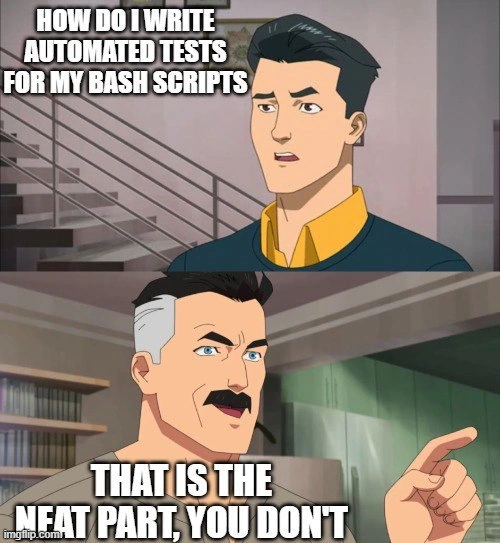
Here’s the funny (and scary) part: those CLITools and scripts written in Bash that orchestrate the CI pipeline often do not have unit tests themselves. The meme shows a kid asking how to write automated tests for such Bash scripts – which is a very reasonable question! He’s basically saying, “Hey, this deployment script is super important. How do we make sure it always works? Where are its tests?” The dad character responds, “That’s the neat part – you don’t.” In other words, there are no tests for it. This answer is humorous because it’s delivered in a confident tone, as if not testing is some clever trick, when in reality it’s an admission that we’re just not doing tests here at all. It’s like telling someone the secret ingredient is not checking anything.

Why would that ever be the case? Well, testing a Bash script is not as straightforward as testing regular code. Bash runs commands on the system – like listing files, copying folders, or starting programs. To truly test a Bash script, you’d have to simulate the environment it runs in or risk the test actually performing those destructive or complex actions. Think about a script that deploys a database: you wouldn’t want to run it on your laptop as a test, because it might actually try to overwrite your real database! Setting up a fake environment for the script to run safely can be complicated. There are tools to help (for example, ShellCheck can scan a shell script for errors or bad practices, and there are frameworks like bats-core for writing basic tests for shell scripts), but they’re nowhere near as commonly used as testing tools for normal application code. Many developers, especially those who aren’t Bash experts, simply don’t bother with these.

It might help to compare how we handle typical application code vs. Bash scripts in practice:

In a Typical App (Python/Java/etc) In a Bash Script (CI pipeline)
Developers write many unit tests using frameworks (e.g. JUnit, pytest) to cover critical logic. Usually no dedicated unit tests; very few developers set up a test harness for shell scripts.
Code is split into functions/classes for easier testing. Script might be one long sequence of commands, not easily broken into testable pieces.
CI runs the test suite on each commit to catch issues early. CI runs the script itself as part of the pipeline. If it finishes without errors, we assume the script “passed”. There’s no separate test suite just for the script.
Failures in code trigger clear test failures, pointing to which function broke. Failures in the script only show up if the script exits with an error (like a non-zero exit code) – often at runtime. The feedback might just be “script failed” with an error log.

As the table shows, we treat AutomationScripts in Bash very differently. In essence, the only test of a mission-critical Bash script might be the real-world run itself. People sometimes jokingly call this “PR-driven testing”, meaning you find out if it works when someone opens a Pull Request and the CI pipeline runs the script for real. If something’s wrong, the pipeline will break, and everyone will see it. It’s a very reactive way of testing – fix issues after it fails rather than assuring it never fails in the first place.

This ties into the phrase “just run it live and hope”. That’s basically the strategy being used. It’s a bit like launching a rocket and checking mid-flight if the engine was properly tested – obviously not ideal! When seasoned engineers who love things like UnitTesting and TDD hear that crucial code has no safety checks, they cringe. They might call it “prayer-driven development” or “hope-driven development” (because you’re just hoping it all works, praying nothing goes wrong). The meme exaggerates this with the dad’s proud tone: he calls the lack of tests “the neat part,” as if it’s something clever. In reality, it’s pointing out a flaw that many of us accept: we rely on Bash scripts daily but often don’t apply the same rigorous testing standards to them as we do for other code. It’s a form of technical debt and a source of many late-night debugging sessions. The humor lands because anyone who has maintained a legacy shell automation or CI script knows the uneasy feeling: “This thing is vital... and we kind of just trust it blindly.”

Level 3: Just Run It Live

At the senior engineer level, this meme hits close to home by exposing a dirty little secret of many CI pipelines: those sprawling Bash scripts that deploy code or run critical automation often have zero automated tests. The humor (tinged with horror) comes from a seasoned understanding that mission-critical CLI automation sometimes operates on pure hope. The son in the meme innocently asks how to add unit tests for these shell scripts, reflecting proper Testing discipline, especially if you follow Test-Driven Development (TDD). In a perfect world, everything – even the glue scripts – would have thorough unit tests. The stern father (Omni-Man from the Invincible meme template) responds with “That’s the neat part, you don’t.” This blunt punchline is funny to experienced developers because it’s a bitter reality: you typically don’t have unit tests for bash scripts, and everyone’s just been running them live and crossing their fingers. It’s the ultimate irony: the very scripts that power your Continuous Integration (CI) and deployment pipeline — whose failure could bring the whole system down — are often untested.

Why would professionals tolerate this? Several reasons resonate with a veteran’s cynicism:

  • Lack of Testing Frameworks: Bash isn’t designed with testing in mind. Unlike Python or Java which have pytest or JUnit, there’s no ubiquitous bash test tool included. You can use niche tools like Bats (Bash Automated Testing System) or write expect scripts, but most teams don’t bother – it’s seen as extra hassle for little gain.
  • Environment and Side-Effects: Shell scripts manipulate the environment, call external programs, and rely on system state. Writing deterministic tests for them is tricky. You’d have to simulate files, directories, environment variables, and even fake user input. Without proper isolation, tests might be as flaky as the scripts themselves.
  • Historical/Legacy Code: Many mission-critical Bash scripts started as quick Automation hacks written years ago by someone who just needed it to work that one time. Fast-forward, and those “one-time” scripts evolved into production systems. They were never designed with testability in mind. Functions are often embedded in one giant file, global state everywhere, no modular structure – a testing nightmare.
  • “It Works, Don’t Touch It” Mentality: There’s a pervasive attitude of “If it ain’t broke, don’t fix it.” Writing tests for an old script means potentially refactoring it or introducing new behavior. Management might not allocate time to write tests for something that seems to work. In fact, veterans know messing with a legacy deploy script right before a deadline is a recipe for trouble. It’s safer (so they think) to leave it untested but unchanged.
  • Continuous Integration as the Safety Net: Ironically, the only “test” is running the script in the actual CI/CD pipeline and seeing if it fails. If the pipeline goes green, folks assume the script is fine. Coverage reports proudly show 100% (because there are no tests to run). This is essentially production testing – the script either works on real runs or triggers a loud failure that everyone scrambles to fix. As a dark joke, some call this “YOLO-driven development” or “hope-driven deployment”.

Seasoned devs chuckle (or wince) at the father’s answer because it reflects a shared PTSD: we’ve all seen a critical release break at 2 AM due to a tiny bash script change that no one thought to test. The “just run it live and hope” culture is terrifying to any engineer who preaches writing unit tests for everything. The meme plays on that contrast – the ideal world of proper testing vs. the grim reality of many CLI-based workflows. It’s a nod and a wink to every old-timer who has jokingly said, “What could possibly go wrong? It’s just a small script,” only to later deal with the fallout. TestingHumor like this is funny because it’s true: behind the scenes of modern, sophisticated Continuous Integration setups lurk fragile Bash scripts held together with duct tape, prayers, and no automated safety net. The father’s smug point (“you don’t”) encapsulates that cynical wisdom: in practice, unit testing Bash scripts is so rare that you might as well assume it’s not done at all. The result? Every time that script runs in production, it’s an act of faith — one that makes veteran engineers shudder even as they laugh at how accurately this meme portrays industry reality.

Description

This is a two-panel meme using the 'That's the neat part, you don't' format from the animated series 'Invincible'. In the top panel, the younger character, Mark Grayson, looks concerned and asks the question, overlaid in white text: 'HOW DO I WRITE AUTOMATED TESTS FOR MY BASH SCRIPTS'. In the bottom panel, his father, Omni-Man, looks confidently at him and points, delivering the punchline: 'THAT IS THE NEAT PART, YOU DON'T'. The meme humorously captures a common sentiment and reality in the DevOps and software engineering world. While frameworks exist for testing shell scripts, it is often considered difficult, cumbersome, and is frequently skipped, leading to scripts being tested directly in staging or production environments. The joke resonates with any developer who has weighed the effort of writing tests for a script against the perceived simplicity of the script itself, and opted for the latter
Comments

8
Anonymous ★ Top Pick Some say my bash script is untested. I say it has a 100% success rate in its target environment: my machine, last Tuesday, with three specific environment variables set. It's practically production-ready
  1. Anonymous ★ Top Pick

    Some say my bash script is untested. I say it has a 100% success rate in its target environment: my machine, last Tuesday, with three specific environment variables set. It's practically production-ready

  2. Anonymous

    BATS, shUnit2, shellspec - every framework reminds you that the first failing assertion is thinking Bash was a language you could safely test in the first place

  3. Anonymous

    After 20 years in the industry, I've learned that bash scripts exist in a quantum superposition - they're both production-critical infrastructure and completely untestable chaos generators. We just deploy them at 3am and hope the exit codes align with our prayers to the POSIX gods

  4. Anonymous

    The real test coverage for bash scripts is production uptime multiplied by the number of times you've nervously run 'set -euo pipefail' and hoped for the best. Senior engineers know that bash testing frameworks exist in the same theoretical space as perfectly documented APIs and meetings that could have been emails - technically possible, but rarely observed in their natural habitat

  5. Anonymous

    Bash scripts hit 100% test coverage: every line eventually runs in prod

  6. Anonymous

    Unit testing Bash is easy: shadow PATH with a tmpdir to stub rm, assert exit codes under set -euo pipefail, and by the time it’s maintainable you’ve accidentally rewritten the script - and the test runner - in Go

  7. Anonymous

    Real talk: if your Bash script needs dependency injection and a mocking framework, you’ve accidentally built a microservice - move the logic to Go or Python, let bats-core verify the argv/exit codes, and keep the shell as glue, not epoxy

  8. @insan3d 2y

    https://github.com/kward/shunit2

Use J and K for navigation