Skip to content
DevMeme
1056 of 7435
The Refactoring Rabbit Hole vs. The Unfixed Bug
Refactoring Post #1186, on Mar 26, 2020 in TG

The Refactoring Rabbit Hole vs. The Unfixed Bug

Why is this Refactoring meme funny?

Level 1: Polishing the Broken Car

Imagine you have a toy car that isn’t working because one of its wheels is broken. Instead of fixing the wheel, you spend all day repainting the car and making it look shiny and new. Now the toy car looks great on the outside – very clean and pretty – but when you try to roll it, it still won’t go because the wheel is still broken. In this story, fixing the wheel is like fixing the bug in a program, and repainting the car is like refactoring the code (making the code cleaner without changing how it works). The meme is funny because the developer did the equivalent of repainting the car instead of repairing the wheel. He worked really hard all night making the code neat, but he didn’t actually solve the real problem that was making the software act up. It’s like cleaning your entire room as a way to avoid doing your homework – the room is spotless, but the homework is still not done when the teacher asks for it. The developer in the comic ends up with tidy code but the same old bug, and that mix-up of priorities is what makes everyone laugh and nod in recognition.

Level 2: Refactor vs Bug

Let’s break down what’s happening in simpler terms. In programming, refactoring means changing the structure or style of the code without changing what the code actually does. It’s like reorganizing your toolbox or cleaning up a messy room – after you refactor, the code should be cleaner, easier to understand, and maybe more efficient, but it’s supposed to behave the same as before (including any mistakes it had!). A bug, on the other hand, is an error or flaw in the software that causes it to behave incorrectly or unexpectedly (for example, a calculation giving the wrong answer or the program crashing when you click a certain button). Fixing a bug means changing the code so that the error goes away and the software works as intended.

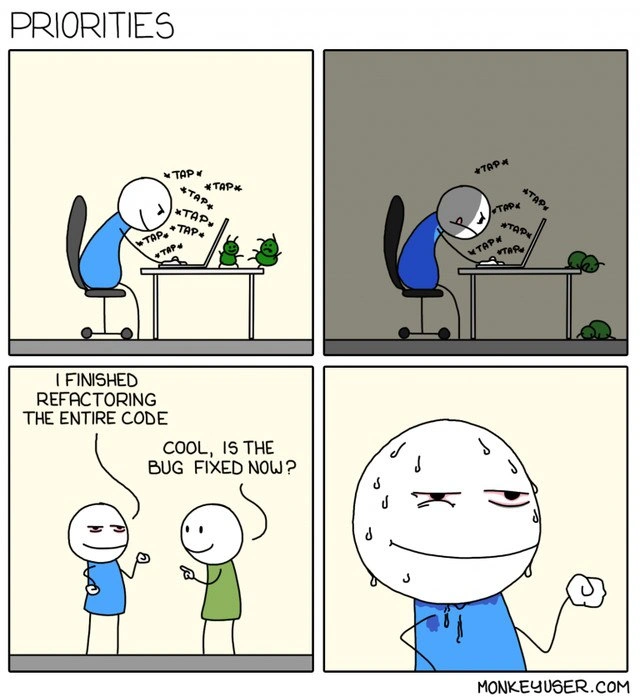
Now, in this comic, the developer finds a bug in the program – something is not working right. Instead of focusing on that specific problem, he decides to refactor the entire code overnight. You can see in Panel 1 (daytime) and Panel 2 (late night) that he’s been coding non-stop: "TAP TAP TAP". The room goes dark but he’s still at it, illuminated by the laptop’s glow. This is the typical night_coding_session. Beside his laptop, he has two little green rubber ducks. Those ducks are a fun reference to rubber duck debugging. This is a common debugging technique where you explain your problem and code, line by line, to a rubber duck as if it were a colleague. The act of explaining often helps you find the mistake. The presence of two ducks is a humorous exaggeration – maybe he thought double ducks = double debugging power! 🦆🦆 In reality, of course, the ducks just sit there silently. In the comic, they don’t mind if he’s veering off-track; they won’t interrupt and say, “Hey, shouldn’t we fix the bug instead of reorganizing everything?” They’re just along for the ride as he restructures code all night long.

By morning (Panel 3), the developer is excited and proud, telling his colleague in the green shirt, “I finished refactoring the entire code.” This means he spent all those hours making the code base neat and tidy. Perhaps he optimized some functions, renamed variables to clearer names, split big messy functions into smaller ones, removed duplicate code – all those good housekeeping tasks that improve the CodeQuality of the software. This kind of work is often done to manage TechnicalDebt. (Technical debt is a metaphor: it’s like when developers take shortcuts or write clumsy code to just make things work quickly – later that messy code is “debt” that has to be “paid back” by cleaning it up, otherwise it causes bigger problems down the line. Refactoring is one way to pay off that debt by cleaning the code without changing what it does.) So, our developer did a massive cleanup – maybe it was really needed because the code was messy (RefactoringNeeded indeed). From a pure code perspective, this might make future changes easier and reduce the chance of bugs in software in the long run.

However, here comes the punchline: the colleague asks, “Cool, is the bug fixed now?” That’s the crucial question. And in the final panel (Panel 4), we see the developer’s face: he’s sweating and giving a nervous half-smile. That expression tells us the answer is “Nope… the bug is still there.” Why? Because he didn’t actually work on the bug itself! He was so busy polishing the code that he never got around to solving that specific problem that started all of this. This scenario is a great illustration of priorities_in_bugfixing gone wrong. The top priority should have been to fix the bug – that’s what users care about and what was likely expected of him by his team. But he got carried away with a different priority: making the code cleaner. It’s a bit like someone spending hours rearranging books on a shelf when the real issue was that the shelf was about to collapse – the arrangement might be beautiful, but it doesn’t stop the shelf from falling. In coding terms, he improved the internal structure but didn’t address the external behavior problem.

For a junior developer or someone new to these concepts, there are a few lessons (wrapped in humor) here:

  • Refactoring vs Fixing: Refactoring is important for long-term health of the code, but it doesn’t add new features or fix bugs by itself. If there’s a bug, usually you want to fix it first, unless the code is so confusing that you literally can’t find the bug without cleaning it up a bit. In practice, developers often do a small, focused refactor around the bug to understand it, but they try not to refactor the entire system in one go while an urgent bug is active. That’s because large-scale changes can introduce new bugs or delay the actual fix. It’s all about balance and knowing what the current priority is.

  • Rubber Duck Debugging: This comic also quietly references how we debug issues. The rubber ducks on his desk suggest he might have been talking through the code to figure out the bug. Normally, explaining the problem to a “rubber duck listener” can help a programmer spot where the code went wrong. But here’s the catch: you have to actually talk about the bug and the code that’s not working. If our developer instead spent the whole night talking through how to reorganize the code, then the ducks wouldn’t magically point out the bug! The ducks are a humorous way to show that he might have been focusing on the wrong thing the whole time. Two ducks, yet not one quack about the real issue. 🐤🐤💦

  • Why developers find this funny (and painful): It’s common in developer culture to joke about procrastination_bug_fix – doing other “productive” tasks to avoid the one task you should be doing. Solving a bug can be tough; sometimes you don’t even know where to start. On the other hand, cleaning up code is straightforward and satisfying. Many of us have felt that urge: “Before I tackle this bug, let me just refactor this ugly code… (and hours later) oops, I never got to the bug.” It’s funny when it’s in a comic, though in real life it can be a bit embarrassing 😅. The humor is very relatable (RelatableHumor) because it plays on a real struggle with DeveloperProductivity: doing what is important vs. doing what is comfortable. The colleague’s question snaps the focus back: no matter how elegant the code is now, it doesn’t matter to the end user if the bug is still making the app malfunction.

In simpler terms, the comic is titled “PRIORITIES” for a reason. It contrasts the developer’s priority (clean code through refactoring) with the team’s or project’s priority (fix the bug affecting users). The two priorities are out of sync. The developer did a lot of work (hence he’s smirking proudly initially), but it wasn’t the work that actually solves the problem at hand. That’s why the colleague looks unimpressed and almost annoyed in panel 3 – you can imagine them thinking, “We pulled an all-nighter expecting the issue to be resolved, and you … reorganized everything instead? Seriously?” It’s a lighthearted jab at how we engineers can sometimes get caught up in the wrong task. The codebase might now be a shining example of CodeQuality, but if the application was crashing or giving wrong results, it’s still doing that now. So all the users and QA testers will see no improvement, and the bug ticket remains open.

Finally, let’s talk about the emotional aspect. Developers take pride in writing good code. When you see a messy system, it’s tempting to fix it properly. There’s even a known phenomenon where developers might subconsciously avoid a hard bug by doing easier cleanup tasks – because at least then they feel accomplished. This comic exaggerates that to a comedic degree: the dev refactored the entire code base! (That’s usually huge – imagine taking every single file in a project and changing it for better style or structure. In one night, alone? It’s kind of absurd, which adds to the humor.) Yet, he neglected the one thing everyone was actually waiting for: the bug fix. The sweat on his face in the last panel is something any junior will recognize too – it’s the “oops” moment. He knows he can’t really justify what he did, except with weak excuses like “But the code is so much nicer now!” Meanwhile the bug (the real assignment) is still due. It’s both funny and a gentle teaching moment: always keep track of what problem you’re actually supposed to solve, especially during those late-night coding sessions.

Level 3: Procrastination-Driven Development

At the highest level, this meme highlights a classic case of misplaced priorities in software engineering. The developer spends an entire night on a massive refactoring spree – reorganizing, cleaning, and restructuring the codebase – yet completely sidesteps the actual bug fix. Refactoring is usually done to improve CodeQuality or pay down TechnicalDebt without changing the software’s external behavior. That’s the ironic twist: by definition, a pure refactor shouldn’t alter functionality, so any existing bugs (which are flawed behaviors) will still be there in the morning. The code might be cleaner, more efficient, easier to read, but the users won’t care if their bug (the one causing real issues) remains unsolved. This disconnect between internal code health and external product correctness is what makes the situation funny and painfully relatable. It’s a form of procrastination disguised as productivity – a phenomenon one might jokingly call “Procrastination-Driven Development.”

Why is this so relatable in DeveloperHumor? Experienced engineers have seen or even done this themselves. There’s a pesky bug in the system, maybe something causing a feature to malfunction. Instead of directly attacking the bug (which can be hard or tedious), the developer decides, “Well, the codebase is a mess; let me clean it up first.” Hours later, the code is beautifully refactored (perhaps converting old imperative spaghetti into sleek functional code, breaking monoliths into neat modules, eliminating global variables – all those good RefactoringNeeded practices), but the original problem still persists. It’s the ultimate case of refactor_vs_bug priority inversion. The term priority inversion in systems actually describes low-priority tasks blocking high-priority ones – here the secondary concern of code cleanliness has blocked the primary goal of bug fixing. The meme exaggerates it: “I finished refactoring the entire code,” the developer proudly announces. Realistically, refactoring an entire codebase overnight is next to impossible (and very risky), but that hyperbole drives the joke. The colleague’s deadpan response –

Colleague: “Cool, is the bug fixed now?” –

delivers the punch. It’s a one-two punchline every seasoned dev recognizes: the awkward moment when you realize all that effort didn’t actually solve the original problem you were supposed to solve. The final panel with the dev’s sweaty, nervous half-smile is a portrait of guilt that says, “I accomplished something… just not the thing everyone needed.”

There’s also a nod to rubber_duck_debugging in the first two panels. The tiny green figurines on the desk are rubber ducks – a familiar sight in programming culture. Rubber duck debugging is a technique where you explain your code line-by-line to a rubber duck (or any inanimate object) to find logic errors. The idea is that by articulating the problem out loud, you often discover the solution yourself. Here, our dev has two ducks, presumably double the debugging firepower! Yet despite their silent support through the night coding session (from daytime to dark room, indicated by the panel colors shifting to night), the BugsInSoftware remained unsolved. The ducks sat by as the developer furiously typed (*TAP* *TAP* *TAP* all night) refactoring everything except the part that was broken. This little detail adds an extra layer of humor: even the trusty rubber duck method can’t help if you’re not actually debugging the right thing. You can almost imagine the ducks thinking, “We’re here to help you find the bug, not redecorate the code!”

From a senior engineer’s perspective, the comic is poking fun at a real software engineering tension: balancing code quality improvements vs. delivering fixes and features. Sure, nobody likes working with ugly, overly complex code – it slows down DeveloperProductivity in the long run. Tackling TechnicalDebt by refactoring is in theory a good thing (there’s famous advice to always leave the codebase cleaner than you found it, sometimes called the “Boy Scout Rule”). However, timing is everything. If there’s a production bug affecting users, that’s a high priority issue. Refactoring should either support the bug fix or be postponed until after the bug is resolved. In this meme, the developer essentially did things backwards: they applied the “make it right” step (improve the code) before the “make it work” step (fix the bug). It’s an inversion of the usual wisdom “Make it work, then make it right.” The humor hits home for many of us because we’ve felt that temptation to clean up a mess first – especially late at night when you get in “the zone” – and worried about the actual problem later. We recognize that sweating, guilty face all too well.

There’s also an underlying commentary on DeveloperPriorities and perhaps even the psychology of coding. Fixing a tricky bug can be frustrating and uncertain – you’re not sure how long it will take or if you’ll even find the solution without a deep investigation. Refactoring, on the other hand, feels productive and is fully under the developer’s control: you can see immediate progress as code structure improves. It’s a form of productive procrastination. The dev likely kept postponing the real bug fix under the justification of “I need to clean this up first, it will help me fix the bug eventually.” We’ve all heard (or used) rationales like: “This code is too messy to debug, I have to refactor it to understand what’s going on.” Sometimes that’s true – a bit of cleanup can illuminate a problem. But taken to an extreme, you end up in a night_coding_session refactoring far beyond what was needed, possibly introducing new issues, while the original bug is still alive and kicking. It’s a classic time sink. Meanwhile, stakeholders or your team lead will come the next day and ask the simple question: did we solve the user’s problem? If not, all that effort doesn’t count for the immediate goal. The meme captures that scenario in a nutshell, and the sweat drop on the dev’s face is every engineer’s reaction when they have to admit, “uh, not exactly.”

In summary, the humor works on multiple levels: it’s CodingHumor that satirizes the urge to perfect code at the expense of actually BugFixing. It highlights a truth about DeveloperHumor in the workplace: what engineers sometimes value (well-crafted code, eliminating technical debt) isn’t always aligned with what the situation demands (a working fix ASAP). The result is a comical disconnect that both new and veteran developers find RelatableHumor. The comic uses a simple setup to expose this engineering foible – two stick figures, a day turning into night, two silent rubber ducks, and one unresolved bug amidst a sea of beautifully refactored code. It’s a gentle reminder (with a chuckle) that we should keep our priorities in bug fixing straight: don’t forget to actually kill the bug! After all, a RefactoringPain hangover is bad, but waking up to realize the bug is still in production is even worse.

Description

A four-panel comic strip titled 'PRIORITIES' by monkeyuser.com. In the first panel, a stick figure developer in a blue shirt is typing at a laptop while two small green bug creatures sit on the desk. The second panel shows the same scene, but it's now nighttime, and the developer is still typing while the bugs have multiplied. In the third panel, the developer, looking tired but proud, tells another person, 'I FINISHED REFACTORING THE ENTIRE CODE,' to which the other person asks, 'COOL, IS THE BUG FIXED NOW?'. The final panel is a close-up of the developer's face, sweating profusely with a strained, guilty smile, clearly indicating that the bug was not fixed. The comic humorously depicts a common developer pitfall: getting sidetracked by a large-scale refactoring project (improving code quality) instead of focusing on the immediate, assigned task of fixing a specific bug, ultimately failing to deliver the required solution
Comments

7
Anonymous ★ Top Pick He didn't fix the bug, but the new architecture is so elegant that the bug is now a fully abstracted, scalable, and distributed feature
  1. Anonymous ★ Top Pick

    He didn't fix the bug, but the new architecture is so elegant that the bug is now a fully abstracted, scalable, and distributed feature

  2. Anonymous

    Production’s still throwing NullPointerExceptions, but after last night our service layer finally follows hexagonal architecture - so at least the ruins are symmetrical

  3. Anonymous

    After 20 years in the industry, you learn that 'I'll just refactor this quickly' is the engineering equivalent of 'I'll just have one drink' - both end with you waking up confused, everything's different, and the original problem is still there

  4. Anonymous

    Ah yes, the classic 'I refactored the entire monolith into microservices while the payment gateway was down' maneuver. Nothing says senior engineering judgment quite like achieving 100% test coverage on code that's actively losing the company money. The real bug was the friends we made along the way... who are now asking why customers can't check out

  5. Anonymous

    Refactoring: bugs in, bugs out - external behavior impeccably preserved

  6. Anonymous

    We cut cyclomatic complexity by 40% and went hexagonal - turns out the bug was faithfully implemented from the requirements

  7. Anonymous

    Refactored the whole codebase - the bug still reproduces, but now it’s SOLID, isolated behind a hexagonal boundary, and emits a beautiful trace in Jaeger

Use J and K for navigation