Skip to content
DevMeme
1055 of 7435
The Developer's Panacea for COVID-19
Dependencies Post #1180, on Mar 26, 2020 in TG

The Developer's Panacea for COVID-19

Why is this Dependencies meme funny?

Level 1: One of These Doesn’t Belong

Imagine your teacher gives you a list of five important things to stay healthy, like: 1) wash your hands, 2) sneeze into your elbow, 3) don’t touch your face, 4) (some random computer gibberish), 5) stay home if you feel sick. Wait a second – one of those is not like the others, right? 😃 That’s exactly why this is funny! Four of the steps are normal health tips you’ve heard a million times, but suddenly there’s a step about doing something to a computer (rm -rf node_modules && npm i – which is basically “delete a bunch of computer stuff and put it back”). It’s completely out of place in a list about stopping a virus.

Think of it like this: what if you saw a poster that said, “Brush your teeth, comb your hair, restart your computer, and eat your vegetables.” You’d probably giggle or do a double-take because one step just doesn’t fit the theme. It’s a silly surprise! In this meme, a very tech-specific instruction got mixed into serious advice about COVID-19 on purpose. It’s an inside joke for programmers, because in their world, when something is wrong with a project, a common fix is to “turn it off and on again” in a way – basically removing and reinstalling parts of the code (kind of like taking all the toys out of your toy box and then putting them back neatly).

For someone who isn’t a programmer, that step looks like random text or a secret spell. For a programmer, it’s a super familiar fix — almost like a magic trick they do when their code is “sick” and not working right. The funny part is treating that nerdy fix as if it’s just as important as washing your hands during a pandemic. It’s a big, absurd mix-up of very different worlds. So the meme makes us laugh because it’s obvious that step 4 doesn’t belong in a health guide, and yet every software developer reading it is like, “Ha! I’ve done that fix so many times.”

In simple terms, it’s funny for the same reason it’d be funny to see “and don’t forget to reboot your Wi-Fi router” on a list about staying physically healthy. It’s unexpected and goofy. It also feels a bit like the person who made the joke is saying, “Hey, things are scary with the virus, but here’s something all us coders can chuckle about.” Even in a serious time, we find comfort in a little joke that combines real life and our daily coding habits. It’s a way of saying: keep clean, stay safe, and oh — if all else fails with your code, try the trusty reboot for your project!

Level 2: Did You Try Reinstalling?

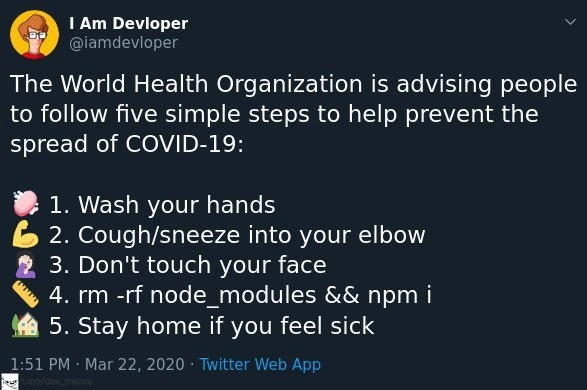
This meme is a screenshot of a Twitter joke that mixes real pandemic advice with a bit of programmer wisdom. The tweet claims the World Health Organization (WHO) recommends five steps to prevent COVID-19 spread, but sneakily replaces the fourth step with a programmer’s go-to move: rm -rf node_modules && npm i.” If you’re a new developer, that command might look intimidating. Let’s break it down and explain why it’s such a wink to anyone who’s dealt with Node.js projects.

First, some context: in March 2020, COVID-19 (a contagious virus) was a global concern, and organizations like WHO were telling people things like “wash your hands,” “cough into your elbow,” “don’t touch your face,” and “stay home if you feel sick.” These are common-sense health tips. The tweet lists those, but then step 4 unexpectedly says to run a command in your computer. That sudden switch is the joke! It’s a form of PandemicHumor combined with DeveloperHumor – blending a serious real-world situation with a lighthearted developer reference.

So what is rm -rf node_modules && npm i? This is a two-part command intended to be run in a CLI (Command Line Interface), like your Terminal or command prompt:

rm -rf node_modules && npm i
# rm = remove, -rf = recursive & force (delete folder even if not empty)
# node_modules = the folder with all your Node.js packages
# && = then do the next command if the first succeeded
# npm i = npm install (reinstall all packages from package.json)

Let’s go through it: rm -rf node_modules will delete the entire node_modules folder (the -rf flags mean “recursive” and “force”, which is a way to tell the computer “yes, I’m sure, delete everything in that folder even if it has a lot of files”). The node_modules folder is where npm (Node’s package manager) stores all the libraries and modules your project depends on. This folder can get really huge with hundreds or thousands of subfolders because modern apps often use many small packages. Sometimes, things in there break or get into a weird state (for instance, a package didn’t install correctly, or two packages have incompatible versions fighting each other — that’s the DependencyHell people joke about).

The second part, npm i, is shorthand for npm install, which tells npm to install all the dependencies fresh, as specified in your project’s package.json file (and usually locked by a package-lock.json or yarn lockfile to exact versions). Essentially, after deleting the old stuff, you immediately bring back a clean set of dependencies. It’s like throwing out all the ingredients in your kitchen pantry and then buying them new according to a recipe, to make sure nothing stale or spoiled remains.

Now, why would a developer do this? Because it often works. If you’ve ever set up a project and gotten bizarre errors or if your code was running fine yesterday but not today, one of the first troubleshooting steps in the Node.js world is: “try deleting node_modules and reinstalling your packages.” It’s practically a meme of its own in programming circles. The idea is similar to the classic tech support advice: “Have you tried turning it off and on again?” Removing node_modules is like turning your project’s dependency system off and on again. It forces a reset. Maybe a certain library didn’t update properly or a cached file got corrupted – wiping the slate clean often clears those glitches.

In fact, the command shows up so often that it’s considered an “obligatory” inclusion when listing ways to fix build problems or run errors in a Node project. Everyone from junior devs to senior engineers has encountered a situation where nothing fixed a problem except blowing away that folder and doing a fresh npm install. It’s a running joke because, while it might sound overly simple, it saves the day more often than we’d like to admit. Hence, it’s referred to as a “survival hack” for JavaScript developers – a reliable if not entirely elegant fix for mysterious issues. You’ll find countless forum threads and TwitterHumor posts poking fun at how often this incantation is invoked.

The tweet uses emojis for each item in the list to make it visually fun and to mirror the original health guidelines style. For example: 🧼 next to “Wash your hands,” 🙌 (raised hands, symbolizing an elbow maybe) for coughing into your elbow, 🤷‍♀️ (person shrugging) humorously for “Don’t touch your face” (perhaps implying “how can I not touch my face?!”), and a 🛠️ (tools) emoji for the rm -rf node_modules && npm i step (because it’s a “tool fix” for your project). Finally, 🏡 for “Stay home if you feel sick.” The fourth emoji, the tools, immediately signals “this one is about fixing something” – and indeed it’s about fixing your project setup. Seeing a wrench and hammer icon in the middle of health tips is the giveaway that this is tech-related humor.

For a junior developer, it’s key to understand that npm (Node Package Manager) is how you add libraries to a Node.js project. Those libraries are stored in that node_modules directory. Over time, especially if you’re switching branches, pulling updates, or changing versions, the contents of node_modules might not line up perfectly with what your project expects. For example, say you upgraded a library but something didn’t overwrite correctly, or you have duplicate copies of a package that conflict. Instead of digging through the node_modules folder (which is like a dense jungle of files), it’s easier to just delete the whole thing and let npm recreate it exactly as needed. This solves problems like missing packages, wrong versions, or corrupted files. It’s a bit of a blunt fix — sort of like reinstalling an app on your phone when it misbehaves. It might not address the root cause deeply, but it often makes the problem go away.

The reason developers find the meme funny is because step 4 is clearly not something the actual World Health Organization would ever say for a real virus. It’s a totally tech-specific action. By placing it in an otherwise serious list (and attributing it to the world_health_organization no less!), the tweet creates an absurd image: doctors in lab coats telling people “make sure to delete your node_modules folder regularly.” 😅 It’s this mix of a very relatable CLI fix with very important health advice that creates the comedy. If you’re not a coder, that line looks confusing and out-of-place – which is exactly the point. And if you are a coder, you’re likely nodding and laughing because you’ve done that exact npm ritual many times, and perhaps wish there were an equally straightforward fix during the real-life pandemic.

This image being a tweet_screenshot is also typical of how dev jokes spread online. Tweets from accounts like “I Am Devloper (@iamdevloper)” often go viral in programmer communities because they capture common experiences in a witty one-liner or list. In this case, the account turned a global situation into a bit of levity for coders. The timing (late March 2020) was when everyone was sharing COVID-19 tips, so adding the “delete node_modules” advice was a way of saying, “hey fellow devs, remember our version of washing hands is cleaning up our projects!” It was a little humorous break from the intense news, something only those in software would fully get.

To illustrate how entrenched this practice is, imagine the typical dialogue in a dev team when a build fails:

Junior Dev: “My project won’t run, it’s throwing bizarre errors I don’t understand.”
Senior Dev: “Hmm, did you try deleting the node_modules folder and running npm install again? That usually fixes those weird issues.”

Chances are the senior developer has encountered a similar mysterious error before and knows that sometimes the quickest fix is a clean reinstall of dependencies. As a new developer, hearing this the first time might be surprising – really, just reinstall everything? – but you soon learn it’s a common first step in troubleshooting Node apps. It’s almost a rite of passage to joke about the size of node_modules or how often we have to nuke it. Some even alias this command in their shell because they run it so often! 🛠️

In summary, step 4 in this meme is referencing a software_rituals known to JavaScript developers. It’s funny because it shoves a piece of nerdy NodeJS advice into what looks like an official health checklist. For newcomers, the takeaway is: when your Node project acts up and nothing else makes sense, reinstalling your packages from scratch is a good debugging step. And also, programmers have a quirky sense of humor – we’ll even joke about global pandemics by referencing our everyday battle with code dependencies. The meme perfectly captures that overlap, making us laugh while we nod in agreement.

Level 3: Infection Control for Code

At first glance, this meme looks like official World Health Organization (WHO) advice, but a closer look reveals an inside joke that only developers fully appreciate. The list of five steps mimics early COVID-19 prevention guidelines, except step 4 swaps in a software fix: rm -rf node_modules && npm i. This humorous substitution highlights a well-known Node.js ritual for curing misbehaving projects. In the global pandemic context (March 2020), everyone was anxious about hygiene and viruses, and here developers cleverly inserted a reference to dependency hell – the “viruses” that infect our code.

In software terms, node_modules is the directory where all your npm packages (project dependencies) live. Over time it can become an unwieldy pile of files, much like a messy lab full of petri dishes growing unknown cultures. Conflicts between package versions, corrupted installs, or ghost dependencies can make a Node project act “sick.” The command rm -rf node_modules && npm i is the nuclear option to heal it: essentially quarantining (deleting) the entire dependency directory and then reintroducing clean copies of packages via a fresh install. It’s a brute-force remedy, analogous to scrapping a germ-ridden petri dish and regrowing everything from a known good sample. Experienced developers recognize this as a last resort when mysterious errors crop up — a cornerstone of PackageManagement folklore.

The humor here riffs on the DeveloperHumor trope that “wiping and reinstalling” fixes everything. Just as washing hands and not touching your face prevent biological viruses from spreading, wiping node_modules and reinstalling prevents software bugs (or “viruses”) from persisting. In reality, this practice is so common because modern JavaScript projects have hundreds or thousands of dependencies (each with their own sub-dependencies). This sprawling ecosystem can lead to inconsistent states — for example, after pulling the latest code or switching git branches, you might have older packages clashing with newer ones. Rather than manually untangling these conflicts, it’s often faster to blow away the old dependencies and let npm fetch them afresh. Think of it as performing a deep clean of your codebase’s environment.

This tweet struck a chord because it blended PandemicHumor with a daily frustration of coding: the fourth item is hilariously out of place in a public health advisory, yet every dev knows it belongs on any checklist of “how to fix things.” It’s the obligatory step in countless bug-fix workflows. In fact, by 2020 the command had become a running gag on Twitter and Stack Overflow – a one-stop answer to build errors, akin to a digital hand sanitizer. The juxtaposition is brilliant: steps 1, 2, 3, and 5 are genuine WHO guidelines with matching emojis (🧼, 🙌, 🤷‍♀️, 🏡), while step 4 uses a 🛠️ tools emoji, marking a sudden pivot into CLI (Command Line Interface) territory. It’s a wink to developers: in our world, maintaining “good hygiene” means periodically purging your node_modules.

Historically, this nod to DependencyHell comes from real pain. Earlier versions of npm would nest dependencies deeply, often duplicating packages and ballooning the node_modules folder (remember the jokes of node_modules containing a node_modules of its own, recursively, ad infinitum?). Even with modern flat dependencies, inconsistencies between your package-lock.json (the snapshot of exact versions) and the actual files on disk can cause bizarre errors. For example, if a library update went awry or a post-install script failed, you might get a malfunctioning state that only a full reinstall can fix. Engineers half-jokingly refer to this process as a “cleanse” or “burn it to the ground and start over” approach. It’s not elegant, but it’s reliable – much like isolating a contagion to stop its spread. The meme exaggerates this habit by elevating it to life-saving status alongside hand-washing and staying home.

What makes seasoned devs smirk is how relatable this is. We’ve all been there: build fails mysteriously on Friday afternoon, nothing makes sense, and someone sighs “Alright, just run rm -rf node_modules and reinstall.” And miraculously, it works – the bug vanishes like a fever after good rest. It’s practically a software ritual now. So seeing it listed by the WHO (of all authorities!) as a step to fight a biological virus is absurdly funny. It’s parodying both the gravity of the pandemic and the almost superstitious faith developers place in this one command. In a time when everyone felt helpless about COVID, devs at least could chuckle that we know how to fix our own “viruses.” This tweet was a little flash of solidarity: yes, the world is scary, but here’s a nerdy joke just for us, conflating our NodeJS woes with global health advice.

Finally, beyond the joke, there’s an implicit commentary on how routine this action has become in JavaScript development. Ideally, our PackageManagement tools (like npm or yarn) should handle dependencies deterministically, but in practice, environment quirks and caching issues mean the brute-force reinstall remains a go-to js_dev_survival_hack. The fact it’s called “obligatory” in the title hints that no matter what the problem is, someone will inevitably suggest this fix. It’s both cathartic and cynical: did clearing node_modules solve the issue? No? Well, it was worth a shot! – reminiscent of how people stockpiled hand sanitizer expecting it to solve everything. In summary, the meme gets its punch from merging serious world_health_organization guidance with a tongue-in-cheek developer cure-all. It resonates on multiple levels of experience, from the global crisis to the everyday grind of debugging, delivering a healthy dose of “it’s funny because it’s true.”

Description

A screenshot of a tweet from the popular 'I Am Devloper' Twitter account. The tweet mimics a public service announcement, stating: 'The World Health Organization is advising people to follow five simple steps to help prevent the spread of COVID-19:'. It then lists five steps, each with an emoji. The first three and the fifth are standard health advice ('Wash your hands', 'Cough/sneeze into your elbow', 'Don't touch your face', 'Stay home if you feel sick'). However, the fourth step is replaced with a classic developer troubleshooting command: '4. rm -rf node_modules && npm i'. This joke humorously equates the universal developer solution for fixing broken JavaScript dependencies - deleting the entire node_modules folder and reinstalling - with critical, life-saving health measures. It's an inside joke that resonates with web developers who have experienced the frustration of dependency hell and view this command as a ritualistic cure-all
Comments

7
Anonymous ★ Top Pick The `rm -rf node_modules` command is the closest thing our industry has to a vaccine. It might not solve the root problem, but it makes you feel better for a little while
  1. Anonymous ★ Top Pick

    The `rm -rf node_modules` command is the closest thing our industry has to a vaccine. It might not solve the root problem, but it makes you feel better for a little while

  2. Anonymous

    WHO’s latest protocol: if node_modules grows larger than your entire container registry, declare a SEV-1 outbreak, quarantine with `rm -rf`, and let npm ci handle the contact tracing

  3. Anonymous

    The WHO missed the most important step: clearing your browser cache. That one's actually killed more production deployments than COVID killed meetings

  4. Anonymous

    The WHO forgot the most critical pandemic prevention step: nuking node_modules and reinstalling dependencies. After all, nothing spreads faster than a corrupted package cache, and the only cure is the nuclear option. At least COVID-19 doesn't require 500MB of disk space and 10 minutes to resolve every time you switch branches

  5. Anonymous

    WHO finally endorses the only fix that scales: nuke node_modules before the dependency mutations metastasize

  6. Anonymous

    WHO’s Step 4 checks out: rm -rf node_modules && npm i - the JS equivalent of quarantine; with ^semver, every reinstall mutates the dependency graph, so you just hope the new strain doesn’t ship to prod

  7. Anonymous

    WHO’s step 4 is close - nuking node_modules is great triage, but for reproducible quarantine you want npm ci, otherwise semver drifts faster than an R0 > 3

Use J and K for navigation