Skip to content
DevMeme
3814 of 7435
The Duality of a Developer: C vs. CSS
Frontend Post #4156, on Feb 2, 2022 in TG

The Duality of a Developer: C vs. CSS

Why is this Frontend meme funny?

Level 1: Finding the Middle

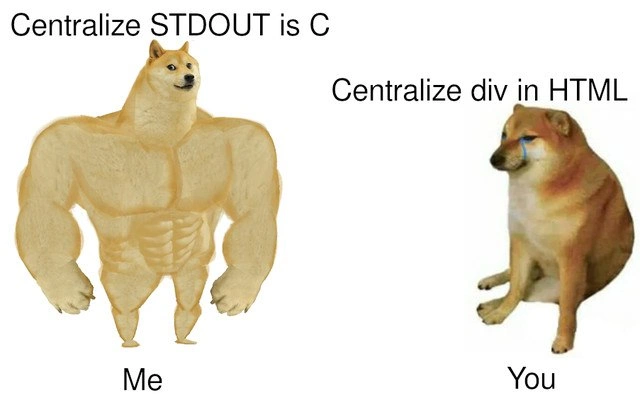
Imagine you have two tasks: one is to say a message out loud, and the other is to hang a picture exactly in the center of a wall. Saying a message out loud is easy – you just speak and it’s done, right? That’s like the big strong Doge who can print text in a program without any trouble. But now think about trying to place a picture perfectly in the middle of a wall. You’d have to measure the wall, find the exact middle point, maybe mark it, adjust the picture, step back to see if it looks right, adjust again... it can get frustrating! That’s like the little crying Doge trying over and over to center a box on a webpage. The meme is funny because the thing that sounds simple (finding the middle) turned out to be the one making the character cry. We expect putting something in the center of a page to be easy, just like hanging a picture should be easy, but it ends up being surprisingly tricky without the right tools. Meanwhile, something that sounds harder – like writing a message with a computer program – was super easy for the strong Doge. So the picture makes us laugh by flipping our expectations: the big tough guy finds his task easy, and the small guy is defeated by what seems like a basic chore. In real life and coding, sometimes the “simple” things take the most effort, and that silly contrast is exactly why this meme hits home.

Level 2: Console vs. CSS 101

Let’s unpack the scenario in a more beginner-friendly way. First, STDOUT (short for standard output) is basically the default place a program sends its text output – usually your screen/console. In C, printing to this console is done with a simple function call like printf(). Think of printf as the C language’s way to say “print this text out for the user to see.” It’s a fundamental operation taught early when learning C. For example, printf("I can print easily!\n"); would instantly display that message in the console window. There’s no need to worry about positioning that text somewhere specific – it just appears on the next line in the terminal. So in C, if you want to show something to the user, it feels very direct and under your control. This is why the left side of the meme boasts about centralizing STDOUT, which humorously might mean just writing output to the central place (the console) – and the "Me" under the buff Doge implies the meme creator (or any coder confident in C) feels strong doing this. Low-level languages like C might be infamous for things like manual memory management and cryptic pointer bugs, but doing basic I/O (input/output) like printing text is one of the easy parts.

Now, contrast that with HTML and CSS on the right side. HTML (HyperText Markup Language) is the language that structures content on a webpage. A <div> in HTML is just a generic container element – kind of like an empty box or section that you can fill with stuff or style in certain ways. By itself, a <div> is just a block that stretches across the page horizontally (by default) and is only as tall as its content. CSS (Cascading Style Sheets) is the companion language that styles these HTML elements – controlling things like colors, sizes, and importantly here, layout and alignment. When the meme says "Centralize div in HTML," it’s referring to the act of using CSS/HTML to center that <div> on the page (both horizontally centered and vertically centered). Ideally, you might wish there was an attribute like center="true" or some magic one-liner to perfectly center a box. But in practice, especially historically, it wasn’t that simple. This is a classic FrontendDevelopment problem that trips up many newcomers: How do I center an element on the page?

For a beginner, you might start by trying something intuitive. Want to center text in a paragraph? You could use text-align: center; in CSS on its container – that works great for inline text. But centering an entire <div> (which is a block-level element) requires different thinking. One common method to center a block horizontally is: give the <div> a specific width, and then set its left and right margins to auto (in CSS that looks like margin: 0 auto; which means top/bottom margin 0, left/right margin automatic). The browser will then evenly distribute leftover space on the sides, pushing the <div> into the middle horizontally. Okay, horizontal centering solved with one line – not bad. But what about vertical centering (making the <div> sit in the middle from top to bottom)? That’s where trouble used to begin. If you naïvely try something like vertical-align: middle; on a <div>, nothing happens – because that property only affects inline elements or table cells, and a standalone <div> isn’t in that category by default. So newbies often find that just “obvious” CSS property doesn’t work in this context and get confused.

Before modern CSS solutions, vertically centering an element inside its parent was tricky. You had to use techniques that weren’t immediately obvious. For example, one trick was to make the parent element behave like a table cell (display: table-cell) and then you could use vertical-align: middle; on it. Another method: set the parent to have position: relative; and the child <div> to position: absolute; with top: 50%; left: 50%; and then adjust with a transform (as shown in the code above) to truly center its midpoint. These techniques were not intuitive at first glance – they were more like recipes you copy-paste after searching "how to center a div" on Google. Every front-end newbie eventually searches for this, and that’s exactly why it’s a FrontendHumor trope: something that sounds so simple ends up involving an unexpected CSS workout.

The meme’s right side (“You” as the crying Doge) perfectly captures that “I have no idea why this is so hard!” feeling. If you’ve ever tried to make a nice webpage, you might have spent an afternoon fiddling with your CSS, moving a box a few pixels at a time, or reading blog posts about the elusive centering solution. Meanwhile, the left side (“Me” as the buff Doge) shows a developer smugly doing a basic LowLevelProgramming task, implying that developer finds the CSS task trivial too – but clearly, it isn’t! This is friendly teasing between different kinds of developers. Backend or system developers (who often use languages like C, C++, or other console-based programs) sometimes jest that front-end tasks are easy – until they themselves try it and discover the quirks of CSS. Conversely, front-end developers joke about how even “simple” CSS tasks have unexpected gotchas. It’s a lighthearted comparison, not to say one side is truly better than the other, but to bond over the absurdity that in programming, each domain has its own unexpected challenges.

It’s worth noting that today, things are improving. Modern CSS offers Flexbox and Grid, which make centering almost laughably easy compared to before. For instance, with Flexbox you can do:

parent {
  display: flex;
  justify-content: center; /* centers horizontally */
  align-items: center;    /* centers vertically */
}

…and boom, the child element is centered both ways. CSS Grid can do it with even one line (place-items: center;). If you know about these modern tools, you might wonder, “why is centering still a joke?” It’s because the meme and jokes persist from years of collective struggle, and not everyone is using flexbox/grid in every situation. Plus, it’s a rite-of-passage kind of joke – even if the solution exists now, almost every developer has a memory of when they didn’t know it and felt exactly like that crying Doge. The humor resonates especially with those who have spent time in the trenches of Frontend layout issues. So at this level, the key take-away is: printing to a console in a language like C is dead simple (you just call a print function), whereas positioning something dead-center on a webpage using HTML/CSS historically required careful CSS know-how. It’s a humorous reminder that “simple” depends on context: low-level and high-level tasks each have their own learning curves. The buff doge vs. sad doge meme exaggerates it in a fun way that anyone who’s wrestled with CSS can appreciate.

Level 3: Flexing vs. Flexbox

The meme brilliantly contrasts low-level programming confidence with front-end layout despair. On the left, a buff Doge represents a developer proudly wielding C to print to STDOUT. In C (a classic LowLevelProgramming language), sending output to the console is straightforward – basically a one-liner like printf("Hello, world!\n");. This buff Doge flexes because writing to the console is easy and direct: the program simply writes bytes to the standard output stream (which by default is the terminal). There’s no layout concern, no styling – just raw text flowing to the screen. This is the world of C, where you manually control things but something as simple as printing text is immediate and under your command. The phrase "Centralize STDOUT in C" (perhaps meaning directing output to center screen, or just controlling console output) underscores how comfortable a systems programmer feels doing console I/O. It’s a flex – literally, the Doge is flexing muscles – because the developer feels powerful accomplishing a task in C with minimal fuss.

On the right, however, we see a small, teary-eyed Doge (often referred to as Cheems in meme culture) labeled "You," suffering through a classic FrontendPainPoints task: centering a <div> in HTML/CSS. The text "Centralize div in HTML" alludes to the notoriously frustrating challenge of aligning an element both horizontally and vertically on a webpage. This humble Doge is crying because, unlike the simple printf scenario, getting a <div> perfectly centered can feel like an epic struggle. The humor lands because centering a div is an almost ritualistic problem every web developer encounters. It’s a true irony in FrontendDevelopment: we have a language for designing layouts (HTML/CSS), yet one of the first things people want to do – put something in the center – historically required arcane tricks or deep CSS knowledge. The meme plays on this contrast: a seemingly simpler technology (front-end HTML/CSS) ends up causing more grief for this task than a lower-level language like C. It’s a humorous take on a classic language comparison where the hardcore system coder (buff Doge) breezes through outputting text, while the UI developer (sad Doge) is in tears over a basic layout chore.

This two-panel format with the muscular Doge vs. sad Doge is a well-known doge_meme_format in developer circles to juxtapose confidence and despair. Here it highlights a shared industry joke: Centering a div is harder than it looks. Seasoned devs nod knowingly at this. Why is centering so infamously hard? It boils down to how CSS layout works. In the early days of CSS, there was no single, straightforward “center this box both ways” option. You could easily center text with text-align: center; (for horizontal centering of inline elements) or center a block horizontally using margin: auto on left/right, but vertically centering an arbitrary block element? That was a headache. The CSS box model and static flow meant elements stack from top to bottom, left to right. Without additional techniques, an element just sits below the previous one, not floating in the center of its container. Developers had to get creative, using CSS hacks and layout tricks:

  • Using the <center> tag in HTML (deprecated and only for horizontal centering of inline content).
  • Wrapping the content in a container and using display: table-cell; vertical-align: middle; to mimic old-school table centering.
  • Absolutely positioning the element at 50% from the top/left of its container and then using a transform like translate(-50%, -50%) to offset it perfectly.
  • More recently, using modern CSS like Flexbox: e.g. display: flex; justify-content: center; align-items: center; on a parent container to magically center its contents both ways.
  • Or using CSS Grid with place-items: center; for an even more high-level solution.

Each of those first few workarounds was essentially a rite of passage (and a source of Stack Overflow copy-pasting). Seasoned front-end devs remember trying one method after another while banging their head on the desk – hence the tears on the Doge labeled "You". By contrast, our buff "Me" Doge printing to console doesn’t have to worry about any of that complexity. In C, there’s no concept of “centering” output because the console is just a stream of characters; you’d have to manually add spaces or padding if you wanted text centered, but typically you just print and it appears on the next line. Frontend work, however, is all about visual presentation, which can be surprisingly complex. This meme taps into that shared DeveloperHumor: even though HTML/CSS are high-level and specifically for layouts, they can make a grown developer cry over something as conceptually simple as centering. Meanwhile, a language known for its difficulty (C, with pointers and memory management) makes something like writing output feel buff-level easy. It’s the classic layout_alignment_struggles joke – a small CSS problem that feels huge. Everyone from junior web devs to senior engineers who normally tackle tougher problems can relate to feeling utterly defeated by a misbehaving <div. In short, the meme is pointing out the absurdity and irony that frontend development can humble you in ways low-level programming might not, using the exaggerated contrast of a super-strong Doge and a weepy Doge for comedic effect.

#include <stdio.h>
int main() {
    // Buff Doge: printing "Hello, world!" is straightforward in C
    printf("Hello, world!\n");
    return 0;
}
/* Cheems Doge: trying to center a div with old-school CSS tricks */
.container {
    position: relative;  /* Parent container established for absolute positioning */
}
.center-me {
    position: absolute;
    top: 50%; left: 50%;
    transform: translate(-50%, -50%);  /* move the element back by half its width and height */
    /* After these, .center-me is exactly centered in .container, phew! */
}

The code snippets above highlight the disparity. The C program uses one line to print a message to the console – no fuss. The CSS, meanwhile, requires multiple properties (and a wrapping container) just to center one box. Senior developers reading this will likely chuckle nostalgically (or groan) at the transform: translate(-50%, -50%) trick – a classic maneuver in the battle to center elements, often learned from blog posts or StackOverflow answers. The buff Doge would never break a sweat doing something this simple, but the crying Doge knows that for years, the question “How do I center a div?” flooded forums and interview questions alike. In fact, “centering a div” became a running joke representing FrontendHumor: it sounds like it should be trivial, yet it revealed gaps in understanding CSS’s fundamentals and the quirks of the box model. The meme distills this inside joke into a single image: one side flexing with ease, the other sobbing in frustration.

Description

A 'Swole Doge vs. Cheems' (or 'Buff Doge vs. Crying Cheems') meme comparing the perceived difficulty of two different programming tasks. On the left, a muscular, confident-looking Shiba Inu (Swole Doge) is labeled 'Me' and is associated with the text 'Centralize STDOUT in C'. This represents a task that, while sounding complex to outsiders, is relatively straightforward for a systems programmer. On the right, a small, sad, crying Shiba Inu (Cheems) is labeled 'You' and is paired with the text 'Centralize div in HTML'. This represents the notoriously frustrating and often counter-intuitive task of centering an element in CSS/HTML, a common pain point for even experienced developers. The humor lies in the ironic inversion of difficulty: a low-level systems task is portrayed as a show of strength, while a seemingly simple web layout task is a source of weakness and despair
Comments

59
Anonymous ★ Top Pick Centering a div is the real 'halting problem' of web development. You think you've solved it, but then a new browser comes out and proves you wrong
  1. Anonymous ★ Top Pick

    Centering a div is the real 'halting problem' of web development. You think you've solved it, but then a new browser comes out and proves you wrong

  2. Anonymous

    I can implement a lock-free queue in C between stand-up and coffee, yet aligning a div dead-center still feels like negotiating CSS politics with four rendering engines and three historical grudges

  3. Anonymous

    After 15 years in the industry, I've shipped distributed systems handling millions of requests per second, but I still Google 'how to center a div' every single time. Meanwhile, junior devs are out here casually using printf('\t\t\tHello World\n') and calling it centered

  4. Anonymous

    Centering output in C is just arithmetic; centering a div requires arithmetic, flexbox, three Stack Overflow tabs, and an apology to the box model

  5. Anonymous

    After 20 years in the industry, I can write a kernel module to redirect stdout through a custom buffer with signal handling, but I still Google 'how to center a div' every single time. The real joke? Both tasks are trivial once you know the incantation, but only one has seventeen different 'correct' solutions depending on which browser version your PM's cousin is using

  6. Anonymous

    I can wire up epoll and a lock‑free ring buffer in C before standup, but centering a login modal still has me choosing between flex, grid, or the ancient translate(-50%, -50%) ritual and praying Quirks Mode isn’t enabled

  7. Anonymous

    Redirect stdout in C: dup2. Center a div: convene Flex vs Grid, consult the Box Alignment spec, and pray Safari doesn’t ship a regression

  8. Anonymous

    C: integer math + printf widths. CSS: vendor prefixes, !important, and sacrificing a goat to the box model gods

  9. Alexey 4y

    margin: auto;

  10. Alexey 4y

    align: center

  11. Alexey 4y

    Можно сделать инлайн блоком и текстовыми стилями или некоторыми современными

    1. Alexey 4y

      Лет 7 на css не писал 😅

      1. @sylfn 4y

        please use english in this chat tr: you can use inline block and text styles or some modern (wtf is this) didnt write in css for 7 years

      2. @RiedleroD 4y

        please write English or provide a translation to your text. (note to self: add /rules to bot so I don't have to manually write this every time)

        1. @sylfn 4y

          https://t.me/devs_chat/47888

          1. @RiedleroD 4y

            bad connection, wrote that before you lol

            1. @sylfn 4y

              how can it be that bad

              1. @RiedleroD 4y

                idk, had some connection hiccup just now

        2. @feskow 4y

          new pr!!!

        3. dev_meme 4y

          Can i get a link on GitHub for researches?

          1. @RiedleroD 4y

            @riedlers_dev_bot look into its description

            1. dev_meme 4y

              Thanks

        4. @newmankrr 4y

          even better: detect cyrillic characters and send the rules automatically

          1. @sylfn 4y

            NO

            1. @RiedleroD 4y

              lmao how is this always suggested 🤦

          2. @sylfn 4y

            Never do that! Cyrillic is not violating the rules Даже не думай об этом! Кириллица не нарушает правила, что она тебе сделала?

            1. @newmankrr 4y

              I mean if it doesn't include the translation

              1. @sylfn 4y

                translation can be sent next message

              2. @sylfn 4y

                also stickers and media files with russian text cant be detexted

            2. @feskow 4y

              I mean yeah, but must include English translation

            3. @newmankrr 4y

              you didn't provide the translation for the last part of the sentence tho... disappointed

              1. @sylfn 4y

                translation should not be exact word-by-word but it should contain same meaning and i was too lazy to open translator to check how to tr correctly last part

              2. @feskow 4y

                He did not provide translation only for the last part of complex sentence (последнюю часть сложного предложения), but he generally gave the idea in the translation

                1. @sylfn 4y

                  how would you translate "ну что она тебе сделала?"

                  1. dev_meme 4y

                    So what did she(Cyrillic) do to you?

                    1. @sylfn 4y

                      looks like the meaning is gone

                      1. dev_meme 4y

                        True

                  2. @feskow 4y

                    what did it do to you? or it didn't do anything to deserve it or it hadn't done anything bad for you

                    1. dev_meme 4y

                      2nd translation is great

                    2. @sylfn 4y

                      3rd one is actually "Она тебе ничего плохого не сделала!"

                      1. @sylfn 4y

                        and it differs from "что она тебе сделала?"

                  3. @QutePoet 4y

                    She didn't mean to do any heck for you.

            4. @kitbot256 4y

              Уоu аге иот шгоиg

              1. @sylfn 4y

                ох схит хов цан и реад тхис?

                1. @sylfn 4y

                  how to read my eyes are in blood now

    2. @beton_kruglosu_totchno 4y

      what dialect of the only laguage allowed here without translation is that?

  12. @mozilaip 4y

    > Centralize STDOUT is C What dialect is it in first place?

  13. @sashakity 4y

    margin: auto; max-width: 1024px; or even better: .wrapper { display: flex; align-items: center; justify-content: center; } .content { max-width: 1024px; }

  14. @beton_kruglosu_totchno 4y

    >is C

  15. @SamsonovAnton 4y

    So, what about centering STDOUT in C?

  16. @SamsonovAnton 4y

    What about centering arbitrary data (groups of variables) on a terminal of arbitrary width? PS. Using curses does not count.

    1. @RiedleroD 4y

      you can just read the terminal width from envvars

      1. @SamsonovAnton 4y

        The catch is that one cannot simply ask printf to center the entire output. Instead, it is required to sprintf to some buffer (which size should be known in advance, which is not the case in general) and only then to center that on screen with printf. To make that a generic function, one needs to rely on va-args, which may not be available.

        1. @sashakity 4y

          this is nonsensical

    2. dev_meme 4y

      It's very easy.

  17. @SamsonovAnton 4y

    So, HTML is actually superior than C even in such a basic task!

  18. @SamsonovAnton 4y

    A complete system freeze is one of the most stable states of a computing device.

  19. @dsmagikswsa 4y

    😂

  20. @QutePoet 4y

    You see this? No code example of centralised text in C!

Use J and K for navigation