The Paradox of Trusting Your Own Code
Why is this MentalHealth meme funny?
Level 1: Trusting Yourself
Imagine you bake a batch of cookies for yourself at home. Just as you’re about to take a bite, a safety robot pops up in your kitchen and asks, “Do you trust the chef who made these cookies?” You’d probably laugh and reply, “Well, I am the chef! I made these cookies myself.” Of course you trust them – you know exactly what’s in them (maybe too much sugar, but nothing poisonous!).
That’s essentially the joke here. The computer (Visual Studio Code, a tool programmers use) is being extra careful and asking a programmer, “Hey, are we sure the person who wrote this is trustworthy?” But the funny twist is that the programmer is the person who wrote it. It’s like a door in your own house asking if it’s okay to let you in. You’d pat the door and say, “Relax, it’s my house!”
In the picture, the old man (Obi-Wan from Star Wars) is basically saying the same thing: “Of course I know him. He’s me.” In our cookie example, that’s like saying, “Of course I know the chef. It’s me!” It’s a silly, feel-good kind of humor. We’re laughing because the computer is just doing its job being careful, but it ends up asking a pretty funny question. It reminds us of those moments when something very obvious gets treated like it’s uncertain. The emotion at the core is a mix of pride (hey, I made that!) and amusement (really, computer, you don’t recognize me?).
So the meme is funny because it turns a high-tech security check into a simple, everyday absurd scenario: being asked if you trust yourself. It makes us smile, because most of us don’t usually doubt that we are trustworthy – especially when we recognize our own work. Just like you wouldn’t suspect your own cookies of being dangerous, a programmer doesn’t usually suspect their own code of being malicious. The meme pokes fun at that little moment of unnecessary caution, in a very playful way.
Level 2: IDE Trust Fall
Let’s break down the joke in simpler terms. The top part of the meme is a screenshot from Visual Studio Code, a very popular code editor (often called an IDE, an Integrated Development Environment, which is basically a software application that programmers use to write and manage their code). VS Code introduced a feature called Workspace Trust. This means whenever you open a folder of code, the program might ask you: “Do you trust the authors of the files in this folder?” It’s essentially asking, “Is this code safe, and do you know where it came from?” If you click Yes, I trust the authors, VS Code will enable all features (like letting extensions run, allowing the code to execute tasks, etc.). If you click No, I don’t trust the authors, VS Code will open the folder in something called Restricted Mode. In restricted mode, certain things are turned off for safety – for example, you won’t accidentally run a build script or debugging configuration that executes code from this folder. It’s a bit like how your phone might say “Unknown app developer – are you sure you want to install this app?” or how a web browser might block a download from an unfamiliar site. It’s there to protect you from potentially dangerous code.
Now, in this meme, the folder path shown (C:\Users\[...]Documents) suggests it’s a directory on the person’s own computer, probably one of their own projects. In other words, the “authors of the files” are actually the developer themselves! Imagine writing some code and then having VS Code treat it as if it came from a stranger – that’s exactly what happened. The program doesn’t automatically know that you wrote those files; it just sees a folder it hasn’t been told to trust yet. So it politely asks. This can feel a little silly when you are the author. The meme captures that silliness.
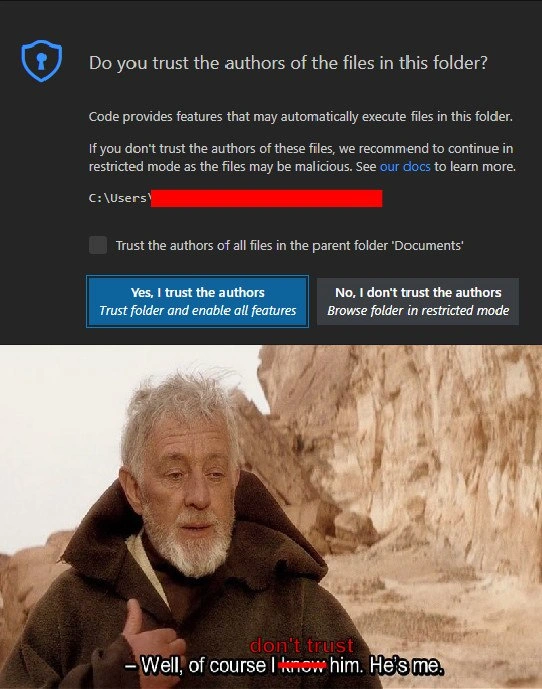
The bottom part of the meme is a scene from Star Wars. The character speaking is Obi-Wan Kenobi, a wise old Jedi. The subtitle in the movie scene is “Well, of course I know him. He’s me.” In that movie moment, Obi-Wan is revealing that he himself is the person someone is looking for (Obi-Wan was living under a pseudonym “Ben” and Luke Skywalker didn’t realize Ben was actually Obi-Wan). It’s a lighthearted “aha!” moment in the film. In the meme, there’s red text added above the subtitle that says “don’t trust”, referencing the VS Code prompt’s wording (“No, I don’t trust the authors”). So effectively, the meme has Obi-Wan responding to VS Code’s question “Do you trust the authors...?” with: “Well, of course I know the author. Don’t worry – it’s me.” Obi-Wan (the developer) is telling the prompt that the person it’s asking about is the developer himself – the one person he can definitely identify.
So the humor here comes from the mismatch between a serious security question and an obvious reality. VS Code is treating the code folder with caution, as if asking “Do we trust these guys who wrote this code?” And the developer (via Obi-Wan’s quote) is like, “I am the guy who wrote the code!” It’s a bit like if your diary app asked you if you trust the person who wrote today’s entry – you’d laugh and say, “I hope so, since that’s me!” This falls under classic DeveloperHumor where the tools we use end up creating awkward or funny situations. It also touches on DeveloperSelfDeprecation: developers often joke about their own code. Sometimes we find bugs or messy parts and quip, “Past me was not very smart.” So there’s an undercurrent joke: Do I trust the author (me) of these files? Hmm, I know I wrote some questionable code after midnight, but malicious? Nah…
For a newer developer, it’s also a tiny lesson in SecurityAwareness. The reason VS Code even has this trust prompt is because not all code is safe. If you download a random project or open code from an unknown source, there could be things hidden in it that try to run on your computer (like scripts that erase files or send your data somewhere). VS Code doesn’t run those automatically until you say “I trust this.” That’s called a security best practice – basically a way to prevent accidents or attacks. In our meme’s case, it’s just funny because the “unknown” code author is actually the user themselves. It’s a bit of an ironic situation: the tool is trying to protect the developer… from the developer’s own code.
Let’s connect it step by step:
- VS Code’s question: “Do you trust the authors of the files in this folder?” – The program is asking if it should treat the code as safe.
- The developer’s realization: “Wait, I’m the author of these files!” – So to them, the question is almost meaningless, of course they trust themselves (at least in terms of not having put a virus in there!).
- Obi-Wan’s quote: “Well, of course I know him. He’s me.” – This famous line is used to answer that trust question in a witty way. It’s basically Obi-Wan (the dev) saying, “I know exactly who wrote this code — me — so yes, it’s trustworthy.”
By using a Star Wars reference (Obi-Wan Kenobi is a pretty universally recognized character), the meme becomes more relatable and fun. You don’t have to know the intricacies of VS Code to chuckle at the idea; even a casual observer might get the gist that something is asking a person if they trust someone, and the person humorously responds that the “someone” is themselves. But as a developer, you likely remember that actual annoying prompt popping up in VS Code, which makes it extra funny. It’s a little jab at how our fancy tools can sometimes appear too cautious.
In summary, the meme is playing on the irony of a security feature: the workspace trust prompt. It shows that sometimes, good security design can lead to humorous moments. The developer’s experience (DevExperience) here involves clicking a “Yes, I trust myself” button, which feels a bit absurd. It’s a shared joke among coders: “My editor is so paranoid, it even asks if I trust my own code!” And using Obi-Wan’s confident, slightly amused line from Star Wars to represent the coder’s reply is a perfect comedic pairing – merging tech humor with pop culture. So if you ever see this VS Code dialog and have to tell your computer “It’s okay, I wrote this code,” know that you’re reenacting a little Obi-Wan moment, and you’re not alone in finding it amusing.
Level 3: Workspace Trust Issues
Every seasoned developer immediately recognizes the scenario: you pull up a project in VSCode, ready to squash some bugs, and suddenly you’re greeted with a pop-up dialog questioning the very integrity of the code you wrote. The meme nails this moment by merging it with an iconic Obi-Wan Kenobi scene. The top half is a screenshot of that real VS Code security prompt: “Do you trust the authors of the files in this folder?” Two options: a big friendly Yes, I trust the authors (enabling all features) and a more suspicious No, I don’t trust the authors (keeping the editor in restricted mode). There’s even a little checkbox to extend trust to the whole parent directory (so you don’t get nagged for every sub-folder). It’s a serious-looking dialog with an almost parental tone: “If you don’t trust these files, please be careful – they could be malicious.”
Now, cue the bottom panel: Obi-Wan Kenobi in the Tatooine desert, confidently declaring, “Well, of course I know him. He’s me.” This is from Star Wars (“A New Hope”), where Obi-Wan reveals that he himself is the old Ben Kenobi Luke has been searching for. The meme maker overlaid the words “don’t trust” in red right above Obi-Wan, linking it to the prompt. The result is brilliant: VS Code asks if you trust the author of the code, and the developer (channeled through wise old Obi-Wan) replies, “Of course I know the author – it’s me!”. It’s a perfect comedic retort.
Why is this so funny to those of us in the trenches of development? Because it’s highlighting a little friction point in our DeveloperExperience (DX). When Microsoft introduced this Workspace Trust feature around 2021, devs understood the intention (safety first!) but couldn’t help giggling or groaning when the prompt appeared for their own personal projects. It’s the digital equivalent of a bouncer asking you for ID to enter your own house. For veteran coders, there’s an extra layer of dark humor: we’ve all had moments we don’t fully trust code that we ourselves wrote, especially if it was hurried or from the distant past. There’s a running joke in our field: “Who wrote this terrible code? …Oh, it was me.” So when asked “Do you trust the author of these files?”, an old-timer might smirk and think, “Trust the author? I remember that 2 AM commit – probably not my finest hour.” The meme taps into that shared self-deprecating truth.
The TrustIssuesInTech tag isn’t just about OAuth or certificates – it’s poking fun at the literal trust issue here: an IDE forcing you to confront the trustworthiness of your own handiwork. It’s a bit of bureaucratic absurdity in the otherwise empowering flow of coding. Imagine a painter who sits down before their canvas, and their easel pops up a sign: “Do you trust the artist who stretched this canvas?” Most would roll their eyes, “Yes, that’s me, thanks.” Experienced devs have a similar eye-roll reaction, often clicking “Yes, I trust the authors” almost reflexively to swat the dialog away. Many of us even went into VS Code settings to disable or auto-accept the trust prompt after the first few times, essentially telling the editor, “It’s my code, stop asking silly questions.”
However, beneath the humor lies genuine SecurityAwareness and a commentary on the balancing act between security and convenience. As a senior developer, you appreciate why this prompt exists: we live in an age of widespread open-source usage and supply-chain attacks. Opening a project from GitHub that you just met is a bit like running stranger’s code on your machine – which can be risky. We’ve heard the horror stories of malicious npm packages or dodgy scripts that can steal environment variables or ransom your files. So VS Code is doing the responsible thing by not automatically trusting every folder. The first time one encounters this feature, it’s actually a SecurityBestPractices lesson built into our editor. It forces a moment of pause – however brief – to consider, “Where did this code come from? Do I recognize it?” In a team setting, you might get a shared repository and that prompt reminds you: maybe scan for anything fishy before hitting the big green trust button.
But in practice, once you’re the sole author or it’s a project you set up, that cautionary message can feel redundant to the point of comedy. This meme shines a spotlight on that everyday dev experience: it’s an inside joke that combines DeveloperHumor with a Star Wars reference (because, let’s face it, Star Wars quotes are the source of infinite memes in tech). It resonates especially with those of us who have been asked one too many times to verify our identity or intentions to our own tools. The Obi-Wan image adds an extra wink: Obi-Wan is a wise, trustworthy mentor figure – the last person you’d doubt. By having him speak for the developer (“I know the code author, thanks, it’s me”), the meme emphasizes how obvious the trust decision is in this case. There’s also an implicit chuckle at the wording “Trust the authors”. In solo projects, authors is plural, but often it’s literally a one-person show. So the dialog might as well say “Do you trust yourself?”
For seasoned devs, there’s a smidge of irony in clicking “Yes, I trust the authors” 100% of the time on machines where we’re pulling code from repos we created. Some might joke that VS Code is having trust issues or is paranoid – like a nervous R2-D2 beeping warnings at Luke even in benign situations. And the subtitle “don’t trust” pasted above Obi-Wan in the meme could hint at the lingering doubt every developer has: Should I always trust myself? Am I unknowingly about to run drop_all_tables.sql from last night’s experiment? 😅 In reality, the trust prompt is about external threats, not our own bugs. But the meme cleverly blends the two interpretations. It’s a senior-level chuckle because it captures that moment where high-level best practice meets low-level annoyance, and it does so with a nostalgic pop-culture twist. Any coder who’s also a Star Wars fan (there are many of us) can’t help but hear Alec Guinness’s voice responding to our IDE, and that’s just pure meme magic.
Level 4: Zero Trust by Default
At the most fundamental level, this meme highlights a security-by-design principle: trust nothing until proven safe. Visual Studio Code’s prompt is an embodiment of the “zero trust” approach in a developer environment. Modern IDEs like VS Code have features (like workspace tasks, auto-loading extensions, or running build scripts) that can execute code from a project as soon as you open it. This introduces a potential risk: if you open a folder containing malicious scripts (say, from a cloned repository or unknown source), the IDE might inadvertently run something harmful on your machine.
To mitigate this, VS Code introduced Workspace Trust, which is essentially a gatekeeper. When you open a new folder, it asks: “Do you trust the authors of the files in this folder?” If the answer is “no”, VS Code enters Restricted Mode – disabling automatic code execution, debugging, and certain extension features. This is analogous to how web browsers block active content from untrusted websites or how operating systems prevent unsigned applications from running without user approval. It’s a mini sandbox for your project. The prompt in the meme is VS Code’s way of establishing a chain of trust: the user (that’s you) must explicitly certify that the code is from a trustworthy source before the editor enables all its powerful features. In security jargon, you become the root of trust for that folder, much like a certificate authority signing its own certificate (a self-signed cert).
The irony here is that the “untrusted” code folder in question is located on C:\Users\...Documents – likely the developer’s own project. From a technical standpoint, VS Code doesn’t actually know who wrote those files; it only knows they’re not already marked as trusted. The meme humorously exposes a corner case in the threat model: the scenario where the code author and the user are the same person. In theory, if you wrote the code yourself on your own machine, the risk of it being malicious is extremely low (assuming you trust you didn’t secretly become a hacker overnight). But the Workspace Trust feature errs on the side of caution for every folder. This approach was born from real concerns: recent supply-chain attacks and malware hiding in open-source projects taught the industry that even familiar-looking code can harbor threats. The SecurityAwareness movement in dev tools is all about not making assumptions – hence zero trust by default.
From a high-level perspective, this safety measure embodies the principle of least privilege: don’t grant code full access until necessary. VS Code’s developers essentially asked, “What if a dev opened someone else’s project? Could that run unwanted scripts on their system?” The answer led to this trust prompt. It’s a bit like a Jedi Council of code security convened to say, “The Force is strong with caution.” By requiring an explicit trust decision, VS Code creates a clear audit point – a conscious moment where you acknowledge the risk (or lack thereof) of the code you’re about to work with. In practice, experienced devs might chuckle at the idea of confirming trust in their own code, but under the hood this is a serious guardrail. It’s trying to prevent scenarios where a developer’s machine gets compromised just by opening a malicious project (think of things like hidden post-install scripts, or a .vscode folder configured to run tasks that could exfiltrate data). Such vectors were not merely theoretical: the rise of complex development ecosystems (with integrated terminals, debuggers, and live servers) expanded the attack surface. VS Code’s trust prompt is essentially saying “This folder could be booby-trapped. Are we in safe territory or should I disarm everything first?”
By implementing a zero-trust model at the IDE level, VS Code joined the broader trend of tightening software supply chain security. Other tools have analogous features: for example, Microsoft Office will open unknown documents in Protected View, browsers will disable certain features on HTTPS errors, etc. In the context of the meme, though, this thorough security stance leads to a comical situation. The developer is both the “suspect” and the “security officer”. From a pure tech standpoint, it’s a logical consequence of the system’s design: no special exceptions, not even for the user’s own home directory, unless previously trusted. This rigorous consistency is normally a good thing in security – but it sets the stage for a perfect punchline when combined with human reality. After all, a veteran coder might wryly note, “I’ve seen my own code break enough times that maybe this caution isn’t so misplaced.” The meme cleverly captures how a robust technical safeguard (born from kernel-level paranoia and security best practices) can feel absurd when your IDE effectively asks, “Are you sure you aren’t the villain here?”
Description
A two-panel meme contrasting a software security prompt with a self-deprecating developer sentiment. The top panel displays a screenshot of the Visual Studio Code 'Workspace Trust' feature, which asks in a dark-themed dialog box: 'Do you trust the authors of the files in this folder?'. It presents two options: 'Yes, I trust the authors' and 'No, I don't trust the authors'. The bottom panel features the famous 'Of course I know him. He's me.' scene with Obi-Wan Kenobi from Star Wars. The original dialogue has been humorously altered: the word 'know' is crossed out in red, and 'don't trust' is written above it, making the line read '- Well, of course I don't trust him. He's me.'. This meme perfectly captures the imposter syndrome and general self-doubt many developers feel. Even when confronted with a security prompt about their own code, their first instinct is one of mistrust, knowing full well the potential for bugs and errors they themselves might have introduced
Comments
9Comment deleted
I have a simple rule for VS Code's trust prompt. If I wrote the code today, I trust it. If I wrote it yesterday, I open it in restricted mode and handle it like a suspicious package from an unknown sender
VS Code: “Trust the authors of this folder?” Me: tough call - my 2011 self is basically an unmaintained third-party dependency with prod access
After 20 years of writing code that barely trusts itself to run correctly, VS Code asks if I trust the author... who happens to be me from last Friday after three beers and a 'quick fix' that definitely won't cause problems in production
Trusting the author of this folder requires trusting me from six months ago - and that guy committed straight to main with the message 'fix'
Every senior engineer's relationship with security warnings: 'Do you trust this code?' Well, I wrote it at 2 AM after six cups of coffee while Stack Overflow was down, so technically I know the author... but trust? That's a strong word. *clicks Yes anyway*
VS Code: Trust the authors of C:\Users\me? After Friday-me's commits, zero-trust says past-me needs a signed tag, two approvals, and a rollback plan
Zero‑trust implemented: the most dangerous third‑party dependency in C:\\Users is Past Me - please sandbox my home directory along with npm
Windows Protected View: guarding you from your own macros since they know Monday commits are malware
Bruh the quality here Comment deleted