Refactoring: A Tragedy in Two Acts
Why is this Refactoring meme funny?
Level 1: The Tidy-Up Trap
Imagine you have a big box of toys that was a bit messy, and you decide to organize it nicely. That’s the good news – now all your toys are arranged perfectly and your room looks great. 😄 But after cleaning up, you go to play with your favorite toy and uh-oh… a crucial piece is missing and the toy won’t work anymore. That’s the bad news. In other words, by cleaning up, you accidentally lost or broke something important.
This meme is just like that. The person tried to “clean up” their code (think of code like the toy box full of pieces). Good news: the code is neat now. Bad news: in the process of tidying, they misplaced something, and the code (their toy) doesn’t work anymore. It’s funny in a “oh no!” kind of way, because the very thing that was supposed to make things better actually made things worse. We laugh because we know they meant well, and we’ve all had moments like this – like when you tidy your desk and then can’t find your homework. The emotion here is a mix of pride in doing something right (cleaning up) followed immediately by the shock and frustration of an unintended mistake (now it’s broken). Even a kid can understand that feeling: you tried to help or improve something, and suddenly you have a new problem you didn’t expect. The meme is a little story that makes us smile and groan at the same time, because sometimes making things “better” can backfire in a silly way!
Level 2: Clean-Up Chaos Explained
Let’s break down the humor and tech terms in this meme for a less experienced developer. The scenario is that a programmer announces they tidied up their code (that’s the “good news”) but then immediately admits the program “no longer works” (that’s the “bad news”). This is funny to developers because it highlights a well-known risk: changing code to make it better can accidentally introduce new bugs.
First off, tidying up the code refers to what we call refactoring. Refactoring means altering the structure or organization of code without changing its intended functionality. For example, you might rename variables to clearer names, break a huge function into smaller ones, remove duplicate code, or simplify a complex section. These are all good practices following Clean Code principles – guidelines that make code more readable and maintainable (think of Clean Code like having good grammar and neat handwriting in an essay). The goal of refactoring is improved CodeQuality: cleaner code is easier to understand, modify, and less prone to errors in the long run.
However, when someone says “I have tidied up the code,” the expectation is that the code should still do exactly what it did before – just in a cleaner way. The meme immediately flips this expectation with “it no longer works.” In plain terms, something in that refactor unintentionally broke the program. A regression bug has been introduced. The term regression in software means a bug that appears after a change, undoing previously working functionality. It’s like taking a step backward. The code was working, we changed something (hoping to improve it), and now a part of it has regressed to a broken state.
Why might this happen? If you’re newer to coding, imagine you have a working program and you decide to “clean it up” or make it “better” without fully understanding what every piece does. It’s easy to accidentally remove or alter something important. For instance, say you have a function that works but looks messy. If you rewrite it in a simpler way, you might inadvertently skip a step that you thought was unnecessary but actually was crucial for certain inputs. Oops! Now the function doesn’t always work, even though the code looks nicer. This is essentially what we suspect happened in the meme. The developer likely made changes thinking, “This won’t affect the outcome, it’s just cleaner,” and then found out that those changes did affect the outcome.
Another key part of this scenario is the lack of adequate tests. Tests are pieces of code that automatically check if your other code works correctly. Unit tests, for example, test individual functions with various inputs to ensure they return the expected results. When refactoring, good practice is to have a suite of tests to run after you make your changes. If any test fails, it signals that your changes altered something they shouldn’t have. In the “good news/bad news” situation, it sounds like either there were no tests, or the tests weren’t thorough enough, because the developer only realized “it no longer works” when they presumably ran the program or saw it fail in action.
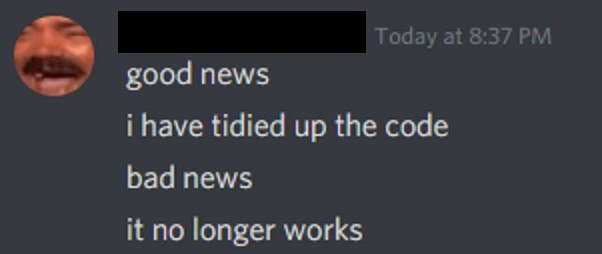
The meme is shown as a Discord chat screenshot, which gives it a very relatable, conversational feel. Discord is a chat app (like Slack or Microsoft Teams) popular among gamers and also used by many developer communities for real-time communication. The text in the image looks like one user sending multiple messages: first “good news”, then “i have tidied up the code”, then “bad news”, then “it no longer works”, each on a new line as if they hit enter four times. This format is a comedic technique. It mimics someone telling a story with a pause: you can almost hear the drumroll between the “good news” and “bad news”. It’s actually a known joke structure outside of coding too – sometimes you hear jokes that start with “The good news is… The bad news is…”. Here it’s applied to a programmer’s update. The good_news_bad_news_format sets you up to expect something unfortunate after the good news, but you don’t know what it is until you read that final line. When the reveal is “it no longer works,” it’s both surprising and ironically unsurprising to developers, which makes it funny. We’ve learned to be a bit skeptical when someone says “I just cleaned up the code,” because often there’s a “but…” coming, exactly like in this meme.
Now, from a junior developer’s perspective, what can we learn from this? Firstly, refactoring is important – you do want to keep your code tidy. But you have to do it carefully. Always ensure the program still behaves the same after each small change. It’s wise to test frequently during a refactor. Even if you don’t have automated tests yet (maybe you haven’t learned about those or written them), you can run the program or that part of the program with sample input to make sure it still works as expected. In a professional setting, developers write tests specifically to guard against these regression bugs. If a test fails after your “tidy up,” you caught the problem early. Without tests, you might only find out later when a user or another part of the program hits the broken piece – which can be much more serious (imagine discovering the error in front of a customer or on the live site!).
The mention of BugsInSoftware is general: a “bug” is any flaw or error in the code that causes it to produce incorrect or unintended results. Bugs can creep in through many ways – typos, incorrect logic, unhandled situations – and here the bug was introduced during a clean-up operation. Debugging_Troubleshooting is what comes next: that’s the process of finding out why “it no longer works” and fixing it. The meme doesn’t show it, but you can bet the developer who sent those messages is now poring over the changes they made to pinpoint which part broke the functionality. Debugging is a skill you’ll grow with experience – essentially you isolate the change and test your assumptions until you discover the root cause of the bug, then correct it.
It’s also worth noting the human side: the meme’s format shows the developer communicating this in a funny, concise way to others (maybe teammates). In real life, if this happened to you, it’s good to be honest like this. Engineers often appreciate when someone owns up to a mistake quickly (“bad news: I broke something”) because then the team can collaborate to fix it rather than waste time. The humor (framing it as good news/bad news) softens the admission – you’re saying “I messed up” without beating yourself up, which is healthy in a team environment. Everyone has been there. In fact, senior devs will usually respond with something like, “Ah, the classic refactor regression! Let’s see what happened.” They know this is a common pitfall.
In summary, this meme for a junior developer is an example of what happens when theory meets practice. Theory: You should keep code clean and well-structured (yes, good news). Practice: if you change code without fully understanding or testing it, you might break things (uh-oh, bad news!). The key takeaways are: value clean code but respect the functionality that code provides; and always verify your changes with tests or careful checking. It’s a friendly reminder that even improvements need to be tested. And if things go wrong, well, it happens – every developer has broken something at some point by doing what they thought was an improvement. It’s almost a rite of passage. The meme just captures that moment in a straightforward, humorous way that many can relate to, whether you’re new to coding or have years of experience.
Level 3: Refactoring Regression Rhapsody
Seasoned developers will smirk at this meme, having learned (often the hard way) that “No good deed goes unpunished” in coding. The good news/bad news format here is a tongue-in-cheek dramatization of a too-familiar scenario: You proudly announce, “Good news: I cleaned up the code!” – following the holy grail of Clean Code principles – only to follow up with, “Bad news: it no longer works.” This one-two punch encapsulates the rollercoaster of emotions during a refactor: initial optimism and pride, swiftly followed by dread and facepalming as you realize your changes introduced a regression bug. It’s a classic refactor_breaks_code story — the cleanup vs functionality tradeoff coming to bite. Every senior dev has war stories of a “harmless” code tidy-up spiraling into a late-night debugging marathon.
Why is this situation so funny (and painful)? Because it satirizes the disconnect between code quality and software functionality. We all strive for well-structured, high-quality code that’s easy to maintain. Messy code (full of confusing logic or redundant bits) begs to be refactored — it’s a siren song for any developer who cares about craftsmanship. In theory, after a good refactor, the codebase should be prettier and all tests still green. But reality often has other plans. Perhaps that tangled, “ugly” code was delicately balancing some edge cases or timing issues that weren’t obvious. Clean it up without fully understanding those hidden quirks, and boom: regression. The software that was working fine this morning is now misbehaving, or outright failing, after your well-intentioned changes. It’s equal parts tragic and comic: we improved the code’s readability, but sacrificed its reliability. It’s the programmer’s equivalent of cleaning your house so hard that you accidentally knock down a load-bearing wall.
Common causes of these “tidy-up catastrophes” read like a bugs rogues’ gallery that any debugger would recognize:
- Overzealous Simplification: Maybe you spotted a clever one-liner to replace a bulky function. Great! Except the original “ugly” code had a crucial null-check or type conversion. The new streamlined version? It’s missing that safety net. Result: A crash or wrong output where the old code quietly handled things.
- Renaming or Reorganizing Gone Wrong: You diligently renamed variables and split large functions into smaller ones (a hallmark of refactoring for clarity). But you missed updating one reference, or changed the initialization order. Suddenly, some variable is always empty or an initialization race condition appears. The code looks cleaner, but now it’s acting crazy.
- Removing “Dead” Code that Wasn’t Dead: That block of code looked unused or redundant, so you deleted it to tidy things up. Surprise! It was actually there to handle a rare edge case or was triggered via reflection/obscure configuration. Now that it’s gone, those edge cases cause errors. Lesson: yesterday’s weird workaround was today’s critical logic.
In essence, the meme is poking fun at regression bugs – specifically the kind of regression introduced by refactoring. A regression means something that used to work has now stopped working (it “regressed” to a broken state). Here, the regression is self-inflicted by a code cleanup. The developer’s upbeat “good news” setup is instantly undercut by the “bad news” punchline, which is classic gallows humor for development teams. It’s the kind of message you might actually see in a team’s chat: a dev trying to soften the blow by framing their mistake with a bit of humor. The Discord chat screenshot style adds to the authenticity – many of us have either sent or received a message just like this on Slack or Discord after deploying a change that didn’t go as planned. The deadpan presentation (white text on a neutral dark background, no fancy formatting) makes the comedic timing land perfectly. It’s as if the person delivers the good news in one breath, then after a beat, drops the bad news, all in the same monotone style. That contrast between the content (dramatic shift from celebration to oops) and the calm, plain chat format is pure comedic effect. You can almost hear the collective groan (and chuckles) from the team reading it.
Beyond the format, there’s a wealth of developer experience baked into this meme. It’s implicitly referencing our industry’s mantra “If it ain’t broke, don’t fix it,” often muttered by the cynical veteran types. Why? Because we know even a well-intentioned fix can open a Pandora’s box of new bugs. Refactoring is supposed to be done in small, controlled steps with lots of testing at each step – that’s the wisdom imparted by folks like Martin Fowler (who literally wrote the book on Refactoring) and by hard lessons on past projects. Fowler’s first rule of refactoring can be summarized as: don’t change code without tests to verify you didn’t break anything. Without adequate unit tests or integration tests, a big code cleanup is like walking a tightrope without a safety net. This meme’s “bad news” line essentially says “…and we fell off the rope.” The codebase face-planted because either tests were absent, or they existed but the team didn’t run them (or they only covered the obvious cases, missing the edge case that just blew up). The result? An instant software bug in functionality that presumably worked fine before the cleanup.
Every experienced programmer can empathize with the ensuing scenario: fire up the debugger, comb through the recent diff (git diff becomes your best friend), and frantically figure out what part of the “tidying” caused the break. It’s often a humbling experience. Sometimes it’s immediately obvious (“Oh, I accidentally deleted that initialization, oops”), but other times it’s a needle-in-haystack hunt, especially if the refactor was large. The “good news/bad news” announcement might even be that moment of admission to your team: “I thought I was improving things, but now we have an outage/bug, help!” It’s both a confession and a call for assistance, wrapped in humor to ease the tension.
We also see a bit of CleanCodePrinciples irony here. Clean Code advocates for readability, simplicity, and elegance. Achieving those is undeniably good for long-term maintenance. However, this meme underscores a dirty secret: sometimes the quickest way to break a stable system is to “clean it up.” Real-life codebases often contain hidden tribal knowledge – unwritten assumptions and subtle fixes layered over time. When a new developer or a well-meaning team member cleans up that code, they might unknowingly strip away these hard-won fixes. The code looks nicer (good news!), but loses some crucial logic in translation (bad news!). It’s like rearranging a puzzle so the pieces look neatly aligned, but now some pieces no longer actually fit together. The net effect is negative, despite the best intentions.
For a senior engineer, there’s also humor in how universal this scenario is. It spans languages and tech stacks. Maybe you moved a check in a C++ codebase and ended up with a nasty memory bug, or you refactored a Python script for clarity and introduced an off-by-one error, or perhaps you aggressively DRY’d up a bunch of JavaScript functions only to find out one of them had a slightly different behavior for a reason. Different technology, same facepalm. The CodingHumor here comes from shared pain – it’s funny because we’ve all broken something while trying to polish it. It unites developers in that “ugh, been there, done that” feeling. Seeing it distilled into such a concise Discord message is both cathartic and amusing.
To ground this in a concrete example, consider a snippet of code before and after a refactor:
// Ugly but works:
let total = 0;
for (const n of ["1", "2", "3"]) {
total += Number(n); // explicit conversion from string to number
}
console.log(total); // outputs 6
// Refactored "cleaner" version (with a subtle bug):
const totalClean = ["1", "2", "3"].reduce((sum, n) => sum + n, 0);
console.log(totalClean); // outputs "0123" instead of 6, oops!
In the original, somewhat clunky loop, the developer explicitly converted strings to numbers. In the refactored version, they used a fancy array method reduce for brevity – but forgot that in JavaScript, adding a number to a string results in string concatenation (joining strings) rather than numeric addition. The new code is shorter and looks cleaner, but it silently broke the functionality, producing "0123" (string) instead of 6 (number). RegressionBugs like this lurk in many refactors: a tiny oversight leads to the program doing the wrong thing. If you had a test checking the sum function’s output, it would scream as soon as you ran it. Without tests, you discover the bug when something visibly fails – often at the worst possible moment.
The meme’s punchline nails this exact kind of situation. It highlights the importance of debugging_troubleshooting skills as the immediate next step. The moment after the “bad news: it no longer works” is posted, you can practically sense a flurry of activity: checking error logs, running git blame on the changed files (and yup, seeing your own name), maybe pinging a coworker: “Hey, I refactored the payment module and now payments are not going through… any idea what I might've broken?” It’s comedic to recount later, but in the moment it’s a little panic-inducing. And that’s another layer of this meme – laughing at our own folly is a coping mechanism in tech. We joke about it in a Discord chat screenshot format to take the sting out of the very real stress such bugs cause.
Organizationally, this scenario can also hint at process issues. In an ideal workflow, code cleanup would go through code review and testing. A diligent reviewer might catch the issue (“Are we sure this still works?”) and you’d run automated tests to verify no breakage. If this process was skipped or rushed, well, the bad news part writes itself. Teams often internalize these lessons: after a few “tidy up” fiascos, they enforce stricter policies like regression testing or require that refactoring commits don’t coincide with feature changes to isolate potential problems. Some even joke about “refactoring Fridays” being banned (nobody wants a surprise production outage over the weekend due to a cleanup that couldn’t be fully tested in time). The presence of this meme suggests a shared cultural understanding: refactoring is necessary, but oh boy can it backfire hilariously when done carelessly.
Ultimately, the “good news/bad news” meme format perfectly frames a mini story that any developer can immediately fill in with their own details. The good news is the aspirational part – following best practices, improving code quality. The bad news is the reality check – something went wrong, and now we have a bug to fix that wasn’t there before. It’s a comedic summary of countless commit-and-regret experiences. The fact it’s delivered in a casual Discord message style just makes it too real. It feels like a screenshot ripped from a dev team’s private channel after someone’s nightly refactor build broke the app. And despite the slight cringe, we laugh because at some point, we were all that person posting a sheepish “bad news, it broke” update. In the grand rhapsody of software development, refactoring that causes a regression is a recurring motif – a bit tragic, a bit comic, and always instructive. This meme captures that in one breath and reminds us: keep your test suite close and your rollback plan closer.
Level 4: When Clean ≠ Correct
At the deepest level, this meme highlights a fundamental challenge in software engineering: ensuring that a refactoring preserves the program’s original semantics (its meaning and behavior). In theory, tidying up code should not alter what the code does. A correct refactor is essentially an identity transformation – the code’s structure changes but its externally observable behavior stays the same. In formal computer science terms, we want observational equivalence: for all inputs and conditions, the “cleaned” code yields identical outputs and side effects as the old code. However, determining that two different versions of code are truly equivalent is a non-trivial (often undecidable) problem. This touches on the realm of formal verification and program semantics. Without a rigorous proof or exhaustive tests, a developer might believe the cleaned-up version is the same, yet subtle differences can creep in. In practice, manually proving semantic invariance (ensuring our tidy code hasn’t changed any required behavior) is about as easy as solving the Halting Problem on a whiteboard – not gonna happen for any complex system.
This is why robust testing and mathematical rigor have become the safety net for refactoring. High-reliability systems (think aerospace or medical software) sometimes use formal methods or model checking to guarantee that a code transformation didn’t break critical invariants. For everyday software, though, developers rely on extensive suite of unit tests, integration tests, and static analysis tools to catch any change in behavior. Essentially, our industry has acknowledged that humans refactoring code are fallible, and we lean on automation to verify we didn’t unintentionally alter logic. Without such safety measures, refactoring is a gamble – you're trying to enforce clean code principles while betting that you'll maintain every tiny assumption the old code made.
The humor in the meme’s good news/bad news delivery is underpinned by this theoretical ideal versus reality gap. The good news announces the intent (a semantic-preserving cleanup), but the bad news reveals the truth: something in the translation went awry, violating an assumption or an invariant the original code quietly depended on. In academic terms, the refactoring was not semantics-preserving after all. It’s a lighthearted nod to the complexity behind code correctness. Even though refactoring is supposed to make code better (and by definition not change its functionality), we often end up in the scenario of “improved the code, destroyed the program.” The contrast is funny because it exposes how maintaining correctness is a delicate dance: one misstep in preserving invariants or understanding implicit requirements, and the whole program waltz falls flat. If we zoom out, it’s highlighting the gulf between the clean, provable correctness we strive for and the messy reality of coding by trial-and-error. In short, under the hood of this simple meme lies a truth every PL theory student and veteran engineer knows: proving code correctness (even after a “harmless” refactor) is hard, and without that proof, “tidy” and “correct” aren’t guaranteed to coincide.
Description
A screenshot of a chat message, likely from Discord, captures a developer's all-too-common refactoring experience. The message, from a user with a laughing man as a profile picture, is broken into four lines, delivering a classic 'good news/bad news' joke. It reads: 'good news', 'i have tidied up the code', 'bad news', 'it no longer works'. The dark-themed chat interface highlights the stark, humorous confession. This meme perfectly encapsulates the peril of refactoring: the noble attempt to improve code quality by cleaning it up, which results in unintentionally breaking its functionality. For experienced engineers, it's a deeply relatable scenario that highlights the critical importance of a robust test suite to prevent regressions during such maintenance tasks. The humor lies in its painful honesty
Comments
9Comment deleted
The five stages of refactoring: 1. This is messy. 2. I can fix this. 3. This is much cleaner. 4. Why are the tests failing? 5. It was never messy
Silver lining: with the refactor in place our cyclomatic complexity hit 0 - turns out code that never executes is incredibly maintainable
After 20 years in this industry, I've learned that 'tidying up the code' is just a euphemism for 'discovering why the previous developer left those seemingly unnecessary lines that were actually load-bearing comments holding the entire distributed system together through sheer force of undefined behavior.'
Ah yes, the refactoring paradox: you finally achieve that pristine, DRY codebase with perfect separation of concerns and SOLID principles - only to discover you've abstracted away the one critical side effect the entire system depended on. It's the software equivalent of organizing your toolbox so well you can no longer find the screwdriver when the production server is on fire. Sometimes 'working' beats 'elegant,' and that's a lesson every senior engineer learns exactly once per major refactor
Refactor complete: cyclomatic complexity down, uptime down - the “duplicate” branches were three subtly different business rules
Refactoring without tests is just renaming the incident and letting production do QA
Refactoring without tests: turning 'barely works' into 'elegantly fails' - the senior dev's minimalist masterpiece
me irl ... then spending 3 days trying to fix the issue Comment deleted
It turns out that the reason that problem was fixed before is the same reason why code was messy Comment deleted