Skip to content
DevMeme
1847 of 7435
The Inevitable Pre-Release Runtime Error
Bugs Post #2055, on Sep 16, 2020 in TG

The Inevitable Pre-Release Runtime Error

Why is this Bugs meme funny?

Level 1: Broken Toy Surprise

Imagine you’ve spent a whole week building your favorite LEGO castle. Every day leading up to the big show-and-tell at school, the castle stands tall without any problems. You even tell your friends, “Look, it’s so sturdy and perfect – nothing is wrong with it!” But then, the night before you’re supposed to present it, suddenly CRACK – the castle collapses into pieces for no obvious reason. You’re shocked and frustrated, maybe even yelling, “But it was perfectly fine yesterday!”

This meme is just like that story, but for a computer program. The developer (kind of like the kid building the LEGO castle) thought their software was working perfectly (no pieces missing, no problems) all week. They were happy and relieved. But right before the important day (launch day, when the program is supposed to be shown to everyone), something goes very wrong. The program crashes, which is like the LEGO castle breaking apart. The person in the last picture is making a rage face – that’s a goofy drawn face people use on the internet to show extreme anger or frustration, kind of like a big “NOOOO!” moment.

So the funny (and sad) part of the meme is that feeling: everything was great, and at the last second it fell apart. Just like you’d feel upset and panicked if your toy broke right before you wanted to show it off, programmers feel the same way when their project has a big problem right before release time. It’s a mix of surprise and panic. We can laugh at the picture because we know this exact situation is super common – things love to break at the worst possible time, and everyone can relate to that “Oh come on, not now!” feeling.

Level 2: Pre-Release Panic

Now let’s break this down for a less experienced developer. First off, what’s going on in this meme? We have a developer character working on a project with a big release deadline looming. “Go-live” or release means the time when the software will be delivered to users or put into production. In the story told by the meme panels, everything seems fine in the days leading up to the deadline (no errors, no issues – the developer is happily typing and saying things like “Yes, the code is running great!”). This gives the impression that the program has no bugs initially. A bug is a flaw or error in the software code that causes it to produce incorrect results or to behave unexpectedly.

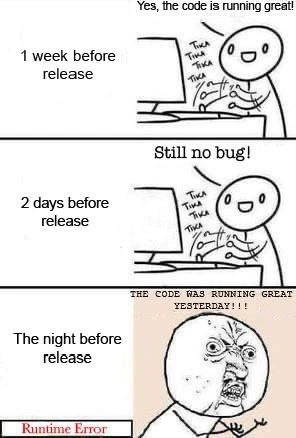
In the first panel (“1 week before release”), the developer is calm and cheerful, suggesting that a week out from the deadline, all tests pass and the application is working. The second panel (“2 days before release”) shows the developer still in a good mood, saying “Still no bug!” – which means after further testing or development, they haven’t encountered any problems. This is portrayed with the character typing away (tika tika tika is the onomatopoeia in the image for keyboard typing sounds). At this point, the developer believes the software is stable. You can almost sense a bit of relief – maybe they’re thinking they are ahead of the game with no issues to fix.

Now, the final panel (“The night before release”) is where it all goes wrong. We see a dramatic switch: instead of the happy round-faced character, there’s the famous Rage Face (a meme face with a furious expression, mouth agape in a scream). The text above him shouts: “THE CODE WAS RUNNING GREAT YESTERDAY!!!”. This is essentially the developer yelling in frustration. And below, there’s a red banner with the words “Runtime Error” in it – indicating that the program has just crashed or thrown an error during execution.

Let’s clarify what a runtime error is: it’s an error that occurs when the program is running (as opposed to a compile-time error which happens when you’re building the program). A runtime error can cause the program to crash or stop unexpectedly. Common examples include things like trying to divide by zero, referencing an array index that doesn’t exist (out-of-bounds access), or null reference errors (e.g., calling a method on something that’s None/null). For instance:

# Example of a runtime error in Python:
numbers = [1, 2, 3]
print(numbers[5])  # IndexError at runtime, because index 5 is out of range for this list.

In the context of this meme, the RuntimeError banner implies the developer’s program threw an error like this right when they tried a final run or deployment. It’s the stereotypical unexpected_crash at the worst time. Everything seemed fine during development and testing, but perhaps some edge case or overlooked scenario caused a failure at the last minute. This leads to a state of panic the night before release – something many developers have experienced. We call this kind of frantic, last-minute troubleshooting “firefighting” or being in crunch time, since you might have to stay up late (even all night) to diagnose and fix the problem before the scheduled release time.

The meme captures ReleaseAnxiety perfectly: earlier in the week the developer was probably feeling confident, but as any release day draws near, there’s natural deployment anxiety – that little worry, “What if something goes wrong at the last second?” Here it did go wrong, very dramatically so. The phrase “The code was running great yesterday!!!” is something you might literally hear a developer exclaim. It’s basically saying: “I swear nothing has changed, it was all working, how on Earth did it break now?!” There’s disbelief and frustration. It highlights the often fickle nature of software: a program can appear stable and then boom – a last-minute bug emerges without warning (or so it seems).

In reality, such bugs usually were there all along or were introduced by a recent change. Some common reasons why a bug might only show up the night before release include:

  • Insufficient Testing: Perhaps the code wasn’t tested under real-world conditions until just now. The developer’s tests might have been too shallow, missing the specific scenario that causes the crash. For example, maybe they never ran the program on a production-like dataset or tried a particular user action that triggers the error. It’s like only ever driving your car in an empty parking lot and then discovering an issue the first time you take it on the highway.
  • Environment Differences: This relates to the classic “code_runs_on_my_machine” problem. The developer’s machine might have certain settings or versions that are forgiving, whereas the deployment environment is slightly different. For instance, a library version might differ, or an environment variable is missing in production, causing a crash. Everything literally “ran great yesterday” on the dev’s own computer, but not in the staging/production setup.
  • Last-Minute Changes: It’s also possible a code change was made a day or two before release (maybe to add a small feature or fix something minor) and it inadvertently introduced a new bug. If that change wasn’t thoroughly tested (maybe due to DeadlinePressure, people often skip tests when in a hurry), the bug might only come to light during a final full run. This scenario is common: you think you’re done, but then you tweak one more thing (“Surely this won’t break anything…”) and that ends up breaking everything.

The categories of the meme (Bugs, Deadlines, Debugging_Troubleshooting) tell us what’s at play: a bug (runtime error) happening just before a deadline (go-live release), leading to an intense debugging session. The tags like ReleaseDeadlines, ReleaseAnxiety, CrunchTime all paint a picture of a stressed developer facing a ticking clock. “Crunch time” is especially relevant – it’s slang for the intense work period right before a project’s deadline where everyone is working extra hard (often overtime) to finalize things. In this case, instead of calmly polishing the product, the developer is suddenly thrown into urgent bug-fix mode with very little time to spare. That’s pretty much a nightmare scenario for anyone in engineering.

From a newcomer’s perspective, the meme is also a cautionary tale: it humorously warns that one should be prepared for surprises. Even if your program seems to have no bugs, it’s wise to double-check and test thoroughly (different conditions, lots of scenarios) before declaring victory. Also, having good debugging skills and nerves of steel helps when that pre_release_panic hits. The rage_comic style face with the caption basically communicates how it feels emotionally: you’re upset, shocked, and desperate, because something you were so sure about just proved you wrong at the worst possible time. It’s both funny and painful because it’s a very human moment in programming – when confidence turns to chaos, and you have to drop everything to troubleshoot.

In summary, this meme uses a simple three-panel story to highlight a lesson every developer learns: don’t celebrate too early, and always be ready for the “surprise bug.” It’s funny to us because we’ve either been that character or dread being them, yelling at the screen “but it worked yesterday!” while a critical error message stares back. The next step for that poor developer in real life? Likely debugging_at_midnight: reading error logs, adding print statements, or using a debugger to trace what went wrong, and frantically patching the code so the release can still happen. It’s a scenario that turns into a war story later (“We had a runtime error at 2 AM right before launch, but we fixed it just in time!”), and in the moment, it’s pure stress – which is exactly what the meme humorously encapsulates.

Level 3: It Worked Yesterday

At the highest technical level, this meme illustrates the inevitable collision of optimism with reality in software development. It’s practically a rite of passage: a program that passed every test a week ago suddenly hits a runtime error at the worst possible moment. Seasoned engineers recognize this scenario as a manifestation of Murphy’s Law in a codebase (if a bug can surface, it will – and always right before a deadline). The humor bites because it’s so true: after days of saying “No bugs, everything looks good,” the code decides to implode just before go-live. This pattern is painfully familiar in large systems where unseen issues lurk until a critical event triggers them.

Why is this scenario so common? Often, it’s because of unexercised edge cases or the infamous “works on my machine” phenomenon. The code may have been running great in the developer’s local environment (perhaps with slightly different settings, data, or timing) but fails in a staging or production-like environment – a classic case of environment drift. For example, the developer’s machine might have a configuration or library version that masks a bug, whereas the deployment environment reveals it. This leads to the dreaded late discovery of a defect, sometimes called a last_minute_failure.

From an experienced perspective, several technical culprits could be at play:

  • Hidden State or Data Conditions: The code might have been fine with small test inputs but chokes on real production data. Imagine a memory leak or an off-by-one error that only crashes after extended runtime or at a specific data size. The bug was there all along, just not reaching the breaking point until now (like a time bomb in the code).
  • Time-Sensitive Bugs: Perhaps the bug is time-dependent – e.g., a date handling error that only triggers near midnight or on a specific date. It’s almost comedic how many unexpected_crash instances happen because of something like a timezone difference or an end-of-month date calculation that wasn’t tested. The night before release could literally mean the code hit a new date and boom: NullPointerException or equivalent runtime_error_pop_up.
  • Recent Changes or “Fixes”: In many real stories, a well-meaning last-minute change (maybe to “clean up” code or address a minor issue) slips through with insufficient testing. This introduces a new bug that wasn’t caught in earlier tests. So one minute the dev is thinking “still no bug!”, and after that final commit… everything catches on fire.

The timeline format of the meme (a timeline_meme showing 1 week before, 2 days before, and the night before release) amplifies the irony. It’s like a slow-motion train wreck every dev recognizes. One week out, confidence is high. Two days out, still all clear – maybe even a touch of ReleaseAnxiety but also hope that things are truly fine. But any greybeard coder knows CrunchTime isn’t over until it’s shipped. The meme’s punchline is that climatic moment of pre_release_panic: the code that “was running great yesterday!!!” is now faceplanting with a big fat Runtime Error banner. The final panel’s raging face (a classic rage_comic expression from internet meme lore) is basically every developer’s soul when a production crash surfaces at 11 PM. It screams the subtext: “Why now? What changed? It worked yesterday!” – a phrase uttered in countless war rooms and Slack channels during late-night debugging.

In this darkly comic scenario, all the DeadlinePressure and ship_it_pressure come crashing down. You’ve got managers pacing because the go-live is hours away, and the code that was supposed to be flawless is misbehaving. This is classic release_day_drama. The senior perspective here might chuckle but also wince, because we’ve survived this kind of fire-drill. It satirizes the shared industry experience where even the best teams sometimes miss something until the zero hour, triggering frantic BugFixing mode. You can almost smell the coffee and hear the furious typing of a developer debugging_at_midnight, racing to squash the bug before the launch can proceed.

One could even say the meme underscores a silent rule in software: don’t celebrate too early. Those “Still no bug!” moments can be deceiving. Any veteran will tell you that BugsInSoftware have a knack for hiding until they cause maximum ReleaseAnxiety. It’s why practices like comprehensive testing, code review, and continuous integration are so critical – they’re our only defense against the gremlins that cause these late-stage runtime failures. Because if you skip those, the inevitable runtime error will find you, and usually at the worst possible time. In short, the humor lands because it’s a pain that cuts across languages, stacks, and decades: no matter how advanced our tools get, we still occasionally end up screaming at a screen "It ran fine yesterday!" while the release clock ticks away.

# Murphy's Law in pseudo-code: the bug waits for the worst time to strike
if hours_until_release < 12:  
    raise RuntimeError("Surprise! Runtime error just before release.")  

(Above: a tongue-in-cheek representation of how the universal laws of debugging feel. It’s as if the software itself checks the schedule and says, “Oh, release is tomorrow? Time to break!”)

Description

A three-panel rage comic illustrating the predictable chaos before a software release. In the first panel, captioned '1 week before release,' a happy stick figure developer is typing, saying 'Yes, the code is running great!'. The second panel, '2 days before release,' shows the same happy developer, now stating, 'Still no bug!'. The final panel, 'The night before release,' depicts a dramatic shift: at the bottom, a 'Runtime Error' message is displayed, and the developer's face has turned into the iconic 'Y U NO' rage face, screaming in frustration, 'THE CODE WAS RUNNING GREAT YESTERDAY!!!'. This meme captures the universal and painful developer experience where a project appears stable right until the final moments before deployment, at which point a critical, unforeseen error emerges. It's a humorous take on Murphy's Law in software development, where if something can go wrong, it will go wrong at the worst possible time, turning a developer's confidence into last-minute panic

Comments

7
Anonymous ★ Top Pick Staging environments are like a Faraday cage for bugs; they provide a false sense of security until you expose your code to the raw, chaotic radiation of the production environment
  1. Anonymous ★ Top Pick

    Staging environments are like a Faraday cage for bugs; they provide a false sense of security until you expose your code to the raw, chaotic radiation of the production environment

  2. Anonymous

    “Works on my machine” ships with a hidden TTL - 24 hours before go-live it silently CNAMEs to RuntimeError

  3. Anonymous

    After 20 years in this industry, I've learned that code stability follows an inverse square law with proximity to release date - and the only constant is that production will always find that one edge case your 10,000 unit tests somehow missed

  4. Anonymous

    The three stages of release confidence: 'We're shipping on time!' → 'We're probably shipping on time' → 'Who changed the environment variables and why is prod using a different JVM version than staging?' This meme perfectly captures Murphy's Law of Software Releases: the probability of discovering a critical bug is inversely proportional to the time remaining before deployment, and directly proportional to the number of stakeholders who've already been promised the release date

  5. Anonymous

    Heisenbugs thrive unobserved in dev - release observation collapses their wavefunction into runtime errors

  6. Anonymous

    Every schedule hides a Heisenbug that only reproduces in the release build with -O3, UTC rollover, and last week’s config - ‘works on my machine’ is not an SLA

  7. Anonymous

    Green all week because staging had mocks and FEATURE_FLAG_EVERYTHING_WORKS=1; the night before release, prod reads the real config, hits a legacy NULL, and the runtime explains why “worked yesterday” isn’t a test

Use J and K for navigation