The Infinite Loop of Unresponsiveness
Why is this Bugs meme funny?
Level 1: Helper Faints Too
Imagine you’re playing with a toy and it suddenly breaks – you’re upset and ask an adult for help. The adult comes in all confident, saying “Don’t worry, I’ll fix it!” They start looking at the toy very seriously to figure out what’s wrong. But then, in a funny turn of events, the helper gets into trouble too: maybe they accidentally step on a piece of the toy, slip and fall down! Now the toy is still broken and the poor helper is on the floor saying, “Oh no, now I need help!” 🙈 The situation went from one problem to two problems, just when you thought help was on the way. It’s silly and unexpected – the person who was supposed to solve the problem ended up with a problem themselves. That’s exactly what this cartoon is joking about. The computer’s big boss (the operating system – like the adult in this story) tried to fix a frozen program (the broken toy) and then it froze up too. It’s funny in the comic for the same reason it’s a little funny imagining a helper slipping on the job: nobody expects the rescuer to also have an accident. So the feeling you get is a mix of “Oh no!” and “Haha, what a mess!” – that’s why we find it humorous. In simple words, the one who came to help had a whoopsie as well, and now everyone’s in the same boat of trouble.
Level 2: Not Responding 101
Let’s break down the scene in simpler terms. We have a user, a program, and the operating system. The Operating System (OS) (like Windows, macOS, Linux – in this comic it’s clearly riffing on Windows) is the main software that manages your computer and runs all your programs. Now, sometimes you’ll see a message saying a program is “not responding.” This means the application (it could be a game, a web browser, anything) has frozen up and isn’t doing what it’s supposed to. On Windows, when an app freezes, the window might turn white and you’ll get that famous title bar message: “(Not Responding)”. Essentially, the app is hung (stuck) – maybe it got overwhelmed or hit a bug (SoftwareBugs can cause programs to freeze or crash unexpectedly).
When this happens, Windows often pops up a dialog box offering to “Check for a solution.” That’s what we see in the second panel: the OS character (with the monitor for a head) cheerfully says it will look for a fix. What does “checking for a solution” actually do? Typically, the OS will try to gather information about why the program froze. It might create an error report (like notes about the crash, maybe the computer will send those to Microsoft HQ to see if the issue is known). It could also search a database to see if this problem has happened before and if there’s an update or patch available. It’s essentially the OS playing detective. However, in real life, this process rarely finds any immediate fix. Usually, after a minute, you’ll get a message like, “No solutions found” or it might just give you the option to close the program. It’s more about sending crash data to Microsoft than saving your document in that moment.
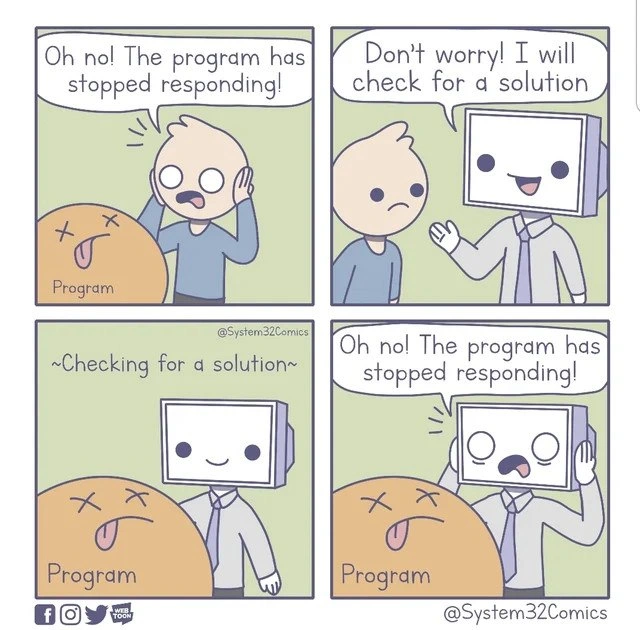
In the comic, panel 3 shows the OS with a blank, neutral face and the words "Checking for a solution" hovering above. This is a cute way to depict that in-between state where the OS is busy searching (or appears to be). The program (the orange blob labeled “Program” with X’s for eyes, meaning it’s basically dead) is still out cold. The user is just waiting, hopeful but anxious. Now, panel 4 is the twist punchline: the OS turns to the user, panicking, and exclaims, “Oh no! The program has stopped responding!” again. In other words, the OS itself froze or got confused while trying to fix the original problem. The “doctor” trying to save the patient caught the same illness, so to speak. In tech terms, the os_hang tag applies – even the operating system’s helper process hung up.
So what’s being parodied here? It’s a windows_dialog_parody of that common situation where Windows tries to deal with a frozen app. The comic takes a jab at the fact that Windows’ attempt to help can be pretty useless – we’ve all seen that checking_for_a_solution progress bar go nowhere. The phrase “joins the crash party” in the title is a humorous way to say that the OS decided to crash as well, instead of actually solving anything. It’s like if you called an electrician because your lights went out, and the electrician showed up and their flashlight immediately died – now both of you are in the dark! That’s essentially a cascading_failure in simple terms: one failure led to another. The meme highlights a slice of developer humor: even our trusted systems can faceplant when trying to handle a problem. For a junior developer or someone new to these concepts, it’s a lighthearted introduction to the idea that computers don’t always fail gracefully. Sometimes the thing that’s supposed to fix the error errors out! And while that’s frustrating in real life, seeing it depicted as a cartoon OS character freaking out is pretty funny and very RelatablePain for anyone who’s sat there waiting for Windows to magically unfreeze their app.
In summary, Panel 1 shows the user and the crashed program (orange blob with “X” eyes = program is kaput). Panel 2 introduces the OS character offering help (that’s Windows saying it’ll find a solution). Panel 3 is the OS “thinking” (trying to find a solution). Panel 4 delivers the punchline: the OS crashes figuratively, announcing the same problem back to the user. It’s a comedy of errors: the helper became another victim of the original problem. For a newcomer: if you ever see that “Not Responding” message and Windows starts “checking for a solution,” now you’ll know why developers smirk – we’ve learned not to get our hopes up too high, because sometimes even the fixer needs fixing!
Level 3: Medic Down!
Every experienced developer has chuckled (or groaned) at that Windows dialog: “The program has stopped responding. Windows is checking for a solution…” We all know what usually follows – spoiler alert: nothing useful. This comic nails that shared DebuggingFrustration. In panel 2, the OS (drawn as a cheerful CRT-headed figure) gives a thumbs-up and says “Don’t worry! I will check for a solution.” That’s the moment of false hope. Any dev who’s been around the block recognizes it. Sure, Windows, go ahead and check for a solution. 🙄 It’s like when a novice sysadmin says “I’ll just reboot and hope for the best” – you’re not holding your breath for a miracle.
The humor hits hard because it’s RelatablePain. The user’s face in panel 1 is all of us when an application freezes up at the worst time (naturally, right before saving work or during a demo). Windows politely offers to help, and for a split-second we want to believe. But as depicted, that help is sometimes as useful as a chocolate teapot. In panel 3 the OS’s face goes blank with "Checking for a solution" – we’ve seen that progress bar or spinning cursor that goes on and on. It’s the OS essentially going “hmm…hmmm…” and you’re just sitting there twiddling your thumbs. Often you’re thinking, “I bet it’s not actually doing anything meaningful.” In reality, it might be gathering a crash dump or querying an online database, but from our perspective it might as well be stuck. The comic exaggerates it to dark humor: the OS itself times out. Panel 4 shows the OS now freaking out with the same line “Oh no! The program has stopped responding!” This is the punchline: the supposed rescuer joins the crash party. Or as a battle-weary admin would say, “Medic down! We lost the medic too!”
Why is this so funny to developers? Because we’ve been there – it’s a satirical take on cascading_failure. We rely on tools to diagnose problems, but those tools can fail at the worst moment. It’s like your backup generator catching fire during a power outage. In real dev life, think of a monitoring service that crashes when the main app crashes, so you have no idea what went wrong because the logger died. Or the times when your debugger freezes because the process you’re debugging is in such a bad state. The meme captures that absurdity in a simple Windows context that almost everyone has witnessed. It’s essentially a windows_dialog_parody: the classic “This program is not responding” box is anthropomorphized.
The title text nails it: “When the OS 'checks for a solution' and joins the crash party.” The OS isn’t literally crashing most of the time in real life, but it feels like it. Sometimes the only way out is to hit the big red “End Task” button (or kill the process) because waiting for the OS’s “solution” is a lost cause. Developers often joke that the only solution Windows finds is to suggest installing updates or to close the program. The comic just takes that joke to the next level: what if Windows itself just gives up? It’s the ultimate send-up of OperatingSystems pretending to have all the answers when, behind the curtain, they’re just as stumped.
There’s also an element of satire here about user experience. Non-technical users see “Checking for a solution…” and might actually hope it will fix their problem automatically. Developers and IT folks, on the other hand, have a more cynical view (“Yeah right, like you’re actually going to fix my code’s null pointer exception by ‘checking online’”). The friendly OS avatar giving a thumbs-up in the comic is basically tech support optimism embodied. By the final panel, that optimism literally comes crashing down. The “crash party” phrase implies it’s almost a celebration of failure – a party nobody wanted to attend. We laugh because it’s better than crying; we’ve encountered those intractable SoftwareBugs where even the operating system throws up its hands.
This meme also subtly hints at the frustration of debugging such issues. As a developer, when your program crashes and Windows offers to check for a solution, you know you’re not going to get a stack trace or any useful insight from that. At best, you’ll get an event log entry or a generic error code. It’s not going to pinpoint the line of code that caused your app to freeze. So from a programmer’s perspective, that chirpy “I will check for a solution” dialog is almost mocking you. The comic personifies that feeling: the OS ends up just as clueless as you are, effectively saying “Beats me, I got nothing.” It’s a comedic illustration of those times when even the system is like, “I have no idea how to handle this either.”
In summary, the senior dev perspective here is equal parts humor and commiseration. OperatingSystems are complex, and Windows trying to troubleshoot itself sometimes borders on slapstick comedy. The meme uses a simple cartoon to convey an experience every dev knows: sometimes the tools we rely on to fix problems become part of the problem. And as the seasoned, cynical voice in our heads might say when we see that “not responding” dialog: “Here we go… the only solution this thing’s gonna find is how to crash in solidarity.” It’s funny because it’s true – the OS checking for a solution is like a colleague who confidently steps up to help, only to shrug and say “I’m out of ideas” or even pass out from the shock. Medic down, indeed.
Level 4: Double Fault Detected
At the deepest technical level, this meme is poking fun at an operating system’s failure handling mechanism imploding on itself – essentially a double fault scenario. In computing, a double fault is when an exception occurs while trying to handle another exception, often leading to a system panic. Here, the first "fault" is the application crash (“The program has stopped responding!”), and the second fault is the OS routine that itself fails while handling the crash. Modern operating systems like Windows are designed with process isolation – one crashed user program (ideally) shouldn’t take down the whole OS. They spawn a helper process (Windows Error Reporting, a.k.a. WerFault.exe) to diagnose or report the issue. That’s the friendly monitor-headed character saying “Don’t worry! I will check for a solution”. It’s the OS stepping in as a crash handler, possibly collecting a memory dump or searching online for known fixes.
However, the comic exaggerates a truth that seasoned developers know too well: sometimes the crash handler can become a resource hog or get stuck, especially if the system is already on the brink. Creating a crash dump of a large app can spike disk and CPU usage. If the original program thrashed the system (say, chewing up RAM or locking up the disk), the OS’s effort to “find a solution” might push the system over the edge. It’s like the OS is performing CPR on a patient while the building is on fire – not a stable situation. In reliability engineering, this is a form of cascading failure, where one fault triggers another, amplifying the problem. The meme shows this literally: the OS’s avatar goes from a happy helper to a blank stare (system thinking... “Checking for a solution”) to finally panicking with the same error the app had. It’s a visual deadlock – the very process that’s supposed to resolve the issue has entered the same hung state.
Under the hood, what might cause the OS’s solution checker to hang? Possibly a low-level issue like a deadlock in crash reporting or the OS waiting on a hardware response that never arrives. Imagine the error-reporting service trying to collect a stack trace from the frozen program’s threads. If those threads are in a bad state (e.g., stuck in a kernel driver or waiting on I/O that’s timing out), the error reporter might also block. In Windows, if the GUI thread of an application doesn’t process messages for a few seconds, you get the “Not Responding” flag – the OS is essentially saying “this window is unresponsive, something’s wrong”. The OS then offers to check for a solution by invoking debugging and reporting tools. But if that process encounters a hang (perhaps waiting on the hung program or contending for the same locked resource), you’ve got a hung helper too. It’s an unintended feedback loop: the watchdog got snarled in the same trap as its prey.
This situation is akin to a known tragedy in OS design: a fault in the fault-handler. In kernel development, if an exception handler itself causes an exception, the system may hit a panic or bluescreen (in Windows, the famous BSOD). The comic’s final panel (OS shouting “Oh no! The program has stopped responding!” at itself) is a humorous nod to that worst-case scenario. It’s the computing equivalent of the fire alarm catching fire. By referencing the OS “joining the crash party,” the meme highlights a core truth: sometimes our safety nets in software are built out of software too – and they’re not exempt from the same bugs and resource limits. In short, the diagnostic can be as fragile as the problem it’s diagnosing. This is both a deep systems joke and a cautionary tale: robust error handling is hard, and if it fails, you end up with no solution found and two crashed processes instead of one.
Description
A four-panel comic by System32Comics. In the first panel, a user character panics, exclaiming, 'Oh no! The program has stopped responding!' over a 'dead' program represented by an orange blob with 'x's for eyes. In the second panel, an anthropomorphic computer character reassures the user, 'Don't worry! I will check for a solution.' The third panel shows the computer character calmly standing over the dead program with the caption '~Checking for a solution~'. In the final, ironic panel, the computer character itself has frozen and is exclaiming, 'Oh no! The program has stopped responding!', mirroring the user's initial panic. This comic humorously depicts the classic Windows scenario where the troubleshooting process or the operating system itself freezes while trying to resolve an unresponsive application, creating a frustrating meta-failure

Comments
7Comment deleted
It's not a bug, it's a deadlock. The troubleshooter is waiting on the unresponsive process to release a lock, but the process is waiting for the troubleshooter to kill it. Classic
Windows “checking for a solution” is just the desktop version of a health-check endpoint running on the same thread pool as prod - congrats, the smoke alarm caught fire
The only thing more reliable than a Windows troubleshooter finding no solution is the troubleshooter itself becoming the problem that needs troubleshooting - it's like hiring a detective who immediately goes missing
The real tragedy isn't that your program crashed - it's that Windows Error Reporting became the very thing it swore to destroy. At least when your production service goes down at 3 AM, you can take comfort knowing the monitoring system that's supposed to alert you has probably also stopped responding. It's turtles crashing all the way down
Health checks that share the app’s single-threaded message pump aren’t diagnostics - they’re deadlock propagation
Layered architecture perfection: diagnostics deadlock waiting on the deadlock itself
“Checking for a solution” - my favorite Windows feature: recovery code that depends on the same deadlocked UI thread