The Unfinished UI Feedback Loop
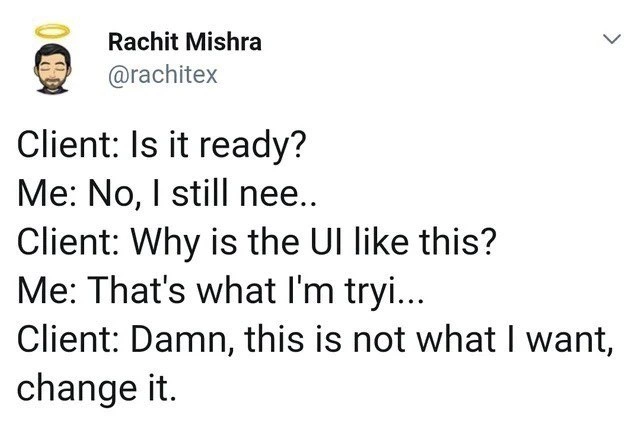
Why is this Stakeholders Clients meme funny?
Level 1: Half-Baked Complaints
Imagine you’re baking a cake with someone standing next to you who just can’t wait. You pour the batter and put the cake in the oven. Five minutes later, they peek and ask, “Is it ready yet?” You start to say, “No, it needs more ti—,” but they cut you off: “Why does it still look like goo?” You try to explain, “That’s because it’s not baked ye—,” and again they interrupt: “Ugh, this isn’t the cake I wanted, it’s all liquid! Change it!” You’d probably facepalm, right? Of course the cake isn’t what they wanted yet – it’s only half-baked! If they just let it finish baking and let you decorate it, it would turn into the cake they asked for. This meme is funny (and a little frustrating) because the client in the conversation is acting just like that impatient person: not waiting for the cake (project) to be done, complaining about the messy half-finished stage, and demanding a do-over when, really, all they needed was a bit more patience.
Level 2: Work-in-Progress Woes
If you're a junior developer or just starting out, this meme might feel painfully familiar even without all the fancy terms. It’s depicting a scenario many of us encounter early in our careers: a client (or any non-developer stakeholder, like a manager or a project owner) keeps checking in on your work before it’s finished, then gets upset because it doesn’t look or function perfect yet. Let’s break down what’s happening in simpler terms and concepts:
Client vs. Developer Roles: In the meme conversation, Client is the person who requested the project (maybe a paying client or your boss) and Me is the developer (the person building the software or feature). Right away, there’s a power imbalance: the client is eager (and maybe anxious) to see results, while the developer needs more time to do the job right. This dynamic can be tricky to manage, especially when you're new and eager to please.
"Is it ready?" – The Pressure of Deadlines: When the client asks “Is it ready?”, it shows they’re impatient or worried about a deadline. A deadline is the due date by which the project or feature is supposed to be finished. Early in your career, you’ll notice that stakeholders often worry about timelines a lot. It’s common for a manager or client to ask for status updates. But in this meme, the client asks if it's ready at a moment when clearly it isn’t. If you’ve ever been in the middle of coding something and a supervisor or friend peeks over your shoulder asking “Done yet?”, you know it can be stressful. It interrupts your workflow – that state of concentration where you’re being productive. When you get pulled out of that flow to answer “not yet,” it can take some time to regain your focus on the coding task. So this first line captures that feeling of being rushed. The developer’s reply “No, I still nee…” suggests they were about to say something like “I still need more time to finish X.” But they get cut off.
UI Looking Bad Halfway Through: The client’s next interjection is “Why is the UI like this?” Here UI stands for User Interface, which is basically what the user sees and interacts with – the buttons, layout, text, colors, all of that. If a UI is halfway done, it might look ugly or confusing: maybe the layout isn’t correct yet, or the colors are default, or some images are missing. That’s normal when something is in progress. Think of building a website: at first, you might just have raw HTML and maybe some basic styling, and it looks very plain or even broken in spots until you finish the CSS and JavaScript. The client in this meme clearly doesn’t understand (or remember) that what they are seeing is not the final design. They’re reacting as if this half-finished interface is the end product. For a junior dev, this is a lesson in managing client expectations. Often, you have to explain: “What you’re seeing is not final. It will look much better once I do XYZ.” In the conversation, the developer tries to do exactly that: “That’s what I’m tryi...” presumably meaning “That’s what I’m trying to fix/improve right now.” If you’ve done a class project or an internship, you might have experienced showing an early demo to someone and they immediately start pointing out flaws that you were already planning to address. It can be frustrating, because you want to say “I know it’s bad now – just let me finish it!” That’s precisely what’s happening to the developer in the meme.
Interruption and Communication Issues: Notice how the developer’s replies are cut off with ellipses (“...”). That indicates the client isn’t even letting them finish their sentence. In real life, this might happen in a meeting where the client interrupts you, or on a call where they talk over you. It’s a communication issue: they have so many concerns that they’re not listening. For someone new in the industry, it can be shocking – you might think, “Why won’t they just listen? I have answers!” Part of being a professional developer is learning how to communicate status and set boundaries. It might mean you have to kindly but firmly say, “I’ll be happy to show you once it’s ready, but it’s too early to judge the UI now.” Not easy to do when you’re junior, but important! In this meme scenario, that communication has broken down completely. The dev is trying to explain but the client’s not hearing it. This can lead to misunderstandings and frustration on both sides.
“Not what I want, change it” – The Scope Creep Monster: The grand finale from the client is “Damn, this is not what I want, change it.” This is where Scope Creep comes in. Scope means the overall plan of what features or requirements the project includes. Scope creep is when that plan keeps expanding or changing after you’ve started work. In other words, the goalposts move. In the meme, the client suddenly decides the thing being built isn’t what they envisioned. Maybe they gave fuzzy instructions initially, and the developer built something slightly different. This happens a lot, because sometimes clients themselves aren’t 100% sure what they want until they start seeing it. As a junior dev, you might have experienced this if you ever built a feature according to specs, but then the product manager said, “Actually, now that I see it, let’s change it to behave differently.” It can feel like all your work was for nothing and now you have to redo it. That’s what “change it” implies here. The client in the meme doesn’t specify how to change it, just that they don’t like it. This is super frustrating for a developer because it’s not constructive feedback; it’s just throwing the work back at you with a vague “do better.” It’s also a bit unfair – if the UI is not finished, of course it's not what they ultimately want yet! But they’re judging it as if it should have been finished. For a newcomer, this is a good example of why clarity in requirements (the descriptions of what the software should do and look like) is so important. If requirements are vague, you might build the wrong thing. And if a client keeps changing their mind, you might never feel “done.”
Why This is Funny (and Painful): The humor of this meme comes from how exaggerated yet familiar this situation is. It’s exaggerated because the conversation happens in rapid succession, like a comedy skit, but many developers will tell you it feels just like that in real projects, only stretched over weeks. If you’ve been in a school group project, imagine one team member (the client role) pestering another (the developer role): “Is the presentation done?” – “Not yet, I still have to add graphs—” – “Why do the slides look so plain?” – “That’s because I’m still working—” – “This isn’t the design I imagined, redo it!” It sounds absurd, but it happens. We laugh because it’s true enough to recognize, and we’ve either been the person being nagged or seen it happen.
UX and First Impressions: A quick note on UX (User Experience) vs UI: UI, as we said, is the look/layout. UX is the overall experience of using the product (is it easy, pleasant, efficient?). In the meme, the client is immediately unhappy with the UI’s appearance. That’s a bit of UX irony – the person is judging the entire user experience based on a first impression of an incomplete interface. It’s like judging a video game’s fun factor by a screenshot of the unfinished graphics. Yes, UI matters for UX, but you can’t judge it properly until the work is done. Early in your career you learn that first demos need a bit of polishing (even if the app isn't fully finished) because non-developers often can’t imagine how it will look later; they react to what they see now. Here, clearly the developer didn’t get a chance to polish anything yet, and the client’s knee-jerk reaction is negative.
How to Avoid This (Lessons Learned): This scenario teaches a couple of important lessons for anyone new in development:
- Set Expectations: If you show a client or boss something that’s in progress, warn them what to expect. For example, “The functionality is about 50% done and the UI hasn’t been styled yet, so please ignore the rough looks at this stage.” It might save you from the “Why does it look like that?” question.
- Communicate Progress: Instead of waiting for them to ask “Is it ready?”, proactively provide updates. Say, “It’s about half done. I plan to finish the backend by tomorrow and then polish the UI the day after.” Non-technical stakeholders appreciate timelines. If you don’t update them, some will start pinging you frequently.
- Lock Down Requirements (as much as possible): While you often can’t control a client changing their mind, you can at least document what the original plan is. If someone says “This isn’t what I want,” you can refer back and say, “Here’s what we agreed to build. If that’s changed, let’s talk about adjusting the timeline or plan.” As a junior dev, it might not be your job to manage requirements directly (that could be a project manager’s duty), but it’s good to be aware of it. When you sense that what the client wants is shifting, raise a flag to your team lead or manager.
- Don’t Take it Personally: The client in the meme sounds rude and can definitely make a developer feel demoralized (“my work isn’t good?”). But remember, this kind of situation is common and usually not because you’re a bad developer. It often means the process was flawed — maybe you were forced to show work too early, or the client had unrealistic expectations. The best you can do is learn from it. For instance, you might gently educate the stakeholder: “The UI will look right once finished. It looks odd now because it’s not fully implemented. It’s like reading a draft of a paper — it’s not polished yet.”
In summary, this meme is a lighthearted warning about how important patience and clear communication are in development. The next time you’re halfway done with a project and someone rushes you with “Is it ready?” or sudden changes, you might remember this tweet and manage a chuckle (instead of a facepalm) because you’ll realize it’s a common situation all developers go through.
Level 3: Interrupt-Driven Development
At the highest level, this meme satirizes the classic Stakeholder vs. Developer standoff where unrealistic ClientExpectations slam into the harsh reality of actual development timelines. In the tweet-style conversation, the client’s impatience and constant interruptions create a perfect storm of ScopeCreep, RequirementsAmbiguity, and DeadlinePressure. Essentially, we’re witnessing a real-time simulation of a project going off the rails due to a feedback loop that’s triggered way too early.
Let’s unpack each line of the exchange, because each abrupt interruption highlights a specific pain point:
Client: "Is it ready?" – This is the stakeholder’s anxiety about Deadlines kicking in. They’re effectively micro-managing progress, pinging for completion status before the work is done. It's an all-too-familiar case of the client treating the development process like a fast-food order: they expect it "ready" on demand. In reality, software isn’t instant ramen; asking "Is it ready?" repeatedly doesn’t cook it faster. Instead, it just interrupts the developer’s flow, similar to an OS sending a high-priority interrupt to a CPU core that's busy executing something else. The developer now has to context switch from coding to status reporting, which introduces overhead and frustration. The irony is that these constant check-ins delay the very thing the client wants done quickly.
Developer: "No, I still nee..." (cut off) – Here, the developer tries to communicate honestly that the work isn’t finished (“I still need… more time, more work, etc.”) but can’t even complete the sentence. This incomplete reply (signified by the “nee..”) is comedic in text but painfully realistic: it shows the Communication breakdown. The developer is literally not allowed to finish explaining the situation. In a normal scenario, this is where the developer would mention a few remaining tasks, perhaps that the UI (User Interface) is in a work-in-progress state or that certain features are half-implemented. But the client doesn’t want to hear it – they jump immediately to the next complaint, illustrating how stakeholder pressure can override listening. Technically, it’s reminiscent of a thread being pre-empted by a higher priority thread mid-execution. The developer’s mental process gets halted abruptly, which means not only do they lose the chance to clarify the status, but they also lose precious concentration on actually finishing the feature. This is Context Switching hell – an inefficient pattern where constant interruption drastically slows progress.
Client: "Why is the UI like this?" – Now the client has glimpsed the unfinished product (maybe they peeked at a staging site or saw a partial demo) and they’re alarmed by the half-baked UX_UI. They were expecting a polished interface, but they’re seeing placeholder text, unstyled buttons, or broken layout. From a developer’s perspective, that’s totally expected at this stage – maybe the CSS styling isn’t done, or the data is just mocked. But the client doesn’t understand why it doesn’t look right immediately. This question highlights RequirementsAmbiguity as well: perhaps the client had a vision in mind that wasn’t clearly communicated as requirements, and now they’re surprised by what they see. It’s also about the client not grasping the iterative nature of development. In a healthy UXDesign process, you gather early feedback on wireframes or prototypes, which are known to be incomplete. But here the client is treating an intermediate build as if it were the final product. It's the equivalent of walking into a house that’s under construction and exclaiming, "Why are the walls just frames and wires? This isn’t the cozy living room I wanted!" Well, obviously, because it's not done yet. In software terms, the UI at this point is basically a feature_in_progress. The humor (and horror) is that the client expects a finished look at a checkpoint where only the structure is there. Developers dealing with FrontendHumor will recognize this scenario: you push some code to test functionality, and someone immediately judges the UI appearance, not realizing you haven’t applied the final styling or fixed the layout yet. It’s premature evaluation at its finest.
Developer: "That's what I'm tryi..." (cut off) – The poor developer attempts a second time to explain: presumably, "That’s what I'm trying to fix/improve right now..." In other words, they’re saying the UI looks like this because I'm in the middle of working on it. They might be about to explain the next steps or to remind the client that this is a partial build. But nope, the client interrupts yet again. This repeated cutoff is comedic as a text tweet (we can practically hear the developer’s exasperated sigh through the ellipses) but it underscores a real communication failure. The client isn't listening; they're reacting. At this point the developer is likely feeling a deep sense of déjà vu (hence "conversation replayed"). This situation has happened before, maybe multiple times in the project. It's a loop of explanation attempts aborted by new demands. If you think in terms of code, the developer’s explanation function keeps getting called but never returns successfully because an exception (client interruption) is thrown each time, preventing normal completion. The stack trace of those half-finished sentences leads to one place: frustration.
Client: "Damn, this is not what I want, change it." – This is the final boss of client demands: the outright rejection and sudden pivot. It epitomizes Scope Creep: after seeing something they don’t like (despite it not being finished), the client now declares it’s wrong and insists on changes. What changes exactly? Possibly “Make it like my vague vision that I never fully explained”. The tragedy and comedy here is that the client may not have known what they wanted until they saw what they didn’t want. This is super common in software projects: unclear initial requirements lead to the developer implementing a feature in a reasonable way, but when the stakeholder finally sees it, they realize it's "not what I had in mind." So now they want to change scope, maybe requesting a different design or additional features. And of course, they want it without slipping the deadline ("it should still be done on time, right?"). The phrase "change it" is basically the harbinger of endless revisions. In code terms, scope_changes++ just got executed. Each time this loop runs, more dev hours are burned and the release date drifts further away. This demand also indicates no appreciation for the work done so far; it’s almost as if everything built is being dismissed outright. For the developer, that’s demoralizing. They might be thinking, "If you’d let me finish in the first place, it would be what you want!" It’s an infinite loop of demotivation.
To illustrate the absurdity, here’s a pseudo-code version of this interaction:
scope_changes = 0
# Simulate the client-developer interaction loop:
while project.status != "Done":
client.ask("Is it ready?")
developer.reply("No, I still nee...") # Developer can't finish before being interrupted
client.interrupt("Why does the UI look like this?")
developer.reply("That's what I'm tryi...") # Again interrupted mid-explanation
client.demand("This is not what I want, change it!")
scope_changes += 1 # Scope creep: new changes requested
# Developer has to rework the UI based on new feedback (and likely loses more time)
Every iteration of that loop is painful. The variable scope_changes keeps incrementing, meaning the project scope is expanding each time the client interrupts. Notice how the developer’s replies never get to complete – just like in the meme text, they’re cut off by the client's next question or demand. This is a humorous exaggeration of real life, where it might not happen in one rapid-fire conversation, but across many meetings or calls it definitely feels like this pattern: impatient check-in, knee-jerk critique of incomplete work, abrupt change of direction.
From a senior engineer or project manager’s perspective, a few deeper issues are clear:
Lack of Clear Requirements: The client’s final line "this is not what I want" suggests that either the initial requirements were not well-defined or they changed. This is known as Requirements Ambiguity. Perhaps the project started with a fuzzy idea ("make me a user-friendly app, you know what I mean") leaving the developer to fill in gaps. When the client finally saw a concrete implementation, it didn't match the mental image they never fully described. Experienced teams try to nail down requirements or use prototypes precisely to avoid this moment of "not what I want" late in development.
Scope Creep and Changing Goalposts: The conversation literally showcases ScopeCreep unfolding. The project goalposts are moving in real-time – the client keeps altering what they want. A veteran developer knows this is dangerous: continuous scope changes are a leading cause of missed deadlines and busted budgets. There’s even a saying in project management: "Fast, cheap, good – pick any two." Here the client wants fast (hence "Is it ready?") and good/precise ("not what I want, change it"), which inevitably means it won’t be cheap (in terms of developer effort or timeline). Something’s gotta give. If you don’t control scope creep, you end up in a death march, working insane hours to chase a moving target. That’s why agile methodologies emphasize managing a backlog and agreeing on what goes into each iteration – otherwise you get exactly this scenario where the plan constantly shifts.
Poor Understanding of the Development Process: The client’s behavior shows a misunderstanding of how software (especially UX/UI design) is built. They seem to expect a near-finished UI at all times. In reality, early versions often look rough. There's a reason developers might initially use unstyled components or basic layouts – they focus on functionality first, then polish the UI. The client jumping in at that halfway mark is akin to judging a book by the first draft of its cover. An experienced UX/UI designer would manage this by setting expectations: e.g. marking something as a wireframe or beta version. But if the client doesn't get the memo, they'll react like it's a final draft. Many of us have learned the hard way: never demo half-finished UI to a client unless you preface it heavily with "This is not final". Otherwise, you'll get reactions like in the meme.
Communication Breakdown & Impatience: Perhaps the core factor here is communication. The developer is trying to say what’s going on, but the client isn't listening. Good communication implies both parties understand what “done” means. Clearly, the client is asking “Is it ready?” with an expectation of a certain level of completion, and the developer’s “No, I still need…” was going to explain what’s left to do. If that explanation had been heard, maybe the client wouldn’t have panicked at the interim UI. But the constant interruptions show a lack of trust or patience. The client might be thinking the dev is making excuses, and the dev is thinking the client is being irrational. This is a typical StakeholderPressure scenario: the stakeholder is anxious and possibly non-technical, so every unfinished aspect is alarming to them. Meanwhile, the technical person knows it's normal at this stage, but can’t get that message across. It’s a feedback loop of frustration. An experienced project lead might step in here and say, "Let's set up regular demos at appropriate milestones," to prevent ad-hoc check-ins from devolving into chaos.
Deadline Pressure Warping Behavior: When deadlines loom, even reasonable clients can become like this meme. The panic of “will it be done in time?” makes them hover and nitpick prematurely. The meme exaggerates it for humor, but it reflects reality: looming deadlines often create a sense of urgency that paradoxically makes completion harder. There’s even a known concept in scheduling called Hofstadter's Law: “It always takes longer than you expect, even when you take into account Hofstadter's Law.” In practice, if a client doesn’t trust that developers will meet the deadline, they might keep checking and insisting on changes, which actually makes the team lose focus and time. It’s a self-fulfilling prophecy — the more they interfere, the likelier the project is to be late or misguided. The developer in the meme is likely thinking, "If you stop interrupting me, I could actually finish this on time!"
The humor in this meme hits home for many of us because it’s a caricature of real project dysfunctions. Any engineer who has worked on client projects or any designer who's shown a draft to an overeager stakeholder will chuckle (and possibly cringe). It’s essentially a comedic case study in how not to run a project: lack of proper requirements gathering, no respect for the development lifecycle, constant Communication interruptions, and the endless expansion of scope under pressure. The meme is funny, yes, but it’s also basically a horror story told in one tweet. Every “Me: ...” that gets cut off is a developer’s scream silenced by the next unrealistic demand. And yet, it’s so relatable precisely because we’ve all been there – on the receiving end of that “Is it done yet? No? Well, change everything!” loop.
If we zoom out, it's also a commentary on the eternal friction between the people who want the software (clients, product owners, stakeholders) and the people building it. The stakeholders are concerned with the end result and timelines (hence the impatience and sudden dissatisfaction), while the developers are concerned with the process and technical feasibility (hence trying to say "it's not ready, I'm working on it"). When those perspectives clash without proper process in place, you get this comically chaotic scenario. The meme is effectively a one-act play of a sprint review gone wrong: no acceptance criteria defined, no patience for iterative development, and no two-way communication.
In summary, the senior perspective here sees a cautionary tale: this "endless scope creep conversation" highlights why processes like Agile exist, why we set client expectations early, and why defining "done" is crucial for sanity. It resonates as humor because it's exaggerated truth – many of us have felt that exasperation of being constantly interrupted and redirected. Just as importantly, it underscores that writing code isn't the only hard part of software projects; managing clients and communication is equally challenging (and clearly meme-worthy).
Description
A screenshot of a tweet by Rachit Mishra that perfectly captures the frustrating dynamic between a developer and an impatient client. The tweet is a short script: Client: 'Is it ready?' Me: 'No, I still nee..' Client: 'Why is the UI like this?' Me: 'That's what I'm tryi...' Client: 'Damn, this is not what I want, change it.' This interaction is painfully relatable for any developer who has had a non-technical stakeholder review work-in-progress. The humor comes from the client's complete inability to grasp that the product is unfinished, leading them to give feedback on a feature that is still actively being built. It highlights a classic failure in communication and managing client expectations
Comments
8Comment deleted
The fastest way to get a client to approve a design is to show them the placeholder UI on the dev server and tell them it's the final version
Our new rule of thumb: every time the client cuts me off mid-sentence, we spin up another micro-frontend. By the next “is it ready?” we’ll have 40 repos, zero cohesive UI, and a textbook case study on Conway’s Law
After 20 years in tech, I've learned that clients have a special quantum superposition ability - they can simultaneously want something 'exactly like the mockup' while also wanting it 'completely different' until you observe the final invoice
The classic client Heisenberg uncertainty principle: you cannot simultaneously have them observe your work-in-progress AND maintain their understanding that it's not finished. The moment they see the UI, the wavefunction of 'reasonable expectations' collapses into 'why doesn't this look like the final mockup I approved three sprints ago?'
Client triggered changeRequest() while the feature flag was off - returned 409 SpecConflict, escalated to a P0 redesign by EOD
Client UI feedback: the only infinite loop that doesn't crash the browser, but sure tanks your sprint velocity
The UI enters a Schrödinger sprint: until release it’s simultaneously “not ready” and “already wrong” - somehow also out of scope per the SOW
Literally the agile Comment deleted