Skip to content
DevMeme
3226 of 7435
Frontend Polish vs. Backend Power
Backend Post #3547, on Aug 17, 2021 in TG

Frontend Polish vs. Backend Power

Why is this Backend meme funny?

Level 1: Clean Room, Messy Closet

Imagine you cleaned your room by shoving all your toys and clothes into the closet. From the middle of the room, everything looks neat – the floor is clear, the bed is made, and you proudly say, “Look, it’s clean!” That’s like the front-end of a project: it’s the part everyone can see, and it looks nice and tidy. Now, think about that closet full of hidden mess. If someone opens it, things might tumble out, or you’d be embarrassed for them to see how disorganized it is. That hidden messy closet is like the back-end of a project – it’s behind the scenes, where people (users) usually don’t look. The joke in the meme is basically this: the app is a clean room on the outside, but the code is a messy closet on the inside. We find it funny because it’s a bit like a kid’s classic trick – making the part that shows look good and hoping no one checks behind the curtain (or inside the closet).

In simpler terms, the meme is saying: sometimes something can look perfectly fine outwardly (like a smiling Tarzan swinging by, or a shiny website) while hiding a not-so-perfect reality (like Tarzan’s goofy backside in the sketch, or messy code that runs the site). It’s the same kind of humor as if you see a beautifully decorated cake that looks yummy, but when you cut it, it’s undercooked or hollow inside – you’d laugh and groan, “Oh no, it was all for show!” For developers, it’s funny because we often work hard to make sure the part you see is great, even if behind the scenes we might be scrambling or using tape and glue to hold things together. It’s a wink-wink, nudge-nudge moment: everyone likes a pretty front, but please ignore the chaos in the back.

Level 2: Polished UI, Messy Code

Now, let’s break this down for a junior developer or someone new to the front-end vs back-end concept. Imagine you’re building your first web app. You’ve heard terms like Frontend and Backend, but what do they really mean here?

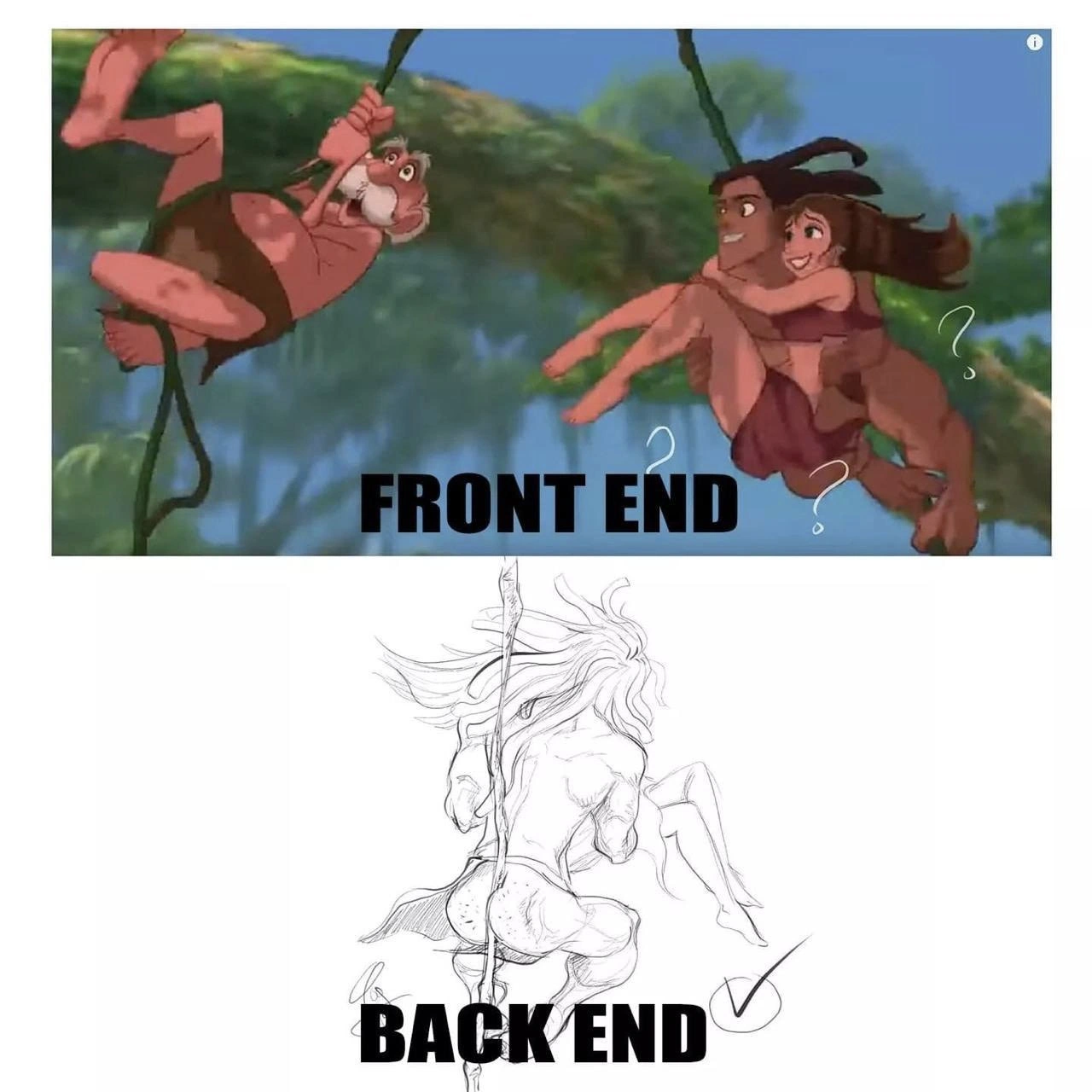
  • Front-end (UI): This is everything the user sees and interacts with in an application. If we’re talking websites, it’s the HTML, CSS, and JavaScript that run in the browser. It’s the buttons, text, images, and layout on the page – basically the presentation layer. For example, if you open a shopping site, the front-end is what draws the product listings, the add-to-cart button, the smooth animations when you hover, and the overall look-and-feel. Front-end developers focus on making the interface user-friendly, attractive, and responsive. In the meme’s top panel labeled "FRONT END", the colorful cartoon Tarzan scene is like a well-designed UI: it’s visually complete and fun to look at from the front. Those little question marks around the characters could hint that something might be off, but it’s not obvious at first glance. In real life, that “off” feeling might be a quirky UI behavior – like a button that works but has a weird delay, or a form that looks fine but occasionally flickers. Still, generally speaking, the front-end looks fine to the user.

  • Back-end: This is the behind-the-scenes engine of the app – the parts the user doesn’t directly see. If the front-end is what happens in the browser, the back-end is what happens on the server or in the cloud. It includes the database (where data is stored), the server-side code (which handles logic, calculations, and data processing), and the APIs (the endpoints that send data to and from the front-end). Taking the shopping site example: when you click “add to cart”, the front-end might show a little popup “Item added!”. But behind the scenes, the front-end has made a request to the back-end – maybe calling an API like POST /api/cart. The back-end receives that, updates your cart in the database, and responds with success. The user doesn’t see any of this directly; they just see the confirmation. Now, if the front-end is Tarzan’s photogenic front, the back-end in the meme is like the rough pencil sketch from behind. It’s not meant to be seen by the public, but it’s absolutely critical for support. If the back-end is poorly done (like the wonky anatomy in the sketch), things can go wrong: data might not save correctly, actions might error out, or the app might crash under certain conditions. However, as long as the front-end covers it up or doesn’t expose those issues, a user might never know.

So why would the back-end ever be messy if it’s so important? There are a few reasons familiar to developers:

  • Deadlines and Pressure: In the real world, projects have tight deadlines. Let’s say you’re a junior dev and your team needs to deliver a new feature by Friday. The feature’s front-end (what the user will use) is top priority because if that’s incomplete, everyone notices instantly. So you might be tempted (or told) to “just make the front-end work and look right.” Perhaps you haven’t fully figured out the ideal way for the back-end to handle it, so you implement something quickly that works “well enough” for now. For instance, maybe the proper solution requires designing a new database table, but there’s no time, so you just reuse an existing table in a weird way. The result is the feature appears to function on the surface, but the underlying code isn’t clean. This is often how technical debt starts building up.

  • Learning and Experience Gap: As a new developer, you might know how to make a webpage look good with CSS or a library like Bootstrap, but structuring back-end code is a different challenge. Early on, it’s common to write back-end code that is not optimal (maybe a single giant function that does everything, or inefficient queries) because you’re still learning. The front-end might rely on well-documented frameworks that enforce some structure, while back-end logic can be more free-form. Without guidance, a junior might create a back-end that “works” but is kind of like that rough sketch: correct in outline but off in details (like Tarzan’s odd anatomy in the meme). The front-end can mask some of these imperfections. For example, the front-end won’t show an error to the user if you catch it on the back-end and just send a default response. From the user’s perspective, the app still behaves normally even if behind the scenes the code is doing extra, unnecessary work or covering up mistakes.

  • Frontend/Backend Team Divide: In some projects, the people who build the front-end and the people who build the back-end are different teams or individuals. Communication gaps or last-minute changes can lead to hacks. Imagine the front-end developer says, “I need an API that gives me data in this format,” and the back-end developer doesn’t have time to do it properly. They might quickly jam something in place that technically returns what’s needed, but isn’t well-structured. The front-end dev tests it quickly: it works, so they style the output nicely and think everything’s fine. Neither sees the full picture of the other’s work. The front-end dev only sees the polished result in the browser, the back-end dev knows about the messy code on the server, but as long as no errors pop up, it’s considered a success (check mark, done). In the meme, this idea is conveyed by literally drawing a check mark on the messy backend image – as if someone said “good enough!”

Let’s clarify some terms that popped up:

  • Technical Debt: This is a metaphor in development. It’s like when you take a shortcut in your code (incur a “debt”) to meet an immediate goal, with the understanding that you should come back later to fix or “pay” it properly. If you don’t pay it off, interest accumulates – meaning the shortcuts can cause bigger problems down the road. In our meme scenario, rushing a feature with messy back-end code is taking on technical debt. The app works (so it’s like you got a quick loan of success), but eventually that messy code might make future changes harder or cause a bug (the interest on the debt).

  • Monkey Patch: This term was mentioned because of our “Monkeypatch Jungle” joke. A monkey patch is a quick and dirty change to a code module at runtime, often to fix or modify behavior without a proper refactor. It’s like slapping a Band-Aid on a leaky pipe instead of replacing the pipe – water flows for now (problem solved temporarily), but it’s not a robust fix. In some languages (like Python or Ruby), monkey patching can be literally altering functions or objects on the fly. Developers use this sometimes when they don’t have time to do it “the right way”. It’s relevant because a back-end full of monkey patches would be very chaotic (hence the jungle analogy). Junior devs might not do formal monkey patching intentionally, but any improvised fix that isn’t well-thought-out is in the same spirit.

  • Developer Experience (DX): The category DeveloperExperience_DX is about how it feels for developers to work on a project. A clean, well-documented back-end gives a good DX – it’s pleasant to maintain and extend. A messy back-end (like the one in the meme) is poor DX – future developers (maybe you, six months later) will struggle with it. You can imagine new devs joining that project seeing the neat UI and being excited, only to open the code and go, “Whoa… what is that?!” – akin to seeing Tarzan’s bizarre backside sketch and doing a double-take. Relatable, right?

So, the meme is developer humor because it captures a scenario every coder learns sooner or later: just because an app looks great doesn’t mean the code behind it is great. A junior developer might first focus on the part everyone sees (front-end) – which makes sense, you want it to be perfect. But as you gain experience, you learn to also care about the unseen parts. It’s like learning that cleaning your room isn’t just making the bed and tidying the visible surfaces; you also need to deal with the closet chaos, or it’ll haunt you later. In development terms: you eventually have to refactor that rough back-end, or it might cause a crash when you least expect it. The meme is a funny reminder: don’t ignore the messy back-end, no matter how fine the front looks. And if you do, at least be aware you’ve got a sketchy anatomy hiding behind your otherwise picture-perfect façade!

Level 3: Monkeypatch Jungle

From a senior developer’s perspective, this meme hits on the ugly truth lurking behind many polished apps. The top panel’s Tarzan-style Front End looks acceptable – our heroes swing through a lush UI jungle, maybe slightly awkward (hence the question marks), but overall user experience (UX) seems fine. The bottom panel, labeled Back End, flips the perspective to an unflattering pencil sketch view. It’s as if we peeked behind the curtains of a slick app and found a half-finished, anatomically incorrect drawing – in other words, a messy codebase. This contrast is painfully relatable: a product can look great to users while the underlying implementation is, well, butt-ugly.

In software terms, the front-end is the client-facing part of an application – the UI that users interact with. It’s often built with frameworks like React, Angular, or Vue, focusing on visuals, responsiveness, and polish. Teams pour effort into making sure everything looks consistent and professional on the surface (the “Tarzan swinging gracefully” view). Meanwhile, the back-end is the server-side logic: databases, APIs, servers, and all the business rules that users don’t see directly. This is where data is processed and decisions are made. A beautiful UI can be propped up by a fragile back-end full of quick fixes, hacks, and technical debt – essentially a sketchy scaffold held together by duct tape and hope.

Why is this so funny (and painful) to experienced devs? Because we’ve all been there. Imagine a rushed feature deadline where the priority is “just make it work for the demo.” The front-end developer ensures everything looks right: maybe hard-coding some values or adding a friendly loading spinner to hide any delay. The back-end developer, under pressure, might write a sloppy piece of code that technically gets the data flowing, but isn’t robust. Perhaps they wrote a giant monolithic function or a bunch of monkey patches (monkey patching is a quick-and-dirty way to change code behavior at runtime) across the codebase to bypass missing features. The result? The app demo gets a thumbs-up (just like that check-mark doodle in the meme), and management says “Looks good, ship it!” From the front, everything appears green-lit.

But the back end tells another story: hidden null-pointer exceptions, barely-handled errors, and cringeworthy hacks that would make any seasoned engineer wince. It’s like viewing a model’s photo shoot vs. the un-airbrushed behind-the-scenes – one is all smooth presentation, the other exposes the blemishes. In real projects, this might mean:

  • Spaghetti code: tangled logic that’s hard to follow (imagine vines twisted in a chaotic knot rather than a clean swing).
  • Hard-coded values and fragile assumptions that “work for now” but break with any data change.
  • Lack of error handling: maybe the back-end just prints “😱 TODO: handle this case” in logs instead of actually handling edge cases.
  • Tech debt galore: postponed fixes that keep piling up. The code might even have comments like // FIXME: quick hack, refine later – and “later” never came.

Here’s a tongue-in-cheek pseudo-code illustrating the kind of hack a back-end might use to keep that front-end looking fine:

function getUserInfo(userId) {
    let data = database.fetch(userId);
    if (!data) {
        // Ugly hack: return dummy data to avoid breaking the UI
        console.warn("User not found, using placeholder");
        data = { name: "Tarzan", role: "King of the Jungle" };  
    }
    return data;
}

// Front-end calls getUserInfo, and displays data 
const user = getUserInfo("12345");
// The UI shows "Tarzan - King of the Jungle" even if 12345 didn't exist.
// Front-end looks happy; back-end is faking it.

In the code above, the back-end function returns a placeholder whenever it can’t find a real user, just so the front-end doesn’t blow up. The UI will cheerfully display “Tarzan – King of the Jungle” (a plausible default) and everything looks fine to the user. But a developer reading this code will raise an eyebrow 😅 – it’s a classic code smell. We basically lied to the front-end to avoid an error. The front-end team might even put a check mark in the task tracker: “✅ Feature works!” Meanwhile, the back-end is muttering, “Just don’t look too closely at how I achieved it.”

The humor here also comes from perspective. In the Tarzan scene, the front view hides the awkward truth – Tarzan and Jane look relatively composed swinging on vines. But the rear view reveals distorted anatomy and an unfinished sketch (Tarzan’s backside isn’t exactly Disney-ready). Similarly, the front-end presents a curated perspective: input forms validate nicely, images load smoothly, buttons give satisfying clicks – it’s the polished facade. The back-end perspective exposes what’s beneath that facade: perhaps an outdated API that only works if called in a very specific way, or a database with an inconsistent schema that the devs pray no one pokes too hard. It’s the unglamorous reality that only developers and unlucky on-call engineers see. There’s a reason the meme labels the back-end drawing with a check mark: it’s like saying, “Yep, we technically met the requirements… don’t ask how.”

Historically, this front-vs-back disparity has been around as long as multi-tier architecture. Think of a 90s website that looked fine in Netscape Navigator, but the CGI scripts powering it were a nightmare of unmaintainable Perl. Or a modern startup where the React front-end follows beautiful design guidelines, while the Node.js back-end is a single 5,000-line file named server_old.js because no one had time to restructure it. Experienced devs have a chuckle (or a groan) because they remember countless systems where outward perfection masked inner chaos. It’s practically an occupational meme: “Sure, the app works and users are happy, but please, for the love of clean code, never show them the source!”

This meme also highlights a human factor: incentives and priorities. Often, what gets rewarded is the visible success – the demo that goes well, the user feedback that “the app looks great and runs smoothly.” Users and managers rarely praise a clean database schema or well-factored code (they don’t see it), so teams under pressure focus on what will get noticed. This can lead to a culture of “polish the UI, ignore the plumbing”. Over time, that neglected plumbing (the back-end) can become a house of cards. Every senior developer has war stories of being on-call at 3 AM because that unseen “sketchy” part of the system finally collapsed under real-world conditions. As a cynical veteran might say, “It’s all fun and games swinging through the trees until the vine (back-end) snaps.”

In summary, the meme’s humor is a nod to the duality of software development: the front-end’s visual polish vs. the back-end’s hidden complexity. It resonates with developers who have dealt with pretty interfaces built on precarious foundations. We laugh (perhaps a bit nervously) because it’s true – many projects are essentially Tarzan from the front, Tarzan’s questionable anatomy from the back. The front-end gets the applause, the back-end carries the cringe. And as long as users don’t see the back-end, everyone pretends it’s “✅ fine.” Just don’t let the developers write the peer review from that angle, or you’ll get those same question marks popping up in code review comments!

Description

A two-panel meme contrasting front-end and back-end development using imagery from Disney's 'Tarzan.' The top panel, labeled 'FRONT END,' shows a colorful but somewhat chaotic scene of Tarzan and Jane swinging on a vine, surrounded by question marks, implying a confusing or kludged-together user experience. The bottom panel, labeled 'BACK END,' displays a detailed, well-defined, and powerful-looking anatomical sketch of Tarzan, representing the clean, strong, and well-structured server-side code. The meme humorously plays on the developer stereotype that the user-facing front end can be a messy affair, while the back end is where the elegant, robust engineering truly resides

Comments

9
Anonymous ★ Top Pick The UI is held together by hope and a dozen '!important' tags, while the backend is a single elegant SQL query that does all the heavy lifting
  1. Anonymous ★ Top Pick

    The UI is held together by hope and a dozen '!important' tags, while the backend is a single elegant SQL query that does all the heavy lifting

  2. Anonymous

    Stakeholders see a graceful React swing-through; in Grafana we’re tracking a half-sketched Tarzan clinging to a JDK8 monolith, three orphaned SOAP vines, and - hey - latency’s green, so ship it

  3. Anonymous

    The frontend team ships a beautiful React app while the backend is still debating whether the vine should be a REST endpoint or GraphQL resolver, completely unaware they're both swinging from the same legacy monolith nobody wants to refactor

  4. Anonymous

    The frontend team gets all the glory swinging through the trees at the company all-hands, while the backend engineers are down in the data center, Atlas-style, holding up the entire distributed system on their shoulders - and somehow still expected to respond to Slack messages about why the API is 50ms slower than yesterday

  5. Anonymous

    Front-end: Pixel-perfect vine physics across browsers. Back-end: Just hoist the payload and scale horizontally

  6. Anonymous

    Front end: silky swing animation; back end: transactional outbox, retries, and a circuit breaker making sure the vines don’t 500 mid‑flight

  7. Anonymous

    Front end: pixel-perfect swing animation; Back end: exactly-once delivery of humans to the next branch

  8. @beton_kruglosu_totchno 4y

    now it's painful

  9. @YYAMETEKKUDASAI 4y

    He is using his legs)

Use J and K for navigation