Skip to content
DevMeme
550 of 7435
The Ultimate Debugging Escalation Path
Debugging Troubleshooting Post #631, on Aug 31, 2019 in TG

The Ultimate Debugging Escalation Path

Why is this Debugging Troubleshooting meme funny?

Level 1: When All Else Fails

Imagine you’re trying to fix a problem and you really can’t figure it out. First, you ask a friend for help, like if you had a tricky puzzle and wanted a buddy’s eyes on it. If that doesn’t solve it, you go to a big community – like asking a question on the internet where lots of people can answer (kind of like asking all your classmates or the whole school for ideas!). Now, if you’re still stuck after all that, you do something extreme: you try to ask the person who actually made the thing. It’s like if your toy isn’t working, you ask a friend and no one knows, so you post on a big toy forum, and finally you decide to write a letter to the person who invented that toy! That last step is a bit wild and over-the-top, right? The meme finds humor in this overkill. It’s showing how a coder might feel so desperate that they even consider asking the biggest person possible to solve a tiny problem. It’s funny because it’s such an extreme cry for help. We usually don’t call the inventor when a small thing breaks, but when we’re frustrated, it feels like we wish we could. In simple terms: the joke is about a person trying harder and harder solutions to fix something, ending with a crazy last resort — asking the genius who made it in the first place. The idea of going that far makes us laugh, because it’s a silly way to show just how frustrating a little problem can be.

Level 2: Friend, Forum, Founder

Let’s break down the elements of this meme and why they resonate, especially if you’re newer to coding. Debugging is the process of finding and fixing issues (bugs) in your code when things aren’t working as expected. It’s a core part of programming: write code, run code, see a mistake, then debug by figuring out what went wrong. In the first panel, the meme suggests “Ask friend to help in debugging.” This is a pretty common scenario for beginners and even experienced coders: when you hit a confusing problem, you might ask a friend or a colleague to take a look. Often, another set of eyes can spot the issue quickly. For example, you might have a typo or a missing character, and you’ve stared at the code so long you’re seeing through it. A friend can be like, “Hey, I think you missed a / in your path there,” and bam – problem solved. This is sometimes jokingly called “rubber duck debugging” (where even explaining the problem to a rubber duck can help you find the solution) but with the added benefit that your friend can actually respond and give advice! Essentially, your friend acts as a first-line debugging buddy.

The second panel takes it up a notch: “Ask for help on Forums/StackOverflow.” When your friend (or local help) can’t resolve the bug, the next logical step is often to tap into the online developer community. Stack Overflow is a famous question-and-answer site where developers all around the world ask programming questions and share answers. If you’re stuck on something like “how to link my JS file to my HTML page,” chances are high someone else has had the exact same issue. On Stack Overflow and other forums (like Reddit’s r/learnprogramming, developer Discords, etc.), you can either search for existing answers or post your own question. The meme humorously portrays this as an expansion of brain power – you’ve gone from just two brains (you and your friend) to potentially thousands of brains online. The brain image glows brighter, implying a more powerful solution. This reflects reality: online forums often provide life-saving fixes and a variety of perspectives. It’s basically crowdsourced debugging. For a junior dev, discovering Stack Overflow is almost a rite of passage – you learn that whenever you see an error message, copying it into Google often lands you on a Stack Overflow page where someone has already explained how to fix it. It’s like magic the first time it happens! Over time, you might even start contributing answers yourself. The key terms here are DevCommunities (places where developers gather to help each other) and DeveloperCommunity support. These communities thrive on the idea that everyone helps everyone, and no one knows everything. Even seniors use Stack Overflow daily – it’s not just you. If you ever felt silly for googling error messages, know that this is totally normal and even the pros do it.

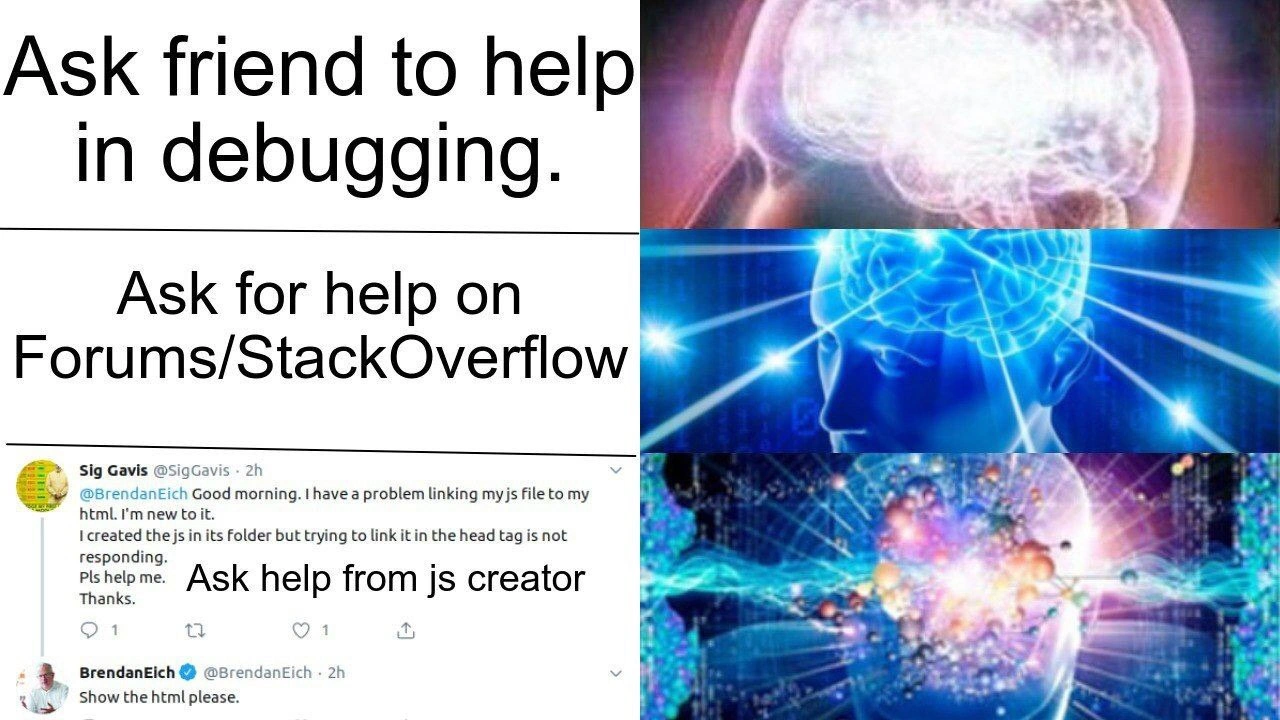
Now, the third panel goes into hyperdrive: “Ask help from js creator.” “JS” is short for JavaScript, one of the world’s most popular programming languages (used to make web pages interactive, among many other things). The “creator” of JavaScript is Brendan Eich – he originally invented the language in 1995. The meme shows an actual screenshot of a Twitter interaction: a user named Sig Gavis tweeted @BrendanEich describing a problem “linking my js file to my html… I created the js in its folder but trying to link it in the head tag is not responding.” This person is basically saying: “I made a JavaScript file and put it in some folder, then included it in the <head> of my HTML, but it’s not working. I’m new, please help.” Brendan Eich’s reply is “Show the html please.” He’s asking to see the HTML code, since without seeing the actual code, it’s hard to guess why the script isn’t loading. This might sound super basic, and that’s the joke: even the father of JavaScript responds just like any helpful expert would – by requesting more info to troubleshoot step-by-step. But think about how wild this scenario is: pinging (contacting) the inventor of a language for help with a beginner issue! It would be like a novice driver tweeting Henry Ford, “Hi, my Model T won’t start, any idea why?” and Henry Ford replying, “Can you open the hood and show me the engine?” It’s both absurd and amusing. This final “galaxy brain” panel implies an enlightened or extreme solution – it’s humor, of course; normally you wouldn’t leap to bothering a world-famous technologist with a simple question. But the desperation in debugging can make us feel like we wish we could consult some ultimate authority when nothing works. The meme pokes fun at that emotional spiral.

A bit more about the script tag issue mentioned: In a web page (HTML file), you use a <script> tag to include a JavaScript file so that your page can run the script. Usually it looks like this, for example:

<!-- Example of linking a JavaScript file in HTML -->
<!DOCTYPE html>
<html lang="en">
<head>
  <script src="app.js"></script>  <!-- Link to app.js file -->
</head>
<body>
  <h1>Hello World</h1>
  <!-- page content -->
</body>
</html>

This assumes app.js is in the same directory as the HTML file. If your file is in a subfolder, say a folder named “scripts,” you’d need to include the path like: <script src="scripts/app.js"></script>. Common mistakes for newbies include: putting the wrong file path (so the browser can’t find your JS file), forgetting the .js extension, or placing the script tag in the <head> section when the script relies on elements in the <body> that haven’t loaded yet (meaning the script might run too early). The person asking Brendan Eich likely had one of these simple mistakes. When Eich says “Show the html please,” he’s essentially following the golden rule of debugging: inspect the code. You can’t fix what you can’t see. It’s exactly what someone on Stack Overflow would have said too: “Can you post your HTML code? Otherwise we’re guessing.” So even though Brendan Eich is a legendary figure, the solution to linking a JS file isn’t secret knowledge— it’s usually something straightforward a more experienced dev (or documented answer) could point out.

Finally, let’s talk about the meme format itself: the expanding brain meme. Each panel shows a brain with increasing levels of illumination and fantastical imagery, to humorously imply that each idea is a higher level of enlightenment than the previous. In panel 1, the brain is normal (asking a friend — a simple, humble approach). Panel 2, the brain is lit up with electric blue energy, signifying a step up in brain power (posting on Stack Overflow — a smarter or at least more “advanced” tactic, tapping the collective brain). Panel 3, the brain is cosmic, exploding with the universe (tweeting the creator — portrayed as the most galaxy-brain move imaginable). The captions alongside each brain escalate in absurdity to match. This format is popular in internet humor because it visually exaggerates how one idea is crazier or more “out there” than the last. Here it’s used to poke fun at how we escalate our search for help: from normal -> clever -> ridiculously over-the-top. It’s DeveloperHumor because in software development, we often joke about these levels of problem solving. For a newcomer, it also subtly teaches the hierarchy of where one might seek help: local, community, and… well, not actually “ask the language inventor,” but rather that’s the meme’s comic exaggeration of seeking the ultimate help. In reality, the takeaway is that programming has an incredibly supportive ecosystem. Most times you won’t need to email Brendan Eich or Linus Torvalds or Guido van Rossum — the answers are already out there thanks to ordinary developers helping each other. But it’s comforting (and funny) to imagine that if all else truly failed, even the giants of tech might hear your plea. After all, as the meme shows, sometimes they do answer!

Level 3: God-tier Support

At the cosmic brain stage of this meme, we witness a developer’s ultimate escalation: directly pinging the creator of a technology for help. The meme humorously plots a support escalation chain that any seasoned dev recognizes — from a casual pair debugging session with a friend, to posting on Stack Overflow, and finally to summoning the deity of JavaScript himself, Brendan Eich. It’s funny because it exaggerates how far debugging desperation can go. In real life, when you’re stuck on a simple bug (like an HTML **<script> tag issue), you’d rarely imagine emailing Linus Torvalds about a Linux glitch or calling up Bjarne Stroustrup to decipher a C++ error. Yet here we have the equivalent: a newbie developer so perplexed by a basic JavaScript file include problem that they tweet @BrendanEich for guidance. It’s the god-tier support option — practically dialing 1-800-BRENDAN at 3 AM — an absurdly enlightened move that only a truly desperate (or blissfully naive) coder would attempt. And to everyone’s astonishment (and amusement), the JavaScript creator actually replies with a calm, methodical request: “Show the HTML please.” 🤯

This juxtaposition is rich with irony and RelatableDeveloperExperience. Every experienced dev has felt the DebuggingFrustration when a seemingly simple thing just “is not responding.” We’ve all been there, frantically bouncing between docs, friends, and forums when something ought to work but stubbornly doesn’t. The first panel (“Ask friend to help in debugging.”) reflects the common sense first step: grab a buddy or a coworker for fresh eyes. It’s a classic remedy when you’re too deep in your own code to see the obvious. The second panel (“Ask for help on Forums/StackOverflow.”) is the next natural escalation. When your friend is stumped too, you appeal to the hive mind of the DevCommunity. Stack Overflow in particular is like the global watering hole for developers — any DeveloperPainPoints you have, someone else has likely asked and answered. This middle stage brain image glows brighter, symbolizing the bigger brain idea of tapping thousands of strangers’ expertise. It’s humorous because it’s true: posting your problem online (or searching past Q&As) often feels like unlocking a higher level of knowledge.

But it’s the third panel that blasts into absurdity: “Ask help from JS creator.” The brain illustration is now an exploding galaxy of enlightenment, parodying the idea that the ultimate debugging solution is to go straight to the top — the source of the language. This plays on an inside joke: when all else fails, why not consult the ultimate authority? It satirizes our occasional tendency to escalate problems beyond all reasonable bounds. The included tweet screenshot cements this joke in reality: a real user on Twitter politely asking Brendan Eich how to link a JavaScript file, as if the inventor of JavaScript moonlights as tech support. The icing on the cake is Eich’s response: “Show the html please.” It’s such a basic, quintessential debugging step — essentially “let’s see your code” — that every dev (friend, Stack Overflow guru, or Brendan Eich alike) would ask before solving the issue. The humor here is multilayered. First, it’s hilarious that the inventor is being queried for a newbie problem. Second, Eich’s response isn’t some godlike pronouncement of new knowledge; it’s the same straightforward help any experienced dev would give: check the actual code for mistakes. In other words, even when you invoke the gods of coding, the answer might still be “Did you plug it in?” or “Have you tried turning it off and on again?”. The meme winks at the reality that DeveloperCommunities are supportive at all levels — from peers to forums to even language creators — but also gently ribs those moments of overkill when a panicked coder might skip some fundamental troubleshooting steps.

Beneath the comedy lies a bit of comfort: the fact that Brendan Eich replied at all is a heartwarming nod to the culture of knowledge-sharing. The JavaScript community (and tech community at large) thrives on openness and mentorship. Seeing the js creator engage in a grassroots help request is both outrageous and uplifting. It reminds senior engineers of the times we’ve seen legends step down from Olympus to answer a beginner’s question on mailing lists or Twitter. It’s a comedic extreme, yes, but it symbolizes that in programming, no question is too simple — and even the “stupid” bugs (like a mislinked script) can humble everyone. In daily debugging war stories, reaching out to the ultimate expert is a fantasy we joke about (“If this regex keeps failing, I’ll just call up Larry Wall…”), and the meme runs with that fantasy to galaxy-brain levels. The expanding-brain format drives home how each escalation feels smarter or more monumental. By the final panel, the brain has transcended spacetime — much like a dev’s hopes that the JavaScript creator’s wisdom will magically vaporize their bug. Of course, the punchline is that even he needs to see the code to help. This mix of reverence and ridiculousness is what makes the meme pure DeveloperHumor gold: it’s hyperbolic, it’s RelatableDeveloperExperience, and it gently pokes fun at both newbie over-enthusiasm and the universal truth that Debugging often reduces everyone to the same methodical steps. In short, the meme hits a nerve because it dramatizes a journey every coder knows, by elevating a humble <script> tag fiasco into an epic quest for answers — one that ascends all the way to the top of the tech Olympus.

Description

An "Expanding Brain" meme format with three panels. The first panel, a normal brain, is labeled "Ask friend to help in debugging." The second panel, a more illuminated brain, is labeled "Ask for help on Forums/StackOverflow." The third and most enlightened panel shows a screenshot of a Twitter user asking Brendan Eich, the creator of JavaScript, for help with a basic HTML file linking issue. The user's tweet reads: "@BrendanEich Good morning. I have a problem linking my js file to my html. I'm new to it. I created the js in its folder but trying to link it in the head tag is not responding. Pls help me. Thanks." Brendan Eich replies, "Show the html please." This is labeled "Ask help from js creator." The meme humorously escalates the process of seeking programming help from reasonable steps to the most extreme and absurd option: contacting the language's creator for a trivial problem. It highlights the naivety of beginners and the patience of seasoned developers


Comments

7
Anonymous ★ Top Pick The final stage of debugging: bypassing Stack Overflow and opening a P1 ticket directly with the creator of the language. Next step is filing a bug report with the universe
  1. Anonymous ★ Top Pick

    The final stage of debugging: bypassing Stack Overflow and opening a P1 ticket directly with the creator of the language. Next step is filing a bug report with the universe

  2. Anonymous

    Next step on the escalation ladder: fork SpiderMonkey, add a console.error that fixes itself, and open a PR before the stand-up ends

  3. Anonymous

    Twenty years in and I still haven't figured out which is more painful: explaining to a junior why their script tag needs to be at the bottom of the body, or explaining to the board why our microservices need seventeen different auth mechanisms

  4. Anonymous

    The meme perfectly captures the developer journey: start by bothering your friend, graduate to Stack Overflow where you'll be marked as duplicate, then achieve enlightenment by @-mentioning Brendan Eich about your script tag placement. Next level: filing a GitHub issue on the ECMAScript spec repo asking why your HTML won't load. The real galaxy brain move? Realizing after all that you just forgot the closing angle bracket

  5. Anonymous

    If your escalation policy skips MREs and jumps straight to paging the language author, the RCA will read: bad script src or load order - not a standards bug

  6. Anonymous

    Even Brendan Eich can’t import your bug; without a minimal repro and the Network tab, the only valid response is ‘show the HTML.’

  7. Anonymous

    Friends apply a targeted fix; Stack Overflow forks your bug into a global MCVE debate

Use J and K for navigation