The Seven Stages of Debugging a Typo
Why is this Debugging Troubleshooting meme funny?
Level 1: Glasses on Your Head
Imagine you're searching all over the house for your missing glasses. You check every room, look under the couch, even accuse your dog of hiding them – you're making a huge fuss. But then you suddenly discover the truth: the glasses were sitting on top of your head the whole time. You feel pretty silly, right? This meme is funny for the same reason. The programmer did a bunch of wild, over-the-top things to fix his broken program (almost like a goofy circus performance), when the easy answer was right there from the start: one little mistake in his code. It reminds us of that familiar feeling of overcomplicating a problem and then laughing at ourselves when we finally see the obvious solution that was there all along.
Level 2: The Typo Trap
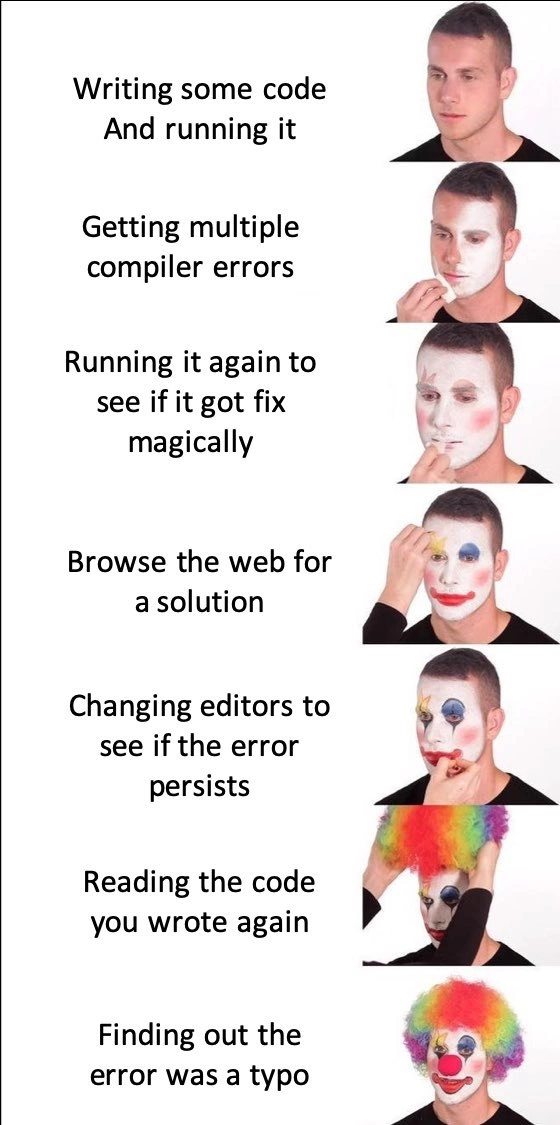
Let's break down what's happening in simpler terms. This meme shows a programmer going through a series of unnecessary steps because their program isn't working. The joke is that the whole time, the problem was just a small typo – a tiny mistake in the code, like a misspelled word or a missing symbol. But instead of noticing that right away, the developer acts out an increasingly frantic routine:
Writing some code and running it: The developer writes a program and tries to run it. This is what programmers do constantly during development – write code, then run (or compile) it to see if it works. In the first image panel, everything seems normal; the developer looks confident, expecting their code to just work.
Getting multiple compiler errors: Uh-oh! The code didn't run. Instead, the computer threw back a bunch of compiler errors. A compiler error is a message from a program (the compiler) that says, "I tried to turn your code into something the computer can execute, but there's something I just can't understand." In languages like C++ or Java, even a single character out of place (say, a missing semicolon
;at the end of a line) can cause the compiler to produce several error messages. The developer in the meme looks concerned now, seeing a flood of errors. It's like writing an essay and then Word underlines a whole paragraph in red – clearly something is off. Often, the first error message is the most important one because it might tell you exactly what's wrong (for example, "expected ';' before}), but it's easy to feel overwhelmed by the list of errors if you're new or panicked.Running it again to see if it got fixed magically: Here the developer, looking a bit confused, decides to run the program again without changing anything. This might sound silly, but it's a common impulse when you're frustrated: "Maybe it was just a fluke. Let's try one more time." Of course, if nothing in the code changed, the same errors will happen again. Computers are very literal – they won't fix themselves just by re-running the exact same faulty code. This step is poking fun at that irrational hope every programmer has had at least once. It's kind of like pressing an elevator button repeatedly and hoping it makes the elevator come faster. In the image, the developer has even started to put white face paint on – the beginning of the clown makeup – symbolizing that this approach is a bit foolish.
Browsing the web for a solution: Now the developer is getting worried and goes online to search for help. They likely copy-pasted one of the error messages into Google or went straight to Stack Overflow (a popular Q&A website for programming problems). Searching the web is often a good idea when you hit an error you don't understand. You might find that someone else had the same issue and there's an explanation or fix. But if the error is caused by a unique typo in your code, the internet won't magically know that. The meme shows the developer's clown makeup getting more elaborate here (some colorful paint on the face), implying that scouring the internet aimlessly instead of checking your own code is making him look more like a clown. It's highlighting a common rookie mistake: trusting random fixes from the internet over your own code analysis. Sometimes you'll even find answers that suggest all sorts of complicated solutions, when the real problem is something simple in your code. This leads to wild goose chases.
Changing editors to see if the error persists: This is where the developer's desperation really shows. An editor or IDE (Integrated Development Environment) is the software you use to write and sometimes run your code (for example, VS Code, IntelliJ IDEA, Sublime Text, etc.). Changing editors means the programmer thought, "Maybe it's my coding tool that's the problem." They switch from one editor to another to open the same file. In reality, if there's a bug in the code, it will cause an error no matter where you write or run it. It's like writing a wrong answer on a piece of paper, then copying it onto a chalkboard to see if it magically becomes correct. The error "persists" (stays) because the mistake is in the code itself, not in the editor. At this point in the meme, the developer has a big clown smile painted on – the joke is that this step is pretty ridiculous. (Why would a different editor suddenly make the typo go away?) This is a form of context switching – jumping from your code, to the browser, to a different tool – and it usually just makes you lose focus on the actual bug.
Reading the code you wrote again: Finally, after all else fails, the developer goes back to the basics and carefully reads through their own code. In the image, now he's wearing the full rainbow clown wig – meaning he has fully "clowned" himself by not doing this earlier. Reading your code (or explaining it to someone else, or even to a rubber duck on your desk – a technique called Rubber Duck Debugging) is usually one of the first things you should do when something isn't working. Often, when you read through slowly and check every line, you'll spot the mistake: maybe a variable name that doesn't match, or a missing
)parenthesis, or a word that's spelled wrong. Here, the meme suggests that's exactly what happened: as soon as he really reviews his own code, he finds the issue.Finding out the error was a typo: The final panel reveals the truth: all along, the error was just a simple typo. The developer probably wrote something like
fro (int i = 0; i < n; i++)instead offor, or named a variabletotal_Countin one place andtotalCountsomewhere else. Such tiny mistakes will absolutely break a program. To the computer,total_CountandtotalCountare completely different names, so one of them isn't defined and the program errors out. Once the developer sees it – perhaps a missing letter, an extra letter, or a punctuation mark out of place – everything clicks. They fix the typo in a second, re-run the code, and surprise: it works! All the errors disappear. The clown metaphor here is that the developer feels like a clown for not catching such a silly mistake earlier. The phrase about a "debugging session turning into a circus" means the debugging process became way more chaotic and over-the-top than it needed to be, all because of one little oversight.
To give a concrete idea of how a tiny typo can wreak havoc, consider this small example in C++:
#include <iostream>
int main() {
std::cout << "Hello, world" << std::endl // Typo: missing semicolon at end of this line
return 0;
}
Even though only a semicolon (;) is missing, a C++ compiler will throw an error like error: expected ';' before 'return' at the return 0; line, and possibly some additional errors because that missing semicolon confused it. The compiler doesn't understand your intent; it only knows the rules. So one forgotten character can make it act as if everything after that point is wrong. The fix is simple: add the semicolon. But if you didn't notice that, you might start thinking "Why is it complaining about return? Something else must be wrong!" when in fact it's just that one character causing all the trouble.
For a beginner (or honestly, even an experienced dev on a bad day), it's easy to overlook such things. Your brain often sees what it expects to see. You might read your own wrong code and it looks right to you because you know what it should do. That's why slowing down and checking each line, or using techniques like rubber duck debugging (explaining the code out loud to catch mistakes), is so effective. All those earlier steps – re-running the program hoping for magic, googling like crazy, switching editors – come from frustration and panic. The meme exaggerates them to make a point: when you finally find that obvious typo, you realize all those detours were pretty silly. But don't worry, every developer has been there. Next time you get weird errors, take a deep breath and double-check the simple stuff first. It can save you from feeling like you put on clown makeup for nothing!
Level 3: Clown Driven Debugging
In this meme, a developer gradually transforms into a clown with each misguided debugging step. It's illustrating a phenomenon many seasoned developers know all too well: turning a simple typo (a one-character mistake in code) into a full-blown debugging circus. The code is written and run, immediately throwing multiple compiler errors, yet the dev's reaction is pure denial and desperation. Instead of calmly investigating the root cause, they embark on a ridiculous multi-step ritual: running the code again without changes (as if the computer might magically fix itself on the second try), scouring the web for answers to an error that is completely self-inflicted, and even switching IDEs/editors out of a futile hope that a different app might interpret the same broken code differently. With each absurd step, another layer of clown makeup gets applied – a visual metaphor for how foolish we feel as we realize the problem was staring at us the whole time.
Why is this so relatable to experienced developers? Because we've all been this clown at some point, especially when debugging under pressure or fatigue. A tiny mistake like a missing semicolon or a misspelled variable can produce a cascade of confusing compiler errors. For example, one stray '{' or a missing ; in C++ can trigger dozens of errors as the parser loses its mind after the typo. The compiler was likely pointing to the real issue in the very first error message (often the clue is right there at "line 42: syntax error near ''"), but it's easy to miss that when a wall of red text floods the screen. Instead of reading carefully, the panicked developer often hits the "Run" or "Build" button again out of sheer wishful thinking. (Cue the definition of insanity: doing the same thing twice and expecting a different result.) The meme nails this developer impulse to rerun code perfectly: we know code doesn't fix itself, yet we've all hit that compile button again immediately, as if praying to the silicon gods for a different outcome.
Next comes the Stack Overflow and Google phase – the "browse the web for a solution" panel. This is a classic crutch: copying the exact error message into a search bar. Sometimes that helps, especially if the error is common. But when the bug is a one-of-a-kind typo in your code, no amount of internet searching will save you (the accepted answer for "why do I get X error?" won't apply if your situation is literally a variable named userNmae instead of userName). At this stage, the clown makeup is fully visible: our developer is anxiously painting their face with each click through forum threads and blog posts that have nothing to do with their actual mistake. It's a form of needless context switching – jumping out of your code into a web browser, mentally juggling irrelevant information, which often makes things more confusing. In a sane world, you'd double-check your own code first. But in the heat of frustration, confirmation bias kicks in: "My code looks right, so the problem must be something else. Maybe someone online knows of a compiler bug or magical trick I don’t."
Then we see the truly comical escalation: "changing editors to see if the error persists." This is the peak of the clown act. It's like swapping out your development environment from VS Code to IntelliJ or from Eclipse to Vim mid-problem, thinking the error might disappear just because you're viewing the code in a different font. Experienced programmers recognize this as pure desperation (and maybe a hint of superstition). It’s akin to turning your computer off and on again, or blowing on a Nintendo cartridge when a game crashes – an almost ritualistic attempt to exorcise a bug. Spoiler: if there's a literal typo in your source, every editor will show the same error. All this does is waste more time and break your concentration further (a classic human error loop: the more flustered you get, the more likely you are to overlook the obvious). At this point in the meme, the guy has a bright rainbow wig and a red clown nose – symbolizing that, yes, the developer has officially become the clown of their own debugging hell.
Finally, in the last panels, reality dawns. "Reading the code you wrote again" – the developer swallows their pride and actually reviews their code line by line, the one thing they should have done in the first place. And lo and behold, "finding out the error was a typo." The punchline hits hard: all those frantic context switches and hair-pulling frustrations, and the bug was a basic coding mistake that was entirely under the developer's control. The clown makeup is now complete because it’s the ultimate self-own – you realize you turned a 2-minute fix into a 2-hour saga. It's a humbling experience that practically every programmer (junior or senior) has lived through. In hindsight, you feel equal parts relieved and ridiculous: relieved that it was a simple fix after all, and ridiculous for having effectively performed a one-person circus around it.
This meme resonates with developers because it satirizes our frustration and makes us laugh at ourselves. It’s a comedic reminder of the importance of methodical debugging: check the simple things first (Rubber Duck Debugging, anyone?), read the error message carefully, and remember that 99% of bugs are in our code – not the compiler, not the editor, not the alignment of the planets. The image of the clown is brutal but fair – when we ignore obvious clues and jump through irrational hoops, we're only clowning ourselves. Nothing feels more foolish than realizing a bug was just a missing letter or a misplaced comma after you've treated it like an enigmatic system failure. The next time you see multiple errors, resist the urge to put on the clown wig; maybe grab a rubber duck, re-read your code out loud, and spare yourself the circus show.
Description
This meme uses the multi-panel 'Putting on Clown Makeup' format to illustrate a painfully relatable debugging journey. On the left, a sequence of text describes a developer's actions, and on the right, a man progressively applies more elaborate clown makeup with each step. The stages are: 1. 'Writing some code And running it' (normal face). 2. 'Getting multiple compiler errors' (applying white base paint). 3. 'Running it again to see if it got fix magically' (adding mime details). 4. 'Browse the web for a solution' (adding colorful makeup). 5. 'Changing editors to see if the error persists' (more exaggerated makeup). 6. 'Reading the code you wrote again' (putting on a rainbow clown wig). 7. 'Finding out the error was a typo' (full clown attire). The humor captures the universal developer experience of escalating through absurd, illogical troubleshooting steps while avoiding the most obvious one - carefully checking one's own code - only to find a simple, trivial mistake at the end

Comments
7Comment deleted
My debugging process has five stages: denial, anger, bargaining with Stack Overflow, depression, and finally, acceptance that I missed a semicolon
Pro tip: before spinning up a new IDE, a new container, and a new existential crisis, grep for the missing semicolon
After 20 years in the industry, you learn that the most sophisticated debugging technique is still 'Did you check for semicolons?' - but only after you've already blamed the compiler, questioned cosmic rays, and considered switching to farming
The real tragedy isn't the typo - it's that we've all been that clown who changed IDEs, cleared caches, restarted the machine, questioned our career choices, and considered sacrificing a rubber duck to the compiler gods, only to discover we wrote 'lenght' instead of 'length'. The compiler was right all along, but admitting that would mean accepting we spent three hours debugging a missing 'g'
20+ YoE truth: Typo fix time scales exponentially with editors tried and SO tabs opened, converging only at clown singularity
Changing editors and re-running is our black-box retry policy; the RCA inevitably reads: one-character typo in an otherwise deterministic compiler
Hermetic builds, deterministic CI, and three dashboards - still defeated by a single-character identifier typo; the hardest distributed system is between chair and keyboard