When you think the last bug is gone but it brings friends
Why is this Bugs meme funny?
Level 1: Bugs Bring Friends
Imagine you’re playing a game where you have to stamp out little popping creatures (like a “whack-a-mole” game at the fair). You hit one creature and you’re happy, thinking, “Hooray, I got it! The game is over.” But suddenly, two more creatures pop up from hiding! Now you have even more to deal with, right when you thought you were done. That’s exactly the funny feeling this cartoon shows with the bugs.
It’s like if you saw a cockroach in your room and squished it, feeling super proud and relieved that it’s gone… and then, surprise! Tiny baby roaches scurry out from under it. Instead of one problem bug, now you have many. The poor computer-faced guy thought he solved his problem completely – he even cheered that he was finished. But then he gets a big surprise because the problem “wakes up” again and brings a bunch of new little problems with it.
The emotion here is a mix of surprise and “oh no, not again!” frustration, which is also why it’s funny. We laugh because we know that feeling when you think you’ve finished a tough task, only to find out it’s not over yet. In simple terms: just when you believe you’ve won, more challenges sneak in. The bug in the comic literally brought its friends to the party! The joke is showing that solving one problem can sometimes create new problems, and the character’s blank stare in the last panel is like the face you make when you realize you spoke too soon. It teaches a small lesson in a goofy way: don’t celebrate too early, because there might be more work to do hiding just out of sight.
Level 2: Whack-a-Mole Debugging
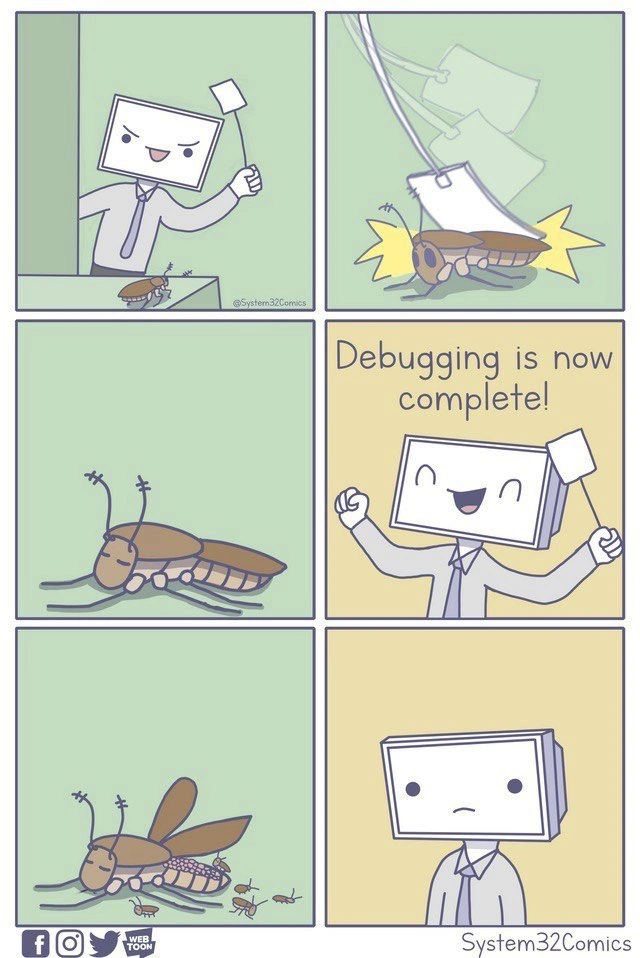
Let’s break down the scene in simpler terms. We have a six-panel comic (drawn by System32Comics, known for lighthearted developer humor). The main character is a developer personified with a computer monitor as his head – a fun way to show he’s a “computer person.” In Panel 1, he sees a big cockroach on his desk. In coding terms, that roach represents a software bug – basically a mistake or error in the code that’s causing a problem. The developer is holding a fly swatter, ready to smash the bug. This is an easy-to-get metaphor: in programming we often say “squash the bug,” meaning fix the error. Here he’s about to literally squash a literal bug. 🪳💻
In Panel 2, SMACK! He slams the swatter down on the bug. There’s a big “impact” symbol (yellow burst) showing he hit it hard. In Panel 3, the bug lies still. It looks dead or squished. Panel 4 has the caption “Debugging is now complete!” with the developer smiling and raising his swatter victoriously. This is like when a coder finally fixes that pesky error and happily announces, “Alright, no more bugs! My program runs perfectly now.” It’s a moment of triumph. In everyday coding, debugging is the process of finding and fixing bugs, so he believes he’s done debugging completely.
But then comes the twist. Panel 5: the squashed roach moves again! 😮 It even sprouts little wings as if it’s resurrected. Even worse, a bunch of tiny bugs crawl out from under it. (Eww, but also uh-oh!) This means that killing that one big bug has actually unleashed more bugs – maybe baby roaches that were inside it or hiding beneath it. In coding, this is a metaphor for those situations where you fix one issue and suddenly discover several new issues that were previously hidden. Panel 6 shows the developer in the final frame just staring blankly, his smile completely gone. You can almost hear the silence and sigh: he’s realizing that even though he thought he was finished, now he’s got an army of new bugs to deal with. This is the exhausted, facepalm moment every programmer experiences when a “fix” doesn’t actually fix everything.
Now, why is this scenario so relatable for developers, including those just starting out? Because it happens all the time. For instance, imagine you wrote a program and it had a mistake in it that caused a crash. You hunt down that error (maybe a variable that wasn’t initialized, or a loop that went one step too far) and you correct it. You run your program again – hooray, it doesn’t crash at that spot now. You might even excitedly tell your teammate or teacher, “I fixed the bug!” But then, as soon as you start using the program more, you hit a different crash or another incorrect behavior that you hadn’t seen before. Your fix solved the first problem but in doing so it might have changed something that causes a new problem.
This is so common that there’s a special term for a new bug that appears after a change: a regression. In plain terms, a regression bug means something that used to work (or at least wasn’t showing an error) has now broken after a change in the code. It “regressed” from working back to not working. New developers quickly learn about this when they fix one thing and then hear, “Uh oh, now feature X is acting weird,” and they realize their code change had side effects. It’s like that comic roach – you thought it was dead, but it had some surprises in store.
Let’s also talk about why a fix can spawn new bugs, in a straightforward way. Code in a program often depends on other code. Think of it like a bunch of connected gears in a machine: if you change one gear, others might be affected. For example, say you have a function that calculates a discount for an online shop, but it had a bug giving wrong results. If you fix the formula in that function, you solve the immediate issue (no more wrong discount). But maybe another part of the program was expecting the old buggy behavior (perhaps someone coded a workaround elsewhere assuming the discount was wrong). Now that the discount formula is correct, that workaround might malfunction and cause a new bug in the checkout process. So by fixing the discount bug, you unintentionally created a checkout bug. This isn’t exactly the scenario in every bug fix, but it illustrates how one change can lead to another problem. It’s a bit like a balloon: squeeze one end, and the other end bulges out.
The whack-a-mole analogy is a common way developers describe this situation. Whack-a-mole is a carnival game where toy moles pop out of holes at random and you hit them with a mallet. Every time you whack one mole down, another pops up elsewhere. Debugging can feel just like that: whack one bug down, next thing you know two more pop up in its place. In the comic, the fly-swatting of a roach is exactly like a whack-a-mole hit, and the baby bugs appearing are the new moles popping up. For newcomers to coding, this humorously warns that one solved problem doesn’t mean you can relax yet — you have to watch out for the next one(s)!
It’s worth mentioning the phrase “literal debugging” here too. In real life, when programmers say “I’m debugging my code,” they don’t mean insects are involved – they mean they’re finding and fixing errors. But historically, the term "bug" for a glitch did come from an actual insect! Back in 1947, computing pioneer Grace Hopper documented a case where a moth got stuck in a relay of an early computer (the Harvard Mark II) and caused the machine to malfunction. They removed the moth and taped it into the logbook, jokingly writing that they were “debugging” the system. That was a literal debug – taking a real bug out. Ever since then, any software error is called a “bug,” even though it’s just metaphorical. This comic plays on that history by showing an actual cockroach as the bug. So the developer in the comic is doing “literal debugging” too – swatting a real bug – as an analogy for fixing code. It’s a fun nod to both the history and the everyday language we use.
System32Comics often uses this style: simple characters and literal representations of tech metaphors to create TechMemes that programmers find hilarious. The monitor-headed dev character is basically “any developer.” And the cockroach is the embodiment of a stubborn bug in code. Cockroaches, by the way, are a brilliant choice for this gag because they’re infamous for being hard to kill and for multiplying. (There’s an old joke that after a nuclear apocalypse, cockroaches will be the last living things — that’s how tough they are!) So when the comic roach comes back to life with babies, it amplifies that idea: some bugs in software feel nearly invincible and breed new problems when you attack them. For a junior developer, this scene is a humorous exaggeration but rooted in truth. It teaches a gentle lesson: Debugging is tricky. You need to test your fix thoroughly and remain vigilant, because software is sneaky – a fix might not be the end of the story.
In essence, the meme is very relatable to anyone who’s written code, even just starting out. If you’ve ever spent an afternoon fixing an error only to encounter new error messages afterward, you’ll smile (or maybe cringe) at this comic. It captures the mix of relief and despair: relief at finally fixing something, and despair when you realize that fix uncovered more work. CodingHumor like this resonates because it turns that frustrating learning experience into a silly visual: a smug bug-squashing moment turned into a mini horror movie of bugs multiplying. And because it’s drawn in a cute, pastel style, we can laugh at it and say, “Yep, been there, done that!” rather than just cry at all the hours lost to debugging.
Level 3: The Conservation of Bugs
In the software world, there's a tongue-in-cheek law that bugs in software are never truly destroyed – they just change form or move around. This meme nails that concept. The developer (with a monitor for a head, System32Comics’ signature character) triumphantly squashes a cockroach-like bug with a fly-swatter, thinking the pesky error is gone for good. This is a physical, flyswatter metaphor for fixing a software bug (we often say we "squash" bugs in code). The humor (and pain) comes from what happens next: the “dead” roach twitches back to life and spawns unexpected bug spawning – tiny baby roaches crawl out. It’s a perfect cartoon depiction of the debugging frustration every programmer knows too well: you fix one bug, and suddenly more bugs (often related but new) appear out of nowhere.
From a senior developer’s perspective, this is an all-too-real scenario. Why does this happen? In complex systems, code is interconnected like a spider’s web. Fixing one issue can unsettle something else. Perhaps the bug you fixed was hiding other problems underneath – like a big roach carrying an egg sac of hidden issues (bug resurrection with “friends”). You might solve the immediate symptom, but the root cause or side effects of the change introduce new errors. This is sometimes jokingly referred to as the Hydra effect of coding: cut off one bug’s head, and two more take its place. Seasoned devs share war stories about that “one-line fix” that unexpectedly broke five other things. It’s why solving bugs can feel like a game of multi-headed whack-a-mole.
There’s a deeper engineering reality here. Modern software has countless moving parts (modules, APIs, databases). If those parts are tightly coupled (interdependent), a change in one place can have ripple effects. For example, tweaking a function to fix a null pointer error might alter an output that another part of the program relied on, causing a new crash elsewhere. These regression bugs (when a fix unintentionally regresses or breaks something that was working before) are the bane of a developer’s life. In large codebases or legacy systems, it often feels like there’s a conservation of bugs principle at play: you squash one, another pops up to maintain the constant bug count. 🪲 DebuggingPain, indeed.
This comic also satirizes the premature celebration that many of us have indulged in. The panel where our dev proudly declares “Debugging is now complete!” – that’s a huge DeveloperHumor red flag. Every experienced engineer knows that confidently announcing “We’re bug-free!” is just tempting fate. The fastest way to discover a new critical bug is to boldly claim there are none. Murphy’s Law of Debugging says: the moment you think you’ve found the last bug, one more bug will immediately surface. In real projects, whenever a developer triumphantly closes the last issue in the tracker, it’s almost a given that QA or a user will find a new edge-case crash moments later. RelatableDevExperience? Absolutely.
Importantly, the meme highlights a perpetual reality of software development: debugging is rarely a one-and-done deal. It’s iterative. You deploy a fix to production and at 3 AM your pager buzzes because that “fix” awoke dormant problems (maybe in a module you didn’t even know existed). This can happen even with good practices because modern software is complex. We have processes like code review and automated tests to catch these things – e.g. unit tests for individual functions and integration tests for how systems work together. But tests can’t cover every weird scenario. Sometimes fixing a bug reveals a flaw in the test itself or an untested use-case. It’s a sobering lesson: DebuggingTroubleshooting never truly ends; it just enters the next round.
For a veteran developer, the sight of that cockroach coming back to life with babies is darkly comedic because it’s a scene we’ve metaphorically lived through. It’s like when you patch a memory leak in one part of an app, only to find the CPU usage spikes somewhere else – surprise! Or when you resolve a database deadlock, and suddenly the web UI starts timing out because the fix slowed down queries. Each bug fix can be a trade-off or a shift in behavior that surfaces another weakness. The meme visualizes this cascade vividly. The System32Comics artist uses a simple pastel palette and a cartoony literal bug to make a point: Debugging often feels like battling an infestation rather than a single foe. You think you’ve won, but the problem wasn’t fully exterminated.
In summary, at this senior-tech level, the humor lands because it’s relatable and a bit cathartic. We laugh (perhaps with a groan) because we’ve been that developer with the smug grin one minute and the blank stare of dread the next. It’s a shared understanding in tech: no matter how many years you have under your belt, software will surprise you. There’s always another bug – or as one famous computer scientist quipped, “If debugging is the process of removing bugs, then programming must be the process of putting them in.” The comic captures that cyclical reality perfectly, with a cockroach and a fly-swat to remind us not to let our guard down even when we think we got the last one.
Description
Six-panel pastel comic by System32Comics shows a developer caricature with a computer-monitor head and a fly-swatter. Panel 1: he looms over a cockroach-like software “bug” on a desk, smirking. Panel 2: the swatter slams down with yellow impact bursts. Panel 3: the bug lies motionless. Panel 4 (text present): “Debugging is now complete!” declares the smiling developer while raising the swatter triumphantly. Panel 5: the bug suddenly twitches, sprouts wings, and several tiny bugs crawl out from underneath it. Panel 6: the developer stares blankly, realizing the fix spawned more issues. Visually simple line art and muted greens/yellows underscore the classic software engineering gag that killing one defect often creates others, highlighting the perpetual reality of debugging

Comments
10Comment deleted
Swatted the prod bug - turns out it was an AbstractFactory, now its subclasses are scurrying all over staging
After 20 years in the industry, you learn that 'Debugging is now complete!' is just the universe's way of telling you to check your integration tests, because you've definitely just spawned three race conditions and a memory leak that only appears on Tuesdays in production
Every senior engineer knows the sinking feeling: you triumphantly close that P0 ticket after hours of debugging, only to watch three new edge cases spawn from the corpse of your 'fix.' It's not a bug, it's a feature... that reproduces asexually
Fixed that prod crash with a quick shoe to the bug - now the call stack's teeming with larvae from the unhandled edge case nest
Squashed the roach in auth; turns out it was the implicit coordinator for three services - now its offspring are called 'regressions' in the release notes
Squashed the bug; the retry storm resurrected it with wings and a swarm - turns out my hotfix added high availability to the failure
Meme is funny Situation is scary Comment deleted
the word scary can't possibly describe it Comment deleted
Oh ok. Sorry for my English Comment deleted
bruh moment... Comment deleted