Skip to content
DevMeme
3061 of 7435
When Shh Means SSH: Quietly Explaining Remote Server Access Protocol
CLI Post #3376, on Jul 5, 2021 in TG

When Shh Means SSH: Quietly Explaining Remote Server Access Protocol

Why is this CLI meme funny?

Level 1: Secret Handshake

Imagine you have a best friend who lives far away, and the two of you have a special secret handshake or password that nobody else knows. Whenever you want to send them a message or share something, you use this secret handshake so that only they understand the message and no one spying can figure it out. Using SSH is kind of like that for computers. It’s like the computers are whispering to each other with a special code that only they can decode. So when someone asks, “How do you talk to your computer that’s far away?”, the funny answer in the picture is essentially, “I use our secret handshake 👆🤫.” In other words, the computers quietly exchange a secret so no one else can listen in, and then they talk freely. The big “SSH” in the picture sounds like “shh,” which is what we say when we want someone to be quiet about a secret. So the joke is that the way we connect to a far-off computer is super quiet and secret – just like saying “shh!” to keep things hush-hush. It’s a little like having a magic word that lets you open a hidden door and talk to your friend without anyone else hearing. And that magic word is SSH!

Level 2: Secure Shell 101

Let’s break down what this meme is talking about in simple tech terms. SSH stands for Secure Shell. It’s a way to remotely access another computer through a text-based interface (the command line). Think of it as opening a window from your machine into another machine’s brain, allowing you to type commands on your computer that actually run on the other computer. This is incredibly useful for systems administration – for example, a sysadmin can sit at home and connect to a web server in a data center far away to update software, all through a terminal window using SSH.

Now, why the “secure” part? Before SSH, there was a protocol called Telnet that did something similar (letting you control another computer remotely). But Telnet had a big flaw: it wasn’t secure at all. Everything you typed – including passwords – was sent over the network in plain text, meaning anyone snooping could read it. 😱 Imagine logging into a server and someone evil on the same network can literally see your username and password as you send them. Not good! SSH was invented to fix that. It encrypts everything you send. Encryption means it scrambles the data into a secret code when it travels over the internet. Only the computer you’re talking to can unscramble it (because it has a key). So if an eavesdropper intercepts your commands or the server’s replies, all they see is nonsense. In other words, SSH makes sure no one can eavesdrop on your remote session – it’s like having a private, secure conversation even though it’s happening across a public network.

SSH typically uses port 22 as its doorway. Ports in networking are like apartment unit numbers for computers – they help route the right data to the right service on a machine. Port 22 is universally known as the SSH port. When you run an SSH client to connect, by default it knocks on port 22 of the remote host and says “hello, let’s start a secure session.” If that port is open and an SSH server is listening, you’ll get a login prompt (or key authentication process). If the port is closed or filtered (firewalled), you won’t connect. That’s why someone might ask “is port 22 open?” when troubleshooting a connection issue.

How do you actually use SSH? Usually via the CLI. For example, on Linux or macOS (or Windows with something like PowerShell or Git Bash), you’d open a terminal and type a command like:

ssh [email protected]

This means: “start an SSH connection to the computer named myserver.com, and log me in as the user alice.” Once connected, you might see a welcome message and then a shell prompt (perhaps $ or #), indicating you can now run commands on myserver.com. It’s as if your terminal window teleported to that remote machine. If myserver.com is actually just an IP address (like 198.51.100.42), you could use that in the command instead of a name. SSH will then either ask for a password for alice or, more commonly in professional setups, use a public-key authentication method.

Public-key authentication is a common way to use SSH without typing a password each time (and it’s more secure than passwords too). Here’s how that works in a nutshell: you create a key pair – a matching private key and public key – using a tool like ssh-keygen. The private key stays with you and is like a secret identity badge (you protect it, never share it). The public key you give to the server (you put it in a file on the server, usually in ~/.ssh/authorized_keys for your user account). Now, when you connect, your computer proves it has the secret private key without actually sending it over. It’s like the server says, “If you really are Alice, solve this puzzle that only Alice’s key can solve.” Your SSH client uses your private key to sign a message (solve the puzzle) and sends the answer. The server checks this against Alice’s public key. If it matches, the server trusts that you’re Alice and lets you in. All this happens behind the scenes in a split second. To you, it just looks like “Authenticated with public key, welcome!”

So essentially, SSH is both secure (no one can sniff what you’re doing, thanks to encryption) and convenient (you can log in from anywhere, and with keys you often don’t even need to type a password each time). It’s the standard tool for remote access in the developer and sysadmin world. When we talk about Networking here, we’re referring to how SSH uses the network to connect two machines. But from the user’s perspective, you run the ssh command and suddenly you’re controlling a remote system. Pretty neat, right?

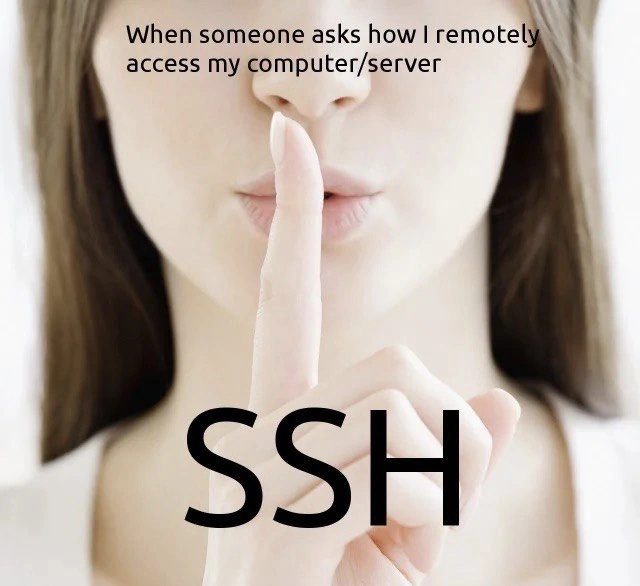
Now, the meme takes a light-hearted angle: it’s playing on the word “SSH” sounding like “shh.” The woman holding a finger to her lips saying “shh” is the universal gesture for “be quiet, it’s a secret.” The text overlay “SSH” implies that the answer to the question is literally the acronym SSH. So when someone asks “hey, how do you remotely access your server?” the cheeky response in the meme is “SSH” – which the questioner might hear as just “shh, it’s a secret”. In reality, you’re actually answering them: SSH is how I do it. It’s a cute remote_access_joke because SSH is indeed the ubiquitous solution for remote login, but to anyone unfamiliar, it might sound like you’re just playfully refusing to tell ("shh!"). It’s a punny way to say: I use the Secure Shell command, of course.

For context, virtually every developer or system administrator knows about SSH. It’s often one of the first things you learn when dealing with servers or any headless computer (one without its own monitor). The meme’s humor works because it assumes the reader knows that dual meaning: shh (the sound) and SSH (the tool). If you didn’t know about the Secure Shell protocol, the meme would just look like a lady telling you to be quiet with some random letters on the screen. But once you do know, it clicks: “SSH – that’s how I quietly get into my servers.” So it’s both a tech tip (use SSH, it’s best!) and a funny homophone pun. And now you’re in on the joke! 🤫

Level 3: Bashful Connections

“When someone asks how I remotely access my computer/server…”

Seasoned developers and sysadmins can’t help but smirk at this meme. The question sounds so mystified — as if remote access were some arcane sorcery — but the punchline is literally right there on the woman’s finger: SSH. In tech circles, saying “I SSH into it” is as ordinary as saying I log in. It’s the de facto answer, almost a sysadmin secret handshake. The meme plays on that by using the classic shh gesture: one index finger over the lips, implying “quiet… it’s a secret.” The humor comes from the homophone: SSH (the secure shell protocol) is pronounced just like “shh,” the sound for “be quiet.” So the image cleverly suggests that the seemingly mysterious method of remote access is nothing more exotic than running the ssh command – but it’s presented as if it’s top-secret.

For experienced folks, this hits on a couple of levels. First, it’s poking fun at the newbie assumption that there must be some elaborate trick to remote administration, when in reality every developer or admin worth their salt simply uses Secure Shell. It’s a bit of developer humor that says, “The thing you think is mystical is actually very standard – so standard it’s almost boring.” We’ve all been there: a junior engineer or a curious non-tech person asks, “How do you manage servers in some data center or in the cloud? Do you have to be physically there?” And the answer is a casually uttered, “Oh, I just SSH in.” Cue the mildly disappointed look when they realize it isn’t done via a flashy 3D hologram interface or something sci-fi. Nope, it’s a plain text terminal, a Command Line Interface (CLI) with a blinking cursor. In a world of slick GUIs, the real power often hides in plain sight on the command line.

Secondly, the meme underscores a best practice in Security and Networking without explicitly saying it: always use SSH (not Telnet or other insecure methods) for remote login. Older heads remember the bad old days of Telnet, which would send your passwords and data in plaintext, effectively like shouting your secrets across the network. Anyone listening on the wire (or Wi-Fi) could just read everything – a nightmare for security. SSH was the game-changer that said, “Let’s encrypt this conversation so nobody can eavesdrop.” It runs typically on port 22 – a well-known port number every IT person can recognize in their sleep. You might even hear veterans joke, “Is port 22 open? If not, I’m not getting in!” because a closed port 22 means no SSH access and thus a locked-out admin.

The Networking aspect also plays a role in the shared understanding: SSH operates over TCP (reliable stream, no fancy requirements) so if you have an IP address or hostname for the server and the right credentials, you can reach across continents just as easily as across a room. Seasoned devs will recall setting up SSH on all sorts of systems – from cloud VMs to Raspberry Pi gadgets – as the first step, because once you have that remote shell, you basically have the server in the palm of your hand.

There’s a layer of inside joke here too: The “shh” gesture woman implies secrecy, and ironically SSH is all about secrecy – it’s Secure Shell, after all. It’s like the meme is winking, “I access it securely and quietly, of course.” For a sysadmin, there’s also humor in how mundane that secret really is. It’s not an actual secret at all – it’s widespread standard practice – but to outsiders it might as well be magic. The meme combines the literal security (keeping data secret) with the visual of keeping one’s mouth shut. In day-to-day ops, a lot of us have had that feeling of being the quiet “computer whisperer.” While others see servers as untouchable black boxes, we just open a terminal and poof, we’re inside the machine managing it from miles away. It does feel a bit like having a magic word. In fact, many of us have dozens of SSH sessions open at any time, jumping between environments. We even tunnel other applications through SSH, forward ports, run X11 GUIs through it – real “black magic” to someone who’s never seen it, but bread-and-butter to a sysadmin.

By dropping the big bold SSH text over a finger-on-lips image, the meme also hints: “This is the one quiet tool that does it all.” It’s as if the community is saying ssh, don’t spread it around, but there’s really only one sensible way to do remote access. It’s funny because it’s true. Also, notice how the meme specifically says “my computer/server.” It’s not even distinguishing – whether it’s your personal machine or a production server farm, SSH is the go-to answer. That universality is something seasoned devs appreciate; it unifies how we work across so many systems.

And let’s not forget the pun factor: developers love a good pun. SSH being pronounced like “shh” is a classic low-hanging fruit for wordplay. This meme takes that literal phonetic joke and maps it onto the scenario perfectly. It’s SysadminHumor 101 – take a tool or command that only insiders know, and twist its meaning with a visual gag. Everyone who has ever typed ssh user@host can chuckle that the ultra-secure login method shares its sound with a gentle “shh”. It’s a reminder that even serious tech (and SSH is serious security tech) can have its little coincidences that make us grin. After all, we often anthropomorphize our tools: here SSH itself is personified as the quiet, reliable agent that says “Don’t worry, I got this, no one else will know what we’re saying.” In practice, that reliability and secrecy is exactly why SSH is beloved. The meme manages to be educational (use SSH, kids!) and funny (homophones!) at the same time – a combo that makes any seasoned dev nod in approval and perhaps share it with the team for a quick laugh on Monday morning.

Level 4: Asymmetric Whispering

Deep beneath this playful pun lies serious cryptographic engineering. When you ssh into a server, your computer and the server perform a silent asymmetric key exchange – a mathematical whisper that eavesdroppers can’t decipher. Using algorithms like Diffie-Hellman, the two machines agree on a secret key over an open network (yes, they create a shared secret while potential snoopers hear only gibberish). This is like both computers arranging a special hush-hush language on the fly. SSH then switches to a symmetric cipher (often AES) using that secret, encrypting the session so every command and output is cloaked in an indecipherable code. Even the integrity is guarded: SSH employs cryptographic message authentication codes to ensure no one has tampered with the data in transit – if anyone tries, the secure shell will know.

What’s ingenious is how public-key cryptography gets woven in. Your client can verify it’s talking to the genuine server by checking the server’s host key (a bit like recognizing a friend’s voice or their unique secret handshake). Likewise, if you use public-key authentication for logging in, the server doesn’t need your password – instead, it challenges you to prove you hold the private key corresponding to a public key on its authorized list. You respond with a cryptographic signature (an answer that only the holder of the private key could give). This way, authentication is done through math magic: no password sent over the wire at all. It’s elegant and very quiet in terms of exposure – an attacker spying on the exchange learns nothing they can use to impersonate you.

All these protocols and algorithms are defined in the SSH standards (the first version was outlined in 1995, with SSH-2 refining things in 2006). They were built on research from the 1970s-80s when pioneers like Diffie, Hellman, Rivest, Shamir, and Adleman developed the foundations of modern encryption. The result for SSH is a battle-tested secure channel. In practical terms, it means when we remotely access a machine, we’re not shouting commands across the internet for everyone to overhear (like Telnet did); we’re whispering them in an encoded form only the intended computer can understand. The meme’s genius is that it hints at all this complexity with a simple “shh” – as if the protocol itself is telling the network, “Be quiet and keep our conversation secret.” It’s a nod to the brilliant, invisible trust mechanism that makes modern remote administration possible on every network from corporate clouds to home Raspberry Pi setups. SSH’s silence isn’t just a joke – it’s literally by design in the form of end-to-end encryption and authentication that render remote commands essentially inaudible to others.

Description

The meme shows a close-up photo of a woman holding her index finger to her lips in the classic “shh” gesture, implying secrecy. Across the top in black sans-serif text it reads, “When someone asks how I remotely access my computer/server.” Over the center of the image, partly covering her finger, huge bold letters spell “SSH.” The visual joke relies on the homophone between the hush sound and the Secure Shell acronym, turning a security best practice into a pun. Technically, it references using the SSH protocol (port 22, public-key authentication, command-line interface) as the standard, secure way sysadmins and developers log into remote machines, contrasting the simplicity of the answer with the implied mystique of remote access

Comments

7
Anonymous ★ Top Pick SSH - because explaining the 4-hop ProxyJump, port-knock sequence, and why ~/.ssh/config now qualifies as infrastructure-as-code would ruin the mystique
  1. Anonymous ★ Top Pick

    SSH - because explaining the 4-hop ProxyJump, port-knock sequence, and why ~/.ssh/config now qualifies as infrastructure-as-code would ruin the mystique

  2. Anonymous

    It's all fun and games until someone asks about your SSH key management strategy and you realize you've been using the same RSA 2048-bit key across all environments since 2015, with a passphrase that's just your cat's name followed by '123'

  3. Anonymous

    The beauty of SSH isn't just the encryption - it's that you can explain your entire remote infrastructure security model with a single finger gesture. Though in production, we'd recommend adding that second factor authentication before the security team makes their own 'shh' gesture during the post-incident review

  4. Anonymous

    Because multiplexing sessions via ControlMaster beats RDP latency every time - shh, don't wake the GUI peasants

  5. Anonymous

    SSH: pronounced “shh” - because nobody talks about the 3am prod fix that skipped Terraform, Ansible, and the change log

  6. Anonymous

    My SSO is spelled “ssh”: short-lived certs, a bastion hop, and tmux - the real remote desktop is still 80x24

  7. @ivan_kostrubin 5y

    do it quietly

Use J and K for navigation