The Modern Web's Unfair Trade Offer
Why is this DataPrivacy meme funny?
Level 1: Not a Fair Trade
Imagine you’re at a playground and a stranger says: “I’ll give you a yummy cookie if you tell me everything about you.” That sounds like a bad deal, right? You’d be giving away something very precious (all your secrets and personal details) just for a single cookie. This meme is funny because that’s basically what some websites do: they want to know a lot about who you are and what you do online (your personal data), and in return they only give you a little treat – like maybe one small convenience or just the fact you can use their site. It’s an unfair trade, just like trading all your toys for one piece of candy. We laugh at the meme because it shows how silly that exchange is: the website gets so much, and you get almost nothing (just a tiny cookie!). In simple terms, the joke is pointing out that we often give away our privacy for very little in return, which is as one-sided as swapping your treasure for a snack.
Level 2: Cookie Banners 101
For those newer to WebDev, let’s explain the joke. On websites, a cookie isn’t a chocolate snack, but a small piece of text data that a website can store in your web browser. Imagine you visit a site and it wants to remember who you are – it can send your browser a cookie like a note saying, “UserID = 12345”. Your browser will save this and send it back to the site on your next visit. This is how the site recognizes you and, for example, keeps you logged in or remembers that you like the dark theme. That’s a first-party cookie (set by the site you’re actually visiting). It’s pretty handy for convenience.
The issue (and the meme’s punchline) comes with third-party cookies and what data sites collect. Many websites include scripts or images from other domains – for example, a social media “Like” button, an analytics script, or an ad. Those outsiders can also set their own cookies via the browser. So if AdNetwork.com or SocialSite.com has their code on 50 different websites you visit, they can drop a cookie and identify you across all those sites. They basically say, “aha, the same user (ID 12345 from our cookie) visited site1, site2, and site3 – and read about sports, then bought shoes.” Over time, they compile a profile of your behavior and interests – that’s your personal data being collected. You didn’t explicitly give them your name or age, but they might infer a lot about you just from tracking your clicks. This cross-site tracking via cookies is what people mean when they talk about online PrivacyConcerns.
Now enter GDPR and other DataPrivacyRegulations. GDPR (General Data Protection Regulation) is a major EU law that, among many things, says websites must get your informed consent before using non-essential cookies that collect your data, especially for things like targeted advertising. That’s why, since 2018, you see those ubiquitous cookie banners and consent pop-ups. They usually say something like: “This site uses cookies to personalize content and ads. By clicking accept, you agree to our use of cookies.” You typically have an option to manage or reject cookies (at least in theory). These banners are essentially the site asking: “Do you agree to let us (and maybe our partners) collect your data via cookies?”
The meme jokes that what you get in return for saying “yes” is pretty much just the cookie itself. In reality, websites often claim you get a better experience: maybe the site remembers your language, or you see more relevant content. But users feel like, “All I did was click ‘Allow’ and all I got was this lousy cookie.” The privacy vs convenience trade-off is front and center: if you click “no”, some sites might restrict features or nag you constantly. If you click “yes”, you give up some privacy. It can feel like a hostage situation for someone just trying to read a recipe or watch a video.
Let’s clarify a few terms from a junior dev perspective:
- Personal data: any information related to an individual. In tech, this can be obviously personal info (like your email, name, address) or less obvious, like your device’s ID, IP address, or your online behavior patterns. It’s all protected under privacy laws because, when aggregated, it can identify or describe you.
- Cookies: small text files stored in your browser. They contain name-value pairs (like
sessionId=abc123). Cookies have attributes (e.g. an expiration date, or flags likeSecurewhich means send it only over HTTPS). They are sent with every request to the domain that set them. So a cookie set bysite.comwill go back tosite.comon each request, and a cookie set bytracker.com(embedded in site.com) will be sent totracker.comwhen loaded. - Third-party cookie: any cookie that is set by a domain other than the one you see in the browser’s address bar. If you visit news.com and there’s an ad from adsRUs.com that sets a cookie, that cookie is third-party on news.com. If later you visit sports.com which also has an adsRUs.com script, that script sees the same cookie and knows the same user is now on sports.com. This is how trackers follow you around.
- Cookie banner/consent: that pop-up or banner asking you to agree (or sometimes just informing you) about cookies. Implementing these is now a common task in web development to comply with privacy laws. Often it involves a library or service that lets users opt-in/opt-out of different categories (Necessary, Analytics, Ads, etc.). As a new dev, you might integrate something like a “consent management platform” or write a script to block tracking cookies until the user clicks accept. It’s one of those tasks that sounds straightforward but can get messy (ensuring no tracking runs before consent, handling user choices, etc.).
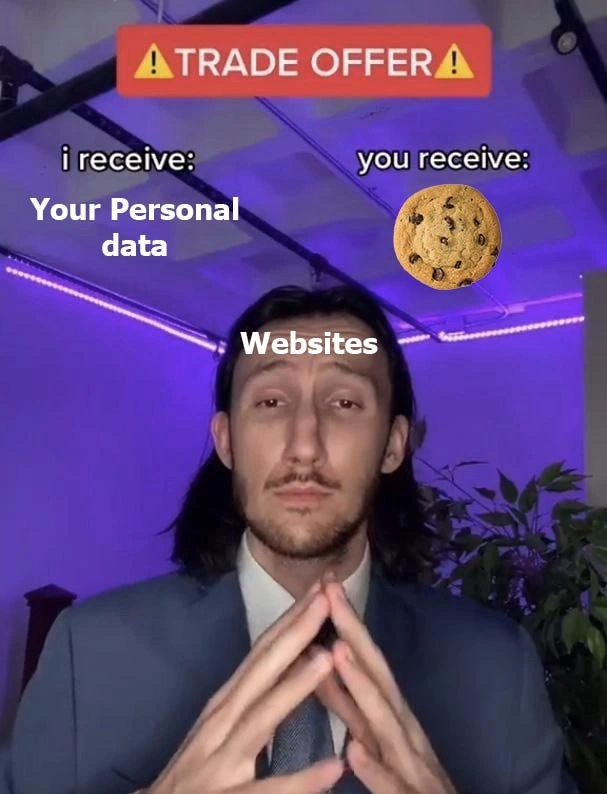
The meme uses an image of a man in a suit presenting a trade offer: on his left, “I receive: Your personal data”, on his right, “You receive: (a cookie image)”. It’s referencing how websites harvest data in exchange for a paltry benefit. It’s poking fun at the entire cookie consent situation. We find it funny (and a bit painful) because it’s true – users end up giving away a lot more than they get. DataProtection ideals say this should be a fair choice, but often users feel they can’t really say no if they want to use the site. So the meme highlights that imbalance in a way even a newbie can understand: one side of the deal is huge (your data), the other side is tiny (a single cookie).
For a junior dev, it’s important to understand that not all cookies are bad. Some are essential (like remembering your login session or what’s in your shopping cart – the site literally couldn’t function normally without those). These usually don’t even require consent under regulations because they’re considered necessary. But many cookies are about tracking for profit. As you grow in web development, you’ll likely encounter both: writing cookies to save user preferences (good use), and adding analytics or ad tags that set cookies (potentially intrusive use). You’ll also hear about browsers phasing out third-party cookies for privacy – for instance, Safari and Firefox already block a lot of them by default, and Chrome (as of 2021) announced plans to do the same eventually. This is a big shake-up in the industry, because it’s forcing companies to find new ways to target ads without those cookies. The meme doesn’t go into all that, but it captures the basic feeling: “All that personal data, and all I got was this cookie.”
So, essentially, the meme is a lighthearted take on a real web development and security concern: the imbalance in personal_data_exchange online. It’s making you chuckle, but also reminding you of the importance of DataPrivacy and why those cookie consent banners exist in the first place.
Level 3: Crumbs for Data
In this meme’s trade offer, the Website (represented by a slick suited figure under neon lights) proposes an exchange that every seasoned developer and user knows too well: “I receive your personal data, you receive a cookie.” It’s a darkly comic summary of the modern web’s business model. Websites and ad trackers are essentially saying: “Give us all your browsing habits, contact info, and preferences (your Personal data), and in return we’ll give you... a tiny text file 🍪 (and maybe a slightly more personalized experience).” It’s an absurdly lopsided deal – akin to trading the crown jewels for a cookie. The humor cuts deep because it’s Privacy vs. Convenience on display: the user’s valuable data is hoovered up, while the user gets a trivial perk (or literally just an annoying pop-up asking for consent).
Under the hood, that innocent cookie banner hides a flurry of tracking technology. When a site says “we use cookies to improve your experience”, it often really means “we’re deploying third-party cookies and scripts to track you across the web.” Those little chocolate chips data packets can contain unique IDs that ad networks use to recognize you on any site that loads their ads or trackers. Over time, this personal data exchange lets companies build a detailed profile of you – your shopping habits, interests, location, even things like your device details. In the meme, the website’s demand “I receive: Your Personal data” highlights how one-sided that exchange is. The site (and its partners) get a banquet of information, monetizing it through targeted ads or selling data to brokers, while you get the digital equivalent of a single cookie. It’s a bit like a shady dealer saying: “I get your entire biography; you get a single, solitary biscuit.” No wonder veteran devs smirk at this: we’ve seen this privacy bargain presented with a straight face far too many times.
Let’s break down this trade offer in plain terms:
| Website Gains | User Gains |
|---|---|
A unique identifier (user_id) to track you |
A small text file (cookie) stored in your browser |
| Your browsing history across many sites (big data) | “Personalized” ads and maybe remembered settings |
| Ad revenue by selling targeted ads (thanks to your data) | Access to the site’s content (often “free” because you are the product) |
| Data to share with partners (PrivacyConcerns galore) | A slightly more convenient next visit (auto-login, saved cart… and more tracking) |
As developers, we implement these cookie banners and tracking scripts, fully aware of the irony. We know that a first-party cookie for your login session or preferences is genuinely useful – it’s what keeps you from re-entering your password every time or remembers your site theme. But alongside those, marketing tags drop a dozen third-party cookies from different domains (ad networks, analytics, social media widgets). Each of those third parties is essentially saying, “Thanks, we’ll take that data too.” The meme nails it: the site’s “you receive: a cookie” is tongue-in-cheek, because the user typically has no idea how much of their DataPrivacy is traded away for that one crumb of benefit.
From a senior dev perspective, it’s both a technical and ethical headache. We have to ensure GDPR compliance and show those pop-ups asking for consent to use cookies for various purposes (DataProtection laws demand it). But often the design of these dialogs is a dark pattern – a big friendly “Accept All” button versus a tiny hard-to-find “Manage settings” link. Many users, inundated with these banners on every site, just click “yes” out of frustration. So the end result? The site obtains the same personal data as before, now with a veneer of consent, and the user’s reward is maybe a slightly faster login or a marginally customized experience (or just access to the article they wanted to read). As a grizzled engineer, it’s hard not to be cynical: we’ve written the code for these consent banners, and we know it’s often a checkbox exercise. The meme’s format perfectly captures our jaded internal monologue – “We get your data, you get… one cookie. Deal?” – highlighting that the scales of this deal have always been tipped in favor of the websites.
Security folks might add: it’s not just privacy at stake. Those same cookies, if not handled carefully, can be a security risk (steal someone’s session cookie and you can hijack their login). That’s why we set flags like HttpOnly, Secure, and SameSite on cookies – to mitigate hacking risks – but none of those protect your privacy from the site itself. Modern browsers and privacy tools are starting to crack down on invasive tracking (blocking third-party cookies by default, intelligent tracking prevention, etc.), and new privacy regulations keep emerging. Yet the fundamental personal_data_exchange hasn’t changed: many online services still run on the economy of personal data. This meme resonates with developers because it spotlights that ongoing tension with a dash of sarcasm. After years of building “free” web apps and then bolting on compliance banners, we can only smirk at the brutally honest summary: “I get your personal data, you get a cookie.” It’s the deal we’ve all accepted, one click at a time.
Description
This meme uses the popular 'Trade Offer' format from TikTok to satirize the relationship between websites and users regarding data privacy. A man in a suit, with the label 'Websites' superimposed on him, presents a deal to the viewer. A red banner at the top clearly states 'TRADE OFFER'. The terms are laid out: under 'i receive:', it says 'Your Personal data', and under 'you receive:', there is a picture of a single chocolate chip cookie. The humor is a clever pun that plays on the double meaning of 'cookie'. While the user is seemingly offered a tasty treat, the 'cookie' they actually receive is an HTTP cookie - a small text file stored in the browser used for tracking, personalization, and session management. The meme poignantly critiques the lopsided value exchange on the internet, where vast amounts of personal data are collected in exchange for access to services, with the user's consent often being a trivialized click on a 'cookie banner'
Comments
7Comment deleted
This trade is missing the fine print: the cookie is third-party, expires in 2038, and comes with a free, non-consensual subscription to a tracking pixel that follows you more persistently than a junior dev asking for a merge review
We spun up a 20-node Kafka pipeline, piped it into Snowflake, hired a DPO, and wired a GDPR purge job - just so marketing can swap a 12 kB PNG of a chocolate-chip “cookie” for 500 MB of user PII
After 20 years in tech, I've accepted that 'legitimate interest' is just corporate speak for 'we're tracking you anyway, but here's 847 toggles buried in nested modals to make you feel like you have control while we A/B test which dark pattern makes you give up fastest.'
Ah yes, the modern web's favorite negotiation tactic: 'Give us your entire digital identity, behavioral patterns, location history, and browsing habits across every site you've ever visited, and in return we'll graciously store a small text file on your machine that expires in 2038. Fair trade, right?' It's the only business model where the product (you) pays for the privilege of being sold, and somehow we all just accepted that a 'Cookie Policy' means surveillance infrastructure, not baked goods. At least with GDPR we upgraded from 'implicit consent via existence' to 'click this banner 47 times per day or leave the internet.'
Cookie consent UX: “Accept all” is the only O(1) path; “Reject all” requires a DFS through four dialogs and still writes a 700‑byte IAB TCF string
The ultimate API trade-off: POST your PII, GET a Set-Cookie header - availability of ads over privacy consistency
Modern consent flow: we get your PII; you get a third‑party cookie Chrome kills next quarter - and a 600ms LCP tax from the CMP