Skip to content
DevMeme
2162 of 7435
The Stakeholder's Paradox: A Classic Boolean Trap
CS Fundamentals Post #2413, on Dec 3, 2020 in TG

The Stakeholder's Paradox: A Classic Boolean Trap

Why is this CS Fundamentals meme funny?

Level 1: Not Following Directions

Imagine you set up a little game for your friends with a big question on a poster: “Are you silly – Yes or No?” You even put two huge buttons on the poster, one for “YES” and one for “NO,” so it’s super obvious how to answer. It’s supposed to be a trick question that catches your friend no matter what they press. But instead of pressing Yes or No, your friend does something totally unexpected: they shout out “Yes!” with a silly extra word or sound in front of it (like saying “Absolutely Yes” or just adding a goofy noise). In our meme, the person literally wrote “!Yes” instead of pressing a button. It’s as if they ignored the only two rules of the game and made up their own answer.

This is funny and a bit frustrating in the same way it would be if you gave someone a multiple-choice quiz and they wrote in their own answer choice. The whole point of only having “Yes” or “No” was to trap them, but by not following the directions, they escaped your trap and messed up the game. It’s like asking a child, “Answer yes or no, do you want ice cream?” and instead of saying yes or no, they just start dancing and yelling “Ice cream!” Technically, you got an answer, but not in the format you asked for! The humor comes from that unexpected response. The user in the meme didn’t play by the rules, and that goofy move ended up breaking the simplicity of the poll. It reminds us that no matter how simple and clear you think your choices are, people can always respond in ways you never saw coming.

Level 2: Ignoring the Buttons

Let’s break down what’s happening in simpler terms. We have a straightforward Yes/No poll question: “Are you stupid?” The design is classic UX for a poll – two big buttons, one green labeled YES, one red/pink labeled NO. In a perfect world, a user would respond by clicking either YES or NO, and the app would tally the results. That’s the frontend plan: the interface (what you see on the screen) only presents those two options. In theory, it’s a closed question with a controlled input.

However, in the meme’s final panel, a user named Ahmed completely ignores the intended UI. Instead of clicking a button, he types !Yes as a comment. In a real app or social media platform, this is like replying to a poll post with a comment rather than actually using the poll’s vote buttons. The exclamation mark “!” is particularly interesting – it’s almost like Ahmed tried to add his own twist to “Yes”. Maybe he was trying to be funny or thought typing it out would still count. Regardless, from the app’s perspective, “!Yes” is not one of the expected inputs. It’s as if the software asked a binary question and the user responded with something off-script.

In development terms, this is a failure of user_input_validation and communication. The phrase “client-side validation” refers to checks done in the user’s browser or app (the frontend) to make sure input is correct before sending it to the server. Perhaps the poll UI only allowed you to click YES or NO, which is a kind of client-side enforcement (it restricts what you can do… theoretically). But here we see why that’s not enough: the user found another way to input an answer (a text comment) that the initial design didn’t account for. This is why developers say you need server-side validation too – the server (the backend system) should double-check that any response is one of the allowed options, because users (or even malicious actors) can bypass the front-end controls. In simple terms: the app should never assume the user will only do exactly what the interface encourages.

Let’s use a quick hypothetical code snippet to illustrate:

// Frontend poll handling (simplified)
function handleVote(answer) {
  if (answer !== "YES" && answer !== "NO") {
    alert("Please pick Yes or No by clicking a button!");
    return;
  }
  sendVoteToServer(answer);
}

// Imagine the user does this via some unintended way:
const userInput = "!Yes";
handleVote(userInput); 
// This would trigger the alert or some warning because "!Yes" is unexpected.

In a robust system, the backend would also verify the vote:

# Server-side pseudocode
valid_answers = {"YES", "NO"}
user_answer = receive_vote()  # e.g., gets "!Yes"
if user_answer not in valid_answers:
    reject_vote("Invalid option")

In our meme scenario, the “vote” wasn’t even cast through the normal function – it was a comment. The developer probably didn’t even get an answer to process in the usual way, because the user’s input went to a different place entirely! It’s as if you built a fancy voting machine with two buttons, but someone walked up and scribbled their vote on a sticky note instead of pressing a button. The poll design failed to corral the user’s input into the expected channels.

For a junior developer or anyone new to UX design, the take-away is that users don’t always use interfaces the way you expect. Maybe the user didn’t realize the YES/NO boxes were clickable buttons (some UI designs aren’t as obvious as we think). Or maybe they knew but just decided to be cheeky. This is a common communication gap in software: what seems clear to the designer can be confusing or invite unintended actions from the user. That’s why we often label such cases as UXFailures or UserError (though arguably it’s on the design too). Good communication in UI means guiding the user so they almost can’t do the “wrong” thing. If a significant number of people are ignoring your poll buttons and typing responses, that’s a sign the UI might not be as intuitive as you hoped.

In summary, this meme is relatable to developers because we’ve all experienced that surprise when a user finds a loophole. It teaches an important lesson in a funny way: always handle unexpected input. Don’t assume the user will only use those shiny intended controls—someone will ignore the big green button and find the one method you overlooked!

Level 3: Never Trust the Client

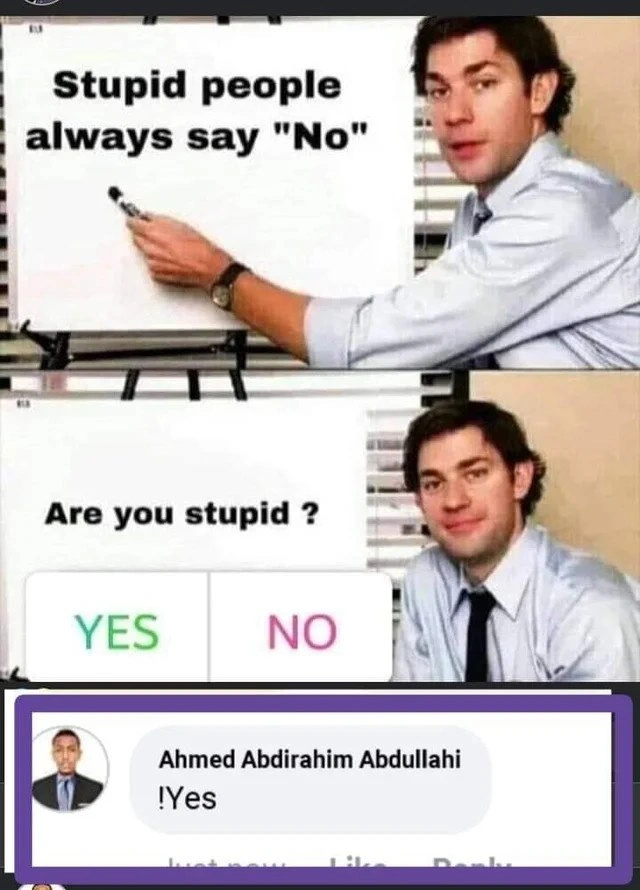
At first glance, this meme looks like a silly logic trap, but beneath the humor lies a UX failure every seasoned developer has seen. In the first two panels, Jim from The Office sets up a Yes/No poll on a whiteboard:

  • Panel 1 proclaims “Stupid people always say 'No'”.
  • Panel 2 asks “Are you stupid?” with big shiny YES (green) and NO (pink) buttons as the only answers.

It’s a devious setup — answering “No” would ironically label you stupid (since “stupid people always say no”), while “Yes” means admitting you’re stupid outright. The only winning move should be not to play... and that’s exactly what our user in Panel 3 does, in the most chaotic neutral way possible! Instead of tapping either button, user Ahmed Abdirahim Abdullahi bypasses the poll entirely by commenting “!Yes”. This move is the punchline: the user ignored the intended UI controls and responded through a channel the dev didn’t plan for. It’s a classic poll_ui_misuse scenario that makes developers facepalm and seniors smirk knowingly.

Why is this funny to developers? Because it exemplifies the golden rule of robust design: never trust the client-side to enforce your logic. The poll provided two obvious choices, but the user went off-script, effectively breaking the simple logic puzzle. In real systems, this is akin to a user finding an input path you forgot to guard. Maybe the poll’s front-end validation assumed only the provided YES/NO buttons would be used, but the clever (or oblivious) user acted through a comment box or another backdoor UI path. Seasoned devs recognize this as an “of course they did” moment – if there’s any loophole, some user will surely stumble through it.

This communication gap between what the developer intended and what the user actually did is both hilarious and painfully relatable. We’ve all built what we thought was a foolproof UI, only to watch a user gleefully break it in a way we never expected. It’s the reason UXFailures is a thing and why memes like this hit home in DeveloperHumor circles. The user’s !Yes comment is effectively a form of user-defined input the system didn’t account for. In security terms, it’s like an unsanctioned input vector – not a malicious hack, but a reminder that client-side constraints can be bypassed. If you rely solely on frontend validation (like a JavaScript check that only counts button clicks), a user might still send any data to your backend (through dev tools, scripts, or, as here, a totally different UI feature like comments). Server-side validation is the backstop that could catch this, e.g., rejecting or handling inputs that don’t fit the expected “Yes”/“No” schema.

This meme perfectly captures an off_by_user error – a play on “off-by-one” errors, but here it’s one user off-script that blows up your plan. It highlights the relatable humor of a dev’s life: you can design a clean two-button interface, but some user will treat it like a free-form text box. The joke’s on the developer for assuming users would stay inside the lines. As any jaded veteran will tell you with a chuckle: if you make something idiot-proof, the world will invent a better idiot. Here, our friend Ahmed isn’t necessarily an idiot – he might be playfully subverting the trap – but he demonstrates the same principle. From a senior perspective, the lesson is clear and always relevant: expect the unexpected from users. Plan for it, design for it, and above all, validate on the server because someone will always click (or type) the one thing you never anticipated.

Description

A three-part meme that presents a logical paradox. The first panel uses the 'Jim Halpert pointing at a whiteboard' format from the TV show 'The Office.' The whiteboard reads, 'Stupid people always say "No"'. The second panel shows a poll-style question, 'Are you stupid?', with 'YES' and 'NO' as options. Jim is pictured again, looking smugly at the camera, highlighting the trap: if you say 'No' to prove you aren't stupid, you confirm the initial premise. The third panel at the bottom shows a screenshot of a social media comment from a user named Ahmed Abdirahim Abdullahi, who enthusiastically responds, '!Yes'. While likely intended as an emphatic 'Yes', the exclamation point in front is a common programming operator for 'NOT'. This meme is relatable to senior developers who often deal with paradoxical or poorly defined requirements from stakeholders. It mirrors frustrating logical loops in code or business logic where any choice leads to a problematic outcome, and the only winning move is to defy the premise of the question, much like the final commenter does


Comments

14
Anonymous ★ Top Pick This is the classic stakeholder requirement: 'The system must be secure, but also allow passwordless login for executives.' The only valid response is to throw a `NotImplementedException`
  1. Anonymous ★ Top Pick

    This is the classic stakeholder requirement: 'The system must be secure, but also allow passwordless login for executives.' The only valid response is to throw a `NotImplementedException`

  2. Anonymous

    Your two-button poll isn’t a binary choice; it’s a case study in why enum columns need CHECK constraints - because somewhere out there, Ahmed is typing “!Yes” and turning your data warehouse into Schrödinger’s boolean

  3. Anonymous

    When you've been debugging production for 12 hours straight and someone asks if you've tried the NOT operator on your sanity check - sometimes the only winning move is to throw an unexpected token exception

  4. Anonymous

    This is essentially a real-world implementation of the halting problem: you can't write a function that correctly determines if it will return true or false based on its own output. The commenter's '!Yes' response is like adding a negation operator to escape the boolean trap - a classic developer move when faced with a poorly designed API that only accepts true/false but you need to return 'maybe' or throw an exception

  5. Anonymous

    Asked “Are you stupid?”, the staff engineer answers “!yes” and opens a PR: ban negative booleans; rename disableNoStupid=false to enableSmart=true

  6. Anonymous

    PM ships a Yes/No modal wired to isNotStupid; analytics logs answer = !click.no, and the exec dashboard celebrates 0% stupidity until someone notices the double negation in the ETL

  7. Anonymous

    Stakeholders rejecting microservices migration: always 'No' - self-selecting into the monolith maintenance tax bracket

  8. @daniivich 5y

    -(yes)

  9. @NiKryukov 5y

    Yesn't

  10. @Mrdedmrz 5y

    only retarded people think they are smart

    1. @desrevereman 5y

      But not all of them.

  11. @slnt_opp 5y

    Stupid people can answer with one word only🌚

    1. dev_meme 5y

      One word? But about which amount of bits we are talking here?

  12. @zirigidum 5y

    !yes

Use J and K for navigation