Skip to content
DevMeme
585 of 7435
The Three-Step Coding Waltz: Work, Pretty, Broke
Refactoring Post #669, on Sep 17, 2019 in TG

The Three-Step Coding Waltz: Work, Pretty, Broke

Why is this Refactoring meme funny?

Level 1: Polish, Break, Repair

Imagine you’re building a sandcastle at the beach. First, you quickly pile up sand and shape it into a basic castle. It might not look perfect, but it stands up and has the general shape you want – yay, it works! Next, you decide to make it really nice: you smooth the walls, carve out windows, add fancy towers and decorations. Now the castle looks prettier. But while doing all this careful decorating, uh oh – you pressed a bit too hard and one wall crumbled. The castle partly fell apart. Now you have to fix that wall and rebuild that section so the castle is whole again. In the end, you do get a beautiful sandcastle that’s standing tall, but you had to do some extra repair because making it beautiful accidentally broke it for a moment.

That’s exactly the funny cycle the meme describes, but with computer code. First make it work (build the castle), then make it pretty (decorate it), then make it work again (fix what broke during decorating). It’s humorous because it’s a little like saying: every time I clean up my project, I end up creating another mess I have to clean up! Even people who aren’t programmers know the feeling – like when you try to nicely reorganize your room and in the process you accidentally break a lamp, then you have to fix the lamp or clean up that new mess. We laugh because we recognize ourselves in it: trying to do something better and briefly making things worse, then working to set it right again.

Level 2: Pretty Code Problems

Let’s break down the joke in simpler terms. The meme shows a list of steps describing a common coding routine:

  1. Make it work – This means get your code functioning correctly first. Write whatever code you need so that the program does what it’s supposed to do. At this stage, you’re not concerned about how nice or clean the code looks. The goal is simply to solve the problem or deliver the feature. If the program was a car, at this step you’re just making sure the car can run, even if it’s held together with duct tape and chewing gum. In software, this might result in code that’s messy or inelegant, but it works. Developers often call this a “prototype” or say “it’s not pretty, but it works.”

  2. Make it pretty – Now that the code does its job, you improve the code itself. This is called refactoring. Refactoring involves cleaning up and reorganizing the code without changing what the code does. Think of it like tidying your workspace after finishing a craft project: you’re arranging the tools neatly, trimming off excess material, maybe labeling things clearly. In coding, “making it pretty” can mean using better variable names, simplifying a complicated function into smaller functions, removing duplicate code, or following clean code principles (guidelines that make code more readable and maintainable). The idea is to improve code quality – which makes the software easier to understand and less prone to future bugs. For example, you might take a chunk of code that was very long and split it into logical sections, or use a more straightforward algorithm that’s easier to follow. After this step, the codebase should be in better shape... in theory.

  3. Make it work again – Uh oh! This step says you have to get the code working again, implying that while doing Step 2, something got broken. This is the punchline: while cleaning up the code (Step 2), the developer probably introduced a bug or caused a part of the program to stop working. So now they have to debug and fix those issues to get the software running correctly again. Debugging (or troubleshooting) is the process of finding out why something broke and fixing it. It can involve checking error messages, printing out values to see what’s going on, or going through the code to spot the mistake. In our car analogy, while you were polishing the car and reattaching parts more neatly, maybe you accidentally disconnected a fuel line. Now the car doesn’t start, so you have to figure out what you inadvertently unplugged and fix it so the car runs once more.

Why does this happen? Often, when improving code, you might change a tiny detail thinking it won’t affect the functionality – but software can be unforgiving. Even a small change can have ripple effects. For instance, you might rename a function or move a piece of code, and suddenly something that relied on the old code breaks. If you don’t have a good set of automated tests (programs that automatically run your code’s functions to check if the outputs are correct), these mistakes aren’t caught immediately. Developers then find out something’s wrong either by manual testing or when a user encounters the bug. This is what the meme is poking fun at: the lack of a safety net (like tests or careful review) means the act of prettifying code often causes a regression – a fancy term for when a feature that used to work stops working after a change. It’s basically saying, “I tried to clean up my code, but I ended up breaking something that was working before, so now I have to go back and fix it.”

This three-step loop is very relatable in programming. Many of us have written some code quickly to meet a deadline (it works, but it’s not well-organized). Later, we return to that code to refactor it – maybe our team expects us to follow certain standards or we ourselves want to make it easier to maintain. Without careful attention (or if we’re unlucky), our changes might introduce new bugs. Suddenly a feature that was fine is acting up because of our “improvement.” Then we scramble to troubleshoot the issue and make it work again. It’s a bit ironic: the effort to improve code quality can backfire if not done cautiously.

The meme is funny to developers because it’s a self-deprecating truth. We know we should write both clean and correct code from the start, but reality isn’t so simple. Time pressure, complex requirements, or human error means we often do things in this make-it-work → make-it-better cycle. And yes, step 3 (fix it again) is almost like a rite of passage – it’s how we learn the importance of testing our changes. Over time, to avoid always ending up in step 3, developers adopt practices like writing tests, doing code reviews with colleagues (so someone else might catch a mistake in your “pretty” changes), or making small incremental changes rather than large sweeping ones. But even then, as the meme jokes, you can’t completely escape occasionally breaking something when all you meant to do was tidy up. It’s a normal part of debugging and troubleshooting in a coder’s life.

In summary, make it work (get the feature working), make it pretty (refactor for clarity/quality), then often fix what the refactor broke (because something unexpected happened) is a cycle that many developers recognize. It teaches an important lesson: always re-check that your code still works after you clean it up. The tweet jokingly admits that “I probably broke it” – an acknowledgment of fallibility that earns knowing laughs from programmers everywhere.

Level 3: Refactoring vs Reality

In day-to-day development, “Make it work, then make it pretty” is practically a mantra. Seasoned devs recognize this three-step loop all too well. First, you hastily cobble the feature together (Step 1: Make it work 💪). The priority here is functionality: get the output correct and the feature delivered. The result might be ugly code – maybe some hard-coded values, duplicated logic, or a marathon 500-line function – but hey, it passes the smoke test. Next comes Step 2: Make it pretty. This is the refactoring phase, where you clean up that hurried code. Perhaps you rename variables to meaningful names, break out a gigantic function into well-named helper functions, eliminate that copy-pasted code, or conform to the team’s Clean Code principles. The codebase breathes a sigh of relief – it’s more readable, maintainable, and elegant. You’re feeling proud, polishing the craft.

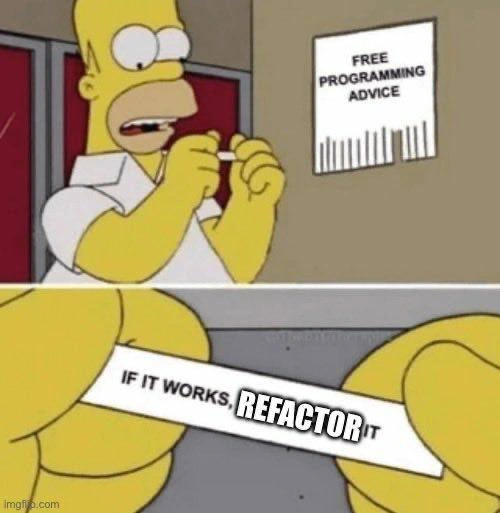
But then reality kicks in: the program suddenly throws an error or produces weird results. 😱 Something that worked before is now broken. Enter Step 3: Make it work again (fix what you broke while making it pretty). This punchline lands because every developer has lived this. You tweak one part of a system to improve it and suddenly a regression pops up elsewhere. Maybe that “one tiny edit” altered a loop condition and now a calculation is off by one. Maybe while rearranging code, you removed a crucial line you thought was redundant. It’s the Debugging & Troubleshooting grind all over again: digging through diffs to find where your beautification went off the rails. A common tongue-in-cheek saying is, “If it ain’t broke, don’t fix it.” Here we tried to fix the non-broken (code style) and in the process, broke it. The refactoring pain is real – hence tags like RefactoringPain and DeveloperReality.

Why does this happen so often, even to senior engineers? One big reason: missing test suites (the “woes” of no tests 👻). Without a safety net of unit tests or integration tests, you often don’t discover you’ve broken something until you manually run the app or, worst-case, until a user reports it. It’s easy to overlook an edge case. For example, say you had some working but clunky code:

# Step 1: Ugly but functional
if user.id is not None and user.id != "":
    process_user(user.id)

# Step 2: "Pretty" refactor using Pythonic truthiness
if user.id:  # assumes empty or None are the only "falsey" bad IDs
    process_user(user.id)

This looks cleaner, right? But oops – if user.id = 0 (a valid ID in some systems), the original code would process it, while the "pretty" version treats 0 as false and skips it. A subtle bug just slipped in during beautification! Such cosmetic refactor regressions bite us because humans aren’t compilers; we might simplify a condition or DRY up some code, only to realize the original “ugly” code had carefully handled a case we didn’t fully grok.

Another factor is that code often reaches a working state through iterative trial and error. There might be hidden side effects or interdependencies. The “make it pretty” step can inadvertently alter timing, state, or assumptions in the code. Perhaps that clumsy-looking sequence of calls was actually relying on a specific order of execution, and refactoring changed it. Or maybe we inlined a function call to be concise, not realizing it needed to happen last for everything to work. In large systems, there’s also the integration factor: your change in one module can break something in another. Without comprehensive understanding (or tests spanning modules), refactoring is like surgery without x-rays – you might nick an artery unknowingly.

What’s beautiful about this meme is the shared engineering comedy: it satirizes the ideal vs. the real. Ideally, we all want clean code (readable, well-structured) and correct behavior. In reality, achieving both simultaneously is tricky. So we default to a cycle: get it working first (no matter how gnarly the code), then improve the code. The laugh comes when that improvement sends us right back to debugging – it’s a little tragicomic dance we do sprint after sprint. Seasoned devs chuckle because they’ve been there: late night, you decide to refactor a function for clarity, and suddenly nothing works. As a coping mechanism, teams develop rules of thumb like “Don’t refactor on a Friday” or always do cosmetic changes in a separate commit – precisely because we anticipate the fallout of beautification.

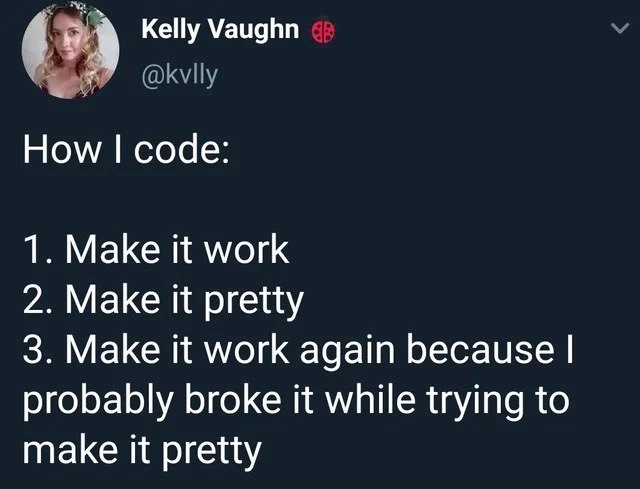
This tweet by Kelly Vaughn resonates especially with anyone who’s balanced code quality against deadlines. It’s basically a gentle roast of ourselves as developers: we pride ourselves on writing elegant code, but we know every once in a while, in the pursuit of elegance, we introduce a bug and have to do the walk of shame back to the debugger. The absence of Step 4: Write tests in that list is the unspoken kicker – had we strong tests, Step 3 might be less painful or even unnecessary. But alas, in the real world of tight schedules or legacy projects, we often skimp on tests and pay the price. The three-step dev cycle continues eternally: code, refactor, fix the refactor. The end result (hopefully) is both working and pretty code – but the journey there is a rite of passage filled with face-palms and bug tickets. In summary, the humor lands because it’s a too-real reflection of developer life: even with experience and best intentions, making things prettier can inadvertently make things worse, at least until we skillfully patch it up again.

Level 4: Refactoring Paradox

At the highest level, this meme touches on the fundamental challenge of software correctness. In theory, the step "Make it pretty" is a semantics-preserving transformation – what computer science calls refactoring. Refactoring is supposed to improve internal code structure without changing the external behavior. If our tools and methods were perfect, step 2 wouldn’t alter what the program does at all. But ensuring two versions of code do exactly the same thing is non-trivial. In fact, determining whether an arbitrary change preserves a program’s behavior can be as hard as solving the Halting Problem! 🧩 This falls into the realm of formal verification: using mathematical proofs or strict rules to guarantee a program remains correct after changes.

Imagine trying to prove that your “pretty” new code is functionally equivalent to the original messy code. You’d have to consider every possible input and state – an almost impossible task for anything beyond trivial programs (thanks to results like Rice’s theorem, which says any non-trivial property of program behavior is undecidable in general). Formal methods like model checking or Hoare logic can handle specific cases (industries like aerospace do use them), but everyday developers don’t have time (or sometimes the tools) to mathematically prove a refactor is safe. Instead, we rely on a proxy: automated tests act as a simplified specification. A comprehensive test suite can give high confidence that “Make it pretty” didn’t break anything important – but even 100% test coverage isn’t a formal proof of correctness. The meme humorously highlights this gap: without an iron-clad guarantee (be it formal proof or exhaustive tests), a seemingly harmless code cleanup can introduce a sneaky bug. In short, keeping software both elegant and correct is a balancing act on the edge of computer science’s theoretical limits. It’s a lighthearted tweet, but underlying it is the deep truth that maintaining correctness under transformation is one of our craft’s eternal hard problems. Even the most advanced compilers and static analyzers struggle here, so it’s no surprise that a solo dev tweaking code style might inadvertently conjure a new bug – a little chaos theory in the codebase, where a small change can have big, unintended effects.

Description

A screenshot of a tweet by user Kelly Vaughn (@kvlly). The tweet presents a relatable three-step process for coding. The text reads: "How I code: 1. Make it work 2. Make it pretty 3. Make it work again because I probably broke it while trying to make it pretty". This sequence humorously captures a universal developer experience: the cycle of implementation, refactoring, and subsequent debugging. It plays on the well-known software engineering mantra 'Make it work, make it right, make it fast,' highlighting the common pitfall where the 'make it right' (or 'pretty') phase inadvertently introduces regressions, breaking what was previously functional

Comments

7
Anonymous ★ Top Pick The senior developer's corollary to this is step 4: 'Write a character-building post-mortem on why the 'pretty' refactor violated the single responsibility principle and took down production.'
  1. Anonymous ★ Top Pick

    The senior developer's corollary to this is step 4: 'Write a character-building post-mortem on why the 'pretty' refactor violated the single responsibility principle and took down production.'

  2. Anonymous

    Red - green - refactor is great until the UI polish phase adds an undocumented fourth color: production-traffic-red

  3. Anonymous

    The real tragedy is when you finally get it working again, the git history shows you've essentially reimplemented your original "ugly" solution with extra abstraction layers and a 40% performance hit

  4. Anonymous

    This perfectly captures the eternal struggle between 'works on my machine' and 'looks good in code review' - where step 3 inevitably involves git bisect to find which 'harmless' variable rename cascaded into a production incident. The real senior move is recognizing that 'make it pretty' often means introducing subtle race conditions that only manifest at 3 AM on Black Friday

  5. Anonymous

    The sacred cycle: functional prototype, aesthetic apocalypse, postmortem refactor - why CSS commits need their own sprint

  6. Anonymous

    Architect translation: step three is the tax for style‑layer coupling - one innocent 'position: relative' and suddenly 47 snapshot tests fail and half your click handlers vanish

  7. Anonymous

    Beauty is a breaking change - rename userId to user_id for “clarity” and suddenly five consumers 400, snapshots detonate, and my SLO becomes aspirational

Use J and K for navigation