The 'Have You Tried Rerunning It?' Debugging Method
Why is this Debugging Troubleshooting meme funny?
Level 1: Magical Thinking
Have you ever seen someone press an elevator button over and over when the elevator is slow to arrive? Deep down, we know that pressing the button once is enough – the elevator is already on its way. Pressing it repeatedly doesn’t make it come faster, but we do it anyway when we’re impatient or frustrated. This meme is showing a programmer doing something similar with code. His program (like the elevator) isn’t doing what he wants, and instead of trying a different approach, he just runs it again without changing anything, hoping it will magically work this time.
It’s a funny and relatable idea because it’s magical thinking – like believing in luck or magic rather than logic. Imagine you have a toy car that isn’t moving because the batteries are dead. Instead of putting in new batteries, you take the same car and push the ON switch again and again, crossing your fingers that now it will suddenly start zooming around. Of course, unless something changes (like new batteries or fixing a loose wire), the toy won’t start. The programmer in the meme is doing the equivalent of that: running the program again with no changes, basically hoping for a miracle. We find it humorous because we’ve all done something like this in our lives, even outside of coding. It captures that moment when you’re frustrated and a bit desperate, doing the same thing again just in case the problem fixes itself.
Level 2: Flaky Bug Basics
For a newer developer (or someone just learning to code), let’s break down what’s going on here. The meme shows a programmer debugging code. Debugging is the process of finding and fixing errors (called bugs) in software. Normally, when our code doesn’t work, we try to figure out why and then change the code to fix the problem. This meme jokes about a situation where the developer says: “My code doesn’t work. Let’s change nothing and run it again.” It’s funny because it sounds like the programmer is expecting the bug to fix itself without any code changes – almost like hoping for magic.
Why would anyone run the program again without changing anything? There are a couple of reasons:
- Human error or confusion: Sometimes we think “maybe I forgot to save the file or ran the wrong command.” Running it again quickly double-checks that the problem is real. It’s like when your phone isn’t working and you try the same thing twice just to be sure you actually pressed the right button.
- Intermittent problems: Some bugs are not consistent. We call these flaky bugs or intermittent bugs. Imagine a lightbulb that flickers on sometimes and off other times when you flip the switch. In software, this could happen if, say, your program tries to fetch data from the internet and the first time the network is down, but the second time it’s fine. Or perhaps the bug only shows up when the computer is under heavy load or only at a specific time of day. In these cases, running the code again without changes might actually succeed if the external situation has changed. For example, if a server was temporarily unreachable or a file was locked by another process, the next run might get through.
- Flushing out a clue: When debugging, a developer might rerun to see if the error message happens exactly the same way again. If it doesn’t happen the second time, that tells them the bug could be something timing-related or environmental. If it does happen again, they know it’s definitely in the code and repeatable. So rerunning is sometimes a quick test.
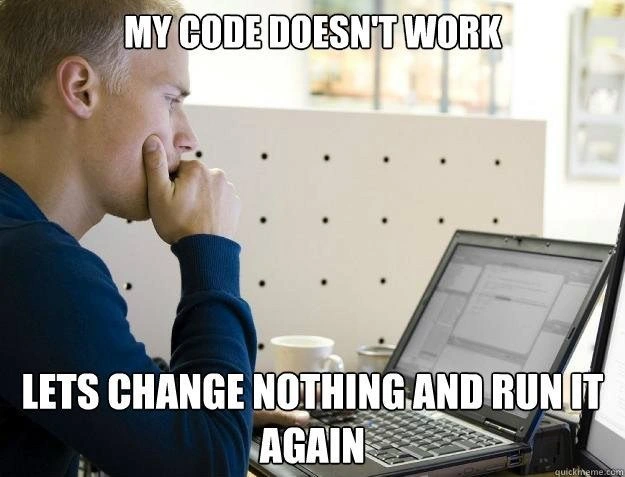
The text on the meme is in big white capital letters (a common meme style for captions) and it highlights frustration and absurdity. The top says “MY CODE DOESN’T WORK” and the bottom says “LET’S CHANGE NOTHING AND RUN IT AGAIN.” It’s poking fun at the irrational hope every programmer has felt during tough debugging sessions: maybe the computer will just sort itself out. It’s definitely born from DebuggingFrustration — that feeling when you’ve tried multiple logical fixes and nothing is working, so you end up doing something illogical out of sheer exasperation.
If you’re new to coding, you should know that the proper way to handle a bug is to investigate the cause (check error messages, use a debugger, add print statements to see what’s going on, etc.), not simply rerun and pray. But this meme resonates because even though we know better, we’ve all been this person at some point. Pressing the F5 key (which, in many programming environments, means “run the program” or “refresh”) starts to feel like hitting the retry button on life. It’s a form of developer humor – laughing at ourselves for the silly things we do when we’re stuck.
In short, the meme is popular in CodingHumor circles because it captures a universal moment in programming: when you’re out of ideas, you do something that makes no logical sense, just hoping for a miracle. It’s like when your car won’t start and you just try turning the key again without doing anything else, thinking “Maybe this time it’ll start.” Spoiler: it usually doesn’t, and that’s why it’s funny. The developer in the image isn’t lazy; they’re just frustrated and grasping at straws, which is a feeling even the best programmers understand all too well.
Level 3: The Rerun Ritual
Every experienced programmer recognizes the scenario in this meme: the code’s broken, frustration is high, and logic has left the building. The image text reads, “MY CODE DOESN’T WORK. LET’S CHANGE NOTHING AND RUN IT AGAIN.” It’s a tongue-in-cheek summary of a desperate debugging ritual. Why would any rational developer do this? Because believe it or not, sometimes it actually works. This is the humor and the pain rolled into one — it’s the debugging lottery mindset, a last resort when you’re out of ideas or clinging to hope that the bug was just a one-time glitch.
In many real-world cases, running the program again without changes can yield a different outcome due to factors outside the code’s logic. For instance, consider a test that sometimes fails and sometimes passes: a classic flaky test. Maybe the first run failed because it hit a network timeout or a database was momentarily unavailable. By the second run, the external service might be responding, and voila – the test passes. Similarly, if there’s a race condition (two parts of the program racing to use a shared resource), it might only manifest under certain timing. One run might interleave the threads in a problematic way causing a crash, and the next run the timing shifts just enough that the threads avoid the collision. We’ve also seen caching issues where the very first run populates some cache or does some initialization; rerunning finds everything warmed up and suddenly the code sails through. This is why the meme’s strategy, absurd as it sounds, is an eternal developer debugging strategy – it’s born from real experiences of “it failed before, but maybe this time it will work.”
Of course, there’s a fine line between persistence and insanity. There’s a famous adage often attributed to Einstein: “The definition of insanity is doing the same thing over and over and expecting different results.” Developers are well aware of that irony. Yet, when faced with a nondeterministic bug (a bug that isn’t consistently reproducible), doing the same thing again isn’t totally crazy – it’s a way to gather clues. If the bug doesn’t happen on the second run, that tells us it might be sensitive to some changing condition. If it fails consistently every time, at least we know the problem is reliably reproducible (and thus not a Heisenbug). In other words, the first rerun is often a sanity check: Did that error happen again?
But the meme is poking fun at going beyond that sanity check into the realm of wishful thinking. Every developer has had that exhausted moment at 3 AM, staring at an IDE with bleary eyes, thinking “Maybe if I just run it once more… please?”. It’s practically a prayer. Pressing the F5 key (the common shortcut to rerun code or refresh) repeatedly becomes a reflex fueled by DebuggingFrustration and dwindling options. There’s also an undercurrent of denial: “Surely my code is fine; something else went wrong. Let’s just try again.” It’s easier to rerun than to accept that you might need to rethink the whole approach.
The meme’s imagery – a developer hunched at the desk, staring intently at the screen – captures that DeveloperFrustration perfectly. You can imagine them watching logs scroll by, hoping not to see that error message this time. In fact, many of us have done a version of this: not just rerunning, but maybe tweaking something completely unrelated (or adding a console.log("here") in desperation) and running again, hoping the bug fairy fixes things. That’s often called voodoo debugging or superstition in programming. We laugh at it because it’s irrational, yet so common. This meme nails that shared experience in software development: when productivity plummets and logic gives way to random success expectation, we resort to the rerun ritual. It’s funny because it’s true – a piece of DeveloperHumor born from collective pain.
To illustrate how this can play out, imagine a command-line program that fails due to a fleeting issue:
$ ./my_code # 1st attempt - it fails
Error: Could not connect to server
$ ./my_code # 2nd attempt - still fails (no changes made)
Error: Could not connect to server
$ ./my_code # 3rd attempt - magically works now!
Data loaded successfully.
In the above scenario, the code itself wasn’t changed at all. The failure was due to an external factor (the server wasn’t reachable) which resolved itself by the third try. The developer’s “let’s change nothing and run it again” approach paid off, but only due to luck. The code didn’t suddenly improve — the conditions did. This is the debugging troubleshooting reality the meme is highlighting. We know the proper solution is to handle such errors or investigate the cause, but in that heated moment of CodingHumor-worthy frustration, simply hammering the run button feels oddly cathartic. It’s the software equivalent of kicking a vending machine when your snack gets stuck: not exactly a productivity best-practice, but oh-so tempting when you’re out of ideas.
Level 4: Heisenbug Uncertainty
At the most granular level of computing, the idea of changing nothing yet expecting different results touches on the concept of non-deterministic behavior in software. In theory, given the same input and initial state, a program’s execution is deterministic – it should produce the same output every time. So why do developers sometimes rerun code without changes? Because in practice, modern systems have hidden variables: thread scheduling, uninitialized memory, cache states, hardware race conditions, and other chaotic elements that can make a bug appear intermittent.
This is where the infamous Heisenbug comes into play – a term (nod to Heisenberg’s uncertainty principle) for a bug that seems to vanish or alter its behavior when you try to study it. For example, adding a printf() or running the program in a debugger might change the timing enough that the error no longer manifests. The software is behaving like Schrödinger’s cat: both working and broken until observed. What’s happening is that tiny differences in execution environment (memory layout, CPU instruction ordering, network latency) can lead to different outcomes. This intrinsic uncertainty is a fundamental challenge in concurrent and distributed systems: e.g., a multi-threaded program might hit a race condition one run in ten, or a network request might time out only occasionally. Mathematically, the program plus its environment form such a complex state space that we effectively treat certain outcomes as random.
So when a seasoned engineer jokes about changing nothing and running it again, there’s a sliver of rationality behind the humor. They’re acknowledging that some bugs are non-deterministic bugs (also called flaky or intermittent issues), and that rerunning might actually yield a different state. It’s a bit like rolling dice: the program might just skip the failure path on the next execution. Of course, from a computer science perspective we know something does change (even if only the system time or memory addresses), but those changes are outside the developer’s control. This meme wryly hints at the underlying complexity of chasing such elusive bugs – it’s practically a gentle poke at the limits of our ability to fully predict program behavior in complex systems.
Description
This meme uses a classic stock photo format, often called 'Pensive Programmer' or 'Frustrated Programmer'. It shows a young man in a blue shirt sitting at a desk, looking intently at his laptop with his fist pressed to his mouth in a thinking pose. The top text, in a bold white font, reads 'MY CODE DOESN'T WORK'. The bottom text reads 'LETS CHANGE NOTHING AND RUN IT AGAIN'. The meme humorously captures the all-too-common, slightly irrational behavior of developers who, when faced with a failing program, will re-execute it without any modifications, hoping for a different outcome. For experienced developers, this is a relatable act of desperation, especially when dealing with intermittent bugs, race conditions, or flaky environments where a transient issue might just resolve itself. It's the software equivalent of hitting a machine to make it work
Comments
7Comment deleted
The definition of insanity is rerunning code and expecting a different result. The definition of a senior engineer is knowing the five distributed system states where that's actually a valid debugging strategy
Enterprise debugging: just keep smashing F5 until the thread scheduler rerolls the exact 1-in-10 000 timing window - Heisenbug gone, ship it
The second run is just giving the distributed cache time to expire, the connection pool to reset, and the cosmic rays to realign - we call it 'eventual consistency debugging.'
This meme perfectly captures the senior engineer's secret shame: we all know Einstein's definition of insanity, yet we've all hit F5 or rerun the same failing test suite multiple times without changing a single line, secretly hoping the race condition resolved itself, the cache magically invalidated, or that the compiler just had a bad day the first seventeen times. It's the programming equivalent of checking if the fridge has new food after closing it for three seconds - logically futile, but somehow psychologically necessary before we admit we need to actually read the stack trace
In distributed systems, “change nothing and run again” is called exploiting eventual consistency; in our monolith it’s just appeasing the Heisenbug
The senior dev's zeroth law of debugging: rerun unchanged code, for even distributed systems occasionally respect blind faith
“Let’s change nothing and run it again” - the classic retry policy for Heisenbugs, banking on cache eviction, scheduler roulette, and a luckier entropy seed