Sora Media Upload Agreement: Checkbox Theatre Before Your Video Gets Rejected Anyway
Why is this AI ML meme funny?
Level 1: Playground Rules
Imagine you’re at school and your teacher is about to give you a super cool new toy to play with, like a fancy paint set. But right before you can use it, she makes you promise a bunch of things. She says:
- Promise you won’t paint any of your friends or any kids who aren’t allowed.
- Promise you won’t draw anything super scary or gross that might upset people.
- Promise the drawings you make are your own ideas and you’re not copying from a book without permission.
- And if you break any of these rules, you’ll lose playtime for a week with no do-overs.
Only after you nod “yes” to each and every rule can you start painting. By then, you might feel a bit nervous to even use the paint set!
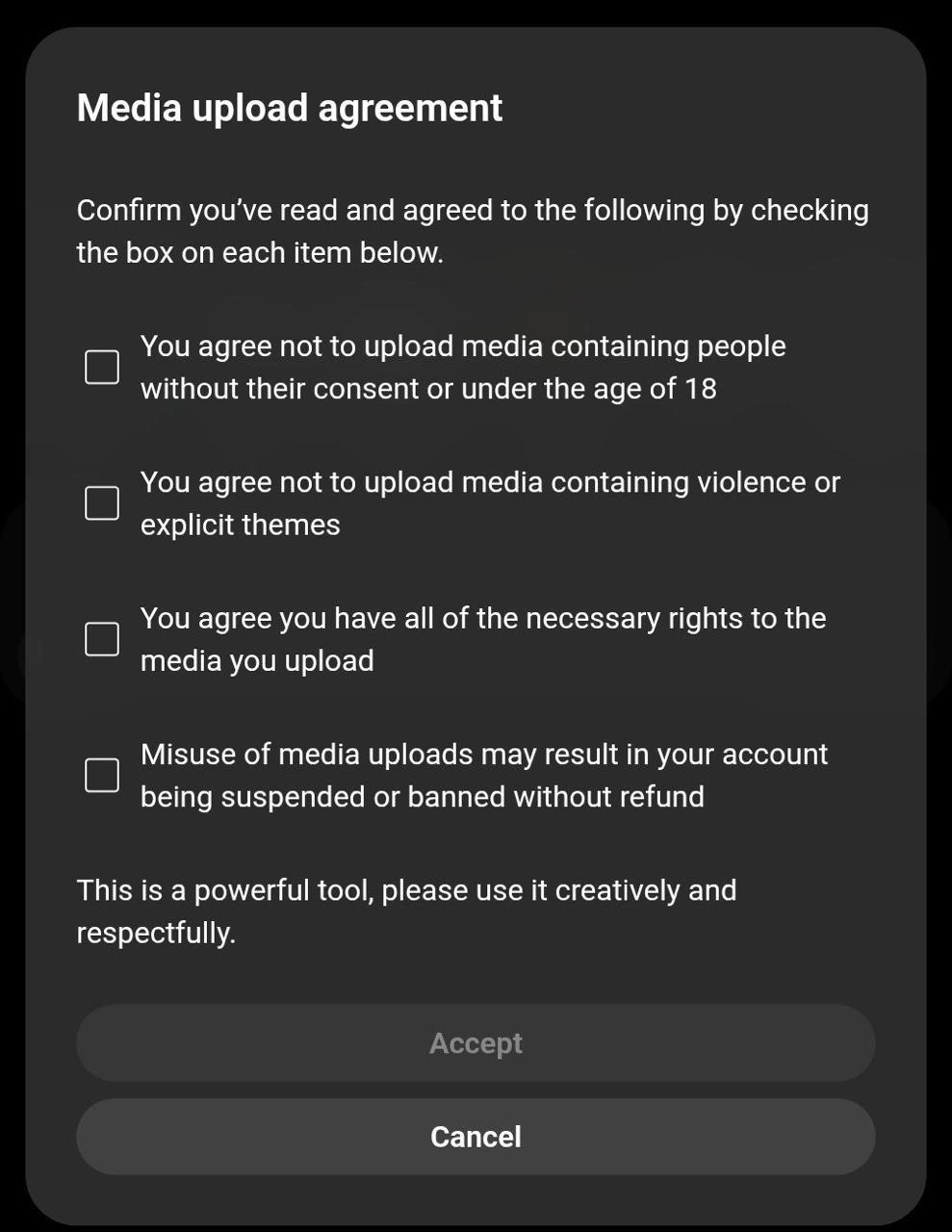
That’s exactly what’s happening in this picture, but for a website. The picture shows a pop-up message that appears when someone tries to upload (share) a photo or video. Before they can continue, the site is behaving like that careful teacher, making the user check off (like saying “yes”) to four important rules. It’s funny in a way, because normally uploading a photo is quick and simple, like just hitting play on a game. But here it’s like “Wait! Agree to all these or no photo for you.” It feels like a big serious lecture right when you just want to have fun.
The emotional punchline is: an upload dialog – usually easy and friendly – is acting like the company’s legal department, laying down the law. It’s as if your fun time has turned into rule time. Just like having to agree to all the playground rules before you can play, it makes you chuckle and roll your eyes. You get why the rules are there (to keep everyone safe and fair), but it’s a bit much all at once. The meme makes us laugh because it captures that feeling of “Whoa, okay, I just wanted to share something, but now I’m basically signing a contract!” It’s the grown-up tech version of your teacher making you pinky swear to a list of do’s and don’ts before letting you play — necessary, maybe, but definitely a mood-killer right when you were excited to start.
Level 2: Checkbox Overload
Let’s break down what’s happening in this dialog in simpler terms. This is a modal, which is a pop-up window that demands your attention before you can do anything else. The title “Media upload agreement” tells us this is basically part of the terms of service specifically for uploading media (like photos or videos) to some platform. Instead of burying these rules in fine print, the designers put them front-and-center as separate items you must agree to. That’s why there are so many checkboxes – each checkbox corresponds to a single rule or condition:
- Rule 1: No non-consensual or under-18 media – They’re asking the user to confirm they won’t upload pictures or videos of people if those people haven’t agreed, or if they’re minors (under 18 years old). This is about DataPrivacy and protecting children. Many countries have laws (like COPPA in the US for kids under 13, or GDPR in Europe with strict privacy rules) that can get a company in big trouble if users upload sensitive content like that. By checking the box, the user says, “Yes, I understand I shouldn’t do that.”
- Rule 2: No violent or explicit content – This is about keeping the platform clean and safe (Security and community guidelines). They don’t want gruesome violence or adult-only material uploaded. Likely, the platform has a content policy, and this checkbox forces users to acknowledge it. It’s a form of Compliance: the company might have to show they warned users not to upload this stuff.
- Rule 3: You have necessary rights – This relates to copyright and ownership. Basically, “Don’t upload stuff that isn’t yours.” If you try to upload the latest Marvel movie or someone else’s artwork, you probably don’t have the rights to do that. Checking this means you promise everything you upload is your own content or you have permission. It protects the company from copyright infringement issues (like DMCA takedown notices). It’s also part of SecurityBestPractices to ensure users aren’t sharing pirated or stolen content.
- Rule 4: Misuse may lead to ban with no refund – In plain terms: if you break the rules, they can kick you off their service and you won’t get your money back (if you paid for a subscription or anything). This is the stick after the carrots. It warns users there are real consequences. This often appears in UserExpectations guidelines or Terms of Service for any online platform: you break it, you lose your account. It’s harsh but meant to scare off bad actors. For a developer implementing this, it’s part of the account management and policy enforcement logic – e.g., code that checks reported content and flags accounts for suspension.
Now, why do all these have separate checkboxes instead of one big “I agree”? That’s to make sure the user specifically acknowledges each point. It’s easy to miss things in a long paragraph, but if you have to tick four individual boxes, the company can argue you saw each rule. A common UI pattern is the accept_button_disabled_until_all_checked – exactly what’s shown here with the greyed-out “Accept” button. The dialog won’t let you proceed until you’ve checked every box, confirming you agree to all the terms. Developers implement that with simple logic in the front-end code: for example, in pseudo-code:
const checkboxes = document.querySelectorAll(".rule-checkbox");
const acceptButton = document.getElementById("accept-button");
checkboxes.forEach(cb => {
cb.addEventListener('change', () => {
acceptButton.disabled = !Array.from(checkboxes).every(c => c.checked);
});
});
This way, the Accept button (likely styled grey and inactive initially) only becomes clickable when every(c => c.checked) is true, meaning all the little check marks are filled. This ensures compliance because the user can’t say “I clicked accept by accident” or “I didn’t see that rule number 3” – at least in theory.
From a UXDesignPrinciples viewpoint, this is heavy-handed. Typically, UX designers want as few steps as possible. If an upload normally just requires picking a file and hitting upload, adding a four-item agreement is a big interruption. It creates friction – some users might even cancel out of annoyance. But from a PrivacyByDesign and security perspective, the company is trying to be transparent about rules up front. It’s a direct way to enforce upload_policy_enforcement: the user is informed and has to self-certify they’ll follow policy.
Young or new developers may not have run into this yet, but it’s common in industries with sensitive content. For instance, any site dealing with user-generated content (like forums, image hosts, social media) has Compliance concerns. If you’ve ever uploaded a video to YouTube or a picture to a stock photo site, you might recall checkboxes like “I certify I have rights to this music” or “This video doesn’t contain violent extremism” etc. That’s exactly what we see here – just consolidated into one place. It’s essentially a mini legalese_in_ux moment: legal language presented in a user interface.
So, to summarize at this level: the meme shows a pop-up that’s supposed to let you upload something, but first it asks you to agree to four serious rules by ticking four boxes. It’s highlighting the tension between making things easy for the user (just upload already!) and making sure the user follows the rules (covering the company legally). Every checkbox is there for a reason – likely a hard-learned lesson or a law – but seeing them all at once feels overwhelming. Developers building this might chuckle (or groan) because they know the backstory: someone from legal or security likely demanded each one. It’s a checkbox_overload that turns a quick task into a mini compliance exam, which is both relatable and a bit absurd.
Level 3: The UI Courtroom
This meme captures the classic showdown between UX simplicity and corporate compliance. A simple upload dialog has morphed into a mini Terms of Service hearing, complete with a list of legal clauses you must individually swear to. Seasoned engineers recognize this as the handiwork of a product counsel who slid into the last sprint and said, "We need users to explicitly agree to all these rules before they upload anything." The result? A dark-themed modal titled "Media upload agreement" that feels more like signing a contract than sharing a file. Each checkbox is essentially the company’s legal department moonlighting in the UI, turning a routine action into a user’s oath of compliance.
Why is this funny? Because it’s painfully real. We strive for frictionless UX – minimal clicks, smooth flows – but then Data Privacy and Security requirements slam on the brakes. For example, clause by clause:
- No under-18 or non-consenting individuals in uploads – This screams GDPR, COPPA, and past horror stories of sites inadvertently hosting illegal images. Legal wants to ensure users know they are liable for violating privacy, not the platform.
- No violent or explicit content – A nod to content moderation and platform policies. Likely born from trust & safety teams and regulators cracking down on harmful content. To a developer, it’s the “don’t make me build a content filter for gore at 3 AM” clause – push the onus onto users instead.
- You have all necessary rights – Ah, the copyright and licensing landmine. This one is about protecting the company from DMCA takedowns or lawsuits because a user uploaded the entire Marvel movie collection. By forcing a checkbox, the platform can say “You agreed you owned it, not our fault!”
- Misuse may result in suspension without refund – The ultimate CYA: “break our rules and we’ll ban you, and you’re not getting your money back.” It’s half deterrent, half legal cover. Engineers know this phrasing was probably debated in five meetings (“should we say will or may result in ban?”) while the dev team sighed heavily.
Each checkbox is legalese_in_ux, and having four of them is pure checkbox_overload. The Accept button remains disabled (Accept grayed out in the image) until all are checked – a technical enforcement of “you can’t plead ignorance later.” This pattern is often mandated by compliance teams: no check, no proceed. It’s annoying, but if even one box were optional, a clever violator’s lawyer would argue their client never agreed to that specific clause. So here we are, coding if allCheckboxesChecked then enableAccept().
From a senior dev perspective, this modal also highlights PrivacyByDesign gone wrong. Ideally, content upload systems should bake DataPrivacy and SecurityBestPractices into their architecture (automatic content scanning, under-18 detection, etc.), rather than slapping a huge warning at the last step. But real life? It’s often reactive. Maybe an incident or near-miss triggered these additions: “User uploaded something bad last month – legal says add warnings!” Now the UXDesign team cringes as their smooth upload flow gains a formidable wall of text. It’s a textbook example of friction_vs_compliance. The company UserExpectations research probably showed people want quick sharing, but risk mitigation wins the day when lawyers are nervous. The meme hits home because every experienced developer has built or refactored something like this: a terms_of_service_modal awkwardly inserted to cover our backs. It’s equal parts comedy and tragedy – we know users will just blindly check all the boxes, defeating the purpose, yet we still had to implement it meticulously to appease the powers that be.
In essence, the humor is the stark contrast: The modal looks like it should be a quick "choose file, hit upload" dialog. Instead, it’s reading you the riot act. It’s the company’s legal department disguised as a friendly UI, moonlighting after hours to make sure you behave. For developers, it’s the memory of interminable reviews with legal teams, turning a one-click upload into a multi-step rite of passage. It’s funny because we’ve all lived it – when a simple feature starts accumulating checkboxes like barnacles, you know lawyers have docked their boat on your product. The meme nails that feeling of “This is a powerful tool, please use it creatively and respectfully” – a spoonful of sugar after a list of threats. In production, we joke that every additional checkbox halves your conversion rate, but hey, at least no one can say we didn’t warn them! The clash of UXDesignPrinciples and Compliance has never been so succinctly summarized as in this single image: an upload dialog turned UI courtroom, where the user must play lawyer before they can play creator.
Description
A screenshot of OpenAI's Sora media upload agreement dialog box with a dark theme. The dialog title reads 'Media upload agreement' and instructs users to confirm by checking boxes: 'You agree not to upload media containing people without their consent or under the age of 18', 'You agree not to upload media containing violence or explicit themes', 'You agree you have all of the necessary rights to the media you upload', 'Misuse of media uploads may result in your account being suspended or banned without refund'. The bottom text reads 'This is a powerful tool, please use it creatively and respectfully.' Two buttons appear: a greyed-out 'Accept' and an active 'Cancel' button. Part of a Sora frustration series -- users go through this only to have every video rejected
Comments
8Comment deleted
OpenAI's approach to AI safety: four checkboxes that nobody reads, a greyed-out Accept button, and a Cancel button that's the only thing that actually works reliably in the entire Sora experience
I love the optimism of 'please use it creatively and respectfully' right after four checkboxes that basically say 'we know you're going to try and upload something awful'
Nothing says ‘CI/CD velocity’ like three extra checkboxes that have to pass legal review before your feature flag can even turn green
Ah yes, the sacred ritual of clicking 'Accept' without reading - the only distributed consensus algorithm that achieves 100% agreement across all nodes while maintaining zero knowledge proof of what was actually agreed to
Ah yes, the classic 'powerful tool' disclaimer - because nothing says 'we trust our users' quite like four unchecked boxes standing between you and a grayed-out Accept button. It's the UI equivalent of a bouncer asking for three forms of ID before letting you into an empty club. Senior engineers know this pattern well: legal wanted checkboxes, product wanted friction reduction, and you're stuck implementing a state machine that tracks four booleans just to enable a button. Bonus points if the backend validates these client-side checkboxes again, because clearly users might inspect element their way to agreement. The real power move? Shipping this to production knowing full well 99% of users will rage-click through without reading, making the entire exercise a beautiful monument to compliance theater
The ultimate compliance middleware: four consent gates before your image hits the diffusion model
Moderation-as-code: acceptEnabled = boxes.every(Boolean); Legal insists that’s governance
PM promised a one‑click uploader; Legal shipped a four‑checkbox finite‑state machine with audit logs and a no‑refund clause - the only idempotent action left is Cancel