Skip to content
DevMeme
1092 of 7435
The True Fear: When 'It Works on My Machine' Meets Reality
Testing Post #1229, on Apr 2, 2020 in TG

The True Fear: When 'It Works on My Machine' Meets Reality

Why is this Testing meme funny?

Level 1: Broken Umbrella

Imagine you’re about to go outside and there’s a big rainstorm. You have an umbrella, so you’re not scared of the rain at all – you feel safe and prepared. The rain is like the “enemy” you expect. But now think of something worse: what if your umbrella looks fine when you’re at home, but the moment you step out in the storm, it suddenly breaks or flips inside-out? 🌧️😱 You’d get soaked! You weren’t afraid of the rain because you trusted the umbrella to protect you, but when the umbrella fails, it’s a nasty surprise. That feeling – being let down by something you were counting on – is what this meme is joking about.

In the world of coding, tests are like your umbrella. They’re supposed to catch problems and keep your app safe during a big “storm” (the deployment). If a test passes on your computer at home, that’s like checking your umbrella and seeing no holes – you feel good. But if that same test fails when you deploy the app (like the umbrella breaking in the storm), it’s a big shock and trouble pours down. Developers say they “fear” those tests more than anything because it’s an unpleasant surprise: you thought everything was okay, and at the last moment you discover it’s not.

So the meme humorously advises: Don’t worry so much about obvious, known problems (the enemies you can see), worry about the sneaky problems that only show up at the worst time (the tests that were fine at home but explode during showtime). It’s funny in a relatable way – everyone likes to think they’re prepared, and it’s ironically true that sometimes what we trust the most (like our trusty umbrella, or our passing tests) can surprise us in a bad way. The joke reminds us to always double-check and not be too confident until the final stage is done.

Level 2: Environment Drift

For newer developers or those just getting into Continuous Integration / Continuous Deployment (CI/CD), let’s break down why tests might pass locally but fail in a deployment pipeline, and why that’s such a common joke in programming circles. First, some terminology:

  • Unit tests are small tests that check individual pieces of code (like functions or classes) in isolation. They usually run fast and don’t touch external systems. If a unit test fails, it typically means there’s a bug in that one piece of code.
  • Integration tests (or sometimes regression tests) go a bit further – they might check if different parts of the system work together or ensure a bug that was fixed in the past stays fixed (that’s the regression part). These tests can involve external resources like databases, file systems, or networks.

When you run tests locally, that means you’re executing them on your own development machine (your laptop or desktop). Everything in that environment is set up the way you have configured it. Maybe you’ve installed a database, maybe you’re running on Windows or Mac, maybe you have certain environment variables or config files present. In contrast, when the code is deployed or when it runs on a CI server, it’s usually a fresh environment – often a Linux machine or container that starts clean, with just the code and whatever setup the pipeline does. The CI server is where the build pipeline runs: it will compile your code (if needed), run the test suite, and if all tests pass, proceed to package or deploy the application (that’s the deployment pipeline part). Popular CI services (just for context) include tools like Jenkins, CircleCI, GitHub Actions, GitLab CI, etc., which all essentially do this automated testing and deployment routine.

Now, “environment drift” refers to differences between your local setup and the test/prod environment. Ideally, we want environment parity – meaning the code sees the same conditions everywhere. But in practice, differences creep in. Here are some concrete examples a junior dev might encounter:

  • Missing environment variables or config: Suppose your app needs a setting like API_KEY to run, which you conveniently set on your machine. If you didn’t tell the CI about this, the tests that depend on API_KEY will fail there. Locally: works fine, in CI: “Error – API_KEY not provided.” Oops!
  • Database or file path issues: Let’s say your integration test writes to /tmp/myapp/test.db (a temporary database file). On your Mac or Linux laptop, /tmp exists and is writable. On a Windows machine or some restricted container, maybe that path doesn’t exist or isn’t writable. Result: local passes, CI fails. Or perhaps you’re using SQLite for local testing but the CI uses PostgreSQL – and a subtle SQL difference causes a test to fail only on Postgres.
  • Dependency versions: You might have installed version 1.2.3 of a library locally, but the CI pulls the newest 1.2.4 version (because the dependency was specified loosely). If 1.2.4 introduced a bug or a change, tests could break only in CI (which fetched the new version). This is why locking dependency versions (with tools like package-lock.json in npm or Pipenv in Python) and using the same versions everywhere is important.
  • Order and state: Imagine you have two tests: one creates a user, another assumes a user exists. If you accidentally rely on the first test running before the second, it will work when run in that exact order (maybe that’s how you ran it locally). But if the test runner in CI runs them in a different order or in parallel, the second test might run first and not find any user, causing a failure. This kind of test interdependence is a common rookie mistake – tests should be independent, but it happens.
  • Flaky tests: A flaky test is a test that sometimes passes and sometimes fails, without any changes in code. For instance, a test that calls an external API could be flaky if the API rate-limits you or has minor downtime – one run it passes, next run it fails due to a network hiccup. If you only ran it once locally, you might’ve gotten “pass”, but when CI runs it (maybe multiple times or just at a different moment), it fails. Another flakiness cause is timing: e.g., your test waits 1 second for something to happen, which is enough time on your machine, but on the slower CI machine it needed 2 seconds – so occasionally it fails if the timing doesn’t line up.

The meme is specifically highlighting the fear and frustration caused by these scenarios. It’s practically a rite of passage in development: confidently merging your code because “all tests passed locally”, and then getting that dreaded email or notification: Build Failed. The deployment didn’t go through because a test failed in the pipeline. You stare at the logs thinking “But… it worked on my machine?!”. Now you have to scramble to figure out why the test is failing in that environment. Often this involves digging through stack traces in the CI logs, maybe re-running the tests in debug mode, or adding print statements to see what’s different. It can be a tremendous time sink and always seems to happen at the worst possible moment (like right before a deadline or when you’re trying to go home for the day).

Let’s decode the humor a bit. The tweet says, “Don’t be afraid of enemies who attack you” – in dev terms, that could be obvious bugs or hostile conditions that you’re prepared for. “Be afraid of the tests that work locally, and then fail when deploying” – meaning the unexpected pitfalls. It’s basically saying: the real danger isn’t the failure you anticipate, it’s the one that blindsides you because you thought you had everything under control. Developers find this funny because it’s painfully true. We often joke that the hardest part of programming is not coding itself, but setting up the same environment everywhere so that code runs consistently. That’s why tools like Docker or package managers exist – to minimize the “But it worked on my computer!” problems.

In Continuous Integration, one best practice is to run tests in a clean environment so that these issues surface early. It’s actually a good thing when a test fails in CI – it saved you from deploying something that could have broken in production. But in the moment, it feels like betrayal because your own tests (meant to protect you from bad code) are now the ones causing the deployment to halt. It’s like your safety net caught you, but also spilled your coffee in the process – you’re grateful, but also annoyed.

A newcomer should take away that this meme is poking fun at a common Deployment pain point. It’s saying “be more worried about subtle bugs (or misconfigurations) that don’t show up until you’re deploying than about obvious ones you can catch easily.” It encourages respecting the complexity of different environments. The solution, of course, is to aim for as much parity as possible: use the same OS, same dependency versions, same configuration in test as in production. And always be ready for that one test that only fails under specific conditions. Over time, you learn to run tests in an environment similar to CI (maybe using a local CI runner or container) to catch these beforehand. But even the best get caught off guard sometimes – hence the meme’s enduring relevance.

Level 3: Deployment Dread

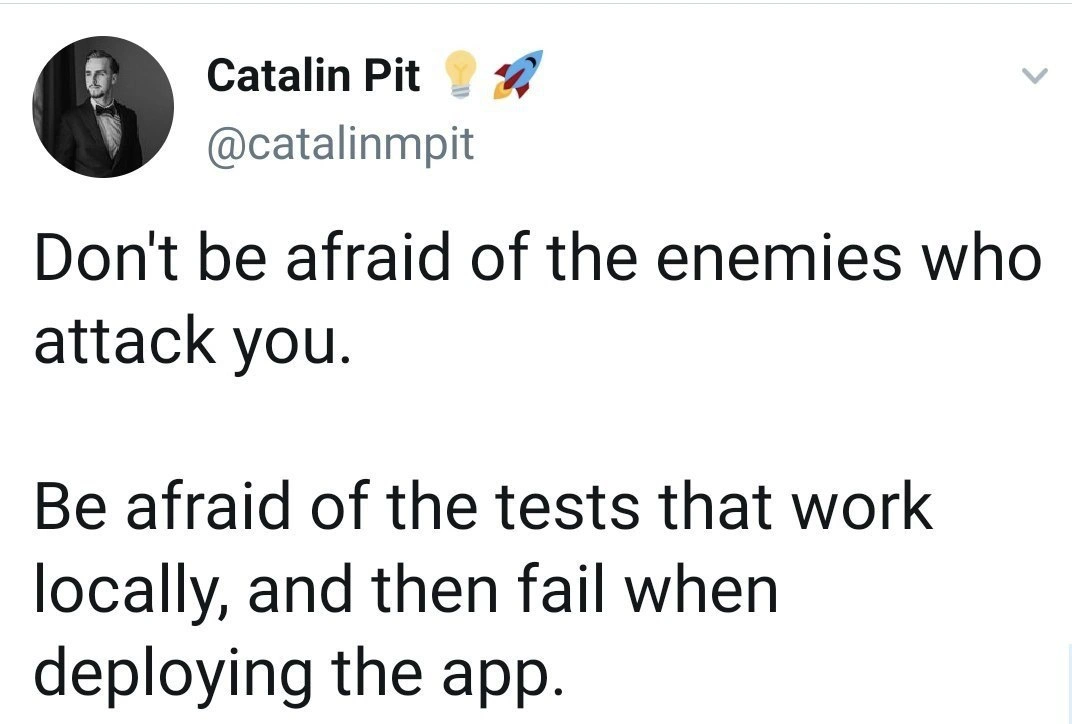
"Don't be afraid of the enemies who attack you.
Be afraid of the tests that work locally, and then fail when deploying the app."

This tweet-turned-meme nails a very real Testing nightmare that haunts experienced developers. It twists a classic adage about fearing false friends more than open enemies – here, the “false friends” are tests that pass on your dev machine but stab you in the back in CI. The humor (tinged with horror) comes from shared trauma: every seasoned dev has confidently run npm test or mvn verify locally to see all green checkmarks, only to push code and watch the CI/CD pipeline go up in flames with a failing test. In the moment, that feels worse than any known bug or enemy attack, because it’s a betrayal of trust. You thought you were safe – “the tests all passed on my box!” – but the deployment pipeline reveals that safety was an illusion.

Why is this so funny and painful? Because it satirizes the infamous works on my machine phenomenon. That phrase is practically a running gag in software teams, an ironic excuse meaning “I can’t reproduce your bug; in my environment everything is fine, so good luck!” Here, the meme suggests that instead of fearing obvious external threats (like hackers, or known failing tests), developers live in dread of the sneaky flaky tests that are green one minute and red the next. It’s a shared industry superstition: the deployment gods are capricious. A test that passes locally lulls you into a false sense of security. Then you deploy or run it on the build server and boom – build failed 🔴. Cue the face-palm and a round of groans on the team Slack channel. It’s essentially a jump-scare for software engineers: everything seems calm, then suddenly the pipeline goes “RED ALERT” just when you’re trying to ship.

Technically, what’s happening is often an environment disparity. The code was tested in one context (your laptop) but behaves differently in another (the staging/production-like environment where the CI server runs). There are countless real-world causes for this drift:

  • Configuration differences: Perhaps you have certain environment variables set locally (or a .env file) that the CI environment doesn’t. For example, a test might assume DATABASE_URL is set to a local test DB. Locally it is, but in CI it might be missing or pointing to a different engine. Suddenly your tests can’t connect or run a different code path.
  • Dependency/version mismatch: “It worked on my machine” often because my machine has slightly different versions of libraries or tools. Maybe you have Python 3.8 but the CI uses Python 3.9, or a different minor version of a library. 99% of the time it’s fine… until some deprecation or behavior change bites a test.
  • Operating system quirks: Think about file paths or line endings – a test that passes on Windows (case-insensitive file system, CRLF line breaks) might fail on a Linux CI runner (case-sensitive, LF line breaks) if the code isn’t written portably. For instance, a local test might happily open C:\temp\file.txt, but in Linux CI there is no C: drive – boom, failure.
  • Timing and performance: Your beefy dev laptop might breeze through a test within the time limit, but the CI container might be slower or under load, causing a timing-sensitive test or performance assumption to fail. Many of us have seen tests that pass individually in isolation but time out or fail in a full suite because of resource constraints.
  • Order dependence and shared state: This one is sneaky. Suppose Test A leaves behind some state (like residual data in a database or a file on disk) that Test B relies on, but you never noticed because you always ran them together locally. In CI, tests might run in a different order or in isolation (or on a fresh environment), so Test B fails because that leftover state isn’t there anymore. Congratulations, you found an implicit coupling between tests.
  • External service availability: Maybe your test suite calls a third-party API or microservice. Locally, you have internet access or a local stub running, so it passes. In CI, outbound internet might be blocked for security, or the external service returns something unexpected. Now that test that “always passes” is failing, through no fault of your code. (Cue the team lead saying: we really should be mocking external calls in tests, folks.)

A classic illustration of this pain is the flaky test that passes or fails seemingly at random. Perhaps it’s interacting with asynchronous code or relying on a particular timing. The test might usually pass, but if the scheduler or network is slow, it fails. You can re-run the CI job and sometimes it magically passes (ugh!). Those are the worst “false friends” – they toy with your emotions and confidence.

To ground this with a concrete example, imagine a developer writes a test assuming a specific date, perhaps the day they wrote it, without realizing it will eventually fail. For instance:

import datetime

def test_today_date():
    # Assume the app should display today's date (written on 2020-04-02)
    expected = "2020-04-02"
    got = datetime.date.today().strftime("%Y-%m-%d")
    assert got == expected

This unit test might pass on April 2, 2020 (the developer’s local date) giving a nice green result. But when the app is deployed or the test is run a day later in CI, datetime.date.today() returns a different date – now the test fails miserably. Locally everything was green, but in CI or production, you’ve got a failing test (and a very confused developer until they facepalm realizing the logic). This toy example shows how environment context (the current date) can turn a perfectly passing test into a failing one elsewhere.

The meme’s punchline is basically a veteran developer commiserating: our real nightmares aren’t aggressive hackers or rival companies – it’s our own test suite betraying us during a deployment. Deployments are stressful enough; when your supposedly trusty tests decide to throw errors only in the final stage, it’s a special kind of agony. There’s a dark humor in it: after fighting external bugs and enemies, it’s your Continuous Integration build pipeline – which is supposed to protect you – that delivers the fatal blow. It’s like surviving a battle unscathed only to trip on your own sword back at camp.

Organizationally, this sort of thing leads to processes like “environment parity” and robust CI/CD practices. Teams now aim to make the dev environment mirror production as closely as possible: using Docker containers or virtual machines so that “if it works on my machine, it genuinely works everywhere.” The rise of containerization (Docker, Kubernetes) and infrastructure as code is largely to slay this dragon. In an ideal world, you'd develop and run tests in a container identical to the CI environment, eliminating the "it ran differently on my laptop" excuse. But even with the best DevOps, subtle differences and misconfigured settings slip through – trust the Cynical Veteran on this, we’ve been burned too many times.

The fact that this meme comes in the form of a tweet with a profound tone (lightbulb and rocket emoji in the username and all) adds to the comedic effect. It’s parodying those inspirational quotes on Twitter. Instead of life advice, it’s giving dire Deployment advice. Seasoned devs chuckle (or groan) because it’s 100% relatable: we are more afraid of a surprise CI failure at 5 PM on Friday than of a known bug we can plan for. One might even say this is developer PTSD from countless failed Friday deploys – you learn to fear that "Tests Passed" status until it’s confirmed in the pipeline.

In summary, the humor lands because it’s true. We’ve all had that sinking feeling when a build that “should work” doesn’t. The meme exaggerates it into a melodramatic warning, which is funny precisely because it’s only a slight exaggeration. After enough years in the field, you indeed become less worried about external attacks (you have tools and alerts for those) and more worried about the friendly tests that quietly smiled on your machine then went rogue in CI. As the Cynical Veteran might say, I don’t fear the bug I know is there; I fear the one I think I’ve caught with tests… until it laughs at me in production.

Level 4: Schrödinger's Test

At the deepest level, this meme highlights a fundamental issue in software testing: non-deterministic behavior due to hidden dependencies on environment and state. In theory, a well-written test should be pure – like a mathematical function, given the same input (code) it produces the same output (pass/fail) every time, regardless of where it runs. But reality is messier. Tests often have implicit inputs like the system clock, file system quirks, un-initialized memory, or external services. These hidden variables mean the test suite’s outcome isn’t strictly deterministic – it’s a bit like Schrödinger’s cat: the test is simultaneously “passing” and “failing” until you observe it in a specific environment. One moment it’s green on your laptop, but in the Continuous Integration environment it’s red. This is essentially a violation of referential transparency – the test’s result isn’t solely a function of the code under test, but also of the context in which it runs.

Seasoned engineers strive for hermetic test environments: containers, sandboxes, or mocks that eliminate external influences so tests behave consistently. Academic ideals like functional programming preach avoiding side effects for exactly this reason – to make reasoning about behavior (and thus testing) simpler. However, the moment a test interacts with mutable global state, time, randomness, or I/O, you introduce entropy. For example, a test might rely on the current timestamp or assume a network call returns quickly. On a developer’s machine at 3:00 PM, everything seems fine, but in the CI pipeline at midnight (or on a slower CPU, different timezone, etc.), chaos ensues. These context-dependent failures are akin to Heisenbugs – issues that might not manifest under a debugger or on a different machine, making them notoriously hard to reproduce. The meme humorously warns us about this gap between theoretical determinism and practical chaos. It’s a nod to the underlying computer science truth: once you step outside pure functions and fixed inputs, you invite the demons of unpredictability into your code. And those demons love to party in your test suite right before deployment.

Description

This image is a screenshot of a tweet from a user named Catalin Pit (@catalinmpit). The profile picture is a black-and-white photo of a man in a tuxedo. The tweet has a two-part structure, starting with a motivational-style phrase, 'Don't be afraid of the enemies who attack you.' followed by the punchline, 'Be afraid of the tests that work locally, and then fail when deploying the app.' The joke perfectly captures a core anxiety for software developers. It contrasts a generic platitude with a highly specific and visceral fear that senior engineers know all too well. The humor lies in the truth that the most challenging and maddening bugs are often not in the code's logic but in the subtle, infuriating differences between a developer's local setup and the production environment, turning a successful local test run into a deployment nightmare

Comments

7
Anonymous ★ Top Pick The 'works on my machine' certification is the first step on a five-stage journey of grief that ends with discovering a missing environment variable in the CI runner
  1. Anonymous ★ Top Pick

    The 'works on my machine' certification is the first step on a five-stage journey of grief that ends with discovering a missing environment variable in the CI runner

  2. Anonymous

    Nothing turns a green tick into existential dread faster than realizing the test only passed because your Mac’s case-insensitive filesystem made “/Config.yaml” and “/config.yaml” best friends - a treaty prod’s Linux never signed

  3. Anonymous

    The real horror story isn't when tests fail in production - it's when they pass in staging, fail in production, then mysteriously start working again when you try to debug them locally with the exact same Docker image

  4. Anonymous

    Ah yes, the classic 'works on my machine' certification - where your localhost is a perfectly controlled paradise with the exact right Node version, environment variables you set three years ago and forgot about, that one system library you compiled from source, and a database seeded with test data that somehow makes everything pass. Then production hits with its Kubernetes cluster running a slightly different timezone, missing that one obscure dependency, and suddenly your 100% test coverage means nothing. Senior engineers know the real enemy isn't the code that obviously breaks - it's the code that passes every gate until it meets real users, at which point it fails spectacularly because production has the audacity to run Linux instead of your MacBook

  5. Anonymous

    Enemies attack predictably; tests embody CAP theorem - local consistency, prod availability, pick one

  6. Anonymous

    Green on localhost, red in prod - turns out your mocks don’t implement CAP, clock skew, or Kubernetes

  7. Anonymous

    If it’s green on your laptop but red in deploy, it’s not a test - it’s documentation for every unpinned assumption you forgot to encode in the Dockerfile and lockfiles

Use J and K for navigation