Skip to content
DevMeme
4058 of 7435
Software snaps back to life the moment Task Manager looms overhead
Debugging Troubleshooting Post #4424, on Jun 7, 2022 in TG

Software snaps back to life the moment Task Manager looms overhead

Why is this Debugging Troubleshooting meme funny?

Level 1: Scared Straight

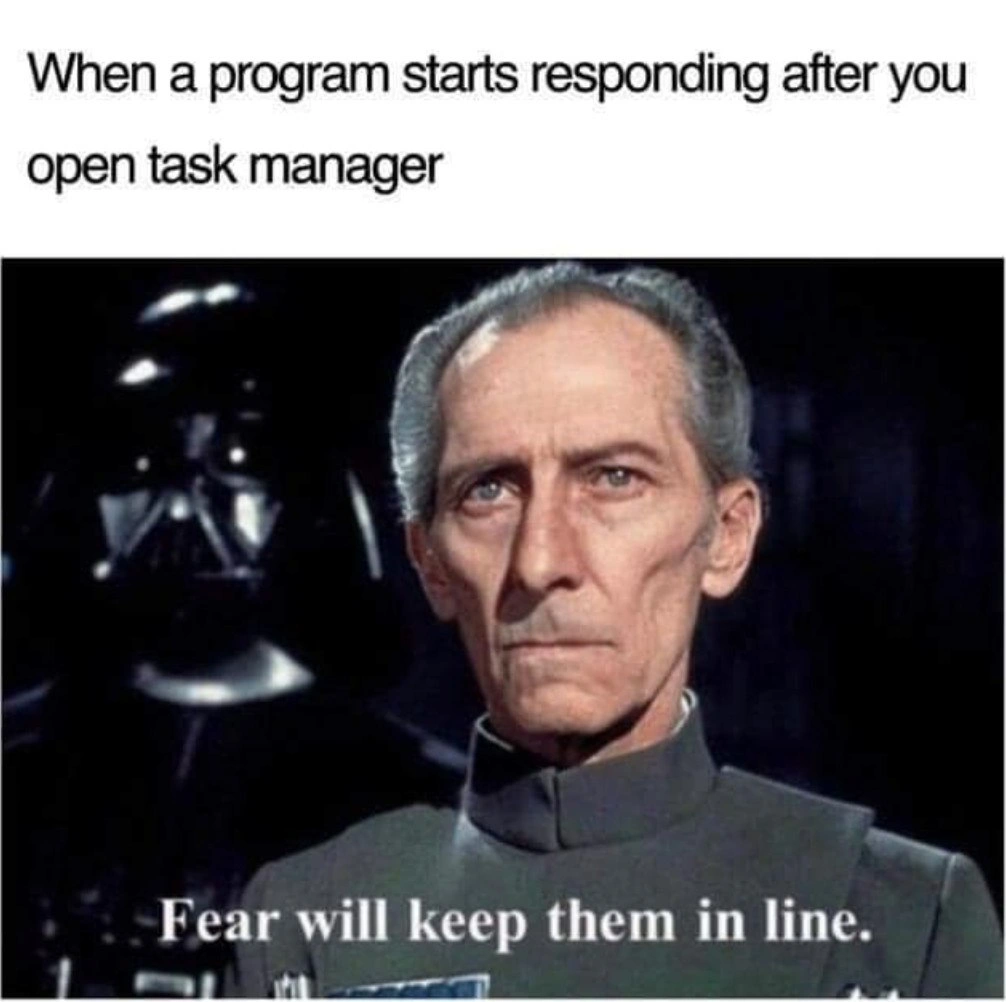
Imagine you have a naughty puppy that’s tearing up a pillow when you’re not looking. The moment it sees you walking over with a stern face (and maybe holding the rolled-up newspaper of doom), it immediately stops and sits there wagging its tail like an angel. This meme is saying a computer program can behave the same way. The “stern face” in this case is the Task Manager – a big, scary control tool on your computer. When a program freezes (like a misbehaving kid making a mess) you might reach for Task Manager to stop it. According to the joke, as soon as the program sees the Task Manager coming, it suddenly starts behaving perfectly, as if it got frightened. The meme even uses a bad guy from Star Wars as the “scary boss” to make it extra clear: sometimes, all it takes is a little fear of punishment to set things in line, even for a cheeky computer program. It’s a funny way to say, “The app wasn’t working, but the moment I went to punish it, it acted fine – just my luck!”

Level 2: Task Manager to the Rescue

For those newer to coding or IT, let’s break down what’s happening. Task Manager is a built-in Windows tool (pressing Ctrl+Alt+Delete or Ctrl+Shift+Esc opens it) that shows all the programs and processes running on your computer. It’s like a control panel where you can see which app is using how much CPU or memory, and you can force-close (end task on) a program that isn’t working right. An unresponsive application (often labeled “Not Responding” by the operating system) is a program that’s frozen or stuck. You’ve probably seen this when an app stops reacting to clicks or typing – maybe it’s caught in a big calculation or hit a bug that caused it to hang. It’s a super common debugging and troubleshooting scenario: your app locks up, so you open Task Manager to kill it or see what’s wrong. The funny observation here is that sometimes the very moment you open Task Manager – before you even end the task – the frozen software suddenly starts working again. It’s like when you call a mechanic because your car won’t start, but then the car immediately starts once they arrive. Frustrating and comical!

The meme uses a scene from Star Wars to exaggerate this. The text at the bottom, “Fear will keep them in line,” is a quote from an Imperial officer (Grand Moff Tarkin) talking about ruling through fear. In our context, Task Manager is compared to this powerful, intimidating authority. The program was “acting out” (not responding), and the moment the mighty authority figure (Task Manager) shows up, the program snaps back to proper behavior. Essentially, the meme jokes that the program was scared straight. As a developer or power user, it feels as if the computer program itself said, “Oh no, the Task Manager is here, I better get my act together!” Of course, in reality what likely happened is that opening Task Manager gave the computer a tiny breather or shifted focus, which coincidentally allowed the app to catch up. Or the problem resolved on its own just when you lost patience. But we often jokingly attribute it to the Task Manager’s “threatening presence.” This captures a bit of the frustration in software debugging: issues sometimes disappear as soon as you try to observe or fix them. It’s equal parts mystifying and amusing for anyone who’s dealt with buggy software.

Level 3: Fear-Driven Scheduling

In more practical terms, this meme nails a classic debugging frustration with a dose of Star Wars humor. Picture a Windows program that’s completely frozen – you’re clicking, nothing happens, the title bar says “(Not Responding)”. Every developer and power user knows the drill: you threaten to hit the big red button via Task Manager. The moment you Ctrl+Shift+Esc and that ominous manager window appears, suddenly the stalled app springs back to life as if nothing was ever wrong. It’s as if the program got a whiff of the process termination threat (“End Task” looming over it) and decided to behave out of sheer terror. The meme uses a scene from Star Wars with Grand Moff Tarkin (and Darth Vader lurking menacingly behind) to capture this feeling. Tarkin’s famous quote, “Fear will keep them in line,” is repurposed here to joke that fear of the Task Manager keeps misbehaving software in line. Developers find this hilarious because it feels true – we’ve all seen an unresponsive application straighten up the second we prepare to kill it. It’s a tongue-in-cheek way to anthropomorphize software: the app itself seems afraid of the “boss” Task Manager peering over its shoulder. Of course, what’s likely happening is coincidence or subtle OS behavior. Maybe the act of opening Task Manager shifts just enough CPU or memory to nudge the hung process. Maybe the app was locked up waiting for something that finally timed out. Or maybe our clicking finally went through at the exact moment we gave up. Still, it feels like Task Manager is an enforcer, akin to Darth Vader using a force choke on a wayward Imperial officer. The senior engineers reading this meme nod knowingly (and a bit sarcastically) because it perfectly encapsulates that “you only work when I’m watching?!” exasperation. We’ve learned to joke that our code has a mind of its own. In fact, some of us have half-seriously written code comments or Slack messages like, “opening Task Manager to scare the app straight.” It’s the dark humor born from countless hours chasing a bug that vanishes whenever you try to show someone else. Here’s a little pseudo-code for how it feels that misbehaving program is written:

# Pseudo-code: how the naughty app reacts when Task Manager opens
if "Taskmgr.exe" in running_processes():  
    # Uh-oh, the user is about to drop the hammer...  
    fix_hang_immediately()  
    print("😅 Sorry, I was just kidding!")  

In reality, no sane program checks for Task Manager like this (the code isn’t really self-aware… we hope). But in those moments, it sure seems that way. This meme brilliantly combines Operating Systems savvy (knowing what Task Manager does) and the shared pain of software bugs to land a joke: sometimes all our computer needs is to see us bringing in the “muscle” to set it straight, and suddenly it snaps out of its stupor. It’s funny, a little cathartic, and just the right amount of nerdy – a true “too real” moment for anyone who’s battled a stubborn app.

Level 4: Heisenbug Uncertainty

Deep in the realm of operating system internals and debugging theory, this meme hints at the dreaded observer effect in software. In debugging circles, we call these elusive glitches Heisenbugs – a play on Heisenberg’s uncertainty principle – because the very act of observing or probing the program (like opening a monitor or debugger) can change its behavior. Here, the mere act of summoning Task Manager (Windows’ process inspector) alters scheduling and timing enough that an unresponsive application might suddenly start responding again. Under the hood, the OS scheduler may preempt the hung process to give Task Manager its share of CPU time (since Task Manager is a high-priority system process). This forced context switch or resource shuffle can inadvertently break the app out of whatever infinite loop or deadlock it was in. One thread might finally get a turn, a locked resource might time out, or a backlog of GUI events suddenly gets a chance to be processed. In essence, the program’s freeze was timing-sensitive; by observing it, you changed the timing. It’s a high-tech ghost story: the bug vanishes when you go looking for it. This phenomenon is maddeningly real in Debugging and Troubleshooting – a race condition or memory corruption that disappears under a diagnostic spotlight. The meme exaggerates it as if the software “knows” it’s about to be terminated, invoking the same eerie vibe as a particle that knows it’s being measured. It’s a reminder that at a deep OS level, tools like Task Manager don’t just watch passively; they poke the system’s state ever so slightly (querying process info, pausing threads to collect data, etc.), and that poke can be enough to jolt a stuck process. The result? A bug that cowered in the spotlight, leaving senior engineers chuckling and grinding their teeth at the capricious nature of software bugs.

Description

The meme has two parts. Top white banner text reads: "When a program starts responding after you open task manager". The lower image is a Star Wars still: Darth Vader stands in the dark background while a uniformed Imperial officer faces forward; the officer’s face is blurred for anonymity. White subtitle text at the bottom of the frame says, "Fear will keep them in line." The joke compares Windows Task Manager to an intimidating enforcer whose mere presence makes an otherwise frozen application suddenly behave, a familiar debugging-and-ops experience for engineers dealing with hung processes and software bugs

Comments

10
Anonymous ★ Top Pick Task Manager is Windows’ Darth Vader: the instant a rogue thread feels that ‘End task’ cursor hover over its PID, the deadlock dissolves - silicon’s homage to fear-driven development
  1. Anonymous ★ Top Pick

    Task Manager is Windows’ Darth Vader: the instant a rogue thread feels that ‘End task’ cursor hover over its PID, the deadlock dissolves - silicon’s homage to fear-driven development

  2. Anonymous

    Just like how observing quantum particles changes their behavior, opening Task Manager collapses the superposition of 'responding/not responding' into a deterministic state - proving that even after 20 years in the industry, we're still practicing fear-driven development at the OS level

  3. Anonymous

    The Heisenberg Uncertainty Principle of process management: you cannot simultaneously observe a frozen process and have it remain frozen. Opening Task Manager collapses the wave function, forcing the process to choose between responding or being terminated - and like any rational actor facing SIGKILL, it suddenly discovers its ability to cooperate. Senior engineers know this isn't magic; it's the OS finally allocating CPU time to check if the process is actually hung, which ironically gives it just enough cycles to unstick itself. The real power move is keeping Task Manager perpetually open as a deterrent - mutually assured destruction for your application stack

  4. Anonymous

    Task Manager's genius: foreground boost turns your infinite loop into a polite context switch, all under threat of abrupt termination

  5. Anonymous

    Task Manager: the only debugger that makes the UI thread discover cooperative multitasking - Heisenbugs cured by intimidation

  6. Anonymous

    Task Manager is Windows' silent SRE: one Ctrl+Shift+Esc and the UI thread suddenly meets its SLO

  7. @ZgGPuo8dZef58K6hxxGVj3Z2 4y

    It started behaving because you opened taskmgr. It would have not become responsive if you waited a whole day

    1. @ZgGPuo8dZef58K6hxxGVj3Z2 4y

      Facts

    2. @RiedleroD 4y

      responsible lol *responsive

      1. @ZgGPuo8dZef58K6hxxGVj3Z2 4y

        Loool typo big typo

Use J and K for navigation