Skip to content
DevMeme
232 of 7435
The Sophisticated Art of Code Retrieval
DeveloperProductivity Post #284, on Mar 30, 2019 in TG

The Sophisticated Art of Code Retrieval

Why is this DeveloperProductivity meme funny?

Level 1: Trash Can Treasure Hunt

Imagine you’re cleaning your room and you throw away a toy or a tool without thinking. Later that day, you suddenly need that exact toy again. The smart thing would have been to set it aside beforehand knowing you’d use it, right? But since you didn’t, what do you do? You dig through the trash can to pull it out, then you put all the other trash back in (so your room is back to how it was), and finally you use that rescued toy for what you need. It’s a silly, roundabout way to get something back, but it works when you’re desperate. This meme is laughing about doing just that, but with code: instead of planning ahead and keeping the useful bits, a programmer “digs through the trash” of their undo history to grab some code and then carries on as if it was a fancy solution. It’s funny because we all know diving into the trash (or hitting “undo” a bunch of times) isn’t the best plan – but hey, sometimes that’s what happens when you’re in a hurry!

Level 2: Undo, Redo, Reuse

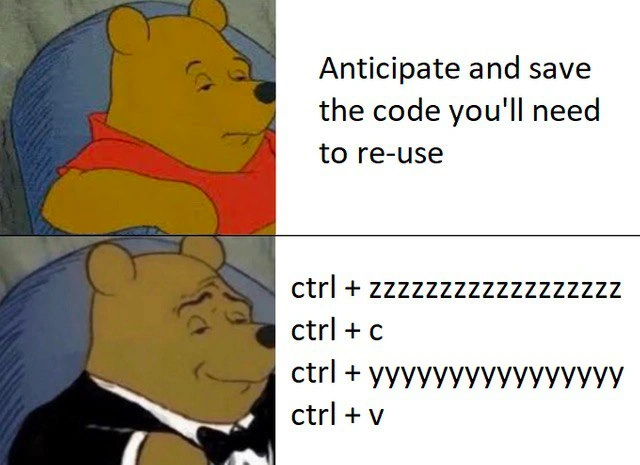
Let’s break down what’s happening for a newer developer. The meme contrasts two approaches to code reuse (using code again instead of writing it from scratch). The first approach says: “Anticipate and save the code you’ll need to re-use.” In plain terms, that’s advising you to plan ahead. For example, if you wrote a bit of code that solves a problem, you should save it in a reusable form – maybe put it in a function or keep a copy in a snippet file – so that you can easily insert it elsewhere later. This is part of the DRY principle, which stands for “Don’t Repeat Yourself.” DRY is a common guideline telling developers to avoid duplicate code. Following that advice means better maintainability: if that code ever needs to change (to fix a bug or update logic), you change it in one place instead of hunting down many copies.

Now, the second approach (the one the meme portrays with the fancy Pooh) is basically: “No foresight? No problem! Just use your editor’s undo/redo and copy-paste.” It spells out the keyboard shortcuts:

  • Ctrl+Z – the shortcut for Undo, which reverses the last edit you made. Holding down Ctrl+Z (hence the “zzzzzz...”) will keep undoing multiple changes, stepping further back in time through your editing history.
  • Ctrl+C – the standard Copy command. This takes whatever is currently selected (highlighted text/code) and copies it to your clipboard (a temporary storage for copied data).
  • Ctrl+Y – the shortcut for Redo in many editors (in others it might be Ctrl+Shift+Z). Redo re-applies an action that was just undone. So after you’ve gone back with undo, Ctrl+Y moves forward in time, essentially restoring the changes you had undone. Holding it (“yyyyyy...”) means you fast-forward through all those undone steps to get back to your latest version of the code.
  • Ctrl+V – the standard Paste command. It inserts whatever is in your clipboard (from the earlier copy) at the current cursor position.

So what’s the actual technique here? Imagine you wrote some code earlier, then removed or changed it, and later you realize “Oops, I actually need that code again!” If you didn’t plan ahead (didn’t save it elsewhere or haven’t committed it to Git yet), you can retrieve it using Undo. You’d hit Ctrl+Z repeatedly until that deleted code comes back into view. Then quickly copy that code. Next, use Ctrl+Y repeatedly to redo all the changes you undid, bringing your editor back to the present state (so you don’t lose anything you did after deleting that code). Finally, paste the copied code wherever you need it. It’s like a magic rewind-and-fast-forward trick in your text editor to grab something from the past without permanently losing your current work. Most modern code editors and IDEs have multi-level undo/redo, meaning they remember a long history of your edits (sometimes even across file saves), which makes this trick possible.

Why is this funny? Because it’s a pretty impractical workaround being portrayed as if it’s a sophisticated plan. The meme uses the popular “Winnie-the-Pooh in a Tuxedo” format: a normal Pooh Bear represents a plain or obvious idea, and the Pooh Bear in a tuxedo represents a supposedly superior or fancier idea (often tongue-in-cheek). Here, the “plain” idea is just doing the sensible thing: plan for code reuse by saving the code properly. The “fancy” idea (tuxedo Pooh smirking) is this convoluted keyboard shortcut maneuver. It’s a form of copy-paste coding – a term for when developers literally copy and paste code instead of writing it anew or abstracting it. Copy-paste coding is generally frowned upon because it can lead to duplicated code and inconsistencies, but it’s incredibly common, especially when you’re learning or when you need a quick fix. We’ve all copied a snippet from our own code or from the internet (hello, Stack Overflow!) rather than composing it from memory.

This meme resonates with developers because it exaggerates a real habit in a humorous way. On one side, you have the ideal developer behavior: be organized, increase your productivity by reusing code via proper methods (like writing a utility function or using your editor’s snippet feature). On the other side, you have the reality of developer experience: sometimes you’re lazy or in a rush, and you fall back on keyboard shortcuts and muscle memory to get the job done. The repeated “z” and “y” in the text really emphasize how one might hold down those keys, practically dozing off on the Undo key (“ctrl + zzzzz…”) and then zooming back with Redo (“ctrl + yyyyy…”). It paints a cartoonish picture of a frantic developer smashing keyboard combos to rescue code from oblivion. It’s funny because it’s true – even if you haven’t done exactly this undo-copy-redo-paste move, you probably have done something similarly scrappy to avoid retyping code or to quickly borrow from your earlier work.

In terms of Developer Productivity, this trick is both clever and a bit clumsy. It’s clever because it uses the tools at hand in an unexpected way to save time right now. It shows how comfortable developers become with their IDEs and text editors, leveraging features like Undo/Redo history to their advantage. It even speaks to Developer Experience (DX): good editors make such flexible history possible, which can be a lifesaver. But it’s clumsy because if you find yourself doing this often, it might be a sign you should improve your workflow (maybe use source control more effectively, or write more reusable code blocks). New developers can learn from this by recognizing that while copy-paste coding and crazy shortcut tricks can save the day in a pinch, the “proper” way (planning for reuse, writing DRY code) exists for good reasons. It can prevent headaches later on. Still, the meme gives us permission to laugh at ourselves – we know what we should do, yet here we are, performing keyboard acrobatics to retrieve a piece of code we didn’t bother to save.

Level 3: Undoing Best Practices

In theory, code reuse should be all about elegant design: write a modular function or library once, then call it whenever needed. The top panel’s text, “Anticipate and save the code you’ll need to re-use,” is basically the textbook best practice. Seasoned developers smirk at this because we all know how quickly that lofty plan can unravel under real-world pressure. Enter the bottom panel: Winnie-the-Pooh in a tuxedo, looking smug, with a keyboard choreography spelled out: Ctrl+Z (undo) spammed with a string of “zzzzz”, then Ctrl+C (copy), then Ctrl+Y (redo) spammed with “yyyyy”, and finally Ctrl+V (paste). This absurd sequence is presented as the “fancier” solution—an ironic twist using the Tuxedo Pooh meme format (normal Pooh vs. Pooh in a tux) to satirize how a downright hacky method gets dressed up as if it’s high-class. The humor hits because the contrast is so relatable: everyone preaches “Don’t Repeat Yourself” (DRY), but when deadlines loom or memory fails, even experienced devs resort to frantic copy-paste coding tricks.

This meme shines a light on a common developer pain point: the gap between ideal process and actual practice. The “fancy” panel mocks us by glorifying a brute-force hack. It’s basically saying, “Why plan ahead when you have muscle memory and an infinite undo stack?” We’ve all been caught in that situation where we realize we deleted or rewrote something useful ten minutes ago. Ideally, you’d have version control (like git stash or a reference commit) or a neat snippet saved. But if you didn’t, the quickest fix is to abuse your IDE or text editor’s undo/redo history. This is a form of “lazy code reuse”: instead of writing reusable code or using proper source control, you literally time-travel within your editor. Modern editors and IDEs (from VS Code to IntelliJ) support multi-level undo, effectively keeping a history of your edits. Here, the meme exaggerates holding down Ctrl+Z (“zzzz…”) to step backwards through that history until the coveted code appears, then copying it, and Ctrl+Y (“yyyy…”) zooming forward back to the latest state, and finally pasting the code snippet in the new spot. It’s a keyboard shortcut ballet that feels both clever and ridiculous. And yes, it actually works – it’s a real trick devs use when they’re desperate to recover code quickly.

From a senior engineer’s perspective, this is both funny and a little painful. It pokes fun at the copy-paste culture common in software development. We all know copy-pasting code can lead to bugs and technical debt (if that code had a flaw, congratulations, you now have it in two places!). Proper code reuse would mean refactoring that snippet into a well-named function or module, improving maintainability. But the meme is winking at the reality: under crunch time, with Product on your back and perhaps an on-call pager buzzing in the background, who’s going to refactor? You’re more likely to do whatever gets the job done now, even if it means violating DRY and later dealing with the fallout. The tuxedo Pooh’s self-satisfied grin perfectly encapsulates that tongue-in-cheek pride a dev might feel after pulling off this slick IDE trick, even though deep down they know it’s a bit of a code smell. It’s like giving yourself a high-five for being resourceful while also knowing you’ve just added a hidden landmine in the codebase.

The broader commentary here is on developer productivity versus discipline. Those keyboard shortcuts (Ctrl+Z/Ctrl+Y/Ctrl+C/Ctrl+V) are part of a developer’s everyday arsenal – an aspect of Developer Experience (DX) that makes editing fast and easy. They’re life-savers when used judiciously. But this meme jokes about abusing them as a crutch for poor planning. It’s highlighting an anti-pattern: instead of using the proper tooling or forethought, we lean on quick fixes. And let’s admit it, the scenario is extremely relatable – it’s the programmer equivalent of digging through the trash for something you tossed too soon, then acting like that was a smart plan all along. The joke lands because we’ve all been Pooh in a tux at some point, treating a messy workaround like a stroke of brilliance to save face or time. In the end, DeveloperMemes like this one get shared so widely because they ring true: the best practice was clear, but the “shortcut” was just too tempting.

Description

This image uses the two-panel 'Tuxedo Winnie the Pooh' meme format to contrast two methods of reusing code. In the top panel, the standard, unimpressed Pooh is paired with the text: "Anticipate and save the code you'll need to re-use." This represents the planned, responsible approach to programming. The bottom panel shows the sophisticated, smug Pooh in a tuxedo, alongside a series of keyboard commands: "ctrl + zzzzzzzzzzzzzzzz", "ctrl + c", "ctrl + yyyyyyyyyyyyyyy", and "ctrl + v". This sequence describes the frantic, yet common, act of repeatedly pressing undo to go back in time to a point where a piece of code existed, copying it, then repeatedly pressing redo to return to the present state, and finally pasting the retrieved code. The joke resonates deeply with developers, as it highlights the chaotic reality of coding versus the ideal. It’s a humorous take on using the editor's history as a temporary, high-stakes version control system when you realize you've just deleted something you desperately need

Comments

8
Anonymous ★ Top Pick Git is for collaborating with others. The undo/redo stack is for when you need to travel back in time to argue with the developer who broke everything, and that developer is you from thirty seconds ago
  1. Anonymous ★ Top Pick

    Git is for collaborating with others. The undo/redo stack is for when you need to travel back in time to argue with the developer who broke everything, and that developer is you from thirty seconds ago

  2. Anonymous

    Why bother with a shared utils library when the “Temporal Clipboard Singleton” - Ctrl-Z back two commits, Ctrl-C, Ctrl-Y to head, Ctrl-V - has 100% test coverage in production?

  3. Anonymous

    Using your editor's undo buffer as a version control system because the code you deleted 47 iterations ago was actually the correct implementation and you've been refactoring in circles for the past hour

  4. Anonymous

    The undo buffer: the only version control with zero merge conflicts, full history traversal, and a retention policy of 'until the IDE crashes'

  5. Anonymous

    Ah yes, the elegant 'temporal code retrieval pattern' - where instead of writing reusable functions or maintaining a proper component library, we simply traverse the undo/redo stack like it's our personal version control system. Why bother with DRY principles when you can just ctrl+z your way back through 47 iterations of that function you deleted three hours ago? It's not technical debt if you never commit it to the repository. Bonus points if you're doing this because you forgot to stage the changes before a hard reset, and now you're desperately trying to reconstruct that brilliant algorithm from muscle memory and undo history. The tuxedo really captures the false sense of sophistication we feel when we successfully retrieve that code snippet from the void

  6. Anonymous

    Ctrl+C/V: the unofficial singleton pattern for spawning identical bugs across your monolith

  7. Anonymous

    Code reuse via event sourcing: CTRL+Z rollback, CTRL+C snapshot, CTRL+Y replay, CTRL+V deploy

  8. Anonymous

    Senior tip: if reuse means Ctrl+Z -> Ctrl+C -> Ctrl+Y -> Ctrl+V, you’ve implemented clipboard event-sourcing with a zero-retention policy - hope the undo stack survives autosave

Use J and K for navigation