Skip to content
DevMeme
5160 of 7435
Little Bobby Tables applies for a TLS certificate, chaos ensues
Security Post #5648, on Nov 10, 2023 in TG

Little Bobby Tables applies for a TLS certificate, chaos ensues

Why is this Security meme funny?

Level 1: Bobby’s Big Prank

Imagine a kid trying to pull a prank by writing something sneaky on a form – so sneaky that it breaks the office’s system. He signs up for a library card, and under “Name” he writes a special message instead of a normal name. Let’s say he writes: "Bobby'); unlock all doors;--" as his name. The librarian innocently enters this into the computer. But hidden in that “name” are secret instructions (unlock all doors) that the library’s software accidentally treats as real commands. Suddenly, doors spring open or alarms go off because the computer got confused by the prank. Now the library prints a library card for the kid with this ridiculous fake name on it. When the kid tries to use the card, the security scanner looks at it and basically says, “Hold on, this card isn’t signed by any library I know – I’m not letting you in!” In other words, the prank name caused havoc in the system and the ID card he got isn’t accepted as valid. That’s exactly what’s happening in the meme, but with computers: Little Bobby Tables gave a mischievous name full of tricky code when applying for a website certificate. The system wasn’t prepared, so it tried to follow those bad instructions and got itself in trouble. And the certificate (think of it like a digital ID for a website) he got is signed by a fake source, so the computer says “I don’t trust this at all.” It’s funny in a naughty-kid way: a simple name prank managed to confuse the big important computer system and also produced an ID that nobody trusts. The lesson is easy: don’t blindly trust weird things people put in forms, or you might end up with chaos – and an ID card that opens no doors!

Level 2: Sanitize Your Inputs

Let’s break this down in simpler terms. A TLS certificate is kind of like a website’s ID card or passport. It proves the site’s identity and helps set up an encrypted connection (that little padlock you see in your browser). Certificates are normally issued by organizations called Certificate Authorities (CAs) – think of them like a trusted government office that signs and vouches for your ID. Your computer (or Windows, in this case) keeps a list of CAs it trusts (the trust store). If it encounters a certificate signed by someone it doesn’t know, it throws an alert. That’s why the dialog says "Windows does not have enough information to verify this certificate." It’s a fancy way of saying “Uh oh, I don’t recognize who signed this; for all I know, it could be fake.” This often happens with a self-signed certificate (where a website basically signs its own certificate without a known authority) or if the certificate chain is incomplete. In normal scenarios, if you saw that warning, you’d be cautious because it means the certificate’s authenticity is in question.

Now, about the crazy text in the “Issued to” and “Issued by” fields: that’s a blatant example of an SQL injection payload. SQL is a language used to talk to databases (for example, to store or retrieve user information). An SQL injection is a type of security vulnerability where an application takes user input and mistakenly treats part of it as SQL code. Imagine a website asks for your name and then builds a query like:

INSERT INTO users (name) VALUES ('[your name]');

If you innocently put Alice, it becomes VALUES('Alice') – no problem. But if someone crafty puts in a name like Alice'); DROP TABLE users;--, that query text turns into:

INSERT INTO users (name) VALUES('Alice'); DROP TABLE users;--');

The '; DROP TABLE users;-- part is actual SQL code appended to the query! The DROP TABLE users command would delete the entire users table, and the -- is SQL comment syntax to ignore the remaining quote. This is exactly the kind of exploit Little Bobby Tables is famous for. In an XKCD comic, a school database was wiped because a student’s name was Robert'); DROP TABLE Students;--. That fictional student earned the nickname “Little Bobby Tables.” The comic’s joke is a mom saying, “Hi, this is Mrs. Tables. I see that Little Bobby got registered for school today.” The school admin replies, “Yes, we're glad to have him.” And the mom goes, “I hope you’ve learned to sanitize your database inputs.” – since the school’s failure to clean that input led to them literally dropping the Students table. It’s a classic lesson: never trust data from users unless you properly check or escape it. In practice, developers use things like prepared statements or input validation to prevent this sort of thing. This falls under SQLInjectionPrevention, a crucial part of writing secure code.

So what’s going on in the meme? It imagines that Little Bobby Tables (with his mischievous name) applied for a TLS certificate. Perhaps there was an online form to generate a certificate request, and Bobby entered something that looks very much like SQL code. The system handling the request should have treated it as just plain text (a name to put on the certificate), but instead it ended up executing or at least embedding that code. The fields “Issued to” and “Issued by” on the certificate show the exact payload Bobby input. It’s like the system printed the trick right onto the certificate! The content is a bit complicated, but essentially it starts with ',1,1,1,...); which is likely closing off a previous command and then issuing new commands: ATTACH DATABASE '...a.php' AS a; and then a CREATE TABLE and an INSERT. This is a hacker’s way of saying: “I ended the normal input, and I’m sneaking in new instructions.” The specifics (ATTACH DATABASE and the PHP snippet) suggest the attacker attempted to create a new database file that’s actually a .php script, and then put some PHP code in it. In simpler terms: they tried to trick the system into adding a malicious file on the server. 😬

Now, Windows shows that warning because whatever certificate got generated from all this wasn’t signed by any trusted authority. Maybe Little Bobby used his own fake CA (with that weird name) or it’s just a direct self-signed cert. Either way, it’s not trusted by Windows. Think of it like forging your own ID card at home – when you show it to a bank, their system will say “Nope, I don’t trust this issuer.” So in the meme, the certificate is both maliciously generated and untrusted. For a junior developer, the big takeaways are: (1) Always sanitize and validate inputs. If a user can input a name, make sure it’s just treated as harmless data (and doesn’t contain sneaky quotes or code). Otherwise, you get an SQL injection, which is a top-tier serious security bug (it can allow attackers to read or modify sensitive data, or even take over the system). (2) Understand that certificates and CAs work on trust. If you create a certificate in-house or use a test CA, your system might not trust it by default (hence the scary warnings). That’s why in production we use known, trusted CAs or install our internal CA certificates on the machines that need to trust them. This meme is a goofy scenario where everything that could be wrong is wrong: the input was not handled safely and the certificate is not properly trusted. It’s poking fun at a disastrous combination of a coding bug and a security misconfiguration.

Level 3: Broken Trust, Dropped Tables

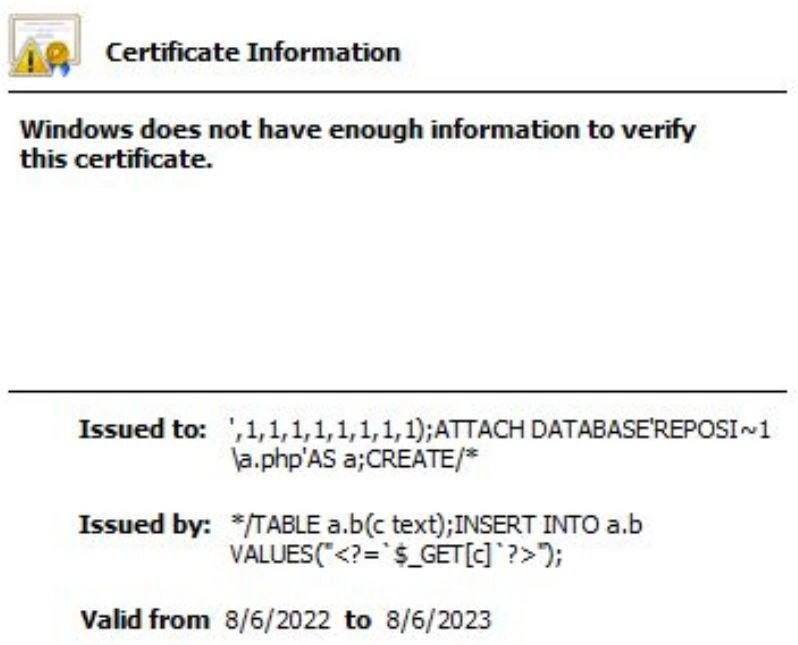
For seasoned engineers, this image hits like a double punch of “I can’t believe they combined those!” The Windows certificate dialog shows an Issued to and Issued by that are pure hacker gibberish. That text ',1,1,1,1,1,1,1,1,1); ATTACH DATABASE 'REPOSI~1\\a.php' AS a; CREATE/* ... followed by */TABLE a.b(c text); INSERT INTO a.b VALUES("<?= '$_GET[c]' ?>"); is clearly not any normal certificate subject or issuer — it’s an SQL injection payload. This is a direct reference to the classic joke about Little Bobby Tables. In the famous XKCD comic "Exploits of a Mom", a school’s database gets wrecked because a parent named their kid Robert'); DROP TABLE Students;-- and the school's system naively used that string in an SQL statement. The punchline: "I hope you've learned to sanitize your database inputs." It’s legendary in tech culture as the quintessential example of why SQLInjectionPrevention is critical. Here, the meme imagines Bobby growing up a bit and applying his unique talents to the world of TLS certificates. Essentially, Little Bobby Tables applies for a TLS certificate and, true to form, chaos ensues.

Why is this so funny (and horrifying) to experienced devs? Because it mashes together two nightmares: database injection bugs and PKI trust issues. Either one on its own can ruin your week; together, they’re a cosmic joke. We have an apparent security flaw in input handling (someone let that bonkers string become part of a certificate!) and a certificate authority/trust problem (Windows can’t verify the cert, implying it’s self-signed or signed by a non-trusted or misconfigured CA). The humor lives in the absurd exaggeration: realistically, no competent CA or system would ever allow such input to literally appear on an issued certificate. Yet, anyone who’s dealt with corporate bureaucracy or sloppy legacy systems has a tiny nagging thought: “I wouldn’t be completely shocked if some internal tool did something this ridiculous.” 🤷

Think of the Issued to field as the certificate’s "name" (Common Name or CN), and Issued by as the authority that signed it. In a normal certificate, those might be something like Issued to: example.com and Issued by: Let's Encrypt Authority X3. Now instead we have what looks like part of a SQL command as the subject, and the continuation of that SQL (closing a comment, then a CREATE TABLE and an INSERT with PHP code) as the issuer. This suggests some truly crazy scenario behind the scenes. Perhaps the certificate request form wrote applicant data into a database without sanitization, and our friend Bobby Tables found a way to inject SQL that both messed with the database and ended up embedded in the certificate fields. It’s a bit meta: the certificate itself becomes evidence of the injection attack. The system essentially printed the attack string onto the certificate like a badge of honor. It’s as if a bank issued an ID card to a robber and printed his stick-up note on it by mistake.

The result? Windows doesn’t trust the ID (certificate) – hence "Windows does not have enough information to verify this certificate." And honestly, could you blame it? The OS is basically saying, “I have no idea who signed this thing, it’s full of weird characters, I’m not touching it.” In practice, that warning appears when the certificate chain is broken – for example, if it’s a self_signed_certificate or the issuing CA’s certificate isn’t installed. Here it’s almost certain no valid CA is named */TABLE a.b(c text)..., so yeah, Windows is throwing up its hands. This is a comical nod to how trust issues in tech manifest: the system correctly refuses to trust a cert that was obviously generated by a totally insane unrecognized source.

From a veteran dev perspective, this meme also satirizes how organizations handle security. We preach “never trust user input” – and yet time and again, someone forgets to sanitize a form field, and next thing you know an attacker has snuck in some SQL or script. It’s one of the oldest bugs in the book (literally Security Vulnerabilities 101), and seeing it pop up in something as high-stakes as certificate issuance is equal parts funny and cringe-inducing. There’s also a jab at the complexity of certificate management: PKI is notoriously finicky. Setting up a certificate chain correctly, dealing with CAs, ensuring Windows or browsers trust it – it’s a non-trivial, often frustrating task. Many of us have stories of production outages because a cert wasn’t trusted or expired (cue the “why is the site down on Sunday? Oh, the cert expired” war stories). So when we see Little Bobby Tables waltz into the PKI world, it’s like two separate PTSD flashbacks at once: the horror of a dropped production database table and the scramble of an SSL/TLS trust failure. No wonder it’s subtitled “chaos ensues.”

This meme is also a commentary on security vs. usability. One reason injection flaws still happen is that being strict about input (for security) can be at odds with being permissive (for user convenience). Maybe someone thought allowing special characters in names was user-friendly (after all, real names can have quotes or commas). But if you don’t validate or escape those inputs, you invite disaster. Similarly, the strictness of TLS (needing proper CAs and verification) is there for security, but it often frustrates users who might say “ugh, just ignore the warning and proceed.” Here, the system was lax where it should’ve been strict (accepting Bobby’s wild input) and then strict where sometimes users wish it weren’t (refusing to trust the cert). The end result: a system that’s compromised and a certificate that’s useless. It’s an ironic two-for-one special in security failures.

Seasoned engineers chuckle because we’ve seen how one tiny oversight can cascade into bugs like this. The idea of a certificate authority getting SQL-injected is over-the-top, but it symbolizes real-world scenarios: e.g., a poorly designed internal tool could indeed be vulnerable if it logs certificate details to a database unsafely. And once an attacker owns a CA (especially a rogue internal CA), all bets are off – they could issue themselves trusted certs for anything, becoming a proverbial ghost in the machine. It’s the ultimate cautionary tale wrapped in humor. In short, Little Bobby Tables successfully pranking the certificate system is a tongue-in-cheek reminder that even our most trusted security infrastructures are built by humans — and humans sometimes forget that SQLInjectionPrevention rule mom told us about. As the mom from XKCD warned: “I hope you've learned to sanitize your inputs.” 🙃 Indeed.

Level 4: Trust Chains & Escape Characters

At the most fundamental level, this meme is a collision of two very different technical worlds: cryptographic trust models and code injection exploits. On one side, we have the rigid mathematics of PKI (Public Key Infrastructure) – the system behind TLS certificates – which relies on a chain of trust. Each certificate is signed by an issuer (usually a Certificate Authority, or CA), forming a chain back to a root CA that your system explicitly trusts. When you see the message "Windows does not have enough information to verify this certificate.", it means Windows could not link that certificate’s issuer to any trusted root in its store. In PKI terms, the certificate’s signature can’t be validated because the signing authority is unknown (a classic trust issue in tech). It’s as if the cryptographic proof of identity is missing a notary’s signature — mathematically, the signature might be correct, but the public key that signed it isn’t one Windows recognizes. This typically happens with self-signed certificates or ones issued by a rogue CA that isn’t installed in the trust store. The humor here is that the issuer’s name itself is pure gibberish code, so of course no legitimate authority by that name exists! The certificate chain is intentionally broken by design of the joke, highlighting a PKI misconfiguration so extreme that it’s laughable: the issuer looks like a SQL injection payload. Essentially, the root of trust was swapped with a root of mischief.

Now, about that payload: the certificate’s Issued to and Issued by fields are laced with what appears to be a malicious SQL injection string. SQL injection is a textbook security vulnerability where untrusted input is treated as part of a database command. In formal terms, the input breaks out of its intended context (data) and into the command context, often by using an escape character like a ' single quote to terminate a string literal early. Here, Little Bobby Tables’s “name” begins with ', which in SQL would close a quote and start a new clause. The payload is very specifically crafted: it includes an ATTACH DATABASE 'REPOSI~1\\a.php' AS a; statement, which is a strong hint we’re looking at a SQLite injection (since attaching an external database file is a SQLite-specific trick). The attacker is trying to attach a file named a.php as a database and then CREATE something. Notice the CREATE/* at the end of the Issued to field and the corresponding */TABLE a.b(c text); INSERT INTO a.b VALUES("<?= '$_GET[c]' ?>"); in Issued by. This split /* ... */ is actually opening and closing a SQL comment across two fields – an incredibly sneaky move. It likely aims to bypass basic query sanitization by splitting a malicious command into two parts that only form a valid SQL command when concatenated together. Once reassembled, the full SQL would create a new table a.b and insert a row containing <?= '$_GET[c]' ?>. That weird string is PHP code: <?= $_GET['c'] ?> is the PHP short-tag to echo a GET parameter. In other words, the injection is attempting to write a .php file to the server (via SQLite attaching it as a database, then inserting PHP code as data) – effectively planting a backdoor or malicious script on the system. This is an exploit chain that goes from a seemingly innocent text field in a certificate request to potential remote code execution on a server. It’s the stuff of pentester fever dreams: one injection yielding both a database compromise and a planted PHP shell. The meme is winking at those who know how deeply such an attack can cut: it’s merging the abstract purity of cryptographic certificate authority protocols with the messy reality of unsanitized inputs that let hackers break grammar rules and inject new commands. The result is simultaneously absurd and technically fascinating. It underscores a core principle in computing: when security flaws arise from mis-placed trust (whether trusting a dubious CA or trusting user-provided strings), the integrity of the system collapses. Little Bobby Tables’s certificate is a perfect storm — a mathematically untrustworthy certificate whose contents exploit a grammatical loophole. It’s a reminder that whether you’re dealing with formal X.509 certificate formats or free-form input strings, the moment you stop enforcing strict boundaries, chaos can ensue.

Description

Screenshot of a Windows “Certificate Information” dialog. Top left shows the yellow-triangle-over-certificate icon. A bold heading reads “Certificate Information”. Below, in plain text, it says “Windows does not have enough information to verify this certificate.” The lower half lists fields: “Issued to:” followed by the payload “',1,1,1,1,1,1,1,1,1);ATTACH DATABASE'REPOSI~1\a.php'AS a;CREATE/*”. Next line is “Issued by:” with “*/TABLE a.b(c text);INSERT INTO a.b VALUES("<?= '$_GET[c]' ?>");”. Finally, “Valid from 8/6/2022 to 8/6/2023”. Visually it looks like a legit certificate window, but the issuer and subject are pure SQL/PHP injection strings, hinting at catastrophic input-sanitisation failures. For seasoned engineers, it’s a mash-up of broken PKI trust chains, unsanitised user input, and the perennial security vs. usability battle - basically every pentester’s fever dream rendered as a cert
Comments

19
Anonymous ★ Top Pick Proof that if you let the same intern handle both PKI enrollment and input sanitisation, your chain of trust ends with DROP TABLE certificates;
  1. Anonymous ★ Top Pick

    Proof that if you let the same intern handle both PKI enrollment and input sanitisation, your chain of trust ends with DROP TABLE certificates;

  2. Anonymous

    When you've been debugging certificate chain validation for three days straight and realize the real vulnerability was trusting user input in the first place - because apparently even X.509 certificates aren't safe from Bobby Tables' descendants

  3. Anonymous

    When your certificate authority's input validation is so lax that attackers can literally ATTACH DATABASE in the CN field and Windows just shrugs with 'not enough information to verify' - as if the SQL injection payload wasn't information enough. This is what happens when your PKI infrastructure treats certificate fields as free-form text and your parsing logic has never heard of parameterized queries. The real kicker? Someone actually got this certificate issued and valid for a full year, proving that certificate transparency logs are the security industry's most entertaining bug bounty program

  4. Anonymous

    When even cert issuers skip prepared statements, your CN becomes a DROP TABLE waiting to happen

  5. Anonymous

    When the CN can ATTACH DATABASE and the issuer name executes PHP, your chain of trust just became dependency injection

  6. Anonymous

    Pro tip: if the CN reaches your ORM, TLS becomes an INSERT handshake

  7. @LonelyGayTiger 2y

    I'm fascinated, I want to know how that happened.

    1. @pnlt_s 2y

      good sql escaping ¯⁠\⁠_⁠(⁠ツ⁠)⁠_⁠/⁠¯

      1. @LonelyGayTiger 2y

        Not so much. If that was the result of successful SQL injection you'd see results, not the commands themselves. It's clearly a failed attempt at SQL Injection, but it's still interesting.

        1. @pnlt_s 2y

          i literally meant that it was failed sql injection because of the query being properly escaped

          1. @LonelyGayTiger 2y

            I see. Though it's still unclear how exactly it got where it's at currently.

          2. @kitbot256 2y

            still you would expected a real CA in the "Issued by" field. I believe this is rather a future attempt to perform injection by sending this file to a system that parses certificate attributes and writes them into a database.

            1. @pnlt_s 2y

              either that or something you could make using openssl on local machine

  8. @a_sulf 2y

    its crt injection😂

  9. @pnlt_s 2y

    for memes

  10. @ZgGPuo8dZef58K6hxxGVj3Z2 2y

    Okay that's fake or RAM failure. You will never see , (comma) in entity name

    1. @ZgGPuo8dZef58K6hxxGVj3Z2 2y

      Yeah that GUI doesn't even support more then 1 line of text anyway

      1. @ZgGPuo8dZef58K6hxxGVj3Z2 2y

        That green thing is where the "label" is actually and it doesn't grow

      2. @ZgGPuo8dZef58K6hxxGVj3Z2 2y

        I could change the size with this tool too but that beside the point

Use J and K for navigation