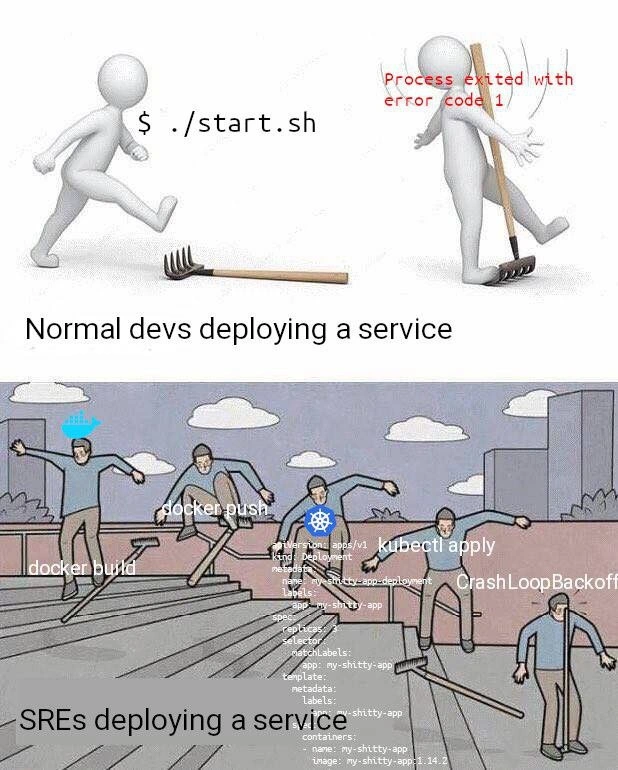
From bash rake faceplants to Kubernetes CrashLoopBackoff: deployment pain escalation illustrated
Why is this DevOps SRE meme funny?
Level 1: One Rake vs Many Rakes
Imagine you’re walking through a yard and there’s one rake lying on the ground. If you’re not paying attention, you might step on its teeth, and the handle will flip up and bonk you in the face – ouch! That’s like a simple mistake when doing a small task: it hurts, but it’s just one thing to fix.
Now imagine a long staircase where every step has a rake on it. To get to the top, you have to step on each step, and each time – WHAM! – a rake hits you in the face. Not fun, right? That’s what’s happening in this picture. The first part is one person stepping on one rake (one problem). The second part is a bunch of people (or one person going step by step) stepping on rake after rake after rake (many problems in a row). It’s showing in a funny way that sometimes, doing something in a more complicated way means you find a lot more ways for things to go wrong.
So, the joke is: one simple task, one smack in the face versus a complicated task, many smacks in the face. Even though making things bigger and fancier (like using a lot of new tools) is supposed to help, it can also create more chances to slip up. In the end, it’s a funny (and a bit painful) way to say that more complexity can lead to more headaches – like walking through a yard full of rakes and getting hit over and over again.
Level 2: So Many Steps
Let’s break down the gag in simpler terms. The meme compares two ways of deploying software:
Normal devs deploying a service: imagine a developer just running a shell script (
./start.sh) on a server to start their app. It’s a single, simple step. In the picture, the stick figure runs the script and immediately hits a problem (the rake). The error messageerror code 1means the script failed – in Unix-like systems, an exit code of 0 means success, and 1 (or any non-zero) means something went wrong. So the top panel is basically “Run script, get error, ouch.” It’s a one-step deployment that ends in failure (face meets rake), but at least it was just that one script to check.SREs deploying a service: SRE stands for Site Reliability Engineer – these are folks who handle deploying and managing software in production. Modern deployments usually aren’t as simple as running one script. They often involve a build pipeline with multiple stages and tools. The bottom panel shows five figures stepping on rakes on a staircase, each labeled with a step in a typical containerized deployment:
docker build– Using Docker to build a container image. Docker is a tool that packages an application with all its libraries and environment into a neat container. This step can fail if the Dockerfile (the instructions to build the image) has an issue. It’s the first rake: e.g., a missing file or misconfigured build step will stop the build with an error.docker push– After building the image, it’s pushed to a container registry (a repository for images). The blue whale icon in the meme is Docker’s logo, hovering over the poor figure hitting the second rake. The push can fail if you’re not logged in, or the registry is down, or there’s a network issue. Another potential smack in the face.- Kubernetes logo (the blue seven-spoke wheel) – This represents Kubernetes, a popular system for running containers across many machines (a cluster). Instead of running the app directly, you hand it over to Kubernetes. But you have to tell Kubernetes how to run it.
kubectl apply– This is the command to apply a YAML configuration to the Kubernetes cluster. YAML (Which humorously stands for “YAML Ain’t Markup Language”) is a text format for writing configurations. In Kubernetes, you write a YAML file (often called a manifest) describing your application deployment: what image to use, how many copies (replicas) to run, what resources to allocate, etc. The meme shows a snippet of such a YAML manifest floating around:
This is an example Kubernetes Deployment config. It’s quite wordy for what it does (deploy one container of the app version 1.4.2). The textapiVersion: apps/v1 kind: Deployment metadata: name: my-shitty-app-deployment spec: replicas: 1 template: spec: containers: - name: my-shitty-app image: my-shitty-app:1.4.2my-shitty-app-deploymentis presumably the app’s name – a self-deprecating joke by the dev, implying even they aren’t confident in it 😅. Writing and applying this YAML is another step that can go wrong: a small formatting mistake (even an extra space or missing indentation) can make the YAML invalid. Or you might successfully apply it, but it’s misconfigured (for instance, pointing to the wrong image tag or missing an environment variable). In the meme,kubectl applyis another figure hitting a rake – meaning even this step can fail or cause issues.- CrashLoopBackoff – This is a status you see in Kubernetes when a container in a pod keeps crashing repeatedly. If your application starts and then exits (crashes) every time Kubernetes tries to run it, Kubernetes won’t give up immediately; instead, it restarts the app again and again with an increasing delay (a “backoff” timer). The term CrashLoopBackoff literally means “crashing, will retry after a back-off delay”. It’s the final rake in the sequence – after you’ve done all the above steps, your app is technically deployed to the cluster, but now it’s stuck in a fail-loop. This often happens because of a mistake in how the app was set up to run in the new environment. Maybe we forgot to set a required config, or the app can’t find a database, or there’s a misconfiguration like pointing to the wrong hostname – anything that causes the app to exit on startup. An SRE now has to troubleshoot why the container is crashing.
So the meme’s bottom half is basically saying: modern deployments have many moving parts – building images, pushing to registries, configuring clusters with YAML, etc. At each part, something can go wrong (each rake = an error or failure). It humorously suggests that SREs (and DevOps engineers) go through a whole gauntlet of these steps, each as treacherous as a rake on the ground, whereas a “normal” developer might just run one script and deal with one error. The phrase “deployment pain escalation” in the title captures this: we’ve escalated from a simple failure to a complex series of potential failures.
This reflects a real sentiment in DevOps culture: deployments nowadays can be complex. Tools like Docker and Kubernetes are powerful – they solve a lot of problems (like ensuring the app runs the same everywhere, scaling it, managing loads, etc.), but they also introduce their own learning curve and failure modes. Debugging a failing ./start.sh script might be easier (“let’s see what line 42 did wrong”) compared to debugging a CrashLoopBackoff, where you have to check container logs (kubectl logs), check Kubernetes events, possibly adjust YAML and reapply, or inspect the Docker image for what might be missing. It’s a lot!
The tags like DeploymentPainPoints, Docker, Kubernetes, BuildPipeline all point to these issues. “Pain points” because each step can be painful. A “build pipeline” is the series of stages that take code from development to production – exactly what’s shown here. Containerization (using Docker containers) and orchestration (using Kubernetes) are standard now for deploying services, especially in large systems or microservices architectures. SREs wrangle with these daily. The meme is comical because it’s true: deploying a service has gotten more involved. We do it for good reasons (consistency, scalability, reliability at scale), but that doesn’t mean it’s free of headaches. As any junior who’s just learned git push heroku master vs. a full Kubernetes deploy will discover, there are a lot more rakes in the yard.
In summary, the top panel’s single rake = a simple deployment error (one step, one error). The bottom panel’s army of rakes = a modern cloud deployment (many steps, many possible errors). Both hurt, but the bottom one hurts in a drawn-out, almost slapstick way. The meme is essentially a big inside joke for DevOps folks: “Remember when deploying was just running a script? Ha! Now we have containers and k8s – and oh boy, the rakes we step on now...”
Level 3: Rakes at Scale
In the top half of this meme, a lone developer runs a simple deployment command ($ ./start.sh) and immediately steps on a rake – metaphorically and literally. The rake whacks them in the face with a red error message: Process exited with error code 1. This is the classic one-and-done failure: a bash script crashed, exit code 1 (a generic Unix error), and our dev’s deployment attempt is KO’d. It’s a painful faceplant, but at least it’s just one rake to deal with.
Now contrast that with the bottom half: an assembly line of five identical figures ascending a staircase littered with rakes. Each step in this DevOps obstacle course is labeled with a modern deployment task: docker build, docker push, a big blue Docker 🐳 icon, the Kubernetes wheel logo, kubectl apply, and finally CrashLoopBackoff. There’s even a verbose Kubernetes YAML manifest floating around like a haunted scroll (complete with apiVersion: apps/v1, kind: Deployment, and a telling name: my-shitty-app-deployment). This gauntlet represents an SRE (Site Reliability Engineer) deploying a service in today’s containerized, orchestrated world – and it’s rake after rake after rake. Each tool in the containerization pipeline introduces a new way to get smacked:
- Docker build: Maybe the Dockerfile has a typo or missing dependency – WHAM, face full of rake.
- Docker push: Oops, no access to the container registry or network glitch – another rake handle to the nose.
- Kubernetes apply (
kubectl apply): Perhaps a subtle YAML indentation error or a misconfigured resource limit – you didn’t even see that rake, but it saw you. - CrashLoopBackoff: The app is deployed but crashes on start. Kubernetes dutifully restarts it in a loop with backoff timing. This is the ultimate rake that keeps hitting you repeatedly while you scramble to read logs. It’s a dreaded state where your pod says “Started... no, crashed... retrying...” endlessly.
The humor is painfully relatable: as systems grow more complex, the deployment pain points just multiply. Veteran DevOps folks chuckle (or cry) because they’ve been there – trading a simple one-step script failure for a five-step CI/CD pipeline nightmare. It’s an exponential rake situation. The top caption labels it “Normal devs deploying a service,” implying a straightforward, if naive, approach. The bottom is “SREs deploying a service,” highlighting that modern DevOps/SRE culture has turned deployments into a convoluted ritual involving Docker images, Kubernetes clusters, and wall-to-wall YAML. SREs are supposed to bring reliability, but here they are, hopping through a minefield of complicated tooling. Each additional modern convenience (containers! orchestration! infrastructure as code!) becomes another rake waiting to smack you if you’re not careful. The meme exaggerates for effect, but not by much – seasoned engineers know that more moving parts = more ways to fail. It’s a darkly funny take on how deploying a web service in 2023 can feel like Sideshow Bob in that Simpsons scene, stepping on rake after rake, knowingly or unknowingly. In production at 3 AM, every rake has your name on it. DevOps humor often leans into this kind of battle-scarred sarcasm: “We solved one problem... and introduced five new ones!” The meme nails that sentiment. Progress gave us Docker and Kubernetes to avoid the old “it works on my machine” problem, but in turn, we got a CrashLoopBackoff problem. Instead of one big faceplant, we now have a series of smaller, continuous faceplants as we ascend the staircase of modern deployment. And yet, we keep climbing, bruised and wiser, because that’s the job. The Deployment gauntlet might be brutal, but hey, at least it’s reproducible and can scale – rakes and all.
Description
The meme is split into two horizontal sections. Top section: a white 3-D stick figure runs the command "$ ./start.sh", immediately steps on a lone garden rake, and the next frame shows the handle smacking its face with the error message "Process exited with error code 1" in red text. Underneath, the caption reads "Normal devs deploying a service." Bottom section: a grey comic strip staircase scene where five identical figures repeatedly step on dozens of rakes; each step is overlaid with dev-ops text - "docker build", "docker push", a blue Docker whale icon, a Kubernetes logo, "kubectl apply", and finally "CrashLoopBackoff" - while a verbose Kubernetes Deployment YAML (apiVersion: apps/v1, kind: Deployment, metadata name: my-shitty-app-deployment, spec.replicas:1, containers: image: my-shitty-app:1.4.2) floats across the panel. The caption below states "SREs deploying a service." Visually it juxtaposes a simple shell script failure with the far more complex, error-prone container/Kubernetes pipeline SREs wrangle, highlighting modern deployment complexity and the inevitability of catastrophic rakes hidden in YAML

Comments
7Comment deleted
Reminder: every rake you remove from the CI pipeline just gets serialized into YAML and committed to the repo - now your CrashLoopBackoff is fully reproducible
The real difference between devs and SREs isn't the tools - it's that SREs have already memorized which specific combination of kubectl rollout restart, imagePullPolicy tweaks, and pod deletion rituals will actually fix that CrashLoopBackoff without anyone noticing the 3AM incident
The evolution from './start.sh' to Kubernetes is like going from stepping on a rake to performing extreme sports while juggling YAML files - both end painfully, but at least now you can fail at scale with proper observability and blame it on 'eventual consistency' in your post-mortem
Devs sweep script fails under the rug; SREs ollie over CrashLoopBackOffs at terminal velocity
Mature SRE pipelines automate the rake too - build, push, apply, detect CrashLoopBackOff, then open the rollback and postmortem PR before Slack finishes saying “deploying…”
Most deployments are “docker build && push && kubectl apply” until the readiness probe, a wrong config‑map mount, and image tag drift conspire into CrashLoopBackOff - Kubernetes’ polite way of saying your start.sh isn’t idempotent and your YAML is a rake garden
me rn(second pic) Comment deleted