Skip to content
DevMeme
857 of 7435
The 'Localghost' Punycode Trick
Networking Post #970, on Jan 18, 2020 in TG

The 'Localghost' Punycode Trick

Why is this Networking meme funny?

Level 1: It’s localghost!

Imagine your computer is like your house. Normally, you call it “home” (that’s like the word localhost for your computer). Now, suppose you put a cute ghost sticker on your front door. Instead of saying “I’m going home,” you jokingly say “I’m going to the ghost house!” It’s still your same house, nothing really changed, but you gave it a funny nickname with that ghost picture.

What this meme describes is just like that: a developer gave their own computer a spooky nickname – localghost, with a little ghost emoji – for fun. They changed a settings file so that a ghost picture can be used to mean “my computer.” So when they go to a website on their machine, they can type a ghost emoji to get there! It’s a playful trick, kind of like calling your best friend 📞 by a silly nickname in your phone. It doesn’t change who you’re calling, it just makes you smile when you see it. The reason it’s funny is because normally computer addresses are very plain (like numbers or the word localhost), and seeing a ghost 👻 as an address is totally unexpected and cute. In short, “localghost” means you’re still visiting your own computer, but with a Halloween-style twist. 🎃👻

Level 2: Haunting the Hosts File

For a less experienced developer or someone new to these terms, let’s clarify what’s going on. First, 127.0.0.1 is a special IP address called loopback. It always points back to your own computer. When developers say localhost, they mean “this same machine I’m working on,” and 127.0.0.1 is the numeric address for that. Normally, if you run a web application on your PC (say a development server), you access it via http://localhost or http://127.0.0.1. It’s how you reach home base.

Now, the file /etc/hosts (on Windows it’s just called “hosts” and lives in a system folder) is a simple configuration file that maps hostnames to IP addresses. Think of it like a personal address book for network names. Normally, when you type a website like example.com, your computer asks the DNS (Domain Name System) to find the IP address for that name. But before it does that, it actually checks your /etc/hosts file to see if you have any manual entries. If you put a name in there, your computer will trust that file and skip asking DNS. For example, many systems have a line in /etc/hosts such as:

127.0.0.1    localhost

This guarantees that localhost maps to the loopback IP. Developers often edit this file to set up fake domain names for local testing. For instance, you might add 127.0.0.1 myapp.local so that typing http://myapp.local in your browser goes to your local dev server instead of the internet. It’s a handy way to simulate real domains without setting up actual DNS records.

In the meme’s case, someone did exactly that but with a twist: they chose an emoji domain name! They added an entry for xn--9q8h, which is a funky-looking string that actually stands for the ghost emoji “👻” in Punycode. Punycode is basically a way to write Unicode characters (like emoji, accented letters, or characters from other alphabets) using only the limited characters DNS allows (letters a-z, numbers 0-9, and hyphens). The xn-- at the beginning is just a standard marker that says “the rest of this is a punycode encoding.” So xn--9q8h is how computers say “👻” as a hostname.

After adding that line, all the developer’s local servers can be accessed at http://👻 in a web browser. It’s as if “👻” became a nickname for their own machine. Networking-wise, nothing fancy is happening beyond the normal process – the browser sees the ghost emoji, the operating system looks it up and converts it (via IDNA rules) to xn--9q8h, then checks the hosts file and finds “oh, that should go to 127.0.0.1.” The result: the browser connects to 127.0.0.1, which is local. The page loads from your own computer, but the address bar shows a 👻 emoji as the host name! It’s a fun illusion, like giving your computer a little costume.

Why is this funny or interesting? For one, developers spend a ton of time on “localhost,” and it’s always the same boring name. Seeing a ghost emoji instead is a delightful change of pace. It’s developer humor because you have to know what /etc/hosts is and how domain names work to get the joke. It’s also relatable in the sense that many programmers have edited their hosts file at some point (maybe to debug a DNS issue or to spoof a domain for testing). Usually it’s a dull task, but here someone found a way to make it amusing. The phrase “localghost” itself is a pun — combining “local” (as in local environment) and “ghost.” It riffs on the word localhost, swapping “host” with “ghost” to be playful. The tweet even calls it a “spooky dev environment hack,” leaning into the ghost theme. It’s silly, but in a way that every developer can appreciate: a tiny hack that doesn’t improve anything except your mood.

Setting this up is straightforward (if you want to try): you open a CLI (terminal), edit the hosts file with admin privileges (because it’s a protected system file), add the line with 127.0.0.1 and the punycode hostname, save it, and voilà — you’ve got a ghost alias for your local server. On macOS or Linux, that might be:

sudo nano /etc/hosts   # opens the hosts file in a text editor
# (then add the line: 127.0.0.1   xn--9q8h)

On Windows, you’d edit C:\Windows\System32\drivers\etc\hosts similarly. Once added, you can test it. For example, if you have a development site running on http://localhost:8000, you could now go to http://👻:8000 and it should load the same thing. The ghost is just an alternate name for 127.0.0.1 on your machine. Just remember, this is local only. If you ping 👻 from another computer, it won’t know what that means unless it has the same hosts entry or a real DNS entry. This keeps the joke mostly personal (or within a team if everyone opts in on the prank). In a shared office, you might even announce “The test server is now at HTTP ghost!” and watch some confused faces — until they realize the trick and get a good laugh. It’s a lighthearted way to remind ourselves that even boring config files can be fun.

Level 3: Ghost in the Name System

At the highest level, this meme is poking fun at low-level network configuration using an emoji as a hostname. It leverages a clever trick with the /etc/hosts configuration file on Unix-like systems to map the ghost emoji domain to your own machine. In other words, it’s remapping localhost (your computer’s loopback network name) to “localghost” by using the ghost emoji 👻 as a domain name. How is that even possible? Through a bit of DNS sorcery called Punycode encoding and IDNA (Internationalized Domain Names in Applications).

Let’s break down the magic: domain names traditionally use a limited character set (Latin letters, digits, hyphens). But with IDNA, you can represent Unicode characters (like emoji or non-Latin scripts) in domain names. The trick relies on an encoding called Punycode, which transforms Unicode symbols into a plain ASCII string. All Punycode domain labels start with xn-- to flag that what follows is an encoded Unicode sequence. In the tweet’s example, the ghost emoji “👻” becomes the punycode string xn--9q8h. So 👻 as a web address is actually interpreted by browsers and networking tools as xn--9q8h.

The meme shows adding a line to the /etc/hosts file:

# /etc/hosts - mapping hostnames to IP addresses
127.0.0.1    xn--9q8h    # maps the ghost emoji domain (👻) to the loopback IP

This line manually associates the hostname xn--9q8h (i.e., the ghost emoji domain) with the IP address 127.0.0.1 (the local loopback address). By doing this, you’re effectively telling your computer: “Whenever I try to reach the host named 👻, don’t go out to the internet. Just loop right back to 127.0.0.1, my own machine.” The OS’s resolver will consult this hosts file before it ever queries DNS. So typing http://👻 into a browser on that machine will resolve to 127.0.0.1, just as if you had typed http://localhost. It’s a playful alias—your own private DNS trick that turns “localhost” into “localghost.” 👻

For seasoned developers, this joke hits on a couple of levels: it references the classic loopback address and the nearly universal experience of editing /etc/hosts for local development, but adds a humorous twist with an emoji. There’s an implicit “because we can” energy here: using a quirk of modern DNS support (emoji domains via punycode) to haunt your dev environment. Networking geeks might chuckle because it’s both absurd and technically legit. It’s not every day you see an emoji in a hosts file; it feels like putting a Halloween costume on your server. And the phrase “It’s localghost!” is a perfect pun, blending a spooky vibe with the ultra-familiar term localhost that developers see every day.

Deep down, this quip also showcases how flexible the internet’s naming system has become. Under the hood of that ghost emoji is the IDNA standard doing heavy lifting – allowing Unicode characters (from Cyrillic to Chinese to 💩 and 👻) to be represented as legal domain names. The ghost emoji (Unicode code point U+1F47B) is just one fun example. Punycode takes that character and encodes it into ASCII so that all the legacy DNS infrastructure (which only speaks ASCII) can still route it. It’s like sneaking a ghost through a letter-only gate by giving it a secret ASCII alias. Seasoned devs appreciate this as a neat intersection of old-school config (/etc/hosts has been around since the ARPANET days) and new-school capability (emoji domains!). The humor comes from repurposing a mundane networking setup in a whimsical way.

Importantly, this hack is local to your machine – it’s not setting up a real DNS entry on the internet. Only your computer knows that “👻” points to 127.0.0.1. If you try to share the spooky URL with a coworker, they’ll be haunted by an “address not found” error unless they add the same entry. In a team setting, finding a ghost in the hosts file later might surprise someone (“Who ya gonna call to remove this ghost config?” 🕵️‍♂️). But as a personal dev environment gag, it’s harmless and fun. It’s a way for tired engineers to amuse themselves by literally putting a ghost in the machine (or rather, in the name system). After all, after years of serious production issues, on-call pages, and configuration nightmares, sometimes you just want to do something goofy with technology that doesn’t break anything. And judging by the thousands of retweets and likes, a lot of developers felt a spark of joy seeing that yes, you can summon a ghost on your localhost.

Description

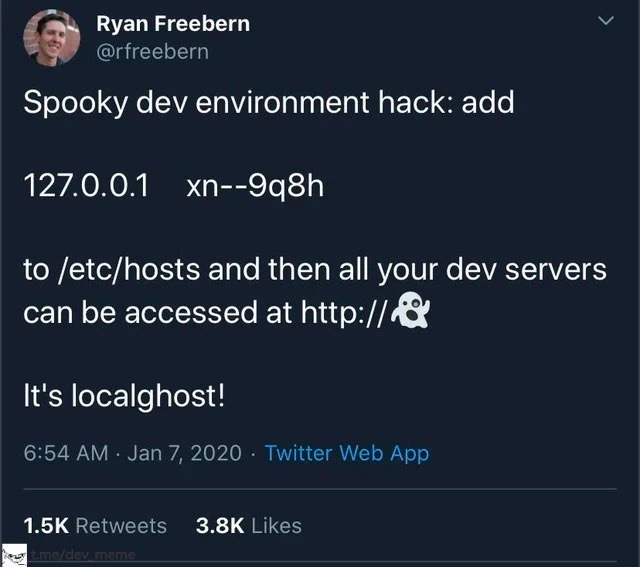
A screenshot of a tweet from user Ryan Freebern (@rfreebern). The tweet, posted on January 7, 2020, presents a 'Spooky dev environment hack.' The text instructs the reader to add the line '127.0.0.1 xn--9q8h' to their /etc/hosts file, which will then allow them to access their dev servers at 'http://👻'. The punchline of the tweet is 'It's localghost!'. The image shows the tweet has received 1.5K retweets and 3.8K likes. The technical joke here relies on Punycode, an encoding that allows Unicode characters (like emojis) to be represented in the ASCII-only Domain Name System. The string 'xn--9q8h' is the Punycode representation of the ghost emoji (👻). By mapping this Punycode hostname to the 127.0.0.1 loopback address in the local hosts file, the user creates a clever alias for 'localhost', hence the pun 'localghost'. It's a sophisticated joke that appeals to senior developers who understand DNS, networking, and OS-level configurations

Comments

7
Anonymous ★ Top Pick The best part about the localghost setup is that when something inevitably breaks, you can honestly tell your manager you're debugging a ghost in the machine
  1. Anonymous ★ Top Pick

    The best part about the localghost setup is that when something inevitably breaks, you can honestly tell your manager you're debugging a ghost in the machine

  2. Anonymous

    Just wait until infosec files a CVE because 👻.internal is technically a phishing domain - turns out even the loopback can haunt you in prod

  3. Anonymous

    The real horror is when you forget about this 'spooky' hosts entry six months later and spend three hours debugging why your monitoring alerts are showing '👻 is down' - and good luck explaining that one in the incident post-mortem when the CTO asks why production depends on a ghost emoji

  4. Anonymous

    Finally, a legitimate use case for Punycode that isn't phishing! Though explaining to your team why production is down because someone accidentally deployed the 👻 domain to prod might be the real horror story. At least when the intern asks 'where's the dev server?' you can now say 'it's in the machine' with full supernatural authority

  5. Anonymous

    Neat until your OAuth callback whitelist rejects xn--9q8h and you’re debugging CORS with a literal ghost in the host

  6. Anonymous

    Cute alias - until someone rsyncs /etc/hosts to staging and the ingress chokes on IDNA/SNI because the cert doesn’t cover 👻; that’s how 'works on my machine' becomes an incident

  7. Anonymous

    Pro tip: Map 💀 to staging next - nails that authentic 'prod is down' vibe without the pager

Use J and K for navigation