Single-page app profile joke about always losing your scroll position
Why is this Frontend meme funny?
Level 1: Forgetting the Bookmark
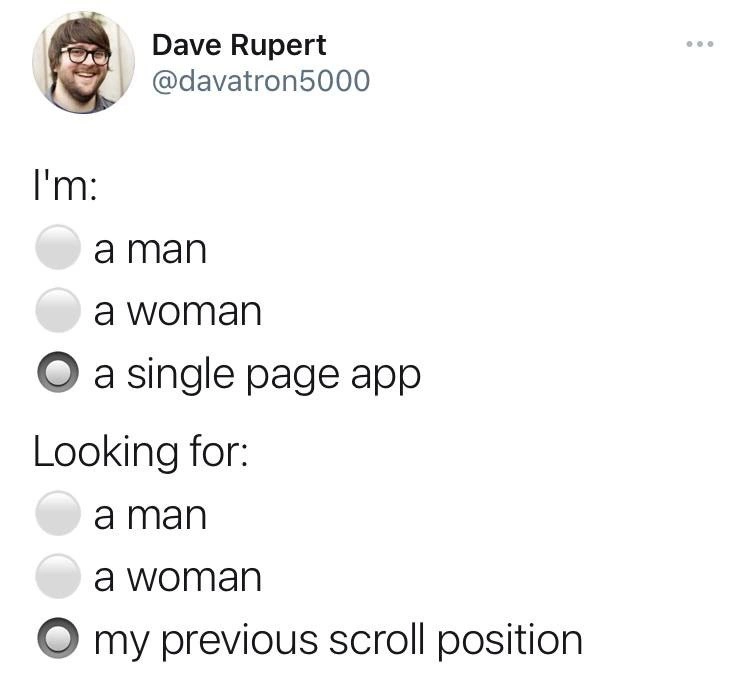
Think of it like reading a book. You know how when you stop reading, you use a bookmark so you can come back to the exact spot where you left off? Now imagine every time you open the book, the bookmark is gone and the book opens at page 1 again. You'd have to flip through all the pages to find where you were – pretty annoying, right? This meme is joking about a similar kind of frustration, but on a website. Some modern websites (especially fancy ones that load new stuff without going to a new page) tend to "forget" how far you scrolled down when you come back to a page. It's like the site lost its bookmark. In the picture, the website is personified (like it's a person with a dating profile) saying it is "a single-page app" and it's looking for "my previous scroll position." That's a goofy way of saying: this website keeps losing where it was, and it's desperately trying to find that spot again! Even if you don't know about web development, you can understand the feeling. It's the same as losing your place in a book over and over. It's funny because we don't usually think of websites as having "profiles" or feelings – but here we imagine a website complaining about its bad memory, which is a silly and relatable idea. Anyone who's had to scroll again to find where they were can chuckle at that!
Level 2: Losing Your Place
The meme shows what looks like a dating profile form, but with a hilarious twist. In the image (which is styled like a tweet), there are form options that say "I'm: ◯ a man, ◯ a woman, ◉ a single page app" and then "Looking for: ◯ a man, ◯ a woman, ◉ my previous scroll position." The circles are radio buttons – those round selection inputs in forms where only one choice can be selected at a time. The filled-in circle (◉) indicates which option is chosen. So basically, the form is joking that the person filling it out is not a man or woman but "a single-page app" and this app is looking for "my previous scroll position" instead of a romantic partner. It's a playful way to say that single-page applications keep losing track of where you were on the page.
Now, what's a "single-page app"? A Single-Page Application (SPA) is a type of web application that loads a single HTML page once and then dynamically updates the content as you interact with it, instead of loading entirely new pages from the server each time. Popular JavaScript frameworks like React, Angular, or Vue are often used to build SPAs. For example, when you use an SPA, clicking a link might change part of the page content via JavaScript and update the URL in the address bar, but the whole web page doesn't refresh. This makes the experience faster and more app-like, because only the needed pieces of content change.
However, SPAs come with some quirks. One common issue is losing the scroll position. The scroll position just means how far down you have scrolled on the page. Imagine you're halfway down a long list of items. In a traditional multi-page website, if you click an item to go to a new page and then hit the browser's back button, the browser remembers how far down you had scrolled and brings you back to that same spot on the previous page. You don't have to scroll again to find where you left off – super convenient! But in many SPAs, because the site isn't doing a full page reload, the browser's automatic "remember where you were" feature often doesn't kick in. Unless the developers of the SPA write extra code to preserve it, when you navigate away from a list and then come back, the page will likely start at the top again, no matter how far down you'd scrolled before.
This meme is poking fun at exactly that problem. It's as if the single-page app itself is saying, "I'm always losing my spot and trying to get it back!" If you've ever been on a site that behaves like an SPA (say, a long Twitter feed or a news site that loads content without refreshing), you might have noticed this: you scroll deep down a page, tap on something to view details, and when you return, you find yourself back at the very top of the page. You then have to scroll and scroll to reach the place where you were. It's frustrating because you literally lost your place on the page and have to waste time getting back to it.
For a newer web developer, it's important to know that this is a common headache and not just you. In developer lingo, it's a known front-end pain point, and it's obviously bad for the user experience (UX) – people get annoyed if they have to redo work or lose context like that. The good news is that there are solutions. As a developer, you can write code to handle it. For example, you might save the scroll position (maybe by reading window.scrollY, which gives the number of pixels the page has scrolled vertically) right before the user navigates to a new view, and then when they come back, set the scroll position back to that saved value using something like window.scrollTo(0, savedPosition). Some frameworks have built-in options or plugins to help with this, but often it's on you to implement. It's a small detail, but it makes a big difference for usability.
In short, the joke here is that a single-page app is depicted like a person filling out a profile, humorously admitting that it's constantly losing something important: the user's scroll position. Developers find this funny because it's a very familiar problem in modern web development – our fancy SPAs can do amazing things, but oops, they might forget something as simple as where you were reading. The meme uses a simple analogy (a dating form) to highlight that quirk in a way that's instantly understandable and silly at the same time.
Level 3: The Lost Scroll Saga
For seasoned front-end developers, this meme hits a painfully funny note. It portrays a Single Page Application (SPA) as if it were filling out a dating profile form, declaring "I'm a single page app" and humorously checking "looking for my previous scroll position." This clever format parodies a typical profile questionnaire to highlight a notorious SPA quirk: these apps often forget where you were on the page after navigation. It's a prime example of front-end humor emerging from real-world pain: losing your scroll position is exactly the kind of modern web annoyance we all know too well.
Under the hood, the joke underscores a real technical issue. SPAs load and swap content dynamically via JavaScript (using techniques like history.pushState for navigation) instead of doing full page reloads. This gives us snappy, app-like interactions in the browser, but it also sidesteps the browser's native scroll preservation. In a classic multi-page website, clicking a link and then hitting "Back" usually brings you right back to the same spot you left off (the browser automatically preserves your scroll position in history). But with a client-side routed SPA, there is no page unload or reload in the traditional sense. The result? The app often drops you at the top of the new content by default, or it might always reset scroll to 0 on navigation. Your previous place on the page is effectively lost in transition. From a UX/UI standpoint, this is jarring – it's a small failure to meet user expectations, yet it happens frequently in modern web development.
Any developer who's built an infinite-scrolling feed or long content list in an SPA can immediately relate to this. It's practically a rite of passage to deploy a shiny new React or Angular app and then discover that every time a user drills down into an item and goes back, poof – the scroll position is gone. That shared “not again!” feeling is exactly what this meme taps into by anthropomorphizing the app. The SPA is depicted like a lonely heart in a dating app, desperately seeking its lost scroll state as if it were a missing soulmate. We smile (or maybe cringe) because we've been that developer frantically trying to make the app "remember" where the user was.
"I scrolled forever to find that item, and when I went back, the list was reset to the top!"
– a frustrated user, every SPA without scroll memory ever
Fixing this issue is often trickier than it initially sounds. There isn't a magical CSS property or simple one-liner to flip; you have to explicitly code a solution. Historically, many SPA frameworks didn't include scroll restoration out of the box. For example, React Router (a popular routing library for React apps) long left scroll handling entirely up to the developer. You'd navigate to a new route and React would display the new content (thanks to its virtual DOM diffing), but the browser wouldn't automatically scroll you back to where you were before. Developers had to get hands-on, perhaps by writing an effect to save window.scrollY before navigation and then forcing a window.scrollTo(...) on the next screen. Some frameworks and libraries introduced their own remedies: Vue Router allows a custom scrollBehavior function, and newer versions of Angular's router have an option to restore scroll position on navigation. There’s even a little-known browser API, history.scrollRestoration, that can be set to 'manual' to hint that you’re handling scroll positions yourself – theoretically useful, but in practice an SPA still needs to decide when and what to restore. All this translates to extra work for developers and countless Developer Experience (DX) discussions on how to handle a seemingly simple thing like scroll position.
The humor here also comes from how such UX hiccups play out in real life. Losing scroll position is a minor bug on paper, but it can really frustrate users (and humble developers). It's the web-app equivalent of a book forgetting your bookmark every time you turn a page. For the user, it's disorienting – they must scroll and find where they left off, breaking their flow. For the dev team, it's a face-palm moment when they realize their slick single-page interface has amnesia about something so basic. This meme nails that dynamic with a simple visual gag: the radio button form. The form's options are absurd in context – nobody in real life identifies as a "single page app" or lists "previous scroll position" as an ideal match – and that's why it's funny. It's pointing out, with a dash of sarcasm, that SPAs have commitment issues when it comes to remembering a trivial thing like scroll location.
From an industry perspective, this is a well-known pitfall of the SPA approach. We gained richer interactivity and smoother transitions at the expense of some browser conveniences. It’s a classic trade-off: by moving control from the browser to our JavaScript, we inadvertently took on responsibility for things the browser handled for free. Seasoned devs remember that older multi-page sites didn't have to worry about this; the browser took care of it automatically. Now, with SPAs, preserving scroll location became a manual engineering task. There are countless Stack Overflow threads and GitHub issues asking "How do I restore scroll position in an SPA?" because everyone keeps encountering it. Over time, the community has come up with various fixes and best practices, but the fact that we need to devote thought to this at all still feels a bit absurd. Hence the joke: even years into the single-page app era, a site might still be "looking for" that lost scroll position like it's a needle in a haystack.
To cope with this quirk, developers have tried a bunch of approaches, each with pros and cons:
- Always scroll to top on navigation: This doesn't preserve the old spot, but at least every new page view starts at a known position. Many SPAs do this intentionally (essentially mimicking a full page load by jumping to the top), which solves one UX expectation for new pages but doesn't help when users hit Back expecting the previous scroll.
- Manual state tracking: Capture the scroll coordinates (
window.scrollY/pageYOffset) in a variable or storage (e.g. save it insessionStorageor in memory) whenever navigating away, and on return, explicitly scroll back to that saved Y position. This can restore the exact spot the user was at, though it requires wiring into your routing logic and careful handling if content height changes. - Persistent components: Use more advanced techniques to keep the previous page/component alive in the background instead of unmounting it completely, so when the user comes back it hasn't moved. For example, some apps keep a hidden DOM node for the list view so that its scroll state never resets. This can be complex (and memory heavy), but it gives a truly seamless feel.
- Cross your fingers (Not recommended): Ship the app without implementing scroll memory and just hope users won't notice or care. (Spoiler: They will notice, and they definitely will care. 😅)
As you can see, none of these solutions are as simple as one might hope. That's why this meme resonates so much with developers. It's an inside joke that perfectly captures a small but persistent annoyance in modern web apps. We've taken a frustrating little bug and turned it into a dating-app metaphor to laugh about it. It's funny because it's true – every SPA is "single" and apparently still searching for that one true love: a reliable memory of where the heck the user left off scrolling.
Description
Screenshot of a tweet that shows a mock dating-profile questionnaire rendered in black text on a white background. Bullet-style radio buttons appear as grey hollow circles except where selected, which is a dark-filled circle. The text reads: "I'm:" followed by options "◯ a man", "◯ a woman", and "◉ a single page app" with the last one selected. A second section reads "Looking for:" with options "◯ a man", "◯ a woman", and "◉ my previous scroll position" with the final choice selected. Visually it parodies typical profile forms while poking fun at single-page applications that fail to restore scroll state, a common UX frustration for frontend engineers working with SPAs and virtual DOM frameworks
Comments
16Comment deleted
Isn’t it poetic? We shipped 400 kB of JS, three hydration passes, and a virtual DOM diff… just so the browser can forget the one feature href solved in ’94: remembering where I was on the page
After 15 years of SPAs promising seamless experiences, we've successfully recreated the browser's back button... poorly. At least our bundle sizes are now large enough to justify those loading spinners we love so much
Every SPA architect's existential crisis: you can handle complex state management across distributed microservices, implement sophisticated lazy-loading strategies, and optimize bundle sizes to perfection - yet somehow preserving scroll position after a route transition remains the Sisyphean task that haunts your dreams. It's the technical debt that compounds with every 'window.scrollTo(0, 0)' you copy-paste, silently judging your life choices as users rage-quit after losing their place in that infinite scroll feed for the third time
We shipped SSR, hydration, and micro‑frontends, yet restoring scroll still needs three hooks, a context provider, and a postmortem - window.history.scrollRestoration = 'auto' was the real senior engineer
SPAs: where preserving scrollY takes more ceremony than a distributed transaction commit
We reinvented navigation with a router and hydration, then filed a P3 because nobody wired window.history.scrollRestoration to anything
Какой-то профессиональный юмор Comment deleted
Наоборот - обычного потребителя пост Comment deleted
Ну, сколько я ни сталкивался с SPA (в качестве потребителя), не очень понимаю, что за проблема с previous scroll position имеется в виду. Буду рад объяснению Comment deleted
Листаешь посты в группе телеграмма уже 3 часа, случайно нажал на кнопку «промотать до последнего поста» Comment deleted
Спасибо! Хм, действительно валидный use case, для него уже есть решение? Звучит тривиально, не удалять значение последнего прочитанного поста, если пользователь нажал "промотать до последнего поста" Comment deleted
Много чего можно придумать, просто пометка поста последнего увиденного перед нажатой кнопкой «вниз» и какой-либо якорь к нему. В 9gag приложении только полгода назад появилась фича, которую требовали уже года 3 Comment deleted
Ну телега вроде как и так хранит значение последнего увиденного поста, то есть решение — просто не удалять его, если пользователь бросился вниз Comment deleted
Ахахах Comment deleted
И теперь чтобы вернутся в прочитанному посту - нужно пальчиком листать 40 минут Comment deleted
Да и фича якоря есть, наглядно работает при использовании поиска. В общем, @durov, обрати внимание 😁 Comment deleted