Skip to content
DevMeme
257 of 7435
Changing three lines and breaking everything: the Godfather developer lament
Debugging Troubleshooting Post #313, on Apr 10, 2019 in TG

Changing three lines and breaking everything: the Godfather developer lament

Why is this Debugging Troubleshooting meme funny?

Level 1: I Barely Touched It!

Imagine you built a big, cool tower out of LEGO blocks. It took a while, but it stood tall and perfect. One day, you see a tiny block out of place and think, “I’ll just fix that real quick.” You move just one small block – and suddenly the entire tower collapses into a heap of pieces. You’re left holding that one block in your hand, shocked and upset, thinking, “Oh no, I barely touched it and now it’s all broken!”

That’s exactly the feeling this meme is talking about, but with a computer program. The program was like the nice tall LEGO tower that was working. The developer changed only a few lines in the program (a tiny tweak, like moving that one block), and the whole thing fell apart and stopped working (just like the tower crashing down). The bottom picture shows a very sad man from a movie saying, “Look what I did to my boy,” which is a dramatic way of saying “I destroyed something I loved.” It’s funny because it’s such an extreme reaction to a common little mistake. Anyone who’s ever broken their favorite toy by accident can understand that mix of shock and regret. In simple terms, the meme is joking that even a tiny change can mess up everything, and when it does, you feel really bad and a bit silly – kind of like knocking over your own LEGO tower and then feeling like, “Oops… my bad.”

Level 2: Minor Edit, Major Error

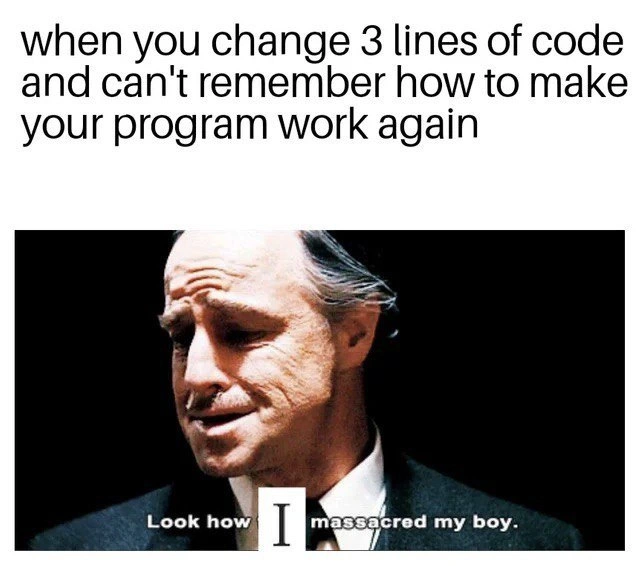
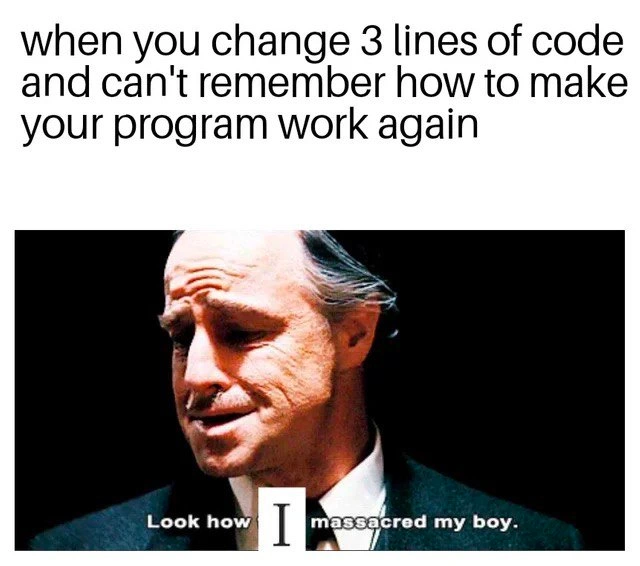
In simpler terms, this meme is about bugs and blunders that happen when you thought a code change was small. The top text says: “when you change 3 lines of code and can't remember how to make your program work again.” That’s a pretty relatable scenario for developers. It means you made a tiny change – literally editing just three lines – and suddenly the program that used to run is now broken. Even worse, you’re scratching your head because you can’t figure out how to get it working like before. It’s like, “I only touched a few things, why is everything on fire?!”

Let’s break down what’s happening:

  • Three lines of code: Usually, we’d assume changing just 3 lines in a program is a trivial update. It sounds so small! That’s why it’s funny – such a small change causing such a big problem feels absurd. Developers often joke about this because it happens more often than you’d think. A tiny CodeChanges can introduce a nasty bug. For example, maybe one of those lines was checking a password correctly, and you “fixed” it and now logins don’t work at all. Oops.
  • Program won’t work: “Can’t remember how to make your program work again” suggests the app is failing to run or produce the right result, and you’re not sure how to fix it. In development, when something that used to work suddenly doesn’t, we call it a regression. A RegressionBug is when a new change breaks an old functionality. So here, your small change caused a regression – something that worked before (your program running fine) is now broken.
  • Forgot how to fix it: It also implies you might have forgotten some steps needed to run the program. This is about the build or setup process. Many projects require specific steps to get going: maybe you need to compile the code, or restart a service, or update a config file. If you haven’t touched the project in a while, it’s easy to forget those troubleshooting steps. Perhaps last time you ran it, you had done a bunch of setup (like installed certain libraries or set environment variables). Now after your edit, you try to run it fresh and you’re seeing errors, thinking “Wait, how did I get it to work last time? Did I miss a step?” This is why the tag forgot_build_steps is included – it’s hinting that part of the joke is the developer can’t recall the magic recipe to make the app run again after their changes.

Now, the bottom panel: that image is from The Godfather, a famous mafia movie. The man in the picture is Don Vito Corleone (played by Marlon Brando) looking sorrowful. In the film, he says, “Look how they massacred my boy,” upon seeing his son hurt. It’s a powerful, sad moment in a serious context. Meme creators love to take serious movie scenes and pair them with silly everyday problems for humor. Here, they changed the quote to “Look how I massacred my boy.” By changing “they” to “I,” the meme makes it about the developer hurting their own “boy” (which is the program or code). So the developer is as heartbroken as a father who accidentally harmed his child. It’s exaggerated, dark humor for sure – comparing a coding mistake to a mafia tragedy is intentionally over-the-top to be funny. But any developer who has broken their own project can relate to that facepalm moment of “Oh no... I ruined it.”

Let’s touch on the tags and why they’re relevant:

  • Bugs: A bug is a flaw or error in the code that causes a program to produce incorrect results or behave wrongly. In this meme, the 3-line change introduced a bug (or several!). The code is now erroring out – that’s the bug you’ve got to fix.
  • Debugging_Troubleshooting: Debugging is the process of finding and fixing bugs. Troubleshooting is a broader term for solving problems in tech. After this mishap, the developer is probably knee-deep in debugging mode, trying to figure out why those three lines broke everything. The joke is that this is a painful debugging session; something that was fine is now broken and it’s frustrating.
  • CodeQuality: This refers to how well-written and maintainable the code is. High code quality means it’s easier to change things without breaking others. Low code quality (like messy or overly complex code) means even a small change can have unexpected side effects. The meme implies that maybe the code wasn’t great or the situation wasn’t ideal – otherwise a tiny edit wouldn’t wreak such havoc. Many developers have dealt with legacy code or fragile systems where you touch one thing and ten other things break. That’s poor code quality in action.
  • RefactoringPain (from the tags): Refactoring means changing code structure without changing what it does (to improve clarity or design). It can be painful if the code is old or untested. The meme’s scenario might be a mini-refactor gone wrong – the dev tried to “clean up” or improve something in 3 lines and ended up breaking functionality. It definitely hurts, hence refactoring pain.
  • DebuggingFrustration: This is exactly the feeling here. You’re frustrated because you have to dig into why your small change broke the program. It’s a mix of confusion (“This should work... why doesn’t it?”) and annoyance at oneself (“I can’t believe I broke it!”).
  • DeveloperHumor / DeveloperSelfDeprecation: This meme is a form of self-deprecating humor among developers. We often joke about our own failures to ease the stress. The dev in the meme basically admits they messed up (“I massacred my boy”) and makes it funny by being overly dramatic about it. It’s comforting because it reminds every coder that you’re not alone – everyone makes silly mistakes that break things, and it’s okay to laugh it off after the fact.
  • small_change_big_breakage: This tag is literally describing the core joke. A small change caused a big break. It’s counterintuitive, which is why it’s memorable and funny.
  • oops_commit: In version control (like Git), after you make a mistake in a commit, you often have to make a second commit to fix it. Informally, developers call that fix commit an “oops commit” (as in, oops, I messed up, here’s the fix). This meme scenario is totally an “oops commit” waiting to happen – the next step after the meme would be the developer furiously writing another patch to un-break the code. The presence of this tag signals that the meme’s about that kind of commit regret.

For a junior developer or someone new to coding, the takeaway is: even tiny code changes can have unexpected consequences. It’s important to test your changes, keep track of what you did, and have a way to revert if needed. And if you ever find yourself in this situation, panicking because your app is broken and you can’t remember how you got it running last time – just know that this happens to everyone! Part of learning to code is learning how to systematically troubleshoot:

  • You might retrace your steps (what were those 3 lines and why did you change them?).
  • You might use tools like git diff to see exactly what changed.
  • You might run the program in debug mode or check error logs to see where it’s failing.
  • And yes, you might have to revisit the setup docs or ask a teammate, “Hey, how do I start this app again? I think I missed a step.”

The meme uses a famous movie quote to dramatize that very relatable feeling of defeat after a simple change. It’s saying, in effect, “I had this beautiful working thing, I tried to tweak it just a little, and now it’s broken and I’m devastated (and it’s my own fault!).” By understanding the references (The Godfather scene) and the tech context (regression bugs from tiny changes), you can appreciate why developers find this both funny and painfully true. It’s a lighthearted reminder: don’t underestimate even a “minor” code change, and always keep notes on how to get your app running! That way, you avoid ending up like the sad Don Corleone of your code, lamenting over the pieces of a once-working program.

Level 3: Three-Line Tragedy

There’s a bitter irony in how often changing a mere three lines of code can bring a whole application to its knees. Seasoned developers have all been there: a tiny diff that should be inconsequential ends up causing a regression bug of epic proportions. One moment the program was working, and after that “harmless” tweak – boom, nothing works and you’re left staring at a failing build or a crashing app. This meme nails that absurdity by comparing the developer’s despair to a mafia boss mourning his son. The code was your pride and joy, and with one commit you feel like “Look how I massacred my boy.” It’s darkly comedic because the CodingMistakes here are self-inflicted – the developer is both the loving parent and the hitman of their own code.

On a technical level, such small_change_big_breakage usually means the codebase had some hidden fragility. Perhaps those three lines were balancing a house of cards in the system’s logic. In software terms, you likely upset an implicit assumption or a delicate dependency:

  • Maybe you renamed a variable or changed a function argument, and it turned out multiple modules relied on that exact name/behavior. Now half the app is throwing NullReferenceException or spitting out wrong results.
  • Or you tweaked a condition (like flipping a boolean flag) thinking it’s a minor refactor, but that inverted some logic globally. Suddenly features that were “on” are now “off” (or vice versa) and nothing makes sense.
  • Perhaps you updated a library version by a tiny increment or changed three lines in a config. And now the build fails because of version conflicts or a subtle difference in how the new library works. RegressionBugs love to hide in those “small” version bumps.

Under the hood, this speaks to CodeQuality and system design. In a robust, well-tested codebase, a three-line change should be easy to verify and less likely to break everything. But in the real world, many projects suffer from tight coupling (parts of the code are overly dependent on each other) and technical debt (quick-and-dirty code that’s fragile). Change one piece and you get a domino effect of failures in seemingly unrelated places. It’s the software version of the butterfly effect: a tiny flap (3 lines changed) unleashes a tornado (massive crash elsewhere). Experienced devs have learned that “trivial” changes often hide non-trivial consequences. As the cynical saying goes, “There’s no such thing as a small change in a large system.”

The meme’s bottom panel (Marlon Brando from The Godfather) adds that extra drama. In the film, Don Vito laments, “Look how they massacred my boy,” referring to his son. The meme twists it to “Look how I massacred my boy,” implying the developer accidentally destroyed their own creation. It’s an DeveloperSelfDeprecation moment – we laugh because we’ve all felt that mix of guilt and sorrow after breaking our “baby.” A senior engineer might chuckle darkly and recall a 3 AM incident where a one-line config change took down an entire service. These war stories are countless: a missing semicolon that broke a prod build, a one-line commit that caused a memory leak and crashed the web server, a minor CSS tweak that blanked out a login page. The Godfather-level sorrow is a tongue-in-cheek way to cope with those nightmares.

Beyond the humor, there’s real DebuggingFrustration here. After those three lines, you’re not just dealing with one obvious error – you’re dealing with a cascade of problems. The code won’t run, and the kicker: you “can’t remember how to make your program work again.” This hints the project might have a convoluted setup or build process (oh hello, forgot_build_steps). Perhaps the app needs a specific build command, environment variable, or database seed that you haven’t touched in months. You change a few lines, pull the latest code, and suddenly nothing compiles or the app gives bizarre errors on startup. You realize you might have forgotten to run the migration, or you lost some local config file, or you simply can’t recall the exact sequence of incantations to appease the build gods. This is classic Debugging_Troubleshooting pain: not only did the code change introduce a bug, but your past self didn’t document the magic formula to get things running. So now you’re scrambling through README files (if any), chasing down cryptic error messages, and Googling for that Stack Overflow answer that saved you last time.

A senior dev reading the meme sees multiple layers of truth:

  • Source control salvation: They know if you used Git properly, a quick git diff will pinpoint those 3 changed lines. (Sometimes you stare at that diff in disbelief: “How on earth did that break everything?”). And if all else fails, git revert is your friend – you can undo the massacre. But pride or panic often delays the revert; instead you spend hours trying to patch the fallout from your “little” change. It’s funny because we often know better, yet we’ve all chased our tails debugging a self-made bug.
  • Lack of tests: A well-tested codebase would catch a regression immediately. The meme scenario implies that either tests were nonexistent or you didn’t run them. (Who writes tests for a three-line change, right? 😅) So of course, Murphy’s Law strikes. This gentle ribbing hides a real lesson: even small changes should be verified. As a grizzled veteran might say with a smirk, “100% coverage until the one thing you didn’t cover bites you.”
  • Environment drift: “Can’t remember how to make it work” is the hallmark of a setup that isn’t automated. Maybe you built the program manually last time with a dozen steps. Your future self is now cursing your past self for not writing down those steps. It’s a nudge toward automating builds and using continuous integration – so your program’s build doesn’t feel like black magic you have to rediscover.

All told, the humor lands because it exaggerates a very real dynamic in software development: CodeChanges that look small can have outsized impacts. It’s the tragicomedy of debugging. You feel like the Don Corleone of code, heartbroken over the beautiful program you yourself put a hit on. 😅 The next time someone says “It’s just a minor change, what could go wrong?”, every senior dev in the room will exchange knowing looks – because we’ve seen how a “minor edit” can turn into a major fiasco. This meme takes that shared experience and gives it a cinematic, darkly humorous twist that both hurts and brings a wry smile. In the end, we’ve all “massacred our boy” at least once – and lived to fix it after a painful all-nighter. Consider it a Godfather-level lesson in humility from the programming world.

Description

The meme is split into two panels. The top panel is a plain white background with bold black text that reads, "when you change 3 lines of code and can't remember how to make your program work again". The bottom panel is a dark still image from the famous mafia movie; a suited, gray-haired man (his face is blurred here) looks down sorrowfully, and the overlaid subtitle says, "Look how I massacred my boy." The visual joke compares a mob boss’s grief to a developer’s despair after a seemingly innocuous three-line change ruins a once-working codebase. Technically, it pokes fun at how small diffs can introduce regressions, erase hard-won build knowledge, and launch a painful debugging session familiar to any seasoned engineer

Comments

7
Anonymous ★ Top Pick Refactored three lines to drop a cyclomatic point - now half the microservices are sleeping with the fishes and Jenkins is holding a horse head
  1. Anonymous ★ Top Pick

    Refactored three lines to drop a cyclomatic point - now half the microservices are sleeping with the fishes and Jenkins is holding a horse head

  2. Anonymous

    Those three lines were load-bearing comments someone deleted in 2019 because "self-documenting code doesn't need comments."

  3. Anonymous

    Three lines changed, zero commits made - the post-mortem writes itself, but the diff never will

  4. Anonymous

    This perfectly captures that moment when you realize your 'quick refactor' has transformed your elegantly working system into a Heisenbug factory - you know it worked before, you can see the git diff is only three lines, but somehow you've violated causality itself and now the universe refuses to compile. The real massacre isn't the code; it's your confidence in ever touching a working system again without a feature branch, comprehensive tests, and possibly a priest on standby

  5. Anonymous

    If a 3‑line diff bricks the app, it wasn’t the lines - it was an undocumented invariant; start with git bisect and then write the test you just discovered

  6. Anonymous

    When a three-line diff bricks the app, it’s usually because the “working” build depended on uncommitted migrations, a stale .env, and my shell history - git bisect can’t debug state you never versioned

  7. Anonymous

    Minimal changes, maximal entropy: the second law of untested refactors

Use J and K for navigation