Skip to content
DevMeme
3031 of 7435
The Unsettling Sound of Silent Code Failure
Debugging Troubleshooting Post #3346, on Jun 29, 2021 in TG

The Unsettling Sound of Silent Code Failure

Why is this Debugging Troubleshooting meme funny?

Level 1: Awkward Silence

Imagine you ask your friend a question, but they just stare back at you without saying anything. You wait... and nothing. They don't answer, they don't even shrug – it's total silence. You’d probably wave your hand in front of their face or poke them, saying, “Hellooo, anybody there?!” At that moment, you might actually wish they would respond, even if it’s just to say “I don’t know,” because at least that’d be something. That awkward silence where you get no answer at all is exactly what a programmer feels when they run their code and nothing happens. The computer isn’t showing any message or error, almost like it’s ignoring the question. It’s funny in a way: just like you’d prefer your friend to say something instead of staying mute, a programmer would prefer the code to at least give an error message instead of doing absolutely nothing. It’s that "C’mon, say something!" feeling – and when the code stays quiet, all you can do is poke it and hope for any response.

Level 2: No Output Bug

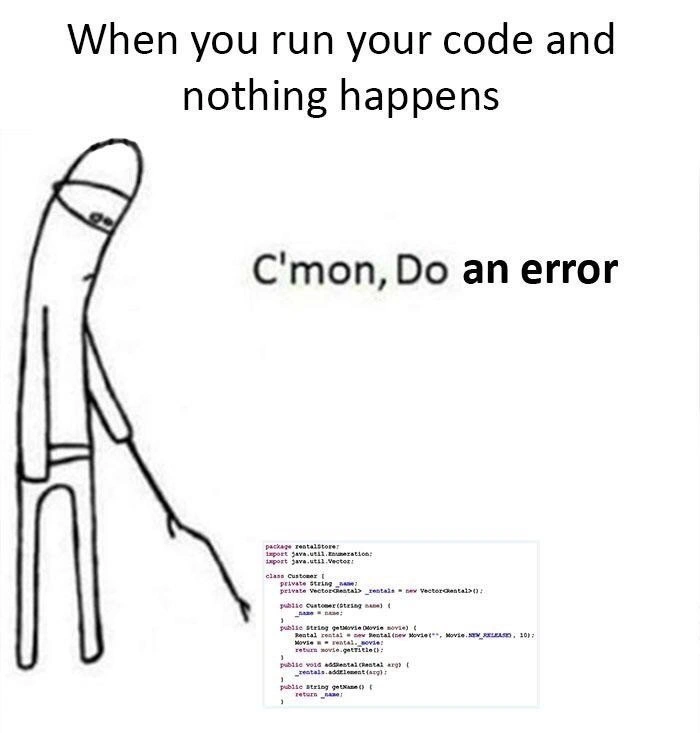
At this level, let’s break down what’s happening in simpler terms. The meme shows a stick-figure character leaning over and poking something with a stick. This is from the classic "C’mon, do something" meme format – usually used when someone is bored or impatient, trying to prod an unresponsive thing. In our developer humor context, the unresponsive thing is the code we just ran. The top text says, "When you run your code and nothing happens." This sets the scene: you’ve compiled and executed your program, but to your surprise, nothing at all appears in the output. No results, no errors, just… silence. The stick figure (which represents the programmer in this scenario) is poking at the program, and the caption next to it says, "C’mon, do an error" – with "an error" in bold. The bold emphasis highlights the absurdity: the developer actually wants an error to happen. That’s the punchline – normally we hate errors, but here we’re so frustrated by the lack of any output that we’d prefer even a scary error message to get some clue about what’s going on. This turnabout is what makes it funny and relatable as a form of DeveloperHumor.

Now, why would a program run and have nothing happen? A few common reasons in programming:

  • The code ran successfully but didn’t have any output or visible effect. In many languages (like Java, which the code snippet in the meme is written in), if you don’t explicitly print something to the screen or perform some action with a visible result, the program will seem to do nothing. It might have calculated something and then immediately exited. For example, if your program only does int x = 2 + 2; and nothing else, it will compute that and then end without showing anything to you. You’d never know it even ran unless you add a print statement to display x.
  • The program might not have been set up correctly to run. In Java, code is organized into classes. The snippet visible in the meme shows a Customer class with some methods (addRental, getName) and a Vector<Rental> to hold data. If you press “Run” on this code as-is, nothing visible will happen because this is just a class definition. There’s no main method here that tells the program to do something like print text or interact with the user. It’s akin to having all the pieces of a machine but not pressing the start button. The code compiles (meaning the computer understood it and it’s valid code), but when you execute it, it quickly loads and exits since there were no instructions like “show this on screen”. This is likely why the meme maker included that Java snippet – it’s a piece of code that does nothing apparent when run.
  • Another possibility is the program has a bug where it didn’t execute the part that produces output. For instance, maybe there was supposed to be a function call or a loop, but due to a logic mistake (like a condition that was never true), that code never ran. So the program finished without ever reaching the code that would print or perform the main action. It’s like expecting a phone call, but realizing later you had your phone on silent and the call never rang – the event you expected happened quietly, or perhaps not at all.

Let’s clarify some terms:

  • Debugging is the process of finding and fixing issues (bugs) in your code. When the meme says "leaves you debugging in silence," it means you’re trying to debug (figure out what’s wrong) but you have no information or error messages to start with. That’s really hard, because usually an error message or some output is like a hint or a starting point for troubleshooting. Without it, you have to guess where to begin.
  • Error in this context refers to something going wrong in the program that would usually stop it from running further (often throwing an exception or printing an error message). If the code had an error, at least you'd get a message like “NullPointerException at line 42” or something to direct your attention. The meme joke is the developer saying "C’mon, do an error" – essentially "Please, code, crash or complain so I know where the problem is!"
  • Console output is the text that a program prints to the screen or terminal where you run it. For example, in Java you use System.out.println("Hello") to output the text “Hello” to the console. If your program doesn’t call any such print function, you won’t see any console output. Many beginner programs start with printing "Hello, World!" just to verify something happens. If you ran a program and didn’t even see "Hello, World!" or any message, you’d wonder if it ran at all. In the meme, the developer expected something to show up, but the console stayed empty.

The stick figure poking visual is exactly how a developer feels in that moment: you stare at your screen, maybe hit the enter key a few times, or add some temporary print statements and run again, essentially "poking" your code to provoke a reaction. The phrase “C’mon, do something (or do an error)” perfectly captures the impatience and anxiety. It’s a bit like watching a pot of water that won’t boil or waiting for a webpage that’s loading forever – you start wishing you’d see something, even a timeout error, rather than indefinite nothingness.

The code snippet itself (though tiny and blurry in the image) is a Java class likely from a tutorial or book (it mentions Movie.NEW_RELEASE which hints it’s an example from a refactoring book or an old project). Key elements in that snippet:

  • Vector<Rental> is a collection (like an array list) for storing Rental objects. Vector is a somewhat old-school Java collection that’s synchronized; nowadays, developers often use ArrayList instead, but either way, this is just setting up a place to keep some rentals.
  • addRental(Rental arg) method adds a rental to that list.
  • getName() returns the customer’s name.

None of these operations print anything or interact with the outside world – they just modify and retrieve data internally. So, if you run this class by itself, you’ll see no output because, again, it’s not designed to print or do I/O on its own. This reinforces the meme’s scenario: the code is probably correct in that it compiles and does what those methods are supposed to do (store a rental, return a name), but if you execute it standalone, nothing visible happens. This situation is a classic no_output_bug for someone who expected a result.

For a newer developer, encountering this can be pretty confusing. You might think, “Did I run it correctly? Is my computer hung? Is the program still running?” Often, the answer is that the program ran just fine, it just didn’t have any instruction to tell you what it did. This is why one of the first lessons is usually to include some output (even as simple as logging or a print statement) to confirm the program’s execution. If you ever find yourself in this spot, a good troubleshooting step is to insert a simple print line at various points in your code like System.out.println("Reached point A");. This way, when you run it, you at least see those messages and know the code is indeed running up to that point. Think of these print statements as breadcrumbs or signs of life that reassure you the program is alive and where it’s going.

In summary, this meme is playing on a very relatable developer experience: running code and getting no feedback. It’s both frustrating and a little funny in hindsight because we usually don’t want our code to error out – but here we are, practically begging for an error as a form of feedback. It’s a lighthearted poke (pun intended) at the pains of debugging. Every developer, junior or senior, eventually runs into the “nothing happens” problem, and it teaches the valuable lesson that no output can be just as telling of a bug as an explicit error – it just takes a bit more work to figure out why. Until you figure it out, you might find yourself just like that stick figure: staring at your unresponsive code and muttering, “Come on... do something!”.

Level 3: Crickets in the Console

When an experienced developer runs code and nothing at all happens, it’s the ultimate debugging nightmare. We’re talking about a program that neither produces output nor throws an error – it's just silent. In a normal failure, you’d get a big ugly stack trace or at least some error logs to hunt down. But here? No output, no clues. The code refuses to crash and leaves you debugging in silence. It's like the app is giving you the silent treatment. As a battle-scarred dev, you know this situation is more unnerving than an outright crash: at least a crash yells “Here’s what broke!” while a silent program whispers nothing. This meme nails that painful irony with the "C’mon, do an error" caption – a phrase no developer ever thought they'd say out loud until they’ve experienced this. We prefer a crashing program over a quietly misbehaving one, because a crash comes with a trail of breadcrumbs (an exception message, a log, a line number) to follow. Silent failure? That’s just a black hole for your DebuggingFrustration.

In the image, the stick figure poking with a stick is a well-known “C’mon, do something” meme template applied to coding. Here the dev is figuratively prodding the unresponsive code, begging for any sign of life – even an error. It humorously captures that desperate feeling when you've run your program and the console is just sitting there like a stone. You start wondering: Did it even run? Did it freeze? Is it secretly doing something incredibly slow? Checking the process monitor, the CPU usage, anything, you might just see nothing. The code might have executed and exited so fast (with no output) that it feels like nothing happened at all. Or worse, it's hanging somewhere without throwing an exception, effectively a ghost program.

Why is this scenario so relatable in DeveloperExperience_DX? Because it happens more often than we'd like:

  • Forgotten Output: Perhaps you wrote a function to calculate something but never printed the result. The program runs and finishes normally, but since you never logged or displayed anything, the console stays blank. No news is not good news here – it’s confusing.
  • Missing Entry Point: In languages like Java, if you run a class with no public static void main(String[] args) method or any test harness, it does nothing. The code snippet shown (a Customer class with a Vector<Rental> and some methods) is a prime example – compiling and running that class directly would result in absolutely no console output. The program technically "worked" (it didn’t crash because it never really did anything), leaving you scratching your head.
  • Swallowed Exception: The code might be failing internally, but some genius wrote a try/catch that catches an exception and then does nothing with it (no rethrow, no log – just an empty catch block). The error is happening, but it’s completely hidden. This is pure evil in debugging terms. You get zero feedback. For example:
    try {
        riskyOperation();  
    } catch (Exception e) {  
        // caught the exception and ignored it...  
    }  
    // Program continues as if nothing went wrong
    
    In this case, the code silently fails – it swallows the error. You’d be poking at the program like that stick figure, wishing it actually crashed at riskyOperation() so you’d know something went wrong.
  • Infinite Loop or Hang: The program might actually be stuck in an endless loop or waiting on some resource, but with no output or logging, it appears as if it’s doing nothing. There’s no error because technically it hasn’t failed – it’s just stuck. This is where you check your CPU usage and see one core mysteriously grinding at 100%, or nothing apparent at all if it's waiting on I/O. Again, no feedback except your code never finishes (or finishes instantly doing zilch).
  • Output in the Wrong Place: Sometimes the program did produce output, but not where you expected. Maybe it wrote to a file or a different log level that isn’t visible on the console. If you don’t know to look there, you’ll think it’s silently doing nothing. This is a lesser issue here (since the meme’s code clearly has no output at all), but it’s one more way a program’s behavior can be effectively invisible.

A senior engineer has a toolbox of strategies for these silent bugs. We’ve learned (often the hard way) to turn on verbose logging, add System.out.println("Reached this point") debug prints, or run the code in a debugger with breakpoints to trace the execution path. It’s a bit like playing detective in the dark – you light a match (add a log here, a print there) to see where the code goes. In a Java program like the snippet, you might start by writing a quick main method or a unit test to actually use the Customer class and then print something, just to verify the code is alive. For instance:

public static void main(String[] args) {
    Customer c = new Customer("Alice");
    System.out.println("Customer name is: " + c.getName());
}

With something like that in place, at least you’d get some output (e.g., "Customer name is: Alice") and know the code ran. Without any such code, running Customer.class alone is like launching a rocket that immediately self-terminates silently because it had no mission. No output, no error, nothing.

The humor in this meme resonates with any developer who’s sat there staring at a blank console or an idle program window thinking, “Hello?? Do something… throw a null pointer, print a log... anything!” It highlights an important truth in debugging: sometimes a loud failure is far easier to deal with than quiet correctness (or quiet incorrectness). When the software doesn’t even acknowledge your input with a response, you’re left as the meme depicts: prodding at the code and pleading “C’mon, do an error.” It’s funny because it’s true – we’ve all reached a point where we’d take a nasty error over ambiguous silence. At least an error would break the uncertainty and give us a direction to fix the bug. Until then, we’re stuck debugging in the dark, feeling around for a clue, with only the sound of crickets in the console log for company.

Description

A popular developer meme using the 'C'mon, Do Something' format. The top text reads, 'When you run your code and nothing happens'. The image features a simple, crudely drawn white character with a blindfold, poking at a small block of Java code with a long stick. To the right of the character, the text says, 'C'mon, Do an error'. The code snippet itself is a Java class named 'Customer' that uses the legacy 'java.util.Vector' collection, suggesting it's older code. This meme perfectly captures the deeply frustrating and eerie experience of executing a program and getting absolutely no output - no errors, no logs, no results. For a developer, a clear error message is a gift; it's a starting point for debugging. A silent failure is a black box mystery, leaving the developer to poke around blindly, much like the character in the meme, just hoping for any sign of life, even if it's an error
Comments

22
Anonymous ★ Top Pick An exception is the code's cry for help. Silence is the code's ghost, haunting your terminal without a trace
  1. Anonymous ★ Top Pick

    An exception is the code's cry for help. Silence is the code's ghost, haunting your terminal without a trace

  2. Anonymous

    When the JVM exits 0 with no logs, I’m reminded that the real legacy isn’t the Customer class - it’s that decade-old `catch (Exception ignored) {}` wrapped around main

  3. Anonymous

    After 20 years in the industry, I've learned that the only thing worse than a null pointer exception is when your distributed system silently swallows errors and you're left correlating timestamps across 47 microservices to figure out why that one customer's order disappeared into the void

  4. Anonymous

    Ah yes, the dreaded silent failure - when your code achieves quantum superposition between working and broken until you add a print statement to observe it. At least with a NullPointerException, you know *where* to start crying. But this? This is like debugging Schrödinger's bug while your Vector<Movie> silently judges your life choices from the Java 1.2 era

  5. Anonymous

    At this point I’d beg for a NullPointer - silent 200s from a no‑op path behind feature flags and catch(Exception){} is the enterprise way of “nothing happened.”

  6. Anonymous

    I'd take a NullPointerException over this void any day - at least it points somewhere

  7. Anonymous

    Crash-only design suddenly makes sense when your service exits 0, emits no logs, and someone shipped catch(Exception e) {} with PROD logging set to WARN - SLOs green, users red

  8. @RiedleroD 5y

    C be like: segmentation fault (core dumped)

    1. @RiedleroD 5y

      Rust be like: *doesn't even compile because you can't have two mutable pointers of the same object at the same time*

      1. @RiedleroD 5y

        python be like: indentation error: inconsistent use of tabs and spaces

        1. @RiedleroD 5y

          YAML be like: *parses Norway into a bool*

          1. @RiedleroD 5y

            ok that's all the jokes I got

          2. @sashakity 5y

            js be like: 🙂

      2. @pavloalpha 5y

        Really?

        1. @RiedleroD 5y

          yes

    2. @pavloalpha 5y

      segmentation fault (core dumped)

  9. @choke_hazard 5y

    *HTML joke, which I'm too lazy to come up with*

  10. @azizhakberdiev 5y

    Me: *Intentionally broke something* Code: everything okay Me: please don't Me: *breaking the entire code* Code: still okay Me: oh god

  11. @azizhakberdiev 5y

    JS be like: callAnyFunc(arg) ^ Unexpected token "c" in 56 line at anonymus(56) at caller at requirejs at... at... at your fucking ass

    1. @RiedleroD 5y

      feelsbadman

  12. @nipunattri1 5y

    Python be like: bash no command python found

  13. Deleted Account 5y

    This is only senior dev skill have from long time experience at office. Ahah

Use J and K for navigation