The ultimate frontend power move: centering a div
Why is this Frontend meme funny?
Level 1: Center of Attention
Imagine a very experienced baker who’s been making fancy cakes for 20 years, but there’s one simple thing – let’s say, perfectly cracking an egg with one hand – that they just never got the hang of. Along comes a new apprentice on the first day, and crack! the newbie cleanly opens an egg with one hand on the first try. The old baker’s jaw drops in disbelief. The apprentice grins and says playfully, “See? I’m just better at this!” It’s a funny scene because we’d expect the older expert to know every trick, but here the rookie outshines the master at that one little task. In the meme, the “little task” is centering something on a webpage (making it nicely in the middle), which is famously harder than it looks. The joke is showing how the newcomer becomes the center of attention by doing this tricky little thing effortlessly, leaving the seasoned pro feeling a bit stunned and humbled. It’s like a kid showing up a grown-up at something the grown-up thought they’d always be best at – a playful reminder that anyone can have their moment to shine.
Level 2: Div Alignment 101
Let’s break down the tech joke here. First, what’s a div? In web development, a div is just an HTML element (a division) used as a container to group other elements or content. Think of a div as a simple box or section on a webpage. Now, centering a div means we want that box (or the stuff inside it) to be positioned right in the middle of its parent container or the page – often both horizontally (left-right center) and vertically (top-bottom center). Sounds easy, right? In practice, it’s been a famously tricky task in CSS (the language used to style webpages). CSS (Cascading Style Sheets) controls layout, colors, fonts – basically how everything looks and is arranged on the page. So, “centering a div” is all about using CSS to align that box dead-center.
Why do people joke about it? Well, for a long time, CSS didn’t have a single, obvious way to vertically center things. Horizontally centering is fairly straightforward – for example, you might use text-align: center; on a parent element to center inline elements, or margin: 0 auto; on a block element (like a div) to center it horizontally within its parent. But vertical centering (making something sit in the middle top-to-bottom) was a headache. Web developers (including seasoned seniors) had to get creative: sometimes they’d turn the parent container into a table (display: table-cell) and use vertical-align: middle;, or they’d absolutely position the child element at 50% from the top and then adjust with transforms or negative margins. These were essentially hacks to coax the browser into doing what you wanted. If you’re a new frontend coder, imagine fiddling with multiple CSS rules and still seeing your box stuck at the top or off-kilter – frustrating! That’s why centering became this almost mythic beginner question on forums like Stack Overflow – everyone needed it, and it was always harder than expected the first time.
Enter modern solutions: CSS Flexbox (Flexible Box Layout) and CSS Grid. These are newer layout systems that make tasks like centering much more intuitive. For instance, with Flexbox, you can align items both horizontally and vertically center with just two lines (justify-content: center; and align-items: center;) on a parent element that has display: flex;. In other words, Flexbox introduced a straightforward, built-in way to center things. For a Junior developer who learned CSS in recent years, using Flexbox to center a <div> might be second nature – they’re taught the “modern” way from the start. Meanwhile, a Senior developer who learned web development 20 years ago had to use older methods and might still remember the pain or just do it the old way out of habit.
Now, the meme jokes about a “Junior dev” who centers a div perfectly on first try and a “Senior dev with 20 years of experience” feeling defeated by that. In real life, titles like Junior and Senior often indicate experience levels. A Senior dev has usually been coding for many years, seen lots of projects, and solved numerous problems. A Junior is relatively new to the field and is still learning a lot of things. Normally, you’d expect the Senior to know all the tricks and the Junior to struggle with basics. That’s why it’s funny and ironic: here we have a Junior immediately solving a layout problem that has historically stumped even veterans. The senior vs junior contrast is exaggerated for humor – the “two-decade” Senior’s ego gets a bit bruised because something he might have considered a tough challenge was nothing for the newbie. The phrase “But I am superior” from the Junior in the meme is a playful taunt. In reality, a Junior wouldn’t usually brag like that, but the joke exaggerates to make the point: sometimes newcomers, armed with up-to-date knowledge, can outshine old-timers in specific tasks. And that can feel both funny and a tiny bit embarrassing to the experienced folks!
So, if you’re new to this meme: it’s poking fun at a well-known FrontendHumor scenario. Front-end developers deal with HTML/CSS/JavaScript – the stuff that runs in your browser to make websites interactive and properly styled. Among front-end devs, “How do I center a div?” is a beginner question that everybody eventually encounters. The twist is that even battle-hardened devs might secretly double-check the answer because CSS can be quirky. Seeing a newbie nail it instantly is both impressive and comical. It reminds us that sometimes fresh knowledge beats old experience (at least in this one tiny case), and that even simple-sounding problems can have a learning curve. It’s a friendly joke – seniors often end up laughing, saying “Wow, back in my day this was a nightmare!” and juniors feel a bit more confident, thinking “Hey, I actually knew something useful!” It’s all part of the fun in the developer community.
Level 3: Flexbox vs Ego
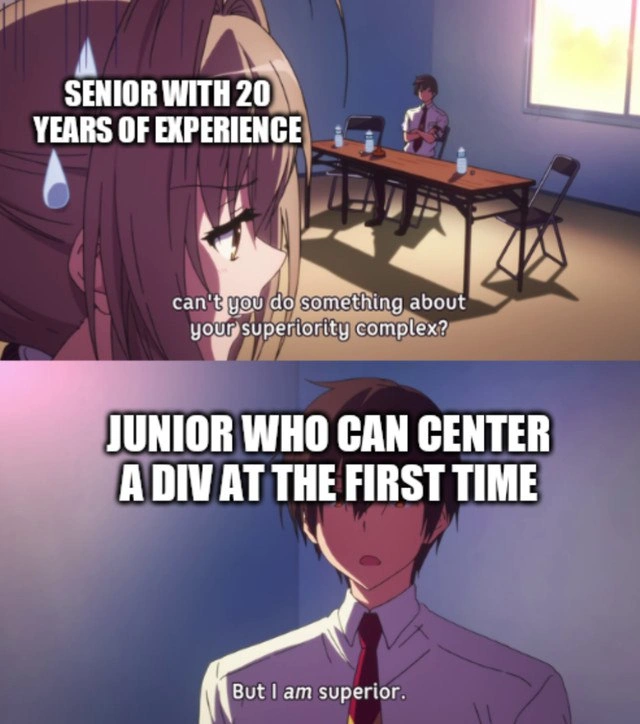
At first glance, this meme taps into a classic front-end inside joke: centering a <div> with CSS. Seasoned engineers with 20 years under their belt have war stories about how something as seemingly simple as aligning an element to the center of a page can drive one insane. In the top panel, an anime character labeled “SENIOR WITH 20 YEARS OF EXPERIENCE” is sweating, looking insecure. The subtitle asks, “can’t you do something about your superiority complex?”. This is a tongue-in-cheek jab at the senior developer archetype – someone who’s seen it all and might carry a superiority complex about their knowledge. Yet here, they’re flustered by a humble CSS task. The bottom panel reveals the punchline: “JUNIOR WHO CAN CENTER A DIV AT THE FIRST TIME” stands confidently with the subtitle “But I am superior.” It’s a hilarious role reversal of senior_dev_vs_junior_dev dynamics: the junior developer has mastered a notorious front-end trick on the first go, instantly vaporizing the senior’s ego. The humor plays on the senior’s decades of experience being outshined in seconds – a direct hit to that 20-year confidence.
Why is css_centering such a legendary struggle? Historically, aligning an element both horizontally and vertically within its container was a CSS rites of passage. Before modern CSS tools, developers resorted to all kinds of hacks for div_alignment: setting parent containers to display: table-cell with vertical-align: middle, or absolutely positioning a element at 50% and using transform: translate(-50%, -50%) to truly center it. There was even the infamous <center> tag in early HTML (now long-deprecated) for horizontal centering. Each “solution” had caveats or needed extra tweaks, causing countless head scratches and Stack Overflow searches. A senior from the early 2000s likely remembers spending hours fiddling with the box model, dealing with quirks of old Internet Explorer versions, and feeling the frontend_struggles of something not centering correctly. It’s the stuff of DeveloperHumor lore – centering a div became synonymous with fiddly, unexpected complexity. There’s an old joke that if you want to humble a cocky web developer, ask them to vertically center a div.
Enter the modern era: CSS Flexbox (and later CSS Grid). These newer layout systems, introduced in the mid-2010s, simplified centering to a one-liner. Suddenly, what took a senior dev half an hour of cross-browser testing could be done by a newbie in just two CSS rules. The junior in the meme likely knows the “secret” – using a flex container to center content effortlessly. For example, a quick CSS snippet can do magic:
/* The modern way to perfectly center a div inside its parent */
.parent {
display: flex;
justify-content: center; /* center horizontally */
align-items: center; /* center vertically */
}
With this, any child <div> inside .parent will sit smugly dead-center both ways. The FrontendHumor here is that a Junior developer fresh from a bootcamp or tutorial is often taught these modern best practices right off the bat. They might center their first element on the first try and wonder why old-timers make such a big deal out of it. Meanwhile, a Senior developer who battled CSS in the dark times (floats, clearfixes, and pixel-perfect woes) might still get flashbacks of aligning-by-trial-and-error. If that senior hasn’t kept up with the latest CSS specs, seeing a junior casually nail it can be a bruising reality check. It’s basically a frontend version of the master becoming the student.
The meme’s anime template amplifies the drama. The line “can’t you do something about your superiority complex?” aimed at the senior is ironic: seniors are often (though not always) the ones with a bit of tech arrogance. Here, that arrogance melts into panic sweat. The junior’s retort “But I am superior.” — conveyed with a confident stance against a flashy background — is ridiculously over-the-top for centering a mere <div>. That’s exactly why it’s funny. It parodies the idea that being able to conquer this one CSS task grants ultimate bragging rights. In reality, no developer (junior or senior) knows everything, and the tech world changes so fast that sometimes JuniorVsSenior roles reverse on specific knowledge. The superiority_complex_quote being flipped like this is comedic exaggeration, highlighting how even a trivial skill can momentarily let the newbie feel like the boss.
In summary, this meme resonates because it’s too real in tech culture. It mixes FrontendHumor about a well-known CSS quirk with the ego dynamics of engineering teams. Veterans chuckle (or groan) remembering the countless times a “small fix” like centering or rounding a corner took way longer than planned. Juniors laugh because, hey, sometimes they do surprise the old guard by breezing through a problem that used to be a nightmare. It’s a lighthearted reminder that in development, experience is valuable, but nothing is permanent – not even the hard ways we centered content. New tools arise, and occasionally, the fresh-faced dev really does have a one-up on the veteran, if only for a glorious, meme-worthy moment.
Description
A two-panel anime meme format that humorously depicts the dynamic between senior and junior developers. In the top panel, an anxious-looking anime girl is labeled 'SENIOR WITH 20 YEARS OF EXPERIENCE,' and the subtitle reads, 'can't you do something about your superiority complex?'. In the bottom panel, a calm and confident anime boy is labeled 'JUNIOR WHO CAN CENTER A DIV AT THE FIRST TIME,' and he replies with the subtitle, 'But I am superior.' The joke is a classic in the web development community, referencing the notoriously frustrating task of centering a div element using CSS. It hyperbolically suggests that mastering this one specific, often-painful task gives a junior developer a sense of power and accomplishment so great that it eclipses decades of a senior's hard-earned experience

Comments
10Comment deleted
20 years of experience gets you distributed systems design, but `display: grid; place-items: center;` gets you god-tier bragging rights
I can juggle eventual consistency across five regions, but when the intern casually drops “place-items: center” and walks off, I realize the only thing still misaligned is my ego
Twenty years of building distributed systems, leading architecture reviews, and debugging kernel panics, but I still google "css center div" every single time because the answer changes depending on which browser decided to interpret the spec differently this quarter
After 20 years of wrestling with float:left, clearfix hacks, table-based layouts, and IE6 box model bugs, watching a junior developer casually drop 'display: flex; justify-content: center; align-items: center;' and call it a day feels like watching someone solve P=NP with a one-liner. The real superiority complex isn't about the years - it's about not having PTSD from the CSS wars of 2005
Nice “place-items: center”; call me when it’s centered in Outlook and IE11, RTL, and 125% zoom without subpixel drift
Two decades scaling monoliths to k8s clusters, yet flexbox still crowns the intern king - true technical debt
Centering a div on the first try means you’ve achieved consensus between flex, grid, and Safari - some of us build Raft clusters because that’s easier
It's me Comment deleted
What's div? *average table enjoyer* Comment deleted
It's quite the other way around but sure Comment deleted