Skip to content
DevMeme
4755 of 7435
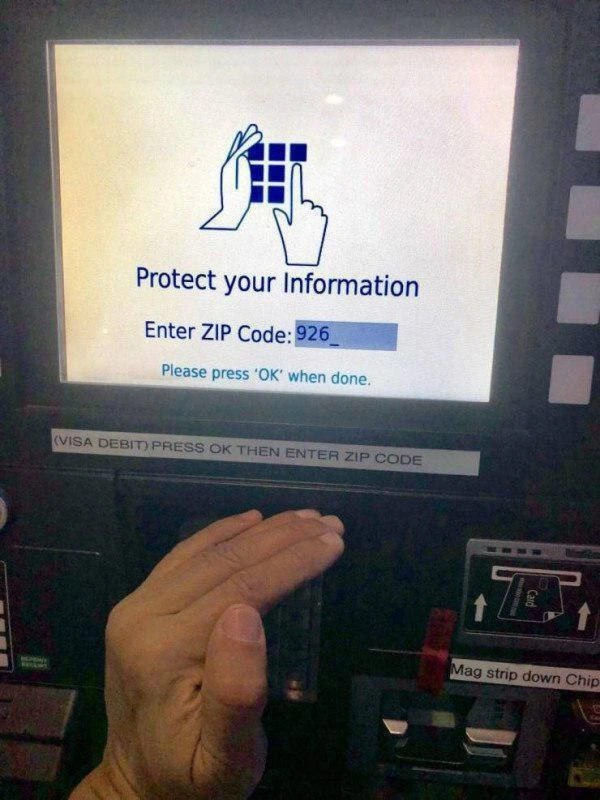
ATM asks to “protect info” while printing ZIP code on-screen
Security Post #5210, on May 18, 2023 in TG

ATM asks to “protect info” while printing ZIP code on-screen

Why is this Security meme funny?

Level 1: Hiding in Plain Sight

Imagine a friend tells you to whisper a secret so no one else can hear, but then they turn around and shout your secret through a megaphone. Pretty silly, right? The friend is telling you to keep it quiet, but they're also the one making it loud. That's exactly what's happening here: the machine says "protect your info" while showing your info openly on the screen. It's funny (and absurd) because the machine's actions totally ignore its own advice – like someone who says "shhh" and then yells out the secret anyway.

Level 2: Hide-and-Seek UI

This payment terminal is asking for your ZIP code – that's the postal code for your address (for example, "926xx" would be an area in California). If you've ever bought gas with a credit card in the US, you might have been asked to type in your billing ZIP code. It's a simple security check to prove you know the address linked to the card.

Now, notice what the screen and the person are doing. The screen says "Enter ZIP Code: 926_" and actually shows those numbers as the user types them. Meanwhile, the person has their hand covering the keypad. Why cover the keypad? To stop anyone nearby from seeing the numbers you're pressing. This is a common safety tip to avoid shoulder surfing – that's when someone literally looks over your shoulder (or a security camera does) to catch your PIN or other secret code.

The funny part is how the machine itself behaves. Normally, when you enter a PIN (Personal Identification Number, like a secret ATM code), the machine will hide your input. For example, if your PIN is 1234, it might display **** on the screen instead of "1234". This is called input masking – it replaces what you type with dots or stars so no one can read it from the screen. But here, the ZIP code field isn't masked at all. The device is treating it like normal text, so "926" appears openly. Yet at the same time, it’s telling you "Protect your Information" as if it were truly secret. It's sending mixed signals: cover your hand, but we're not hiding the numbers.

What’s going on? It comes down to a trade-off between security and convenience. Hiding the input (like a password) is safer because prying eyes can't see it, but it’s a bit less user-friendly (you might make a typo and not realize). Showing the input is more convenient for the user, yet less secure. In this case, the designers leaned toward convenience – they let the ZIP code be visible so you can check it as you type – but they also gave a security warning as if it were secret. They tried to have it both ways, and it backfired.

To visualize the design choice, think about how you'd set up input fields differently for secret vs non-secret data:

<!-- A secure input field for something like a PIN (shows **** instead of actual numbers) -->
Enter PIN: <input type="password" placeholder="****" />

<!-- A normal input field for something non-secret (shows what you type as is) -->
Enter ZIP Code: <input type="text" value="926" />
<!-- In our ATM, they used a normal text field for the ZIP, so it displays "926" as typed. -->

The first line uses a password-type input, which devices mask with dots or asterisks. The second line is a plain text input, which shows characters openly. The ATM should have treated the ZIP code more like a password input if it truly wanted to keep it secret from prying eyes.

In the end, it's a UX failure. The machine is telling the user to be cautious, but its own interface isn't being cautious at all. The design's left hand and right hand aren't in agreement: one part says "keep it secure," while the other part exposes the info. For someone new to this, that's really confusing – you're doing what you're told (covering the keypad), but the system isn't doing its part (hiding the data). It’s both funny and frustrating, and it shows how important it is to get security and usability on the same page in design.

Level 3: Security Theater in Action

Protect your Information
Enter ZIP Code: 926_

The irony is almost painful. The ATM confidently instructs you to "Protect your Information" – even showing a little icon of hands shielding a keypad – while simultaneously printing your secret in plain sight. Because nothing says keep it secret like broadcasting the first three digits of your code on a bright screen for any onlooker to read.

This is a textbook Security vs Usability facepalm. The system is trying to be user-friendly by showing what you type (so you don't accidentally enter the wrong ZIP), but in doing so it completely undermines security. It's essentially performing security theater: giving the appearance of protecting you (with warnings and icons) without actually doing the hard work of keeping anything private.

In the photo, the user is dutifully covering the physical keypad with their hand to thwart any shoulder surfing (peeking over your shoulder to steal a PIN). That's standard advice at any ATM or payment terminal. But here the real shoulder-surfing risk isn't from the keypad at all – it's from the visible ZIP code on screen. A person in line behind you doesn't need ninja eye skills to catch your code; the machine is volunteering it for them.

To be fair, a ZIP code isn't treated as ultra-secret the way a PIN is. It's part of the card's Address Verification System (AVS), a mild security check to confirm you know the billing zip. Designers probably thought, "Eh, it's just a ZIP code, not a PIN – no need to mask it." They prioritized usability (letting you see and confirm the numbers) over confidentiality. But then they bizarrely kept the Protect your Information alert as if this were a hidden PIN entry. It's an inconsistent UI to the point of self-parody – the interface's left hand doesn't know what the right hand is doing.

This kind of UX failure has us experienced devs shaking our heads. It's reminiscent of those sites that demand a super-strong password and then promptly email you that password in plain text. Here, the terminal tells you to guard your input while effectively shouting it out loud. We have a fancy warning message and even physical stickers on the machine (notice the bezel label instructing a completely different input sequence) trying to encourage security, but the implementation shows lax security attitudes.

No surprise, the outcome is both hilarious and a bit tragic. The user does everything right – following the on-screen advice and covering the keypad like a pro – yet the system itself betrays them. This debacle can’t be blamed on user error; it’s a design failure from not thinking through the threat model. In the end, the ATM is basically saying: "Shield your PIN... while I flash it on the display." It's hard not to laugh and cringe at the same time.

Description

Photo of a payment/ATM terminal display. The white screen shows a blue icon of two hands shielding a keypad with text: “Protect your Information.” Below it reads: “Enter ZIP Code: 926_” with the first three digits already visible in a blue input field. A lighter blue message says, “Please press ‘OK’ when done.” A thin label on the bezel states “(VISA DEBIT) PRESS OK THEN ENTER ZIP CODE.” Off to the right is a diagram instructing “Mag strip down Chip” for card insertion. In the foreground, a user’s hand carefully covers the physical keypad, illustrating classic shoulder-surfing prevention - yet the interface itself leaks the sensitive digits in plain sight. The meme highlights poor UX and the perennial security-vs-usability trade-off in interface design

Comments

12
Anonymous ★ Top Pick Their “defense-in-depth” strategy: 1) tell users to cover the keypad, 2) echo the ZIP in 48-pt Helvetica, 3) file a slide deck claiming PCI-DSS compliance
  1. Anonymous ★ Top Pick

    Their “defense-in-depth” strategy: 1) tell users to cover the keypad, 2) echo the ZIP in 48-pt Helvetica, 3) file a slide deck claiming PCI-DSS compliance

  2. Anonymous

    After 20 years of PCI compliance audits and security reviews, we've successfully implemented a system that displays your ZIP code while showing an icon of hands protecting information - it's like putting a 'Please Do Not Read' sign on your passwords in Comic Sans

  3. Anonymous

    When your payment terminal's hardware team and software team never talked to each other, you get Schrödinger's UX: the ZIP code must be both entered before AND after pressing OK. It's like having a merge conflict in production, except the production is a gas station at 2 AM and the merge conflict is between a sticker and a screen. This is what happens when your integration testing consists of 'it compiles, ship it' - the ultimate race condition where the user is guaranteed to lose no matter which instruction they follow first

  4. Anonymous

    Security theatre 101: “cover the keypad” while we printf(zip) in 24pt - PCI ticket closed, threat model reopened

  5. Anonymous

    Classic UI state machine deadlock: OK depends on ZIP, ZIP awaits OK - pure circular dependency bliss

  6. Anonymous

    “Protect your information”: please cover the keypad while we render your ZIP in 24pt cleartext - the kiosk version of hashing passwords and then logging req.body to Splunk

  7. @callofvoid0 3y

    completely secure no one will know that 926 zip code...

  8. @MrZarei 3y

    Cekuryti

  9. @callofvoid0 3y

    there are 2 paradoxes in this picture first the security second the order of pressing ok and entering zip code

    1. @RiedleroD 3y

      technology, man

      1. @callofvoid0 3y

        the note says press ok then entre the screen says the other way

        1. @RiedleroD 3y

          I saw. I think it depends on if you pay per "visa debit" or whatever the alternative is

Use J and K for navigation