Skip to content
DevMeme
1031 of 7435
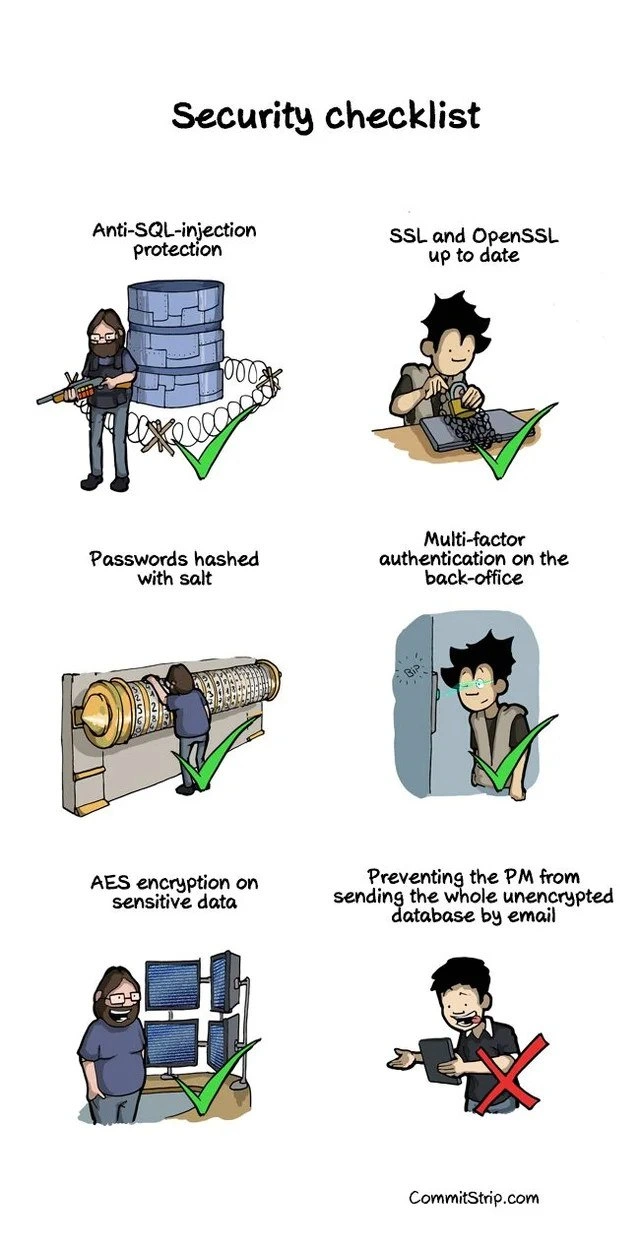
When your security checklist misses the biggest threat: the enthusiastic PM
Security Post #1159, on Mar 20, 2020 in TG

When your security checklist misses the biggest threat: the enthusiastic PM

Why is this Security meme funny?

Level 1: Locked House, Open Door

Imagine you and your family turn your house into a fortress – you lock every door with the strongest locks, close all the windows, even put bars and alarms everywhere. No bad guys can break in because you’ve made it super secure. But then, your very eager friend comes over, and without thinking, he opens the front door wide and hands a copy of your house key to a stranger because he thought the stranger might need it or asked nicely. 😮 All your hard work putting locks on everything didn’t help at that moment, right? This joke is like that: the programmers built a “super safe castle” around the important data (the database), but then a friendly project manager basically let the treasure out by trying to email it to someone with no protection. It’s funny in a silly way – it’s as if you had the world’s safest safe, and someone said, “Hey, let’s just take the money out and mail it in a plain envelope.” It shows that sometimes the biggest security risk isn’t a lack of locks, but a well-meaning person who doesn’t use them.

Level 2: Securing All the Things

Let’s break down the technical terms and practices featured in this security checklist, especially for newer developers or those just learning about SecurityBestPractices:

  • SQL Injection Prevention: SQL injection is a common web vulnerability where an attacker sneaks malicious SQL code into your queries (for example through a form input) to manipulate your database. If you’ve ever heard the joke about “Robert’); DROP TABLE Students;--” (often called Little Bobby Tables from an XKCD comic), that’s referencing SQL injection. To prevent it, developers use prepared statements or parameterized queries and proper input validation. In the comic’s first panel, the dev guarding a database with barbed wire and a big rifle symbolizes how we defend our databases from such injection attacks. It’s like putting up a fence and armed guard around your data – no malicious query is getting through our perimeter. In practice, SQLInjectionPrevention means writing code like this rather than string-concatenating user input:

    // Bad (vulnerable) example:
    String query = "SELECT * FROM users WHERE name = '" + userInput + "';";
    statement.execute(query);  // userInput could terminate the query and add new SQL commands!
    
    // Good (protected) example using a parameterized query:
    String preparedQuery = "SELECT * FROM users WHERE name = ?;";
    PreparedStatement stmt = connection.prepareStatement(preparedQuery);
    stmt.setString(1, userInput);
    stmt.executeQuery();  // Now any special characters in userInput won't break the SQL syntax
    

    By using parameter placeholders (?) or equivalent, the database knows to treat userInput as data, not as part of the SQL command. This simple coding practice is like anti-SQL-injection armor. It’s often one of the first items on any web app security checklist.

  • SSL and OpenSSL up to date: SSL/TLS refers to the protocol that secures web traffic – it’s what puts the “s” in HTTPS. OpenSSL is a popular library implementation of SSL/TLS. Keeping it “up to date” means you’ve patched any known vulnerabilities (for example, the notorious Heartbleed bug in OpenSSL shook the industry in 2014, and only updating the library could fix it). In the second panel, the developer’s laptop is wrapped in heavy chains, indicating that all communications are locked down with encryption. So any data moving between servers or to the user’s browser is encrypted (meaning if someone eavesdrops on the network, all they see is gibberish, not plain passwords or personal info). Up-to-date OpenSSL also implies you’re using the latest and greatest protocols (e.g., TLS 1.2+ instead of old, broken SSL versions) and that you’re aware of cryptographic SecurityTradeoffs (preferring strong ciphers and disabling weak ones). For a junior dev, just remember: always use HTTPS for data in transit, and keep your encryption libraries patched. It’s like making sure the locks on your doors aren’t defective – an outdated lock can be picked by attackers.

  • Passwords Hashed with Salt: Storing passwords securely is critical. Rather than storing actual passwords, we store a hashed version of them. Hashing is a one-way mathematical function: you input the password and get a fixed-size string of characters (the hash) that cannot be feasibly reversed to get the original password. However, simple hashing isn’t enough; hackers can use precomputed tables (rainbow tables) to reverse common hashes. That’s where the salt comes in. A salt is a random piece of data added to the password before hashing (like adding extra random characters). This makes each password hash unique even if two users have the same password, and it thwarts those precomputed attacks. The comic depicts a huge old-fashioned salt grinder being used – a funny literal take on “salting” passwords. In practice, developers use functions like bcrypt, argon2, or PBKDF2 which automatically handle salting and are slow-by-design. Slow hashing is good because it makes it incredibly time-consuming for an attacker to try billions of guesses. This is tagged as BcryptPasswordHashing in the context because bcrypt is a common choice. For a junior dev, the takeaway is: never store plaintext passwords, always hash (with a salt and a strong algorithm). It’s like storing an important key not as a key itself, but in a form that even if someone steals the safe, they still can’t use the key.

  • Multi-Factor Authentication (MFA) on the back-office: Multi-factor auth means you don’t rely on just a password to grant access; you require an additional factor, like a one-time code from the user’s phone or a fingerprint scan. The idea is to have “something you know” (password) plus “something you have” (a phone app or hardware token) and/or “something you are” (biometrics). The comic’s panel shows an entry door that needs a key and code – implying the developer needs that second factor to get into the admin area (“back-office” refers to internal administration interfaces or tools not public-facing). For someone new to this, think of logging into your favorite service and after entering the password, you have to enter a 6-digit code sent to your phone – that’s MFA. It dramatically improves security because even if an attacker somehow phishes or guesses the password, they still can’t log in without that second factor. It’s a common item in SecurityBestPractices checklists for any sensitive system.

  • AES Encryption on sensitive data: AES stands for Advanced Encryption Standard, and it’s a symmetric-key encryption algorithm widely used to protect data at rest (like files, database fields, backups). “Sensitive data” might include things like credit card numbers, personal records, or in some cases entire database files. Encrypting this means if someone gains unauthorized access to the raw data, they can’t read it without the secret key. The panel with multiple monitors and a dev likely monitoring systems indicates they’ve encrypted data wherever needed and are keeping an eye on it. For a junior dev: imagine you have a diary and you write all your secrets in a special code that only you know how to translate – even if someone grabs the diary, it’s unreadable to them. AES is that “special code” for computers, except it’s standardized and extremely hard to break if used correctly (AES-256, for instance, is practically unbreakable with current tech if you guard the key). Implementing AES encryption might mean using a library to encrypt fields like social security numbers in the database, or turning on full-disk encryption on servers.

So those five items – SQL injection defense, up-to-date SSL (TLS), salted password hashing, MFA, and AES encryption – represent a pretty robust security checklist for any web application. As a new developer, if you ensure each of these, you’re doing a lot of things right. However (and here’s the kicker that the comic drives home), even with all that, you also have to consider policies and people. In the comic’s final panel, the project manager emailing the database in plain form is an example of a UserError or oversight not typically in a technical checklist. It’s like having an amazing alarm system, but someone with the code decides to prop the door open. This is where SecurityAwareness training and company policies come into play. Junior devs might not immediately think of “non-technical” vulnerabilities, but as you gain experience, you learn that things like Communication policies (e.g., never email sensitive data, use secure channels only) and management buy-in are just as important. The meme tags it as pm_opsec_fail (operational security fail by a PM) and human_factor_security_risk because, indeed, humans can introduce security risks despite all tech safeguards. The enthusiastic PM probably didn’t realize emailing an unencrypted database is essentially broadcasting secrets to anyone who might intercept that email (email can be insecure, attachments can be forwarded, saved in unintended places, etc.).

In summary, the second-to-last step in any security plan is often “train your team and stakeholders”. You can implement every fancy protocol and lock, but you also need to educate everyone involved about security versus usability trade-offs. A junior developer learning about security should remember: technology alone can’t fix what people might undo. Always think about the SecurityVsUsability aspect – if your security makes something too difficult, people might try to circumvent it (which can be far worse). Good security design includes making the secure way also the convenient way, or clearly communicating why doing it the insecure way (like emailing the data) is dangerous. This comic is a lighthearted reminder that a checklist shouldn’t just be ticking off technical tasks, but also those “so obvious we forgot” items like don’t let someone email the crown jewels!

Level 3: Encryption vs Enthusiasm

In this CommitStrip comic, each panel dutifully checks off a major security best practice – and seasoned developers and security engineers will nod knowingly at every green check mark. We see a developer geared up like a commando guarding a database behind barbed wire, labeled “Anti-SQL-injection protection.” This is referencing how developers fortify their apps against SQL injection attacks (the infamous Bobby Tables scenario where malicious input like Robert'); DROP TABLE Students;-- could otherwise trick a database into executing destructive commands). The green ✅ means “we got that covered.” Next, another dev happily works on a laptop wrapped in chains: “SSL and OpenSSL up to date.” This implies all data in transit is encrypted via SSL/TLS, and the team diligently patches their crypto library (no Heartbleed-style vulnerabilities on their watch – keeping OpenSSL current is crucial). Another panel shows a comically huge salt grinder for “Passwords hashed with salt.” It’s an exaggeration of using salted password hashing (like using bcrypt to store passwords), ensuring even if hackers get our password database, they can’t reverse the hashes easily or use rainbow tables. Then we have “Multi-factor authentication on the back-office,” with an image of a dev using a secure door: meaning the admin interface or internal “back office” requires MFA (beyond just a password, maybe an app code or hardware token). Another ✔️ – they’ve implemented 2FA wherever it counts, thwarting attackers who might have stolen a password. The fifth panel highlights “AES encryption on sensitive data” with a dev monitoring screens, indicating that data at rest (like database fields or backups) is encrypted with a strong cipher (AES, Advanced Encryption Standard, is a gold-standard symmetric encryption algorithm). Yet another big green check for cutting-edge security: basically they’ve nailed defense in depth from input validation to encryption.

By the fifth panel, any senior engineer is thinking, “Wow, this team checked every box – SQLInjectionPrevention ✅, up-to-date encryption ✅, BcryptPasswordHashing ✅, MultiFactorAuthentication ✅ – what could go wrong?” And that’s exactly the setup for the punchline: the final panel reveals the overlooked menace — “Preventing the PM from sending the whole unencrypted database by email” — with a big red X ❌ because obviously that wasn’t on the checklist. The project manager (PM) is gleefully about to hit “Send” on an email with what appears to be the entire database attached in plain, unencrypted form. This immediately resonates as dark humor with experienced devs: all these technical controls can be foiled by a well-intentioned colleague who just doesn’t get it. It’s the ultimate facepalm moment – an enthusiastic PM, perhaps trying to share data with a client or generate a report quickly, unwittingly bypasses every safeguard. The human_factor_security_risk is laid bare: no external hacker was needed, because an insider with legitimate access became the threat vector.

This scenario is painfully familiar in enterprise settings. It’s a form of insider threat, though in this case borne from ignorance or urgency rather than malice. The humor lands because it’s a management_humor trope: developers vs. PMs. Devs implement strict rules and SecurityTradeoffs (maybe they’ve slightly dented usability to enforce strong security), while the PM breezily ignores all that in the name of getting something done (“I’ll just email Bob the data, easy!”). It highlights the classic security_vs_usability tension: secure systems often add friction, and people will sometimes route around them for convenience. For example, maybe there was a secure file transfer system or an encrypted share set up – but if it’s too complex or slow, an overzealous PM might say “Ah, I’ll just send this via Gmail, no big deal,” not realizing the risk. The comic exaggerates it as sending the whole database – which is hilariously horrifying to any seasoned professional. We’ve all heard stories like an HR representative emailing a spreadsheet of all employee salaries to the entire company, or a salesperson accidentally CC’ing the world on customer data. Those incidents provoke that mix of laughter and cringe because they’re so avoidable yet happen so often.

Importantly, this meme underscores a DevSecOps lesson: true security isn’t just about ticking boxes on a checklist (pentesting done, encryption done, code hardened) – it’s about culture and awareness. You have to educate and involve everyone, including PMs and non-engineers, otherwise one enthusiastic click can undermine months of security work. In real life, companies implement policies and technical guards against this, like Data Loss Prevention systems that detect and block sensitive attachments or require encryption. A cynical veteran might joke that “there’s no MFA for sending an email” – meaning once the PM is legitimately inside the system (with their own MFA and access), the system trusts them not to do something foolish. In a security review post-mortem, the team might shake their heads and add a new line to the checklist: “Security awareness training for PMs”. It’s a bittersweet irony: we spend weeks fortifying against SQL injection and hardened encryption protocols, but forget to tell Carol the PM, “Please don’t email the database to random people.” This is why experienced folks often say the user is the weakest link. No matter how hardened your servers and how locked-down your code, a naive “insider” action can open the biggest hole. The comic uses humor to deliver that message: defense_in_depth_irony – five layers of armor and then a big gaping hole right where the human is.

To put it in perspective with a bit of levity, here’s a pseudo-code take on the situation:

security_checklist = [
    "Anti-SQL-injection controls",
    "Latest SSL/TLS patches",
    "Salted password hashing",
    "Back-office MFA",
    "AES data encryption"
]
for item in security_checklist:
    print(f"{item} ✅")
# Everything above is secure... now the unforeseen step:
print("Prevent PM from emailing unencrypted database ❌")
# Oops: that last item wasn't implemented, and the database just went out via email.

Every senior dev reading this comic has that mix of laughter and anxiety, thinking “Yep, been there.” It’s funny because it’s true in so many environments – the enthusiastic PM isn’t evil, they’re just focused on delivering results and unknowingly trigger a security nightmare. The final red X panel turns what looked like a perfect score into a failing grade, and every checkbox hero can relate. After all, as the saying goes in IT, “We can secure against hackers, but how do we secure against *this*?”, where this is usually Dave from accounting clicking a phishing link or, in this case, a zealous PM emailing sensitive data.

Level 4: The Unpatchable Vulnerability

At the most fundamental level, this comic highlights a truth that even the strongest cryptography and security protocols cannot solve: the human factor. In security theory, we can formally verify algorithms and prove properties about protocols, but no algorithm can fully predict or patch human behavior. We have mathematically robust defenses like AES-256 encryption (with an astronomical key space of $2^{256}$ possibilities, effectively unbreakable by brute force) and secure hashing algorithms (where adding a random salt makes precomputed attacks infeasible). These are grounded in solid mathematics: number theory, one-way functions, and complexity theory. However, all that math assumes the keys and data remain under control. The moment an authorized person with access directly shares plaintext data (like emailing a database dump), the cryptographic strength becomes irrelevant. This is a classic illustration of the axiom: a chain is only as strong as its weakest link. In security, that weakest link is often the human element – sometimes jokingly called the unpatchable vulnerability because you can't apply a software update to human habits or knowledge.

Academically, this falls under the study of socio-technical systems: you can design a near-perfect technical system, but if your threat model doesn’t consider enthusiastic-but-uninformed insiders, it’s incomplete. No amount of defense-in-depth (layered technical protections) can prevent a trusted user from doing something outside the expected protocol. In formal terms, if a system’s security proof assumes all users follow the rules, then a well-meaning rule-breaker (like our overly helpful PM) is outside the model – a Byzantine actor the system wasn’t proven against. It’s reminiscent of real-world breaches where advanced intrusion detection and encryption were rendered moot because someone with access was phished or simply sent out sensitive data unencrypted. The comic’s humor hides a deep lesson: the hardest problems in cybersecurity aren’t just math problems; they’re human behavior problems. As security guru Bruce Schneier famously said, “Only amateurs attack machines; professionals target people.” Here, our PM isn’t even under attack – he’s volunteering the data, which is the ultimate irony that no cipher or firewall can cure.

Description

Six-panel CommitStrip comic titled “Security checklist.” Panel 1 shows a developer in tactical gear guarding a cylindrical database behind barbed-wire with the caption “Anti-SQL-injection protection” and a large green checkmark. Panel 2 shows another dev happily typing on a laptop wrapped in heavy chains, captioned “SSL and OpenSSL up to date,” also with a green check. Panel 3 depicts a huge mechanized salt grinder labeled “Passwords hashed with salt,” with a developer turning the crank; green check. Panel 4 lists “Multi-factor authentication on the back-office,” showing a developer entering through a secured door; green check. Panel 5 reads “AES encryption on sensitive data,” illustrating a developer monitoring several screens, again a green check. Panel 6, captioned “Preventing the PM from sending the whole unencrypted database by email,” shows a project manager about to hit send on a tablet, overlaid by a big red X. The strip humorously highlights that despite strong technical controls - SQL-injection defenses, TLS patching, salted hashes, MFA, and AES - the human factor (a well-meaning PM) can still undermine security, underscoring classic DevSecOps lessons about social engineering and usability versus security
Comments

6
Anonymous ★ Top Pick We deployed zero-trust, FIPS-validated, SOC2-compliant everything - then spent the afternoon begging the PM to stop treating Outlook as S3
  1. Anonymous ★ Top Pick

    We deployed zero-trust, FIPS-validated, SOC2-compliant everything - then spent the afternoon begging the PM to stop treating Outlook as S3

  2. Anonymous

    After implementing quantum-resistant cryptography, zero-trust architecture, and SOC2 compliance, the biggest security vulnerability remains the PM with database read access and an Outlook account. Next sprint: implementing a middleware that intercepts emails containing SELECT * and replaces them with cat memes

  3. Anonymous

    You've got military-grade encryption, salted hashes, MFA on the back-office, and a database fortress that would make Fort Knox jealous - but your PM still has 'Send' permissions and Outlook auto-complete. Congratulations, you've built a bank vault with a screen door. The real zero-day exploit isn't in your code; it's in your org chart. At least when the breach happens, you can tell the board you had a comprehensive security checklist - just nobody thought to add 'prevent management from being the attack vector.'

  4. Anonymous

    Nailed OWASP Top 10 mitigations, but forgot email's the dev's favorite zero-day exfil vector

  5. Anonymous

    Anti-SQLi, TLS, salted hashes, MFA, AES - impeccable defense-in-depth; then the PM emailed the prod dump as a CSV because “SSL means it’s encrypted,” proving the real perimeter is Outlook

  6. Anonymous

    We nailed SQLi, TLS, salted hashes, MFA, and AES‑256, then got pwned by the only zero‑day that never gets patched: Export → Email → PM - aka the Layer 8 bypass for every DLP rule

Use J and K for navigation