Skip to content
DevMeme
4752 of 7435
UEFI Secure Boot: the Vendor Lock-In loophole via “security reasons” excuse
Security Post #5207, on May 17, 2023 in TG

UEFI Secure Boot: the Vendor Lock-In loophole via “security reasons” excuse

Why is this Security meme funny?

Level 1: The “It’s for Your Own Good” Trick

Imagine you have a toy box that only opens if it recognizes a special sticker from the toy company. The toy company says, “We did this to keep you safe, so only approved toys that won’t hurt you can go in.” That sounds nice, right? It’s true that it might keep out some harmful things. But it also means you can only use that company’s toys, because the box won’t open for any others – even if those other toys are perfectly safe and fun. Every time you try to put a new toy in, the box checks for the sticker and says, “Nope, I don’t know this one. Can’t play with it!” The company’s reason: “It’s for your safety.”

How would you feel? On one hand, yeah, you’re safe from broken or dangerous toys sneaking in. On the other hand, you lose freedom to choose. It’s as if your mom or dad locked the cookie jar and said, “It’s for your health!” – maybe true (no more tummy aches), but also convenient because now you can’t eat any cookies unless they allow it. The meme is joking about this kind of situation. It’s basically saying: “Hey, if someone in charge wants to keep all the control, all they have to do is say it’s for safety and people will accept it.” It’s poking fun at how calling something a safety measure can sometimes be a sneaky way to get people to go along with a rule that mostly benefits the rule-maker. In simple terms, the picture is telling us: “It doesn’t feel like a unfair rule if you call it a safety rule!” – and that’s both the joke and the lesson.

Level 2: Keys, Locks, and Boot-ups

Let’s break down what’s going on in this meme in simpler terms. First, what are we talking about with UEFI Secure Boot? Modern computers have something called UEFI (Unified Extensible Firmware Interface), which is basically the modern replacement for the old-school BIOS. This firmware is the first thing that runs when you turn on your computer – it initializes hardware and then finds an operating system to boot (like Windows or Linux). Secure Boot is a feature of UEFI that acts like a security gatekeeper during this startup process.

Imagine the computer’s firmware is like a security guard checking badges at the door. Each operating system’s bootloader (the little program that kicks off loading your full OS) must present a proper digital signature badge that the guard recognizes. This signature is like a cryptographic key saying “I’m verified by a trusted authority.” If the signature (badge) is on the approved list, UEFI says “All good, come on in!” and allows the boot process to continue. If not, the firmware stops the boot and usually throws an error, essentially saying, “Hold on, I don’t know you – you can’t run because you might be unsafe.” This is great when it’s truly an unknown, malicious program trying to sneak in, often referred to as a bootkit or boot virus. It’s like catching a fake ID at the club – the bouncer saves the day.

Now, what about vendor lock-in? That’s a term for when a company designs a product or system such that you are stuck with their ecosystem or products, making it hard to switch to a competitor. In software/hardware, examples include things like only being able to use official chargers, or file formats that only one program can open. In this case, the concern is that Secure Boot could be used to lock a computer to only run vendor-approved operating systems. Think of a vendor like a big company (e.g., Microsoft for Windows or another company for a special device) that would love if you only ever used their OS or their approved software on the machine. If that vendor holds the keys (literally the cryptographic keys) that Secure Boot trusts, then by default the machine will only boot OS versions signed by that vendor. Trying to boot something else will be like showing the guard a badge from a different club – it won’t be recognized.

For a real-world example: Many PCs come with Microsoft’s Secure Boot key. So they will boot Windows with no issues (Windows has the right badge). If you try to boot a Linux distribution that hasn’t gone through Microsoft’s signing process, the PC might flat-out refuse, saying the OS is “unauthorized” or not trusted. As a user, you have a few options: go into the UEFI settings and turn off Secure Boot (basically telling the guard “take a break, let everyone in”), or sometimes add your own key (if you’re advanced and the firmware allows it), or use a Linux bootloader that is signed with a Microsoft-recognized key (Linux communities actually set up a system to do this, so their bootloader has a valid badge and then it can load the rest of Linux). The very fact that Linux had to politely ask Microsoft, “Please sign our bootloader so we can get in,” is part of what this meme is ribbing. It’s like needing a permission slip from the very company you might be trying to avoid, just to use your own hardware.

Now the phrase in the meme: “It’s not vendor lock-in if you say it’s for security reasons!” This is a sarcastic way of saying that a company can do something that looks like restricting user choice (vendor lock-in) but try to make it sound acceptable by claiming it’s purely for security. “Security reasons” is in quotes because it’s often a generic excuse. In everyday tech life, you might hear something like “Oh, we can’t let users install other apps for security reasons,” or “You can’t have admin rights on this work laptop for security reasons.” Sometimes those reasons are valid! But other times, it’s just the easiest way to stop any further argument – after all, who can argue against security if you put it that way?

In context, system engineers and security professionals are familiar with this tension. Security vs. Usability (or Security vs. Freedom) is a balancing act. Secure Boot is a security feature (it genuinely can protect against certain types of malware), but it comes at the cost of flexibility – it can make the system less user-friendly for those who want to install or tweak things. And importantly, if the user isn’t given full control over that feature (like the ability to turn it off or use their own keys), then the power lies with the vendor. That’s where the “loophole” idea comes in: a loophole is like finding a clever way around a rule. Here, a vendor can claim “we’re just securing the system” and in doing so, they get a lock on the user’s choices without it sounding nefarious. It’s almost an ethical workaround – make it about safety, and it doesn’t sound like you’re just being anti-competitive.

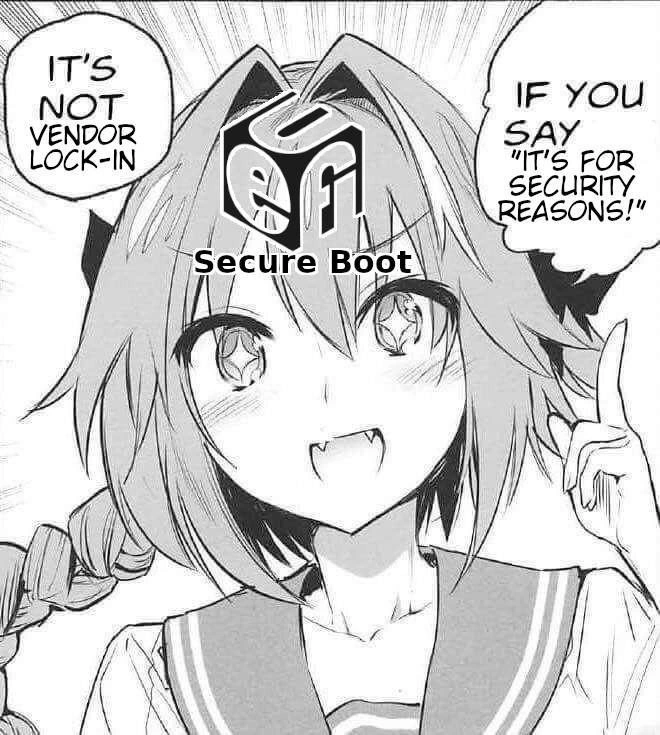
Let’s decode the visual a bit too: It’s a manga-style (Japanese comic) grayscale image with an anime girl in a school uniform confidently pointing her index finger up, lecturing us. On her head is a 3D cube with the letters u e f i on each visible face, and the words “Secure Boot” below it – basically indicating she is (or is representing) UEFI Secure Boot. The left speech bubble says “IT’S NOT VENDOR LOCK-IN,” and the right says “IF YOU SAY ‘IT’S FOR SECURITY REASONS!’”. The format is playful and exaggerated (speed lines, proud expression) to mimic that classic “I have the answer/loophole!” moment in anime. This contrast – cute cartoon schoolgirl delivering a cynical tech one-liner – makes it both funny and memorable. It combines the serious tech concept (hardware_firmware_security is a heavy topic) with a lighthearted anime trope.

For someone newer to these terms, here’s a quick rundown of key concepts featured:

  • UEFI: The firmware in modern PCs that initializes hardware and boots the OS, replacing older BIOS. It’s extensible and can run more complex tasks, even a mouse-driven setup UI, etc.
  • Secure Boot: A UEFI feature that ensures only cryptographically signed (trusted) software can start up. Think of it as the bouncer only letting known guests into the party (where the party is your OS starting).
  • Keys & Signatures: Secure Boot uses cryptographic keys (kind of like super complex passwords or codes) to sign and verify software. A signature is a chunk of data attached to the software that can be checked against a key to verify authenticity. If the public key in the firmware matches the signature from a private key that signed the bootloader, it’s like verifying a document was stamped with an official seal.
  • Vendor Lock-In: When a company’s product is designed so you are dependent on that company’s ecosystem. For example, a printer that only accepts the manufacturer’s ink cartridges (with chips) is a form of vendor lock-in. In software, an example is a file format that only one program can use, or—like this meme highlights—a computer that will only run an OS that the manufacturer approves.
  • “Security reasons” excuse: A catch-all phrase that implies “we’ve made this decision to protect you/your data.” Often valid, but sometimes overused. Newcomers in tech soon learn to gently probe this reason: what security reasons exactly? Are we sure it’s not also convenience for the vendor or admin? This meme is basically an old-hand telling juniors, “Don’t take all ‘security’ claims at face value; sometimes it’s just an excuse.”

In summary at this level: the meme is highlighting a real debate in the Security vs Usability space. Secure Boot = good for security, yes, but it can also = headache or restriction for users wanting something else. The joke is that a company can hide its self-serving restrictions behind the innocent face of “we’re just trying to keep you safe!” – depicted literally as an innocent anime character making an authoritative statement. It resonates especially if you’ve tried to tinker with your system and encountered this roadblock. Once you get the terms, it’s a pretty straight-forward jab: calling something a security measure can be a convenient way to also lock you in.

Level 3: Security vs. Freedom Showdown

Now let’s peel back to a more practical perspective. The meme hits home for a lot of senior engineers and sysadmins because it satirizes a familiar pattern: corporate lock-in being masked as security. In the panel, a confident anime girl balancing a cube labeled “UEFI Secure Boot” is essentially voicing a corporate PR line: “It’s not vendor lock-in if you say it’s for security reasons!” Seasoned folks in tech have heard variations of this phrase countless times. It’s basically the tech equivalent of “It’s not a bug, it’s a feature!” – here becoming “It’s not monopoly, it’s protection!”

Why is this funny (or painful) to industry veterans? Because it’s recognizably true. Vendors often defend restrictive practices by invoking security. Consider real scenarios: You buy a new laptop, and it has Secure Boot enabled with only Microsoft’s signing key recognized. By default, it will happily boot Windows (because Microsoft’s OS bootloader is signed with Microsoft’s key – no surprise), but if you try to install an alternative OS (say a Linux distro or anything not blessed by that key), you’re greeted with a boot error. Essentially, “Sorry, I can’t let you do that” – your PC’s firmware sounds like HAL 9000 denying access. The official reasoning? “Unrecognized OS. Secure Boot violation. It’s for your own protection against malware.”

For a systems engineer who wants control of their hardware, this is both ironic and infuriating. Sure, malware is real – nobody wants a rootkit in the boot sector – but being forced to trust only the vendor’s choice of OS feels like your device isn’t entirely yours. The meme calls this out: the loophole where a company can say “security!” and escape accusations of anti-competitive behavior. It’s poking fun at how adding “for security reasons” is like an all-purpose get-out-of-jail-free card for otherwise unpopular decisions.

We’ve seen this pattern beyond just UEFI too. SecurityTheater is a term that comes up when companies impose something that looks like security but also conveniently boosts their control or profits. For instance, think about app stores that only allow you to install approved apps “to keep you safe” (and also to take a 30% cut and block rivals), or printer manufacturers using “security chips” in cartridges to prevent refills by third-parties under the guise of authenticity checks. Developers and IT pros swap these war stories: “The boss says we can’t use any other cloud service ‘for security reasons’ – riiight, nothing to do with that exclusive contract, I’m sure.”

Specifically with Secure Boot on PCs: it was introduced around Windows 8 era as part of a secure computing initiative. The idea was to prevent malware at boot time, a genuine concern because malware that loads before the OS (bootkits) can be almost impossible to detect or remove. Initially, the PC ecosystem handled it with some balance: Microsoft required OEMs (hardware makers) to ship PCs with Secure Boot enabled to get Windows certification, but (for x86 PCs) they also required that the user be able to turn it off or add their own keys. This is why on many laptops you’ll find a firmware/BIOS setting to disable Secure Boot or switch to “Setup Mode” or “Custom Mode” where you can enroll your own keys. That was a nod to the uproar from Linux users and others concerned about lock-in. Microsoft, perhaps learning from the backlash, didn’t totally shut the door – at least not on traditional PCs. (On some devices like ARM-based Windows tablets, they did lock it down without an off-switch, which fed the conspiracy flames.)

However, the practical pain remains: even though you can often disable Secure Boot or finesse keys, that’s extra hassle for the user. A sysadmin installing Linux on 100 new machines might sigh heavily, “Time to go into BIOS settings on each one and turn off this so-called security feature so I can actually do my job.” It’s a rite-of-passage for many Linux enthusiasts to learn about Secure Boot when their new dual-boot setup doesn’t boot and they have to either find a signed bootloader (hello shim.efi) or disable the feature. The meme speaks to that shared experience: “We just wanted to install our OS of choice, and we got lectured about security.” It’s equal parts comedy and commiseration.

From an organizational standpoint, senior engineers also recognize a political truth: claiming “security” basically ends debate. Security is a paramount concern, so it can be misused as a trump card. Want to force all software through your channel? Say alternatives are a security risk. Need to justify why something is locked down? Invoke vague threats. It’s not that security isn’t important – it’s that it’s sometimes wielded less as a sincere shield and more as a convenient sword. The meme calls out that insincerity. It’s winking to the audience, “We see what you did there, dear vendor. You said the magic word security and expect us all to nod along, but we know a VendorLockIn play when we see it.”

Technically, Vendor Lock-In means making a customer dependent on your ecosystem such that leaving is difficult. Secure Boot can contribute to that by making it technically challenging to run alternative OperatingSystems unless they go through hoops. It edges toward a walled garden: today your PC might only boot OS signed by a certain key – if in the future manufacturers remove the override or if a user isn’t tech-savvy enough to find it, that’s effectively a closed platform. Engineers who lived through the open architecture of the PC (where you could boot anything from DOS to Linux to FreeBSD with a tweak) feel a bit of claustrophobia seeing those walls go up.

And let’s not forget the SecurityVsUsability angle. Security features often introduce complexity. Secure Boot might prevent a malicious rootkit, but it can also prevent you from doing something legitimate if you don’t have the right signing key. It’s a classic friction point: the more gates you add for security, the more they can frustrate normal use (especially when the gatekeeper is a corporation with its own agenda). Senior devs and security professionals constantly juggle this trade-off. The meme lands as a tongue-in-cheek critique: sometimes the pendulum swings more toward “keep the user on our platform” than actual user-centric security. It’s basically labeling that scenario as “security theater” or at least “security excuse.”

In summary, Level 3 perspective recognizes the satire and the real concern behind it. The joke works because it’s grounded in truth – a truth the audience likely has grappled with. It’s the bitter laugh of, “Ha, yep, been there.” The cute anime_manga_panel style (grayscale manga with a cheerful girl) only adds to the irony: a bubbly presentation for a somewhat devious concept. That contrast itself is humorous – it’s like corporate marketing personified by a cute character exclaiming an obviously self-serving line with a smile. The experienced reader chuckles and rolls their eyes, appreciating the meme’s jab: “Call it security, and you can get away with a lot.”

Level 4: Root-of-Trust Paradox

At the deepest level, UEFI Secure Boot is all about establishing a cryptographic chain of trust from the firmware upward. The UEFI firmware contains a set of public keys (often controlled by the hardware vendor or OS provider) that serve as the root-of-trust. When your machine powers on, UEFI’s job is to validate that the next piece of code (usually the bootloader) is signed by a trusted private key corresponding to one of those stored public keys. This forms a hierarchical PKI (Public Key Infrastructure): firmware trusts bootloader, bootloader then can validate the OS kernel, and so on. Mathematically, this ensures that each stage is authentic and unmodified – an elegant application of digital signature verification. If any component isn’t signed or has been tampered with (signature check fails), Secure Boot halts the process. It’s like an immutable logic gate at the hardware level saying, “No signature, no entry.”

From a security theory standpoint, this is a sound design to prevent bootkits and low-level malware. By anchoring trust in hardware/firmware (sometimes with help of a TPM – Trusted Platform Module – as a secure key store), the system enforces that only code vetted by a certain authority can run during boot. It addresses the fundamental problem that an operating system cannot fully trust itself once compromised; only an earlier, immutable layer can truly verify integrity. This concept of a trusted computing base and measured boot has roots in academic research and industry consortia (the Trusted Computing Group’s specification, etc.). In principle, it’s a triumph of applied cryptography: the same RSA/ECC signatures that secure your HTTPS connections are used to ensure your OS hasn’t been replaced by a rootkit.

However, here’s the paradox: the strength of this scheme – that there’s a single source of truth (the root key) – is also its potential for control. Someone must decide which keys are pre-loaded as trusted. In practice, that somebody is often the hardware manufacturer or OS vendor (e.g., a PC might trust Microsoft’s key by default). The chain-of-trust can thus become a chain-of-command. If the owner of the device (you) cannot easily add or change the trusted keys, then effectively the vendor holds the master key to what software your hardware will accept. This isn’t a cryptographic flaw – mathematically it’s working as intended – but it’s a socio-technical loophole. The very mechanism designed to secure the system can be (and sometimes is) used to exclude alternative software under the banner of security. In other words, the cryptography doesn’t know whether a key is held by a benevolent security team or a monopolistic vendor – it just obeys the trust hierarchy. The “for security reasons” justification exploits this neutral stance of math: as long as the policies are encoded in keys and signatures, the firmware will dutifully enforce them, indifferent to whether it’s truly for user protection or for market protection.

It’s a bit like a formal proof that a certain OS is authorized to run; if your OS isn’t signed with the approved key, it’s mathematically (and literally) untrusted. This rigidity is what makes Secure Boot effective against malware – and simultaneously what raises concern about vendor lock-in. The meme highlights this dual-use of a security mechanism. It’s pointing out that a security feature can be absolutely technically legitimate (there’s no denying the cryptographic integrity provided by Secure Boot) while also being a convenient tool for maintaining a walled garden. In security engineering terms, it’s the classic tension of who holds the keys. The technology by itself is neutral, but control of the keys is power. When that power is held by a vendor who isn’t keen on user autonomy, the root-of-trust becomes a root-of-restrictions.

So at this deepest level, the humor has a dark, academic twist: it’s essentially saying “We found a loophole in the formal security model – not a mathematical backdoor, but a human one: just call your vendor-controlled keys a security necessity, and voilà, you have a monopoly under the guise of a mathematical guarantee!” The Chain-of-Trust that was meant to protect you can also be the chain that binds you. It’s a reminder that in systems design, technical measures often have social implications. The meme wraps this complex dance of cryptography and control in a cheeky one-liner, but the subtext could launch a thousand heated debates on security ethics, open computing, and who ultimately gets to hold the Master Key to our devices.

Description

Black-and-white manga-style panel shows a school-uniformed anime girl with a 3-D cube bearing the letters “u e f i” balanced on her head. Left speech bubble reads, “IT’S NOT VENDOR LOCK-IN,” while the right bubble adds, “IF YOU SAY ‘IT’S FOR SECURITY REASONS!’” The composition is grayscale, with speed lines emphasizing her confident pose and raised index finger. Technically, the meme riffs on how platform vendors justify UEFI Secure Boot key restrictions as “security,” effectively locking hardware to approved operating systems and limiting user freedom. It highlights the tension between genuine firmware security measures and corporate control, a pain point familiar to system engineers and security professionals

Comments

12
Anonymous ★ Top Pick Threat model: anyone who dares boot an OS we didn’t preload. Countermeasure: fuse our key into UEFI, call it “Secure Boot,” and voilà - security and vendor lock-in share the same line item
  1. Anonymous ★ Top Pick

    Threat model: anyone who dares boot an OS we didn’t preload. Countermeasure: fuse our key into UEFI, call it “Secure Boot,” and voilà - security and vendor lock-in share the same line item

  2. Anonymous

    After 20 years in the industry, I've learned that 'security reasons' is just enterprise-speak for 'we need to justify why your $5000 workstation won't boot that Ubuntu USB without a three-day ticket to IT and a signed affidavit from Microsoft.'

  3. Anonymous

    Ah yes, Secure Boot - the feature that's definitely about protecting you from rootkits and absolutely not about ensuring only Microsoft-blessed bootloaders can initialize your hardware. It's pure coincidence that implementing it requires either paying for code signing certificates, using vendor-controlled keys, or spending hours in MOK Manager hell. The fact that it makes dual-booting Linux feel like defusing a bomb while reading UEFI specs is just a happy accident in the name of security. Nothing says 'open computing platform' quite like needing permission from a certificate authority to boot your own hardware

  4. Anonymous

    UEFI Secure Boot: the only PKI where rotating keys requires opening a ticket with your OEM and hoping the next dbx update doesn’t brick GRUB at 2 a.m

  5. Anonymous

    UEFI “Secure Boot”: where the root of trust is a vendor PKI and the threat model is the customer

  6. Anonymous

    Secure Boot: outsourcing your root of trust to the vendor who can't patch Log4Shell in a weekend

  7. @shynekomaid 3y

    I'm sorry, but why we have 35 (sic!) hotkeys to select a tab in the gnome terminal 🥴

    1. @alexandr_guluta 3y

      xd

    2. @Johnny_bit 3y

      Because it's gnome. be hapy you have options there.

    3. @callofvoid0 3y

      browser tab?

      1. @RiedleroD 3y

        terminal tab

      2. @prirai 3y

        Bowser tab

Use J and K for navigation