The Ancient Hieroglyphs of Wi-Fi Passwords
Why is this Networking meme funny?
Level 1: Password Treasure Hunt
Think of it like this: your friend says, “The secret key to get onto the Wi-Fi is written on the back of that box.” You turn the box around and… whoa! The back is covered in a mass of tiny symbols and letters, kind of like a giant, ancient treasure map covered in mysterious drawings. It was supposed to be easy to find the password, but now it feels like you’ve been handed a big puzzle. The meme is funny because the poor person looking at the router is expecting something simple – like a single word or a clear number – but instead sees something as confusing as an old Aztec calendar stone. In everyday terms, it’s like being told the key to your house is under the doormat, then lifting the mat and finding a whole map with hundreds of confusing clues! You’d probably laugh and say, “Seriously? I have to figure that out just to get in?”
At the simplest level, this meme is showing the frustration and silliness of finding a Wi-Fi password that’s technically “right there” but is so hard to read that it might as well be written in an ancient language. It’s poking fun at how something meant to be helpful (printing the password on the router) can still feel like a challenge. Anyone who’s tried to hook up a new internet box can relate: you end up squinting at the back of the router, running your finger over the lines like you’re deciphering a secret code. It’s a little annoying, sure – you just want to get online! – but when you step back, it’s pretty funny that getting internet access can feel like solving an old-fashioned riddle. The meme uses the big stone with carvings to exaggerate that feeling. You don’t need to know anything about Aztecs to get it: all you need to know is that stone has a crazy amount of details on it. Just like a treasure hunt or a puzzle, finding the right password on that busy sticker takes a bit of effort. And when you finally succeed, you feel both victorious and amused that it was such an adventure for something so simple.
Level 2: Sticker Shock
Let’s break down what’s actually happening in this meme. Routers – the hardware boxes that direct network traffic and beam out your Wi-Fi – often come with a sticker on the back (or bottom) containing important setup info. If you’ve ever flipped a new Wi-Fi router upside down, you’ve seen it: a label crammed with text. Here’s typically what you find on that router label:
Network Name (SSID): This is the name of the Wi-Fi network, like
Linksys_SetuporAztecWiFi_5G. SSID stands for Service Set Identifier, but in plain terms it’s just what shows up in the list when your laptop or phone scans for Wi-Fi. Routers often have default SSIDs that include the brand or model (e.g.,NETGEAR_5GEXT). Sometimes two SSIDs are printed if the router supports 2.4 GHz and 5 GHz bands separately. So the sticker might list both “SSID (2.4G): AztecWiFi” and “SSID (5G): AztecWiFi-5G” for example, doubling the text to parse.Wi-Fi Password / Network Key: This is the critical one you’re usually looking for – the key to actually connect to the Wi-Fi. On modern equipment, the default Wi-Fi password is often a long, random string for security. For example, a real sticker might say “Wireless Key: XJ47-9QK1-6ZOP-AB12”. That jumble of letters and numbers is your Wi-Fi passphrase. It’s intentionally complex to be hard to guess (following good WiFi security standards like WPA2). The downside? It’s also hard to read and type! Zeros and O’s look alike, B could be an 8, and if the font is tiny, good luck distinguishing
Ilfrom11. This is exactly the illegible device credentials problem the meme highlights. You end up double-checking each character like you’re decoding a secret message. By comparison, an ancient Aztec calendar stone with hundreds of symbols comically represents how that random password can feel to an average person.Admin Username/Password: Many routers also print the default login for the router’s settings page. This is separate from the Wi-Fi network password. For example, the sticker might include something like “Admin Login: http://192.168.0.1”, “Username: admin”, “Password: admin” (or a unique admin password). This info lets you go to the router’s configuration webpage to change settings. Default admin passwords are notoriously simple (often literally “admin” or “password”) on a lot of devices – the meme’s point about weak or unchanged default passwords comes into play here. A good practice is to log in and change that admin password right away, because if you don’t, anybody connected to your network (or in some cases even someone outside, if remote management is on) could guess “admin/admin” and take control. The sticker tells you the factory-set credentials because you’ll need them initially, but they’re not meant to stay that way. Still, as techs can attest, many people never change them.
Serial Numbers and Other Codes: The rest of the sticker usually has stuff like the router’s serial number, model number, MAC address, maybe a QR code, and various certification logos (FCC ID, CE mark, etc.). These are important for inventory or support but not relevant to getting online. However, to the untrained eye, it’s all part of the same daunting block of text. You can imagine someone rotating the router trying to figure out which of these sequences is “the password”. It’s easy to grab the wrong string – say, the serial number – and wonder why the Wi-Fi isn’t working. This adds to the device setup frustration: the info is there, but not exactly user-friendly in presentation.
Now, why do they put the password on the back of the router in the first place? It’s about convenience and security (in theory). Instead of using a one-size-fits-all default password (which would be dangerously guessable), manufacturers give each unit a unique default password and print it on the device. That way, your neighbor can’t just guess your Wi-Fi password unless they physically look at your router. It’s a decent security measure for out-of-the-box protection. The trade-off is usability – you, the user, must read a complex string off a tiny label. It’s like a built-in mini treasure hunt. Some newer routers and mesh Wi-Fi systems try to ease this pain by providing a printed card in the box (so you can keep it in your wallet or stick it somewhere easier to read) or even using a QR code that your phone camera can scan to join the network automatically. Those are modern solutions to the exact silly scenario this meme jokes about.
This meme also nods to a broader truth in networking and security: even though we have high-tech wireless standards and strong encryption (like WPA2/WPA3 requiring robust passwords), the initial setup often boils down to a very analog step — reading a label. For a junior developer or tech enthusiast, it’s a memorable lesson in security vs. usability. Strong passwords are good for security, but they can be hard to handle. Weak passwords (like “12345678” or actual dictionary words) are easy to handle but terrible for security. The default Wi-Fi passphrase on routers tries to hit a sweet spot: strong and unique, but physically handed to you so you don’t have to invent one. It works, but not without a laughable side effect: the person setting it up feels like they’re deciphering ancient runes.
To put it plainly, the meme is exaggerating how the back of a router feels when you’re trying to find the password. It’s a mix of genuine tech inconvenience and humor. On your first networking job or first home IT setup, you quickly learn the ropes: find the router label, identify the right code (SSID vs. network key), and input it exactly. You also learn why you should change default passwords to something you can remember (and preferably still a strong password!). But until you do, you’ll be that person turning the router every which way under a lamp, tongue out in concentration, reading off what looks like an encrypted Aztec glyph to your friend trying to type it in. It’s a rite of passage in tech setup – one this meme captures with perfect absurdity.
Back of Router Sticker Example:
SSID (Network Name): AztecWiFi_2.4G
SSID (Network Name): AztecWiFi_5G
Wireless Password (WPA2): XJ47-9QK1-6ZOP-AB12
Admin Login URL: http://192.168.0.1
Admin Username: admin
Admin Password: admin
Serial No: AZTEC123456789
Above: An example of the kind of info a real router’s sticker might contain. It’s a lot! By breaking it out line by line, it’s less overwhelming. But imagine all of that squeezed into a small label with tiny font – you can see why the meme jokes that it looks like an ancient calendar glyph. The phrase “the password is on the back of the router” is practically an inside joke among IT folks now. It usually means “prepare to decipher a confusing label”. As a junior tech or a curious beginner, it’s good to know you’re not alone if you found this confusing – even seasoned pros find it a bit ridiculous (we’ve just learned to laugh and deal with it).
Level 3: Arcane Router Runes
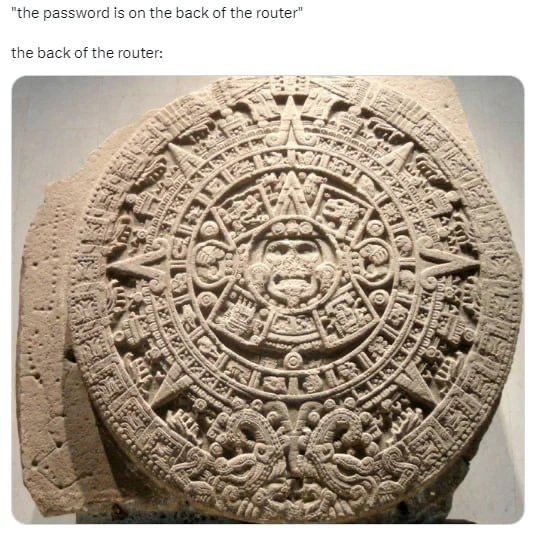
From a seasoned network engineer’s vantage, this meme nails a familiar frustration. The top text sets us up with the deceptively simple directive: “the password is on the back of the router.” Every IT veteran knows what’s coming next – a pain shared by anyone who’s ever crawled under a desk squinting at minuscule print. The meme’s punchline image (the Aztec Sun Stone, dense with intricate glyphs) brilliantly satirizes the router label complexity we’ve all encountered. It’s a hyperbole, of course – no router actually has Mesoamerican hieroglyphs on it – but it feels that way when you’re trying to decipher a chaotic sticker of tiny text and endless codes.
On a technical level, the humor stems from the usability gap in consumer networking gear. Router manufacturers slap a sticker on the device’s backside listing the SSID, default Wi-Fi password, admin credentials, serial numbers, MAC addresses, regulatory logos – a flurry of alphanumeric soup. In theory, providing the default password physically on the hardware is a security improvement over generic defaults (at least it’s unique per device). In practice, it means the WiFi password often looks like XJ47-9QK1-6ZOP-AB12 – a string so long and random it might as well be an ancient glyph. Under ideal lighting, with the router in hand, you can painstakingly transcribe that Wi-Fi key. But real life isn’t ideal: the router is wedged behind a cabinet with cables taut, the font on the sticker is 6pt at best, and the contrast has faded with heat. Device setup frustration kicks in as you misread O for 0 twice and wonder if you’re deciphering an artifact. The meme exaggerates this struggle by comparing it to decoding an Aztec calendar stone, implying you’d have better luck hiring an archaeologist than reading that sticker. It’s funny because it’s true enough – anyone who’s been the “IT friend” at a house setup has felt like they’re performing an arcane ritual just to join the Wi-Fi.
Beyond the physical comedy, there’s a layer of industry commentary: default passwords and weak passwords are a long-running security joke (the bad kind of joke). That sticker is supposed to be a solution – a unique default password so that, in theory, only someone with physical access can know it. But users often never change these default credentials, leaving many networks protected by whatever random passphrase the factory printed (or worse, something like admin/admin). Network administrators and security professionals have been banging the drum for years about changing default logins. We still uncover routers in the wild with credentials so default they could be guessed by a teenager – a fact as shocking (and antiquated) as discovering an ancient inscription in use. The broader security issue here is that unchanged defaults are a huge attack vector. Remember the Mirai botnet? It famously took over thousands of IoT devices by using a list of factory-default passwords. It was basically an internet plague born from people never deciphering or updating the “glyphs” on their devices. So, when an exasperated engineer sees this meme, they’re nodding along: Yep, those illegible device credentials are a joke – one that can lead to real vulnerabilities. The humor has that “it’s funny because it’s true” bite to it. We laugh, but also recall the countless times we’ve had to flip a router (or a cable modem or a smart device) upside-down like a treasure tablet, trying to distinguish the Wi-Fi key from the serial number while muttering “Who designed this?!”.
In essence, the meme is poking at both networking and security culture. On one hand, it’s a lighthearted jab at the poor user experience of hardware design – the fact that critical info is presented in an illegible, inconvenient way. On the other, it’s a wink at the persistent security laziness around default passwords. The Aztec glyph analogy carries an extra sting for veterans: we deal with high-tech systems daily, yet something as basic as getting a password from a consumer-grade router can feel like deciphering an ancient code. It’s a reminder that even in 2023, some tech habits are stuck in the stone age (pun intended). Manufacturers could at least throw us a bone – bigger print, a removable card, or a QR code for the Wi-Fi (many modern routers actually do include a QR code now, acknowledging that reading those runes is a nightmare). Until then, we keep our Indiana Jones hat at the ready for the next time someone says, “The Wi-Fi password? Yeah, it’s written on the back of the router.” Time to start deciphering those router runes... 🗿🔍
Description
This is a two-part meme that humorously exaggerates the difficulty of finding and reading a Wi-Fi password on a router. The top part consists of two lines of black text on a white background. The first line says, '"the password is on the back of the router"'. The second line sets up the punchline: 'the back of the router:'. The bottom part of the meme is a high-resolution photograph of the Aztec Sun Stone, a massive, circular stone monument covered in incredibly intricate and complex carvings, symbols, and a central face. The joke lies in the analogy: the default passwords printed on routers are often long, randomly generated strings of characters in a tiny font, making them as difficult to decipher as ancient hieroglyphs. This meme is highly relatable to anyone, but especially to tech professionals who have grappled with user-unfriendly hardware design and the frustration of a seemingly simple task becoming an archaeological challenge
Comments
22Comment deleted
The router password isn't just a string; it's a legacy system. You don't read it, you perform a ritual and hope the network gods accept your sacrifice of typing 'O' instead of '0' three times
Router vendors’ newest threat model: “UX-driven zero-trust.” If you can’t decode the 32-char WPA2 key hidden in 6-point hieroglyphics between six MAC addresses, the network has successfully authenticated you out
The ISP's password generator is just /dev/urandom piped through a base64 encoder that got stuck in a loop sometime in 2003, and they've been too afraid to restart it ever since
When your ISP's idea of 'security by obscurity' involves a 63-character WPA2-PSK printed in 4-point font on a label that's somehow simultaneously upside-down, behind ethernet ports, and requires archaeological expertise to decipher - you know someone in product design has never actually set up their own router. Bonus points if it's a mix of ambiguous characters like 'Il1O0' that make you question whether you're authenticating or decoding the Rosetta Stone
Perfect entropy: survived Aztec apocalypse, undefeated by OCR or eyeballs
Home CPE security model: print a 32-char WPA2 PSK in 6pt font next to admin/admin; implement MFA as 'Mesoamerican Factor Authentication' - whoever can decipher the Sun Stone gets Wi‑Fi
"Password's on the back of the router." I flip it over and it's the Aztec calendar - finally, a documented key rotation schedule; measured in epochs, still faster than our prod JWT secret
ᄅZƐɾΛ⅁xxɥ9⋊8ގɟǝZp8onԀ⅁ɓZ Comment deleted
My username was once a WiFi password on the back side of a router and I memorized it so that why it’s my username now. Comment deleted
Do you mean ZgGPuo8dZef58K6hxxGVj3Z2 was factory set password? Who is manufacturer of a router with such a default password? Comment deleted
A1 (Austrian ISP who actually owns at least a bing chunk of physical network) Comment deleted
You want to know the best part? This password was set before QR codes were used to connect to WiFi. Heck tablets of that time didn’t even came with any cameras. Comment deleted
I will probably remember this password even on my deathbed Comment deleted
“My son remember ZgGP… Comment deleted
and dQw4w9WgXcQ Comment deleted
DAMN you rickrolled me in 0,5 seconds without making me open a link Comment deleted
mind rickroll? Comment deleted
Yes Comment deleted
zellasoft.org/announcement Comment deleted
what happens if I accept? Comment deleted
oh I see I see, that's fair Comment deleted
Decline it Comment deleted