Regex: From 'Fun and Easy' to a Nightmare in One Substitution
Why is this Languages meme funny?
Level 1: Recipe for Disaster
Imagine you found a recipe in a cookbook that said, “This will be fun and easy, anyone can do it!” You excitedly start following the steps, throwing in a pinch of this and a dash of that. But as you go on, the instructions become weird and confusing – you’re adding ingredients in a crazy order, using ten different bowls, and doing strange techniques you’ve never heard of. By the end, the kitchen counter is covered in a chaotic jumble of bowls and spices, you’re utterly confused, and the “simple” dish you were trying to make has turned into a big nasty mess. When you take it out of the oven, the food has rearranged itself to spell out “This is a nightmare.” 😱
That’s basically what happened with this regex meme. It’s like someone promised, “Oh, using a regex (a pattern for matching words) will be easy, trust me!” – but then the actual process became super complicated and frustrating. The final result literally says it’s a nightmare, just like our disastrous recipe. The humor comes from that twist: something that was supposed to be fun and easy turned into a confusing mess. Even if you don’t know what regex is, you can laugh at the idea of a “fun tutorial” suddenly turning on its head and the student going, “Nope, this is awful!” It’s a joke about expectations vs. reality – and anyone who’s ever tried something that was promised to be simple, only to end up completely overwhelmed, can relate to that feeling.
Level 2: Symbol Soup
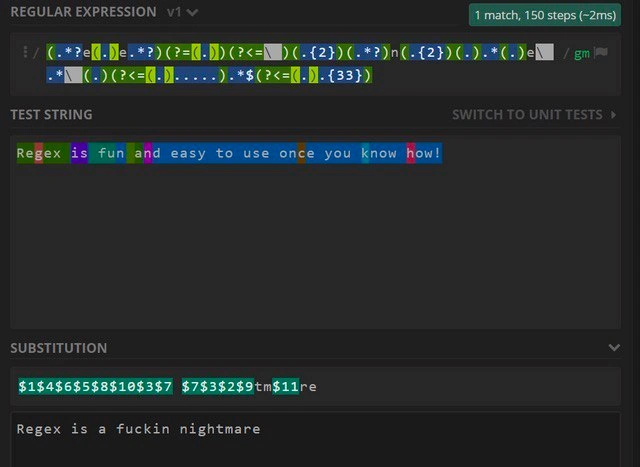
So, what exactly are we looking at in this meme? At this level, let’s break down the jargon and visual elements so that someone with a bit of coding experience (say a junior developer or a student) can follow along. The meme image is a screenshot of an online regular expression tester (specifically a site like regex101, which is popular for trying out regex patterns). Regular expressions (regex for short) are patterns that allow developers to match and manipulate text. They’re a sort of mini-language built heavily out of punctuation symbols. If you’ve ever used CTRL+F to find a word, regex is like a super-powered version of that, where you can search for complex patterns (like “find a word that starts with A and ends with Q and has three digits in the middle”).
In the screenshot, the top pane labeled "REGULAR EXPRESSION" contains a monstrous pattern. It’s highlighted with lots of colors – each color corresponds to a capturing group (parts of the pattern in parentheses that capture portions of the text). The pattern looks intimidating: it has a lot of parentheses (...), question marks, and backslashes. This is what we lovingly call “symbol soup.” To someone new, it might as well be line noise or cartoon swearing (you know, like $#@!% characters). But each symbol has a meaning in regex: for example, . means “any character” and * means “repeat 0 or more times.” When you see .* together, that means "match any sequence of characters of any length." In the pattern here, we even see .*? – that question mark makes the * lazy, meaning it will match as few characters as possible instead of as many as possible. Those nuanced behaviors are part of regex’s quirkiness.
Now, lookahead and lookbehind are a bit advanced but key to this pattern. A lookahead is written like (?=...). It says “the following characters should match this sub-pattern, but don’t include them in what you actually capture.” It’s a way to impose a condition without consuming characters. For example, Hello(?=!) would match "Hello" only if it’s followed by an exclamation mark, but it wouldn’t capture the exclamation mark itself. Lookbehind is similar, but checks the text behind the current position, written as (?<=...). In the meme’s regex, you see things like (?<=\ ) which likely is checking that there’s a space character before a certain point (the \ is probably \s or a literal space escaped – the formatting is a bit mangled in description). These are zero-width assertions – they don’t consume characters in the match; they just assert that something exists before or after. They’re powerful for complex patterns (e.g., “match X only if Y comes before it, and Z comes after it”), but they can make the regex quite harder to read and write.
The middle pane "TEST STRING" shows the input text: "Regex is fun and easy to use once you know how!" Each word or segment in this sentence is underlined with a color. Those colors correspond to the capturing groups from the regex pattern. For instance, the green part might be what the first ( ... ) in the regex matched, the purple part what the second group matched, and so on. The presence of so many colored segments tells us the regex has a LOT of capturing groups. Typically, $1 refers to the text matched by the first capturing group, $2 to the second, etc. So if the word "Regex" was captured as group 1, then $1 would be "Regex". If "fun" was group 2, $2 would be "fun", and so forth (just illustrative – the actual pattern likely captures more fragmented pieces than whole words).
At the bottom, there’s a "SUBSTITUTION" box. This is where the user can specify a replacement string, using those captured groups. In the screenshot, the user typed a crazy sequence: $1$4$6$5$8$10$3$7 $7$3$2$9$tm$11re. This looks insane, but it’s basically instructions to rearrange the captured pieces and add a bit of literal text. For example, $1 inserts whatever was captured by group 1. $4 inserts group 4’s text, and so on. The letters tm in there are just the literal characters "tm" since they aren’t preceded by a $, so they will appear as tm in the output. Same with re at the end – that’s literal "re". So, the substitution string is piecing together: group1 + group4 + group6 + group5 + group8 + group10 + group3 + group7, then a space, then group7 again + group3 again + group2 + group9 + "tm" + group11 + "re". It’s like assembling a jigsaw puzzle of text. Why on earth do that? Well, the original phrase was "Regex is fun and easy to use once you know how!" and the end result is "Regex is a fuckin nightmare". The person who made this meme figured out a ridiculously convoluted regex that would capture bits of the original sentence such that when you paste them together in that new order, you get the humorous message. It’s an absurd way to achieve a substitution – normally you’d never do something this convoluted for a simple text change – but that’s the joke. It’s showing how a “simple tutorial” can escalate into a highly complex solution that produces a cheeky outcome.
To put it in a more familiar context: imagine you have a pattern to swap two words. A much simpler regex example would be:
const text = "John Doe";
const regex = /(\w+)\s+(\w+)/;
console.log( text.replace(regex, "$2 $1") );
// Output: "Doe John"
In that example, the pattern (\w+)\s+(\w+) captures two words (sequence of letters) separated by whitespace. $1 would be "John" (first word) and $2 would be "Doe" (second word). The replacement string "$2 $1" flips them, so the result becomes "Doe John". Pretty neat, right? That’s a normal use of capturing groups and backreferences in a substitution.
Now compare that to the meme’s regex: they essentially did this kind of trick, but on steroids – capturing not just two words, but many fragments across the sentence, then reordering all of them to form a totally different sentence. It’s way more complicated than a beginner’s tutorial example. This is why the meme labels it a nightmare. They took what should have been a straightforward concept and pushed it to an extreme.
Let’s also touch on the context tags like regex_overengineering and DeveloperFrustration. Regex over-engineering means using a regex when a simpler solution exists, or making a regex far more complex than necessary. Often, beginners fall into this trap because it’s tempting to solve everything in one regex. The result can be something fragile and inscrutable, as we see here. Developer frustration comes into play when someone tries to read or modify such a regex later – it’s frustrating because it’s hard to tell what’s going on without retracing each capture and condition. The highlighted screenshot with color-coded groups is exactly what a frustrated dev might use to dissect a complicated pattern: you basically need an interactive tool to understand it.
Lastly, consider DeveloperExperience_DX (Developer Experience). This term is about how developers interact with tools and code in their day-to-day life. A codebase that’s easy to read and maintain has good DX; one that’s full of puzzles like this regex has poor DX. The meme humorously implies that while regexes are a powerful part of many languages (hence the category Languages), abusing them can lead to a terrible developer experience – the code becomes painful to work with. This is why many teams encourage writing regex patterns in a more readable way (like using the x flag that lets you insert spaces and comments in the pattern) or just splitting the problem into smaller pieces of code if the regex gets too unwieldy. In summary, at this level: the meme is a cautionary tale about learning regex. It starts simple and fun in tutorials, but if you’re not careful, you end up with symbol soup that spells out your despair. It’s a rite-of-passage kind of joke that newer devs will come to appreciate as they gain more experience with real-world regex tasks.
Level 3: Now You Have Two Problems
For seasoned developers, this meme hits right in the feels. It’s riffing on the old joke: “Some people, when confronted with a problem, think ‘I know, I’ll use regular expressions.’ Now they have two problems.” The image encapsulates that wisecrack literally. What began as a “simple regex tutorial” – you know, the kind with cheerful promises that “regex is fun and easy once you know how!” – has spiraled into an unmaintainable monstrosity. The screenshot from a regex testing tool (looks like regex101 with its dark theme and colorful highlights) shows an incredibly convoluted pattern in the Regular Expression field. It’s the kind of regex that gives even senior engineers PTSD: a single line of gibberish with a rainbow of capturing group highlights, cryptic lookahead/lookbehind assertions, and an absolute jumble of punctuation. It’s regex overengineering in its purest form, and every experienced dev immediately recognizes the scenario.
The humor here is that the substitution result at the bottom spells out exactly what anyone who’s wrestled with such a pattern is thinking: “Regex is a fuckin nightmare.” The original test string was the upbeat tutorial claim, “Regex is fun and easy to use once you know how!” All those numbered $1$4$6... replacement tokens took that sunny sentence and reassembled it into the bitter truth. It’s a brilliant contrast – the optimism of a newcomer’s perspective versus the cynicism of a battle-worn developer, contained in one before-and-after snapshot. We’ve all been that newcomer, marveling at how a regex “one-liner” can replace a hundred lines of code, feeling like wizards of text manipulation. And then we’ve also been the poor soul inheriting a godawful 200-character regex from a former colleague and muttering curses under our breath while trying to debug why it doesn’t quite work for some edge case. This meme compresses that entire journey into a single image and punchline.
Notice how the regex pattern uses advanced tricks meant to impress: there are nested lookahead conditions – for example a (?=-(?=(?<=\ )(.*)... ) structure, which reads like “ensure that after this dash, somewhere ahead is a space behind which something occurs...” etc. This is lookahead-ception, and it’s not typically how you’d solve this problem in real code – it’s clearly showing off every trick in the book. The result is the epitome of write-only code: only the author (maybe) understands it, and anyone else who opens this regex will experience immediate brainfreeze. The colored blocks in the test string correspond to capturing groups – pieces of the input matched by each parenthesized sub-expression. We see so many colors because the pattern is capturing a ton of fragments (probably $1 through $11 or more!). The substitution $1$4$6$5$8$10$3$7 $7$3$2$9$tm$11re is basically a recipe of “take the captured pieces in this bizarre order, and glue them together with a couple of literal letters (tm and re) sprinkled in.” This is how the author’s replacement string constructs the phrase “a fuckin nightmare” out of bits of the original. It’s a crazy mix of clever and insane. Senior developers will chuckle because they’ve seen this movie before – maybe not exactly this Rube Goldberg regex, but the general pattern: a quick task escalates into a mini-project of regex Jenga, where each added requirement (just add a lookbehind to handle that space, just add a capturing group for that two-letter bit…) makes the whole thing more precarious.
On a serious note, this meme is shining light on a common Developer Experience problem: regex readability. Sure, regexes are powerful. They let you do complex find-and-replace tasks in one shot. But they are notorious for being opaque. There’s a reason many teams enforce code reviews that say “if your regex isn’t trivial, add comments or break it into smaller pieces.” A regex like this in production is a maintenance nightmare – imagine a future dev (or future you, after a few months) trying to adjust it. Which capture group was $7 again? Was it (.{2}) or (.*)? And if you insert a new group somewhere, you have to re-number all those $ references in the substitution – one slip and the whole output garbles. It’s brittle as heck. The meme’s punchline is basically yelling what every frustrated maintainer eventually yells: “This looked so fun and simple, but now it’s an indecipherable nightmare!”
There’s also an industry backdrop here: Developer humor often pokes fun at the disconnect between theoretical simplicity and real-world messiness. Regex is a prime candidate for this because every programming language has some implementation of it, and all developers eventually dabble in it, crossing that line from “I’ll just use a quick regex” to “OMG what have I created?”. The tags like LanguageQuirks and LanguageGotchas come into play because regex is basically its own mini-language embedded in our code, full of quirky syntax (\s vs \S, the meaning of ^ depending on context, etc.) and surprising pitfalls (like how $ can mean end-of-line or end-of-string depending on multiline mode). Many a bug has been caused by a misplaced ? or an extra +. And let’s not forget the infamous catastrophic backtracking – write a slightly incorrect pattern with .*.* overlapping, and your program might freeze on certain inputs. Experienced devs have learned to be both respectful and a little fearful of regex. This meme exaggerates that fear for comic effect: the final output isn’t just “hard to maintain” – it flat out spells disaster.
By highlighting an actual tool (regex101) interface, the meme also nods to the real-life coping mechanisms of developers. When confronted with a complex regex, we instinctively run to an online tester to visualize matches and debug. The screenshot’s details – the “1 match, 150 steps” badge – serve as inside-baseball humor. Only someone who’s tried to optimize a regex would care about the step count or know what it implies. It’s showing that the author is in on the joke at a very technical level. The /gm flags are another wink: g (global) means find all matches (though here we only have one match anyway), and m (multiline) alters ^/$ behavior. Seeing those flags, a seasoned dev might smirk: “yep, they turned on all the things.” It’s like the regex equivalent of going to ludicrous speed.
In essence, the senior perspective on this meme is a recognition of a common cycle: naïveté leads to regex abuse, regex abuse leads to suffering, and suffering leads to dark humor on the internet. We laugh because it’s true. The next time someone declares “regex will save us so much time,” every veteran in the room will remember this meme and maybe think twice. After all, that simple solution might just output a not-so-simple truth.
Level 4: Lookaround Labyrinth
At the most granular level, this meme underscores the computational complexity and theoretical quirks of modern regular expressions. Despite being called "regular" expressions, the pattern in the screenshot has long left the realm of true regular languages (which are handled neatly by deterministic finite automata) and ventured into a maze of advanced features. The regex shown is jam-packed with lookahead and lookbehind assertions – denoted by snippets like (?= ... ) and (?<= ... ) – essentially turning the pattern into a mini backtracking algorithm. Each lookaround is a zero-width check that doesn’t consume characters but forces the regex engine to explore multiple state paths in parallel, almost like adding nested if conditions inside a single pattern. That’s why the tester’s header reports “150 steps (~2ms)” for a single match on a short sentence – the engine had to perform dozens of checks and backtracks to satisfy all those intertwined sub-patterns. In theory, a basic regex can be processed in linear time by a DFA, but here we’re dealing with a complex backtracking NFA engine (like PCRE) that can veer into exponential time if we’re not careful. This is the labyrinth part: with each .*? (non-greedy wildcard) and layered assertion, the engine must try different permutations of matches, winding through possibilities like a depth-first search through a tangle of conditions.
What’s more, the presence of backreferences in the substitution (the $1, $4, $6, ... syntax) means we’re effectively using the regex as a text rewriting system, not just a test for matches. Advanced regexes can indeed act like tiny programs – in fact, modern regex engines are Turing-complete under certain conditions, meaning they can theoretically perform arbitrary computation (with features like recursion or clever backreferences). Here, rather than a simple find-and-replace, the author crafted a pattern to capture many fragments of the input string and then recombine them in a new order. This pushes the regex engine beyond simple recognition into the realm of string transduction (a fancy way to say it’s transforming input into output). In formal language terms, such transformations go beyond regular grammars towards context-sensitive manipulations. The lookbehind (?<=<{33}) hints at one of those engine-specific quirks: some regex engines require lookbehinds to be fixed-width, so (?<=<{33}) asserts that 33 < characters precede the current position – a bizarre condition likely inserted to demonstrate just how esoteric these patterns can get. It’s a tongue-in-cheek way of saying this pattern has 33 levels of absurdity. All these theoretical underpinnings – from automata theory to the peril of catastrophic backtracking – manifest in that one-liner monstrosity. It’s a perfect illustration of how a supposedly “regular” expression can hide an NP-hard backtracking problem under the hood, turning a straightforward string match into a puzzle worthy of an academic paper (or a nightmare debugging session). The meme leverages this deep complexity to set up its joke: by the time you grasp what the regex does, you’ll agree with its blunt output.
Description
This meme is a screenshot of a regular expression testing tool, likely regex101, demonstrating the perceived complexity of regex. The interface is divided into sections. The top section, labeled 'REGULAR EXPRESSION', contains an extremely long and convoluted regex pattern, full of complex groups, lookaheads, and quantifiers, which has successfully found one match in the test string. The 'TEST STRING' section below shows the input text: 'Regex is fun and easy to use once you know how!'. The tool has color-coded different parts of the string that correspond to various capture groups in the expression. Below this, the 'SUBSTITUTION' section contains a seemingly random string of backreferences (e.g., '$1$4$6...') which reassembles the captured parts of the original string. The final output, shown at the bottom, is the starkly contrasting phrase: 'Regex is a fuckin nightmare'. The humor is a classic bait-and-switch, using the powerful but notoriously obtuse syntax of regex to transform an optimistic statement into a cynical, profanely honest one. For senior developers, it's a deeply relatable commentary on how quickly a 'simple' regex can spiral into an unreadable, unmaintainable mess, perfectly capturing the love-hate relationship many have with this powerful tool

Comments
7Comment deleted
I love write-only languages. I wrote a regex last week and I'm still trying to figure out who the author is
Regex is that senior dev who ships the feature in 2 ms and 150 steps - then quits, leaving you to babysit 11 capture groups and a look-behind that gaslights the diff
The only regex that passes code review is the one you wrote six months ago and can no longer explain
This perfectly captures the regex paradox: you spend 2ms and 150 steps to prove that the thing claiming to be 'fun and easy' is actually a nightmare. It's like using a Turing-complete pattern matcher to demonstrate why Turing-complete pattern matchers were a mistake. The real kicker? Someone actually debugged those capture group indices to make this work - which means they understand regex well enough to hate it properly
If your regex has both lookbehind and backreferences, you’re not matching text - you’ve quietly shipped a fragile parser with a performance incident scheduled
If your replacement string references $11, you didn’t write a regex - you shipped an undocumented parser; assign an owner before it pages you
156 backtracking steps to match a sentence? Unit tests: three asserts, zero eldritch horror