Skip to content
DevMeme
4848 of 7435
The 2FA security paradox: an infinite authentication loop
Security Post #5308, on Jul 20, 2023 in TG

The 2FA security paradox: an infinite authentication loop

Why is this Security meme funny?

Level 1: Chasing Your Tail

Imagine you have a special box that can only be opened with a secret code. Now, suppose you wrote that secret code on a piece of paper and… locked that piece of paper inside the same box. Uh oh! How are you ever going to open the box if the instructions to open it are trapped inside? You’d be stuck, going in circles trying to get in. This meme is joking about that kind of silly, looping situation, but with security on a computer. The authenticator app is like the special box that’s supposed to help you get into your accounts safely. But if it ever decided to ask for another safety check that only it can provide, you’d be locked out of everything, just like the box with the code inside. It’s funny in a head-shaking way: the very thing that’s meant to help you keep safe has made it impossible to get in at all. In simple terms, it’s like a dog chasing its own tail – an endless loop that doesn’t accomplish anything except making you dizzy and frustrated.

Level 2: Two-Factor Inception

Let’s break down why this scenario is funny (and frustrating) in simpler terms. Two-factor authentication (2FA) means you need to prove who you are in two different ways before you get access. For example, first you enter your password (that’s one factor: something you know), and then you enter a code from an authenticator app on your phone (second factor: something you have). Popular authenticator apps like Google Authenticator, Microsoft Authenticator, or Authy generate a new secret code every 30 seconds that you type in as that second step. This makes it much harder for bad guys: even if they somehow steal your password, they’d also need your phone (or the code on it) to break in. Authentication apps are a common Security tool and generally improve safety without too much fuss.

Now, imagine the tool that’s supposed to give you those extra codes suddenly demands another code itself. It’s like a dream within a dream for security – hence “Two-Factor Inception.” Normally, the authenticator app is the helper that provides the second factor. You open the app, read the six-digit code it shows, and use that to log in to some other service (say, your email or GitHub). The joke here is that when you open your authenticator app, it says “Hold on, prove your identity with 2FA before I show you the code.” That’s completely backward and self-referential. If your 2FA app were to ask for another 2FA code, where would you get that code? From the same app? But you can’t get into the app because it’s asking for a code… see the problem? You’re stuck in an authentication_loop. It’s a bit like a hall of mirrors for login credentials. This definitely isn’t how Security Best Practices are meant to work – it’s an obvious security_ux_fail, a failure of user experience in security design.

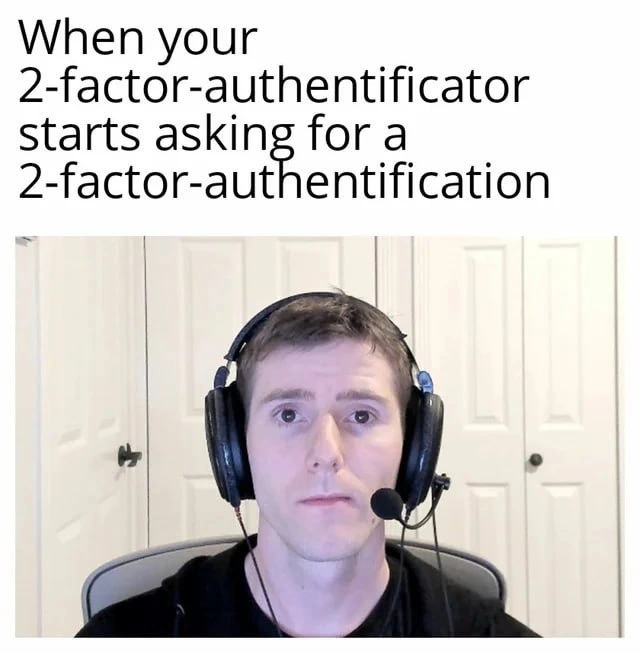
For a junior developer or someone new to these concepts, think of it this way: We add security steps to protect accounts (that’s good!), but each step should be straightforward and usable. The Developer Humor in this meme comes from taking a good idea (MFA) to a nonsensical extreme. It’s reflecting a real concern in tech: every extra lock or Authentication Method makes things safer and more annoying. Good security finds a balance. A bad design, like an app asking for a code that the app itself generates (but won’t show you), is just a cruel joke. The guy in the picture is wearing a headset and staring blankly as if he’s been defeated by this ridiculous login requirement – believe me, that’s a face many of us have made after dealing with overly complex deploy pipelines or login processes. It’s equal parts “Is this for real?” and “I give up.” This meme is a lighthearted reminder: don’t design a TwoFactorAuthentication process that functions like an infinite loop or you’ll just frustrate your users (and yourself).

Level 3: Ouroboros of Authentication

For seasoned developers and IT veterans, this scenario triggers a knowing groan. It’s a satire of the real frustration when security measures go overboard. The user’s blank, stunned expression (with those big over-ear headphones) is basically every developer’s face when they encounter a security UX fail this ridiculous. The text “2-factor-authentificator” with its misspellings hints that the situation is so absurd it leaves you a bit dazed (and maybe questioning your spelling skills). We’ve all dealt with login processes that felt like a snake eating its own tail – an Ouroboros of authentication where solving one challenge just leads to another. This meme exaggerates it to the ultimate degree: an MFA app that itself demands MFA. It’s poking fun at the endless Security vs Usability struggle. Sure, Security Best Practices call for strong Authentication Methods, but there’s a point where adding more locks just means you lock yourself out.

Developers know this pain. Perhaps you’ve implemented an SSO integration where logging in required an authenticator code, but to get that code you first had to VPN into the network which… needed an authenticator code! 😫 It sounds silly, but enterprise setups sometimes come close to this. Or think of a password manager that’s protected by a password stored in... the password manager (hopefully not, if designed right!). The meme is essentially a joke about 2FA app loop insanity. If your TwoFactorAuthentication process isn’t designed with a clear start and end, you end up with an unusable system. In real life, authenticator apps like Google Authenticator or Authy might let you secure them with a PIN or biometric (additional factor for the app itself), but they would never ask for another code from themselves. This image riffs on the nightmare of an over-engineered security policy. It’s the developer humor version of “locking the key inside the safe.” We laugh because it’s a cautionary tale: if you blindly pile on security features without thinking of user experience (the DeveloperExperience counts too, when devs have to jump through these hoops daily), you get madness like this. The caption and the deadpan face say it all: “Seriously? My authenticator app wants its own auth?” The absurdity hits home because keeping systems safe is critical, but when the tools meant to help become hindrances, it feels like security eating itself. And every engineer who’s wrestled with onerous login procedures or bizarre corporate security requirements is nodding (or crying) at this meme.

Level 4: Authentication All The Way Down

In security architecture, two-factor authentication (2FA) is supposed to rely on independent proofs of identity: e.g. something you know (password) and something you have (a device or token). This meme pushes that concept to a paradoxical extreme: the authenticator itself demanding another authentication, creating an infinite regress. It’s like a recursive function with no base case – an authentication loop that can’t resolve. In theoretical terms, we’ve lost the root of trust. Normally, there’s an initial credential or hardware token that bootstraps the whole process. Here, the supposed second factor (authenticator_app) is asking for yet another factor, leading to a self-referential deadlock. The result? No one can ever log in, which ironically is the most “secure” system imaginable (if nobody gets access, breaches drop to zero 😜).

At a protocol level, one could imagine the absurdity: the app generates a one-time password using an algorithm like TOTP (Time-Based One-Time Password, defined in RFC 6238) based on a secret key. But if the app itself were locked behind another TOTP, you would need a secret to get a secret – a classic catch-22. Cryptographically, multi-factor authentication (MFA) works because each factor is independent. If factor 2 depends on factor 2 (itself), the independence assumption breaks down completely. It’s akin to a certificate chain in PKI where a certificate is signed by itself in a loop — there’s no external authority, no base certificate, so trust cannot be established. Security experts sometimes joke about the idea that the only truly secure computer is one that’s unplugged and locked away. This meme nails that dark humor: an authenticator requiring an authenticator, giving us a system so secure that even the legitimate user is permanently locked out. Quis custodiet ipsos custodes? Who authenticates the authenticator? It’s a paradox of infinite security. In academic terms, it exposes the importance of a well-defined trust anchor; without a starting point, our security efforts become overkill overengineering that collapses under its own recursion.

Description

The meme features a top-text, bottom-image format. The text at the top reads, 'When your 2-factor-authentificator starts asking for a 2-factor-authentification'. Below the text is a medium close-up shot of tech YouTuber Linus Sebastian from Linus Tech Tips, wearing a large black gaming headset with a microphone. He is staring directly into the camera with a completely blank, deadpan expression, mouth closed and eyes wide. The background consists of plain white closet doors. This meme humorously captures the absurdity of a recursive security requirement. Two-factor authentication (2FA) is designed to be a secondary security layer, so the idea of the authenticator itself needing authentication creates a logical paradox and an impossible loop. The joke resonates with developers and IT professionals who have encountered overly complex or poorly designed security systems that prioritize protocol over user experience, leading to frustration. Linus's motionless, bewildered stare perfectly embodies the user's internal reaction when faced with such a nonsensical system error
Comments

11
Anonymous ★ Top Pick This is what happens when the security team implements recursion without a base case
  1. Anonymous ★ Top Pick

    This is what happens when the security team implements recursion without a base case

  2. Anonymous

    Zero-trust gone fractal: my TOTP app now wants a second factor signed by a quorum of YubiKeys - pretty sure this is how we accidentally implement the halting problem in IAM

  3. Anonymous

    This is what happens when your security architect takes 'defense in depth' so literally that even your zero-trust architecture doesn't trust itself - next they'll require biometric authentication to access your fingerprint scanner

  4. Anonymous

    Ah yes, the classic bootstrap problem: you need to authenticate to set up authentication. It's like requiring a code review for the PR that adds the code review process, or needing root access to install sudo. At some point, we've created such a deep chain of trust that we've forgotten the original threat model was 'someone guessing password123' - not a nation-state actor with physical access to your authenticator app's authenticator app. But hey, at least we're compliant with the 47-page security framework that nobody's actually read past the executive summary

  5. Anonymous

    When your 2FA authenticator asks for 2FA, congrats - you’ve created an IAM circular dependency: the root of trust points to itself; uptime 0, auditors thrilled

  6. Anonymous

    Zero Trust implemented so hard the IdP formed a circular dependency - RecursionError: enter the TOTP from the app that only opens after entering the TOTP

  7. Anonymous

    The ultimate auth bootstrap paradox: securing the securer until even Kerberos envies the ticket loop

  8. @MDSPro 2y

    Just use itself!

  9. Felix 2y

    it's authenticators all the way down

  10. Deleted Account 2y

    Microsoft Azure can ask third

  11. @stkhir 2y

    It's 3-factor-authentification

Use J and K for navigation