
Skip to content
DevMeme
1479 of 7435
Reactive Programming: The Spit Take on Memory Leaks
Bugs Post #1655, on Jun 2, 2020 in TG

Reactive Programming: The Spit Take on Memory Leaks

Why is this Bugs meme funny?

Level 1: Trick Candle Surprise

Imagine you have a birthday candle that you just blew out, and you’re sure the flame is gone. But suddenly, whoosh! – the candle magically lights up again on its own. You’d be pretty surprised, right? You thought you stopped the candle from burning, but it’s still going. It’s kind of funny because it’s unexpected and a little sneaky. That’s what’s going on in this joke. The programmer thought they turned something off in their computer program (like blowing out a candle), but that thing kept happening anyway (like the candle that refuses to stay out). It gives the same silly feeling as saying “Stop!” and the thing keeps going. The picture with the child blowing out the candle and spraying spit everywhere is an exaggerated, funny way to show that surprise. It’s humorous because the person believed the event was finished, yet it still happened, making a playful mess – just like a trick candle relighting and making everyone laugh in surprise.

Level 2: The Event That Wouldn't Quit

Let’s break down what this meme is talking about in simpler terms. Reactive programming is a style of coding where you work with streams of events or data. For example, instead of writing “do X, then Y, then Z” in sequence, you set up a flow like “whenever X happens, react by doing Y, and then Z.” In reactive libraries like RxJS (Reactive Extensions for JavaScript), you create an Observable to represent a stream of values (these could be user clicks, data from a server, timer ticks, you name it). You then subscribe to that observable with a function – basically saying, “Whenever a new value comes from this stream, run this code I gave you.” This is built on the classic observer pattern: an object (observer) listens to another object (observable) and gets notified of events.

Now, subscribing is only half the story – you often also need to unsubscribe. Unsubscribing means you detach that listener so it will no longer be notified. Think of subscribing like plugging in a lamp to an outlet (you start getting electricity/events), and unsubscribing like pulling the plug (stop the flow). In code, when you call something like const subscription = myStream.subscribe(data => { ... }), you get back a subscription object, and later you can call subscription.unsubscribe() to stop receiving events from myStream. If you don’t unsubscribe (and the stream doesn’t end by itself), your listener stays plugged in, and the events keep coming.

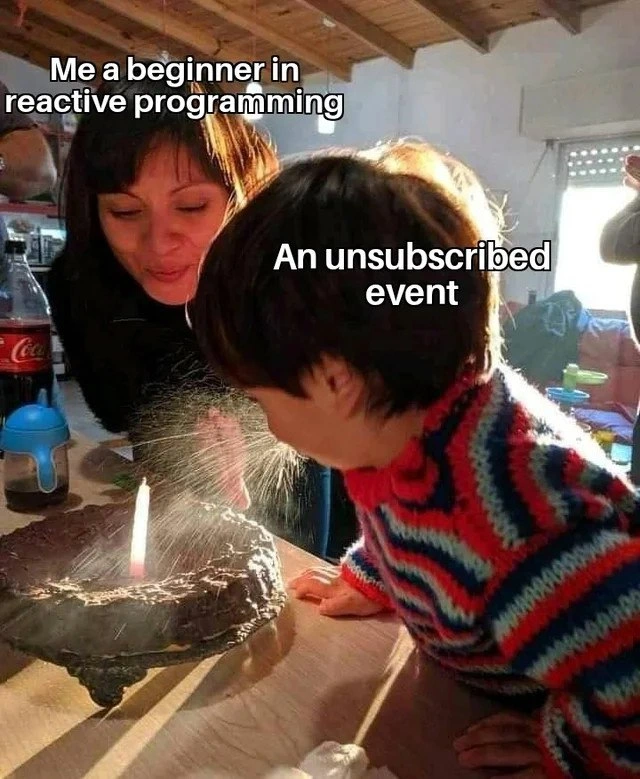
This meme jokes about a situation where a beginner programmer thinks they have unsubscribed from an event stream, but in reality, they haven’t done it correctly – so the event still fires. In the picture, the adult labeled “Me, a beginner in reactive programming” believes they’ve handled the situation, and the child labeled “An unsubscribed event” represents the event that was supposedly turned off. But surprise! The child is blowing out the candle with a big spray of spit. In other words, the event still happened and made a bit of a mess, even though the poor developer thought they stopped it. The text “When your unsubscribed event still fires in rookie reactive code” directly describes that scenario: you unsubscribed (so you expected no more event), yet the event still fires (it still runs). It’s a lighthearted way to say “Oops, my code is still doing the thing I told it not to do.”

Why does this happen in real programming? Often, it’s because the developer either forgot to unsubscribe or misunderstood how. For instance, in RxJS if you create an Observable that doesn’t complete on its own (like one wrapping DOM events or an interval timer), you must manually unsubscribe or those events will continue indefinitely. A beginner might not realize that. They might remove a component from the screen but not cancel its streams. So later an event occurs (like a timer tick or a user action elsewhere) and that hidden listener reacts, maybe trying to update something that’s not there anymore. This can lead to bugs or weird output. It’s also a small memory leak: the program is holding onto that listener and any data it uses, longer than needed. Memory leak in simple terms means the program wastes memory because it didn’t clean something up – kind of like leaving a faucet running slowly; each drop isn’t a problem, but over hours it fills the sink.

Let’s connect it to a simpler common example: consider event listeners in a web page. If you add a listener to, say, a button (button.addEventListener('click', doSomething)), that function doSomething will run every time the button is clicked. If you later remove the button from the page without removing the listener, the listener might still exist in memory. If that button or something triggers a click event or you accidentally kept a reference, the old doSomething could fire unexpectedly. The correct practice is to call button.removeEventListener('click', doSomething) when you remove or no longer need it. In RxJS or reactive code, calling unsubscribe() plays a similar role – it’s cleaning up the listener connection.

So the rookie mistake is either not unsubscribing at all or thinking you did but actually didn’t tie up all loose ends. The meme is relatable to developers because hitting that moment is almost a rite of passage: your program behaves as if it has a mind of its own, and then you realize you left an event subscription running. It’s both frustrating and funny. The photo of the child blowing out a candle dramatically (with saliva spray) exaggerates the “mess” an unsubscribed event can cause. The adults in the back (one is “the beginner”) look like they weren’t expecting that outcome. In the same way, the beginner coder didn’t expect their code to still react after unsubscribing. Once you understand the technical side, it’s a chuckle-worthy reminder: always properly unsubscribe from your streams, or you might get spit... er, events... in your face later!

Level 3: Ghost Listener Leaks

For anyone who’s spent time debugging RxJS or GUI event handlers, this meme hits a nerve. It highlights the classic rookie mistake: forgetting to remove an event subscription, leading to ghost behaviors in your app. The image caption “Me, a beginner in reactive programming” over the adult and “An unsubscribed event” over the child sets the scene. The beginner developer thinks they’ve blown out the candle (i.e. stopped the event stream), yet the event still goes off, spraying effects everywhere. The humor comes from that mismatch between intention and outcome – the dev confidently says, “I unsubscribed, it should be fine now,” and then gets a messy surprise as the supposedly stopped event calls code anyway (like the child enthusiastically spitting all over the cake despite the adult’s attempt at control). Every seasoned developer chuckles (or winces) because we’ve all been that adult at some point, wide-eyed as our code does something after we thought we told it to stop.

In real applications, this often means you see logs or UI updates happening from a component that was already destroyed, or an action firing twice because an old listener hung around. It’s a memory leak or event leak in action. For example, take a web app using Angular or React with RxJS for asynchronous data: a beginner might subscribe to a stream of events (like user input or timer ticks) when a component mounts, but forget to unsubscribe when the component unmounts. Later, even though that component is gone, its callback is still registered and running – a ghost listener haunting the application. The user triggers an event (say, clicking a button or receiving a WebSocket message), and behind the scenes that orphaned subscription still reacts, maybe trying to update UI that no longer exists. This can lead to errors in the console (“Cannot read property of undefined” as the code tries to access a disposed component), or just extra work being done invisible to the user. It’s debugging purgatory: you’re scratching your head wondering “Where is this event coming from? I thought I turned that off!”

One common scenario is the double-subscription bug. Imagine a newbie writes code like:

// A rookie reactive pattern (anti-pattern) – nested subscriptions
userIds$.subscribe(id => {
  // subscribe inside another subscribe
  dataService.fetchById(id).subscribe(data => {
    console.log("Received data for", id, data);
    // ...update UI with data
  });
});

// Sometime later...
userIdsSubscription.unsubscribe();
// The inner subscription to dataService.fetchById for the last id is still active!

Here, each time userIds$ emits a new ID, they subscribe to another observable fetchById(id). But they only ever unsubscribe the outer userIds$ stream. That inner subscribe (fetching data) is never torn down. If userIds$ emits frequently (say a stream of rapid selections), the app spawns a bunch of inner subscriptions. Even after stopping the outer one, those inner streams continue until they complete. In a worst-case, if fetchById never completes (maybe it’s a live data stream), those are permanent ghost listeners. This is a classic RxJS rookie error – not managing multiple subscriptions properly. The result is exactly what the meme jokes about: events still firing after you thought you unsubscribed. In our code snippet, data keeps pouring in from fetchById for an ID even after we "stopped" listening to new IDs. It’s like cutting off the main power, but leaving a bunch of batteries running in various devices around the house. Surprise, things are still on!

From a senior developer’s perspective, this joke also pokes fun at the surprising learning curve of reactive programming. Reactive streams are powerful, letting you compose asynchronous code in a declarative way (maps, filters, combines, etc., on events). But they introduce new responsibilities: you have to manage the lifecycle of subscriptions. Forgetting an unsubscribe() is the new equivalent of forgetting to free memory in manual memory management – it won’t crash immediately, but it will cause trouble down the line. Seasoned devs have tales of chasing down why an app’s state was mysteriously mutating or why a modal kept receiving old events after it closed. The culprit is often a leftover observer still responding to events – what we humorously call a ghost listener. It “haunts” the application, because it’s hidden and unexpected. The meme’s exaggerated visual of a child blasting spit after the candle should be out is basically a representation of a bug that’s both frustrating and embarrassingly common.

We also find it funny because it’s so relatable. The text “rookie reactive code” suggests an inexperienced coder using something like RxJS or another reactive library for the first time. We can imagine their confusion: “I called unsubscribe on that observable, why is it still logging?!” Perhaps they unsubscribed the wrong thing, or unsubscribed at the wrong time. In reactive libraries, some streams never complete on their own (e.g. an interval() or an event emitter for mouse movements will run indefinitely). If you don’t explicitly unsubscribe or otherwise bind it to a lifecycle, it will keep going until your application ends. Newcomers often assume things stop by themselves when no longer needed, underestimating how persistent these streams are. It’s a harsh lesson when you discover your app is getting slower or behaving oddly because dozens of unseen observers are still active in the background.

Resource leaks from unsubscribed events can even lead to performance issues – memory usage grows or CPU cycles churn uselessly. In a long-running single-page application, this is like piling up more and more “spit on the cake” – eventually the app is a mess. The experienced folks know to use patterns to avoid this: for instance, using operators like takeUntil to auto-unsubscribe when a component is destroyed, or using framework hooks (like Angular’s OnDestroy) to dispose subscriptions. But a rookie might not realize that at first. The meme’s charm is that it captures that “D’oh!” moment of realization. We laugh because we recall being that person, breathing a sigh of relief after adding subscription.unsubscribe() in the right place and watching the ghost events finally vanish. It’s the kind of bug you only need to encounter once to never forget to clean up your subscriptions again – a true coming-of-age in debugging asynchronous code.

Level 4: Zombie Event Emissions

In reactive programming, unsubscribing from an event stream is supposed to kill the stream’s notifications to your observer. But under the hood, if that unsubscribe isn’t handled correctly, you end up with a zombie event – an emission that keeps coming even though no one supposedly listens. This happens because of how the Observer pattern and RxJS work: when you call subscribe(), you register an observer callback and get back a subscription handle. Unless you actively call unsubscribe() on that handle (or the stream completes on its own), the source of events keeps pushing data. In theory, an Observable is like an ongoing function; if you don’t explicitly stop it, it’s going to continue producing values. The unsubscription is essentially a signal to cancel the data flow, akin to breaking out of an infinite loop or stopping a running thread. If that signal doesn’t get sent or is ignored, the data flow lives on in memory – a bit like a zombie process in an OS that refuses to die after the parent is gone.

Deep in the design of reactive systems, there’s a notion that Observables are the dual of Iterables. An Iterable (like an array or a generator) lets you pull values when you want them, and you stop pulling when you’re done (say, by breaking out of a loop). An Observable, in contrast, pushes values to you whenever they’re ready, and you have to signal when you’re done via unsubscribe. This is a fundamental duality in computing, described by RxJS creator Erik Meijer: "observables are like asynchronous enumerables." Unsubscribing is the flip-side of ending a loop. If a beginner forgets or mis-implements that ending, the observable keeps pushing – the event stream doesn’t know you mentally “left the loop.” The humor in the meme arises from this inversion of control: the beginner developer (supposedly in control) is actually not in control of the event once it’s set in motion, due to a missing or faulty unsubscribe.

From a functional reactive programming (FRP) standpoint, ideally the system would handle such lifecycles automatically. In academic FRP models (as seen in some Haskell libraries or Elm’s architecture), streams of events can be garbage-collected when no longer needed. But in practical implementations like RxJS (in the JavaScript world of web apps), we’re working in an imperative environment on top of a functional facade. The runtime doesn’t magically know when you’re “done” with an event source – you must tell it. A subscription holds references to observer callbacks; if those aren’t released, you get resource leaks. Garbage collectors free memory that’s no longer referenced, but an active subscription is a reference chain: the event source holds onto the observer. So if you don’t unsubscribe, that observer (and any of your variables closed over in its callback) can’t be collected. The result: memory leaking like a slowly dripping faucet, and possibly stray behavior as the event still triggers code you thought was gone. The meme’s absurd scenario of an “unsubscribed” event still firing is rooted in this real technical gotcha – a consequence of the underlying push-based stream model and the need for explicit teardown of observers. It’s a tongue-in-cheek reminder that even in a high-level reactive paradigm, you can’t escape the low-level reality of managing subscriptions.

Description

A meme illustrating a common beginner's mistake in reactive programming. The image shows a woman and a young child at a birthday party. The woman, leaning in with a smile, has text over her that reads, 'Me a beginner in reactive programming'. The child is leaning forward to blow out a single candle on a chocolate cake, but instead of just air, a fine spray of saliva is erupting from their mouth onto the cake. This spray is labeled 'An unsubscribed event'. The humor lies in the visceral and messy visual representation of a technical problem. In reactive paradigms (like RxJS), failing to unsubscribe from an event stream when a component is destroyed can lead to memory leaks and unexpected behaviors, as the subscription continues to exist and fire in the background - much like the child's unending, messy spray long after the 'blowing' action should have been completed


Comments

7
Anonymous ★ Top Pick Forgetting to unsubscribe from an observable is the asynchronous version of leaving a database connection open. Eventually, the pool runs out, and your app just sits there, drooling on itself
  1. Anonymous ★ Top Pick

    Forgetting to unsubscribe from an observable is the asynchronous version of leaving a database connection open. Eventually, the pool runs out, and your app just sits there, drooling on itself

  2. Anonymous

    Nothing like realizing your “disposed” subscription is still next()-spamming the UI - apparently I’d invented Schrödinger’s Observer: simultaneously dead and saturating prod logs

  3. Anonymous

    After 15 years of fixing production memory leaks, I've learned that unsubscribed observables are like that one contractor who keeps billing after the project ends - except instead of money, they're stealing heap space and your weekend plans when the OOM killer shows up at 3 AM

  4. Anonymous

    Every senior engineer remembers their first production memory leak from forgetting to unsubscribe - watching heap dumps grow like a birthday cake that never stops expanding. The real rite of passage isn't learning reactive programming; it's debugging why your SPA now consumes 4GB of RAM after users navigate between routes a few times, only to discover you've been accumulating event listeners like Pokémon cards since the component mounted

  5. Anonymous

    Unsubscribed hot observable: the reactive dev's reminder that backpressure isn't optional at scale

  6. Anonymous

    Unsubscribe() detaches you, not the hot source - without takeUntil(destroy$), your Subject keeps multicasting like this kid, and your component tree gets a very moist memory leak

  7. Anonymous

    Reactive lesson: “unsubscribe” doesn’t stop a hot observable - if refCount > 0 the upstream keeps blowing side effects; the only thing disposed was my illusion of control

Use J and K for navigation
