Skip to content
DevMeme
6223 of 7435
When the Windows 11 start menu is just another React Native component
Frameworks Post #6823, on May 28, 2025 in TG

When the Windows 11 start menu is just another React Native component

Why is this Frameworks meme funny?

Level 1: Using a Rocket to Go Next Door

Imagine your friend lives in the house right next to yours, and they want to visit you. It’s a very short trip – you could literally walk in a minute. But your friend just so happens to be a rocket scientist who loves rockets. So instead of walking, they decide to hop into a giant rocket ship to fly over to your house! 🚀 Sounds crazy, right? You’d probably laugh and ask, “Why on earth would you use a rocket for something so simple as coming next door?” Your friend replies, “Well, I’m a rocket scientist, so of course I’m going to use a rocket. It’s what I know best!” Now the rocket launches, makes a ton of noise, uses up a bunch of fuel, and finally (maybe a bit awkwardly) lands in your yard. You then ask, “Wasn’t that a bit much? That seems slow to set up and kind of over-the-top just to come over here. What about all the fuel and effort it took?” But your friend waves their hand and says, “I don’t really worry about those things when I’m doing something cool.”

It’s a silly story, right? Your friend used a huge, complicated machine to do a simple job just because that’s their favorite thing to use. They ignored the easy, normal way (like just walking) and didn’t care that the rocket was a lot of extra work and resources for such a small task. This is exactly why the idea of building the Windows Start Menu with React Native is funny. In the tech meme, the developer is like that rocket scientist – he had a favorite tool (React Native, which is big and powerful) and he used it even though making a Start Menu isn’t that hard of a job for a computer. Other people are basically asking him, “Why use that? Isn’t it overkill and kind of slow for a Start Menu?” And he jokingly says he doesn’t care about those concerns. It’s humorous because it’s obviously a ridiculous approach, just like using a rocket to go next door. Everyone can see there’s a simpler way, which is why we shake our heads and laugh.

Level 2: Framework vs Performance

Let’s break down what’s going on in simpler terms. The joke here is about someone using React Native to build the Windows 11 Start Menu. If that sounds odd, let’s clarify: React is a super popular JavaScript library for building user interfaces on websites. You know how a modern web page might have interactive buttons, menus, and pop-ups? React is a tool developers use to organize and create those parts efficiently with reusable components. It’s loved in the web development world. React Native is like React’s sibling that lets developers use similar techniques to build native apps – originally for phones (Android and iOS) and later extended to other platforms like Windows and macOS. In React Native, you write JavaScript and JSX (a HTML-like syntax) to describe your app’s UI, and under the hood React Native turns those into real native UI elements on the device. So, you get to use JavaScript, but the result isn’t a web page – it’s a real app that can look and feel native. Cool, right? Companies use it to share code between their iPhone and Android apps, for example. Microsoft even created a toolkit so you can use React Native on Windows desktop (for making Windows apps using React).

Now, Windows 11 Start Menu is the thing that pops up when you click the Start button on a Windows PC – it shows your apps, settings, power options, etc. Typically, that is built using efficient system code (like C++ and Windows-specific libraries) because it’s part of the operating system. It needs to open fast and run smoothly since people access it all the time. It’s not an area where you expect to see a web technology. That’s why the idea of it being “just another React Native component” is funny – it’s as if the Start Menu was made like a phone app or a webpage inside your OS!

So why would a developer do that? According to the tweets, the guy says: “I’m a React developer so it only made sense.” This hints at a phenomenon in tech: developers often reach for tools that they personally know well, sometimes without considering if it’s the ideal choice. It’s a bit like if you only know how to use a Swiss Army knife, you might try to use it for every task, even those that really need a specialized tool. Here React Native is the Swiss Army knife. The decision was likely driven by developer experience (DX) – that’s a term for how easy and pleasant it is for a developer to build something. Using React Native might have made the developer’s job faster or allowed code sharing with other platforms. From his perspective, why not use the same framework everywhere? It keeps things consistent for him and maybe for the team. This is sometimes called framework bias – preferring the framework you’re comfortable with. There’s also a buzzword “write once, run anywhere” that React Native fans appreciate: you can theoretically reuse the Start Menu code on other devices if needed.

However, the other side of the coin is performance – basically, how fast and resource-efficient the software is. The question “what was the performance consideration for such an implementation?” is pointing out that React Native might make the Start Menu slower or more heavy than if it were done in native code. Why could it be slower? Well, if you use React Native, inside your computer there’s now an extra layer: a JavaScript engine running the React code which then talks to the native UI. This is different from a traditional Start Menu that’s just native code running directly. Think of it like adding a translator to a conversation: if you speak directly (native code to computer), it’s quick; if you speak through a translator (JavaScript to native bridge), it can be a bit delayed or use more energy. React Native has to bridge between the JavaScript world and the Windows world – e.g., when you click a menu item, a JS function might handle it and then call a native function to launch an app. Those extra steps can make things a tad slower. It also likely uses more memory because you’ve loaded a whole framework and maybe parts of a browser or JS runtime into memory just for the menu.

Over-engineering is a term that fits here. It means using a solution that is far more complicated or powerful than necessary. A Start Menu is conceptually a pretty simple UI: a list of apps and some tiles. You don’t need a heavyweight cross-platform framework for that if you’re only running on Windows. A leaner, simpler approach could do the job with less overhead. By choosing React Native, the developer possibly added hundreds of files, libraries, and layers that aren’t strictly needed for a one-platform, one-purpose interface. That’s why people are essentially asking “why?!”. It’s overkill. An overkill technology choice would be like using a huge truck to deliver a single pizza – sure, it will deliver the pizza, but it’s excessive. The meme magnifies this concept for comedic effect.

Let’s talk about that cheeky response: “I try not to let such considerations get in the way of doing great work.” This is the developer jokingly saying he ignored performance concerns because he was focused on “great work” (which, contextually, was using React in a fancy place). Obviously, in real engineering, ignoring performance is usually a bad idea. Performance considerations are a big part of what makes work great when it comes to user-facing software. The humor is that he’s parodying a certain arrogance – as if using React Native is such a noble cause that things like speed or efficiency are just petty details. It’s funny because in reality, if the Start Menu lagged or froze because of this choice, users would be upset, and management would not call it “great work” at all! Veteran developers care a lot about these details (some have been bitten by slow apps or high memory usage in the past), so they immediately spot the potential problem. That’s why the tweet got a reaction – it touches on a common tension in development: Developer Experience vs. User Experience. Making something easier for the developer (using a high-level framework, writing in one language) can make it harder on the user’s machine (needing more resources to run).

To give a bit of context, Microsoft and other companies have experimented with mixing web tech into desktop applications. There are apps like Slack, Discord, or Microsoft Teams which use Electron (that’s basically Chrome + Node.js bundled to run an app) – they let developers use web tech to build desktop apps, but they often use a lot more memory than a traditionally coded app. The Start Menu being in React Native suggests a similar path: using web-like tech for desktop features. Framework churn in frontend development is the rapid cycle of new frameworks and tools that become popular. In the last decade, we’ve seen AngularJS → React → Vue → Angular 2+ → etc., and new ones keep coming. Companies sometimes latch onto a popular framework thinking it’s a silver bullet or just to attract talent who know that framework. The meme hints that Windows 11’s team might’ve just gone with what was hip or what their devs knew (React Native) instead of the old way.

In summary, at this level we can say: The meme jokes that the Windows 11 Start button’s menu was built using React Native because the developer in charge was a “React guy.” Other devs on Twitter found that funny and concerning, asking why he’d do that and if he even thought about speed and efficiency. It highlights a common tech joke: sometimes developers use a tool just because they like it, even if it’s over-engineering for the task, and sometimes they’ll even brush off performance optimization as unimportant – much to the dismay of more experienced engineers. It’s a playful critique of choosing developer-centric convenience over tried-and-true efficient solutions.

Level 3: React All the Things

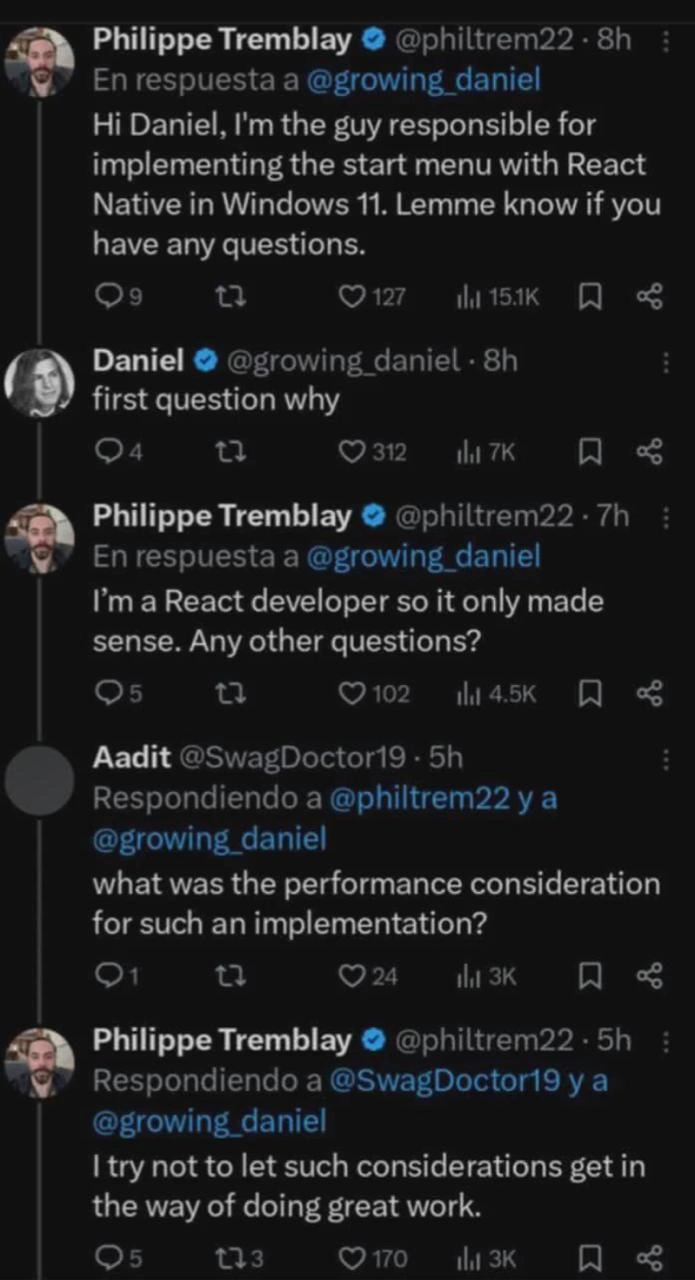
This meme hits on a deep irony in software development: using a web framework to build a core operating system feature. The screenshot shows a Twitter thread where a developer boasts about implementing the Windows 11 Start Menu with React Native, and others respond in shock. For seasoned engineers, this scenario is equal parts hilarious and horrifying. Why? Because it’s a textbook example of over-engineering due to framework bias. The developer essentially treated the Start Menu as just another ReactNativeApp in their portfolio. In the tweet, when asked “first question why, he answers: “I’m a React developer so it only made sense.” This is the classic hammer-and-nail situation: when all you have (or know) is React, everything looks like a React component. It’s a cheeky nod to framework churn and resume-driven development – choosing a tool because you’re comfortable with it or it’s trendy, rather than because it’s the best fit for the job.

From a senior dev’s perspective, the Windows 11 Start Menu is a critical piece of the OS shell – traditionally implemented with lean, compiled native code for snappy performance. Swapping that out for a React Native component implies embedding a whole JavaScript engine and React runtime just to render your programs list. 😱 In technical terms, React Native introduces a bridge between the JavaScript world and the native UI. So every time you click the Start button, JS code has to run, communicate across that bridge to native Windows UI elements, and manage a virtual DOM (or its equivalent) to decide what to display. This added indirection and layer of abstraction means more opportunities for lag or bugs. It’s as if the Start Menu were re-imagined as a mini web app: behind the scenes there might be a hidden Chromimum engine or JS runtime churning away. For veteran engineers who cherish efficient, minimal design, that’s almost sacrilegious. They imagine the simple act of opening the Start Menu now potentially involving a Node.js event loop and a pile of JavaScript just to show some icons – a scenario that feels absurdly heavy.

The humor really lands with the developer’s blasé response to a performance question. Another user asks: “what was the performance consideration for such an implementation?” and our React-happy dev replies: “I try not to let such considerations get in the way of doing great work.” 😂 This sarcastic retort pokes fun at a certain cavalier attitude. In reality, performance optimization is a huge concern, especially for something as frequently used as the Start Menu. Ignoring performance considerations is exactly what keeps on-call engineers up at 3 AM. The tweet’s joke implies the dev was so focused on using his favorite framework that he waved away the downsides. To an experienced dev, this is comically backward – great work in UI engineering usually demands tuning and care for speed and responsiveness, not just using a cool framework. It’s like saying, “I don’t let minor details like memory usage or frame rate get in the way of my art.” That tongue-in-cheek arrogance is funny because we’ve all met developers who get overzealous about a tool and lose sight of practical limits.

The meme resonates with anyone who has seen overkill technology choices in the real world. It brings to mind all those times a simple app turned into an Electron monster or when a tiny feature pulled in an entire framework just because the team knew it well. There’s a shared industry joke about modern software being “just Chrome wrapped around JavaScript, even for a toaster”. Here, the venerable Windows Start Menu isn’t safe either – it’s portrayed as falling victim to the trend. Seasoned folks will chuckle and cringe remembering apps like Slack or Microsoft Teams, which infamously use web tech internally and end up using hundreds of MB of RAM. The idea of applying the same approach to the Start Menu – something that used to run in a few MB of memory in C++ – is both absurd and a pointed commentary on the state of developer priorities. Developer Experience (DX) often competes with user experience; using React Native likely made the developer’s life easier (same code across platforms, faster iteration with hot reload, etc.), but it can make the user’s experience slower (more CPU and RAM just to open a menu). Veteran engineers in the thread are essentially screaming internally: “Just because you can use a framework everywhere doesn’t mean you should!

In short, the meme humorously encapsulates a real engineering debate: frontend convenience vs. native efficiency. It exaggerates it by imagining a world where even an OS’s core UI isn’t safe from JavaScript. The replies (“why”, “what about performance”) are exactly the groans of senior devs who’ve been burned by slow, bloated apps. And the React dev’s confident answers parody the sometimes bubble-like perspective of framework enthusiasts. It’s a light-hearted jab at our industry’s tendency to “React all the things”, even when it might be total overkill. A cynical old-timer reading this might smirk and mutter, “Welcome to 2025, where even your Start menu has an npm dependency.” 🙄

Description

Screenshot of a Twitter thread in dark mode. Tweet 1 by Philippe Tremblay (@philtrem22) reads: “Hi Daniel, I'm the guy responsible for implementing the start menu with React Native in Windows 11. Lemme know if you have any questions.” Tweet metrics show 9 replies, 127 likes, 15.1 K views. Tweet 2 by Daniel (@growing_daniel) replies: “first question why” (4 replies, 312 likes, 7 K views). Tweet 3, Philippe responds: “I’m a React developer so it only made sense. Any other questions?” (5 replies, 102 likes, 4.5 K views). Tweet 4 by Aadit (@SwagDoctor19) asks: “what was the performance consideration for such an implementation?” (1 reply, 24 likes, 3 K views). Tweet 5, Philippe answers: “I try not to let such considerations get in the way of doing great work.” (5 replies, 170 likes, 3 K views). Visually, each tweet is stacked with avatar circles on the left, blue verification ticks, and interaction icons below. Technically, the meme pokes fun at choosing React Native for a core OS component, highlighting over-engineering, framework bias, and ignored performance trade-offs that veteran engineers love to debate
Comments

22
Anonymous ★ Top Pick Proof that if the only tool you have is npm, every OS shell begins to look like a node_modules folder
  1. Anonymous ★ Top Pick

    Proof that if the only tool you have is npm, every OS shell begins to look like a node_modules folder

  2. Anonymous

    This perfectly captures the 'when you're a React developer, everything looks like a component that needs 300MB of node_modules' - though I'm still not sure if Philippe is satirizing Microsoft's actual architectural decisions or if this is the most elaborate way to explain why my Start Menu takes 3 seconds to render a list of 12 apps

  3. Anonymous

    When your entire architectural decision-making process is 'I'm a React developer so it only made sense' and performance considerations are just obstacles to greatness, you know you've achieved peak modern software engineering. Nothing says 'enterprise-grade OS component' quite like shipping a JavaScript runtime with your Start Menu - at least the inevitable memory leaks will give users a reason to reboot regularly, maintaining that classic Windows experience

  4. Anonymous

    Pressing the Windows key shouldn’t trigger a hydration cycle, but hey - nothing embodies resume‑driven architecture like a system shell that needs a JS runtime before you can click Shut Down

  5. Anonymous

    Performance considerations? In React, we just add React.memo to the boot screen and call it optimized

  6. Anonymous

    Classic RDD: pick React Native for the Windows Start menu because 'team expertise,' then wonder why the JS bridge turns click‑to‑open into an IPC benchmark - SLOs downgraded to eventual responsiveness

  7. @feralape 1y

    React developers are so sick in the head they'd code an entire operating system in react if they could

    1. アレックス 1y

      https://www.windows93.net

    2. @yontouryuu 1y

      The only thing that prevent this motherfuckery is their incompetency

    3. Sure Not 1y

      Vscode exists. Pretty much an operating system.

  8. @graduated_vernier 1y

    Oh so that is what is wrong with Windows 11. Makes sense.

  9. @graduated_vernier 1y

    I love how we have like 5+ layers of different UI systems stacked on top of each other in Win11, too.

    1. @TheFloofyFloof 1y

      It wouldn't be so bad if Microsoft would deprecate and remove old stuff

  10. @graduated_vernier 1y

    But if they did, there'd be huge holes in critical parts of their management UI. :D

  11. @graduated_vernier 1y

    Good luck trying to set your environment variables if you got rid of the comdlg32.dll era crap.

  12. @TERASKULL 1y

    Only the "Recommended" section is written in React Native, which still uses WinUI. It's not a big deal and no, cpu does not spike in any way that matters when you press the Windows key

    1. @deadgnom32 1y

      my computer turns into a toaster just by starting windows system. while I can start and update my Linux setup without fans accelerating to even half of the speed. I think the whole system was programmed without performance considerations.

  13. @Eugene1319 1y

    Is it true?...

  14. @Agent1378 1y

    Just use open shell https://open-shell.github.io/Open-Shell-Menu/

  15. @ZgGPuo8dZef58K6hxxGVj3Z2 1y

    Dude needs to get shot

  16. @SuperCosmicBeing 1y

    Is this legit

  17. @leandrofriedrich 1y

    I get a cpu usage spike ok all cores from 30% idle to 70% just when opening start menu because of this fucking idiot

Use J and K for navigation