The Perils of Deeply Nested Python
Why is this Languages meme funny?
Level 1: Too Much Python
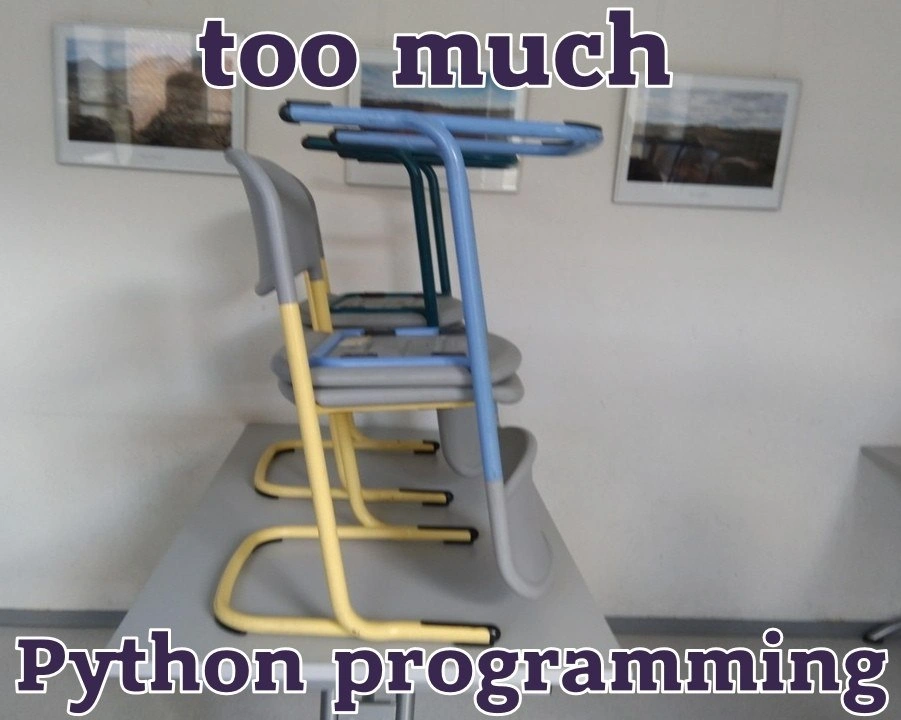
Imagine you’ve been doing something for so long that you start doing it everywhere, even when you’re not supposed to. For example, think of playing a video game about stacking blocks all day – later you might catch yourself stacking your books or toys in the same pattern without thinking about it. This meme is showing that idea with a programmer who writes a lot of Python code. In Python (a popular coding language), you organize the code by moving each inner part a bit to the right, kind of like making a stair shape with the lines. The picture shows three chairs stacked like a little staircase – each chair is a bit forward from the one below it. It’s as if the person’s brain is so full of Python code that when they went to put chairs away in a classroom, they unknowingly arranged them exactly how they would format their code!
Why is this funny? Well, it’s a silly mix-up of worlds. Coding has very strict rules about spacing and alignment, but real life usually doesn’t. Seeing ordinary chairs aligned in a perfect stepped order is unusual – chairs aren’t normally stacked with a gap like that – so it catches your eye. The text “too much Python programming” jokes that the person has been programming so much that they started treating chairs like lines of code. Even if you don’t program, you know that doing anything nonstop can make you start to dream about it or repeat it by habit. Maybe you’ve built a super tall Lego tower and later you line up your pencils in a tall order without realizing, or you play a song over and over and then hum it all day. Here, the programmer wrote so much Python that their brain said, “hey, everything needs to be indented!” and the result was this funny chair arrangement.
In simple terms, the meme is laughing at how people can carry over behaviors from one activity into another. It’s poking fun at programmers (people who write code) in a friendly way: “You’ve been coding Python way too much when even your chairs are stacked like your code!”
Level 2: Spaces vs Braces
Let’s break down why those chairs being offset is a joke that every Python beginner can relate to. In Python, the way you show that one piece of code belongs inside another (for example, that a certain line should run as part of an if statement or a loop) is by adding leading spaces or tabs – what we call indentation. In many other programming languages, you might use special characters or keywords to mark a block of code. For instance, languages like C, Java, or JavaScript use curly braces { } to wrap a block of code. Python takes a different approach: it uses whitespace (spaces or tabs at the beginning of a line) to infer the grouping. This means the amount of indent is meaningful. If one line is indented further to the right than the line above it, Python knows that line is inside a new block.
For example, compare a simple conditional in Python and in JavaScript:
# Python code
x = 5
if x > 0:
print("x is positive")
print("This line is still inside the if")
print("This line is outside the if")
// JavaScript code
let x = 5;
if (x > 0) {
console.log("x is positive");
console.log("This line is still inside the if");
}
console.log("This line is outside the if");
In the Python snippet, we don’t see any { } or endif to close the if block. Instead, we see that the two print lines are indented with 4 spaces (a common Python convention) under the if x > 0: line. That indentation is Python’s only way to know those print statements belong to the if. The moment we stopped indenting (the final print("...outside the if") has no spaces in front), Python knows the if block has ended. In the JavaScript code, indentation is technically optional for correctness (we could put it all on one line and it would still run), but we include it for human readability. The braces { } explicitly tell where the if block starts and ends. So, JavaScript (and C/Java/etc.) relies on braces for the computer’s sake and uses indentation just for humans; Python relies on indentation for the computer’s understanding as well.
Now, because Python treats indentation as part of the syntax, you must be very precise and consistent with it. If you add one print too far to the left or right, you’ll get an error. For instance, if we wrote the Python example like this (with the second print wrongly aligned):
if x > 0:
print("x is positive")
print("This line is still inside the if") # Incorrect indentation!
Python would throw an error, something like:
IndentationError: expected an indented block
This error means Python was expecting the indented lines to continue (because we started an if block with a colon :), but when it saw a line that wasn’t indented as much as it should be, it got confused. Essentially, we broke the structure by not indenting properly. For beginners, this can be puzzling at first (“I didn’t put any braces, what did I do wrong?”), but soon you learn that whitespace matters in Python. It’s not just decorative; it defines the program’s structure.
Let’s connect this to the meme: The photo shows three chairs stacked in a staggered way, each slightly forward from the one below it. Visually, it resembles code that has three levels of indentation. Think of the bottom chair as a top-level line of code (no indent), the middle chair as a line inside a block (indented once), and the top chair as a line inside a sub-block (indented twice). The text “too much Python programming” hints that a person who writes a lot of Python might start seeing the world in terms of indents and blocks. It’s like their brain thinks “everything must be properly nested!” The chairs on the table are a real-world metaphor for how Python code is structured.
This is a language quirk that’s both a feature and a source of humor. In everyday coding, once you get used to it, lining up indents becomes second nature. Many newbies even develop a habit of pressing the Tab key or spacebar in other applications (like writing an email or a document) expecting to indent text the same way – only to realize they’re not in a code editor! In Python, you typically use 4 spaces for each indent level (that’s recommended by Python’s official style guide, PEP 8). Some code editors help by automatically inserting those spaces when you press Tab. If you mix tabs and spaces arbitrarily, Python can’t interpret your indents correctly – kind of like mixing two units of measurement – so it will complain. That’s why one of the first things Python learners hear is “use spaces, not tabs” or at least "be consistent with them."
Another relatable aspect: after working with properly indented code for hours, you might find it oddly satisfying to see things neatly aligned. Aligning chairs in a graded row scratches that same itch for order! The meme exaggerates it to make us laugh – no one actually needs to stack chairs like this – but we chuckle because we understand the impulse. When you’re deep into coding, especially in Python, you sometimes catch yourself thinking about structure and indentation even away from the keyboard. It’s a bit like playing a ton of Tetris and then later seeing patterns of blocks in the real world; here it’s writing so much Python that you start treating real objects as if they were lines of code that need formatting. This joke resonates with developers because we’ve all had moments where our coding mindset leaks into regular life (arranging books by size, sorting objects methodically, etc.), and Python’s strict indentation just makes that habit even more pronounced.
In short, for a newcomer: Python uses indentation (spaces at the start of a line) to organize code. The meme shows someone taking that idea to a silly extreme by organizing chairs in a physically indented way. It’s funny to programmers because it connects a programming habit with a normal life scenario in a clever visual pun.
Level 3: Indentation Addiction
For seasoned Python developers, this meme hits close to home. It humorously exaggerates how writing a ton of Python can wire your brain to obsess over alignment in all things. The image shows chairs stacked in a perfectly nested arrangement, each one set a little further forward than the one below it, exactly like code indented multiple levels deep. In Python, we indicate nested blocks (like an if inside a for loop inside a function) by indenting each level with consistent spacing. After hours of crafting def and if blocks, carefully adding four spaces for each new block, a dev might step back from the screen and find themselves literally seeing the world in code structures. Too much Python programming, as the meme text says, can lead to a kind of indentation OCD where you feel an urge to line up and tier everything just so.
Why is this so relatable? Python’s whitespace sensitivity is a quirky language feature that every Pythonista had to master early on. Unlike in C, Java, or JavaScript – where curly braces or keywords mark the beginning and end of blocks – in Python the indentation is the block. That means if you mess up the alignment by even one space, the code either won’t run or (worse) will do something unintended. Many of us have felt the pain of an IndentationError halting our script because one line had 3 spaces instead of 4. It’s a rite of passage in Python: hours debugging only to realize your while loop’s body wasn’t properly indented. Over time, you develop almost a muscle memory for hitting that Tab key (or inserting the exact number of spaces) to the point where incorrect indentations stick out visibly. Seeing a misaligned line of code can be as jarring to a Python dev as a crooked picture frame to a perfectionist. This meme plays on that exact instinct, but in a real-world scenario with chairs – the chairs must be aligned as if each is a subordinate block under the previous one.
There’s also an inside joke here about coding habits bleeding into real life. Developers often joke about the “Tetris effect” of programming: spend all day immersed in a problem, and you’ll see it everywhere. If you’ve ever closed your eyes after a long coding session and visualized code or dreamed about algorithms, you know the feeling. Here, our Python coder has been so deep in the code that when tasked with something mundane like tidying up a classroom, they subconsciously apply Python’s indentation rules to it! The top chair is like a top-level block, the next chair is an inner block (indented a bit), and the third chair is yet another inner block. It’s as if each chair represents a nested loop or conditional: a three-layer stack of logic, translated into furniture.
From a senior dev perspective, this also pokes fun at the extreme of loving Python’s clean syntax. Python aficionados often tout how readable Python code is because of its forced indentation. We sometimes jokingly take pride in lining things up neatly. Some might even say Python encourages good coding hygiene—your code won’t even run if it’s not tidy! In team settings, Python codebases are usually very uniform in style because everyone has to indent the same way (and tools like linters or autoformatters enforce conventions like the PEP 8 recommendation of 4 spaces per indent). Compare that to other languages where one person’s messy but technically correct indents can drive another developer crazy; Python removes that debate by making the layout part of the syntax. This meme carries that to an absurd extreme: picture a developer so indoctrinated by PEP 8 and consistent spacing that they treat a stack of chairs like a chunk of code needing proper format. It’s a playful nod to how Python can reshape a coder’s mindset. A veteran Python dev might chuckle, remembering late nights where their brain was basically parsing everything around them as if it were code. They know it’s a joke, but it’s funny because it’s almost plausible — who hasn’t straightened a row of items on their desk after debugging for 10 hours straight?
And of course, no Python humor is complete without the classic tabs vs. spaces war lurking in the background. Python doesn’t technically forbid tabs (you can use a tab character to indent, and historically one tab was treated as 8 spaces), but the community overwhelmingly prefers spaces for consistency. Mixing tabs and spaces in the same file will lead to errors, and style guides strongly advise against tabs. There’s an unwritten rule (and an actual rule in Python 3) that you don’t mix them. So when we see those chairs aligned just so, we can joke: "Hope they used spaces, not tabs, to measure those offsets!" This references a well-known developer debate (even depicted humorously in HBO’s Silicon Valley) about the one true way to indent Python code. The meme doesn’t explicitly mention it, but any experienced dev might slyly think about whether those chairs are separated by exactly “4 spaces” of distance. It’s that kind of layered humor — simple on the surface (haha, lined-up chairs like Python code) with extra seasoning for the initiated (reminding us of all the peculiarities and habits around Python’s whitespace).
In summary, the humor works on multiple levels. It’s riffing on a language quirk of Python that defines our everyday coding experience. It satirizes the almost ritualistic habit we develop about indentation — turning a mundane classroom scene into a sight gag about coding style. Seasoned programmers laugh because they recognize themselves: the absurdity of physically aligning chairs is funny, but it’s funny because we truly do care about alignment deeply in our work. The phrase "too much Python programming" is tongue-in-cheek; it suggests the developer might need a break before they start refactoring the furniture layout of their entire house. As any veteran will tell you with a chuckle, “In Python, whitespace is no joke… except when it very much is.”
Level 4: Significant Whitespace
Python’s syntax is built around the off-side rule, a concept in programming language design where the indentation (leading whitespace on a line) defines the scope of code blocks. Instead of using explicit delimiters like {} or keywords like end to mark blocks, Python uses changes in indentation levels to generate special tokens (INDENT and DEDENT) during parsing. Under the hood, the Python interpreter’s lexer inserts these tokens whenever it encounters a new level of indent or a return to a previous indent level. This means the structure of a Python program is literally encoded in its whitespace. In compiler terms, whitespace is syntactically significant in Python’s grammar, which is a distinctive design choice compared to many other languages.
This idea wasn’t invented by Python; it traces back to earlier languages that influenced it. The British computer scientist Peter J. Landin coined the term “off-side rule” in the 1960s (an analogy to the offside rule in football) to describe languages where indentation determines scope. Python’s founder, Guido van Rossum, was inspired by the ABC language (a teaching language from the 1980s) which also used indentation to group statements. Haskell, Miranda, and Occam are other notable languages following this rule. The goal is to enforce visually clear and consistent code structure by design. In a Python source file, when you write:
if x > 0:
print("Positive!")
if x > 100:
print("Very positive!")
the interpreter sees the indent before the print lines and understands that those belong inside the if x > 0 block. It then sees a further indent for the second if and its print, indicating a nested block. When the indentation decreases (or the file ends), DEDENT tokens are generated to close off those blocks. This mechanism ensures a one-to-one mapping between the visual layout of the code and its block structure in the abstract syntax tree (AST).
One interesting side-effect of this design is how it shapes a programmer’s habits and ways of thinking about code. Because inconsistent indentation will cause a SyntaxError or IndentationError (e.g. IndentationError: unindent does not match any outer indentation level), Python developers become highly attuned to spacing. The language has effectively baked the style guide into the compiler—enforcing a clean layout as a requirement, not just a convention. This can be seen as an elegant solution to the "pretty-printing problem" (ensuring code is nicely formatted) at the cost of making whitespace a critical part of the code’s meaning. After working in Python for a long time, your brain internalizes that order and hierarchy are manifested through indentation. In the meme, that concept is taken to an extreme: the programmer’s mind is so conditioned to Python’s structured whitespace that they unconsciously arrange physical objects (the stacked chairs) in a stepped, indented fashion as if real life followed Python’s grammar rules.
Description
The image displays a stack of four colorful classroom-style chairs placed precariously on top of a grey desk. The chairs have metal legs (yellow, blue, and teal) and plastic seats. The scene is set against a plain off-white wall with a few framed pictures. Across the top of the image, text reads "too much", and at the bottom, it says "Python programming". This is a clever visual pun that experienced programmers, particularly those familiar with Python, will understand. Python uses indentation to define code blocks, unlike many other languages that use braces. The stack of chairs humorously represents excessive or deeply nested indentation in Python code, which can become unwieldy and hard to read, a common sign of overly complex logic or poor code structure often referred to as the 'arrow anti-pattern'

Comments
7Comment deleted
I showed this to a C++ dev and they didn't get it. They're used to seeing brackets, not a Jenga tower of existential dread
Spent so many nights policing PEP 8 that the cleaning crew just raised a Jira: “ChairStacking fails CI - expected 4-space offset, found 3.”
When the junior dev discovers list comprehensions can be nested and decides to solve FizzBuzz in one line that requires horizontal scrolling on a 4K monitor
When your Python code violates 'Flat is better than nested' so egregiously that even your furniture starts implementing recursive data structures. This is what happens when you nest your context managers inside your decorators inside your list comprehensions inside your try-except blocks - eventually, you're just stacking chairs and hoping the whole thing doesn't collapse during code review. The Zen of Python warned us, but we were too busy writing `with open() as f: for line in f: for word in line.split(): for char in word: if char.isalpha(): ...` to listen
Signs you’ve been writing Python too long: the chairs are stacked like nested decorators - elegant until the GIL reminds you seating is still single-threaded
PEP 8 brain: stacked the chairs with 4‑space indentation, banned tabs, and flake8 still flags E117 for over‑indent
Python codebases: elegantly scripted prototypes that scale into Jenga towers of interdependent duck types